全新的Assistants API是我们Chat Completions API的有状态演进版本,旨在简化类助手体验的创建,并为开发者提供访问强大工具(如代码解释器和文件搜索)的能力。
本文已归档,可能包含过时信息。文中所述方法、模型或技术为撰写时的最新内容,但可能已不再代表最佳实践或最新发展。
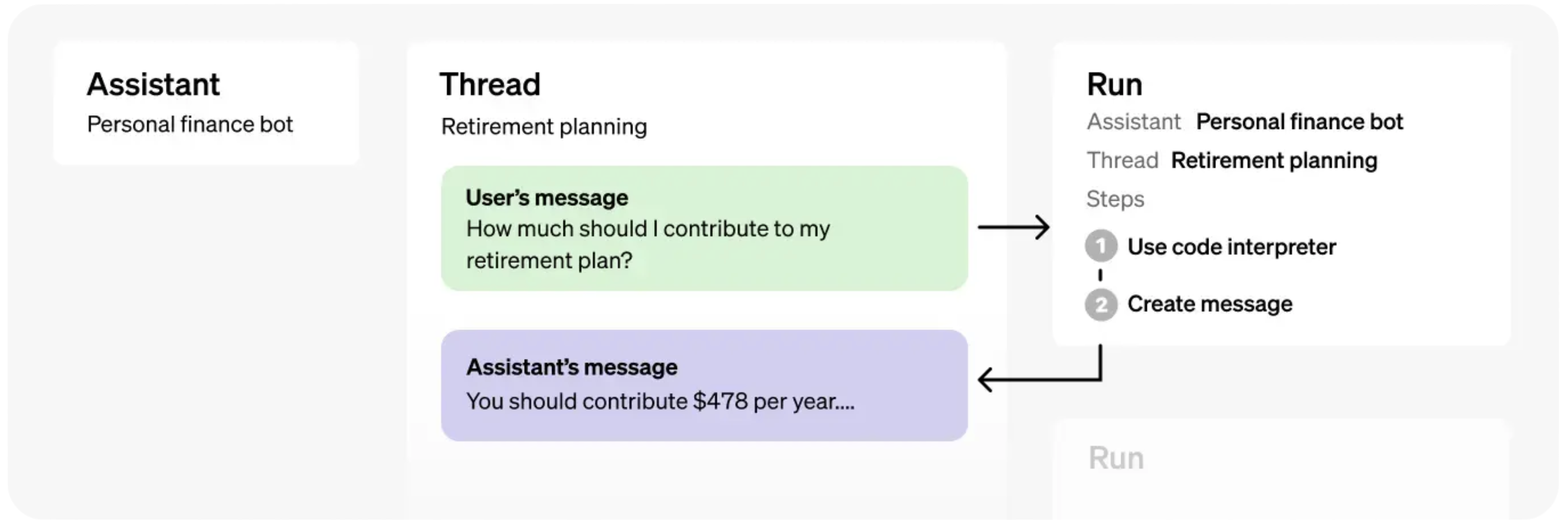
Chat Completions API vs Assistants API
Chat Completions API的基本元素是Messages,您可以使用Model(如gpt-4o、gpt-4o-mini等)对其执行Completion操作。该API轻量且功能强大,但本质上是无状态的,这意味着您需要手动管理对话状态、工具定义、检索文档和代码执行。
Assistants API 的基础组件包括
Assistants,封装了基础模型、指令、工具和(上下文)文档,Threads,代表对话的状态,以及Runs,用于驱动Assistant在Thread上的执行,包括文本响应和多步骤工具使用。
我们将探讨如何利用这些功能来创建强大的、有状态的体验。
设置
Python SDK
注意 我们已更新Python SDK以添加对Assistants API的支持,因此您需要将其更新至最新版本(当前最新为
1.59.4)。
!pip install --upgrade openaiRequirement already satisfied: openai in /Users/lee.spacagna/myenv/lib/python3.12/site-packages (1.59.4) Requirement already satisfied: anyio<5,>=3.5.0 in /Users/lee.spacagna/myenv/lib/python3.12/site-packages (from openai) (3.7.1) Requirement already satisfied: distro<2,>=1.7.0 in /Users/lee.spacagna/myenv/lib/python3.12/site-packages (from openai) (1.9.0) Requirement already satisfied: httpx<1,>=0.23.0 in /Users/lee.spacagna/myenv/lib/python3.12/site-packages (from openai) (0.27.0) Requirement already satisfied: jiter<1,>=0.4.0 in /Users/lee.spacagna/myenv/lib/python3.12/site-packages (from openai) (0.7.0) Requirement already satisfied: pydantic<3,>=1.9.0 in /Users/lee.spacagna/myenv/lib/python3.12/site-packages (from openai) (2.8.2) Requirement already satisfied: sniffio in /Users/lee.spacagna/myenv/lib/python3.12/site-packages (from openai) (1.3.1) Requirement already satisfied: tqdm>4 in /Users/lee.spacagna/myenv/lib/python3.12/site-packages (from openai) (4.66.4) Requirement already satisfied: typing-extensions<5,>=4.11 in /Users/lee.spacagna/myenv/lib/python3.12/site-packages (from openai) (4.12.2) Requirement already satisfied: idna>=2.8 in /Users/lee.spacagna/myenv/lib/python3.12/site-packages (from anyio<5,>=3.5.0->openai) (3.7) Requirement already satisfied: certifi in /Users/lee.spacagna/myenv/lib/python3.12/site-packages (from httpx<1,>=0.23.0->openai) (2024.7.4) Requirement already satisfied: httpcore==1.* in /Users/lee.spacagna/myenv/lib/python3.12/site-packages (from httpx<1,>=0.23.0->openai) (1.0.5) Requirement already satisfied: h11<0.15,>=0.13 in /Users/lee.spacagna/myenv/lib/python3.12/site-packages (from httpcore==1.*->httpx<1,>=0.23.0->openai) (0.14.0) Requirement already satisfied: annotated-types>=0.4.0 in /Users/lee.spacagna/myenv/lib/python3.12/site-packages (from pydantic<3,>=1.9.0->openai) (0.7.0) Requirement already satisfied: pydantic-core==2.20.1 in /Users/lee.spacagna/myenv/lib/python3.12/site-packages (from pydantic<3,>=1.9.0->openai) (2.20.1)
并通过运行以下命令确保其是最新版本:
!pip show openai | grep VersionVersion: 1.59.4
Pretty Printing Helper
import json

def show_json(obj):
    display(json.loads(obj.model_dump_json()))
使用Assistants API的完整示例
Assistants
开始使用Assistants API最简单的方法是通过Assistants Playground。
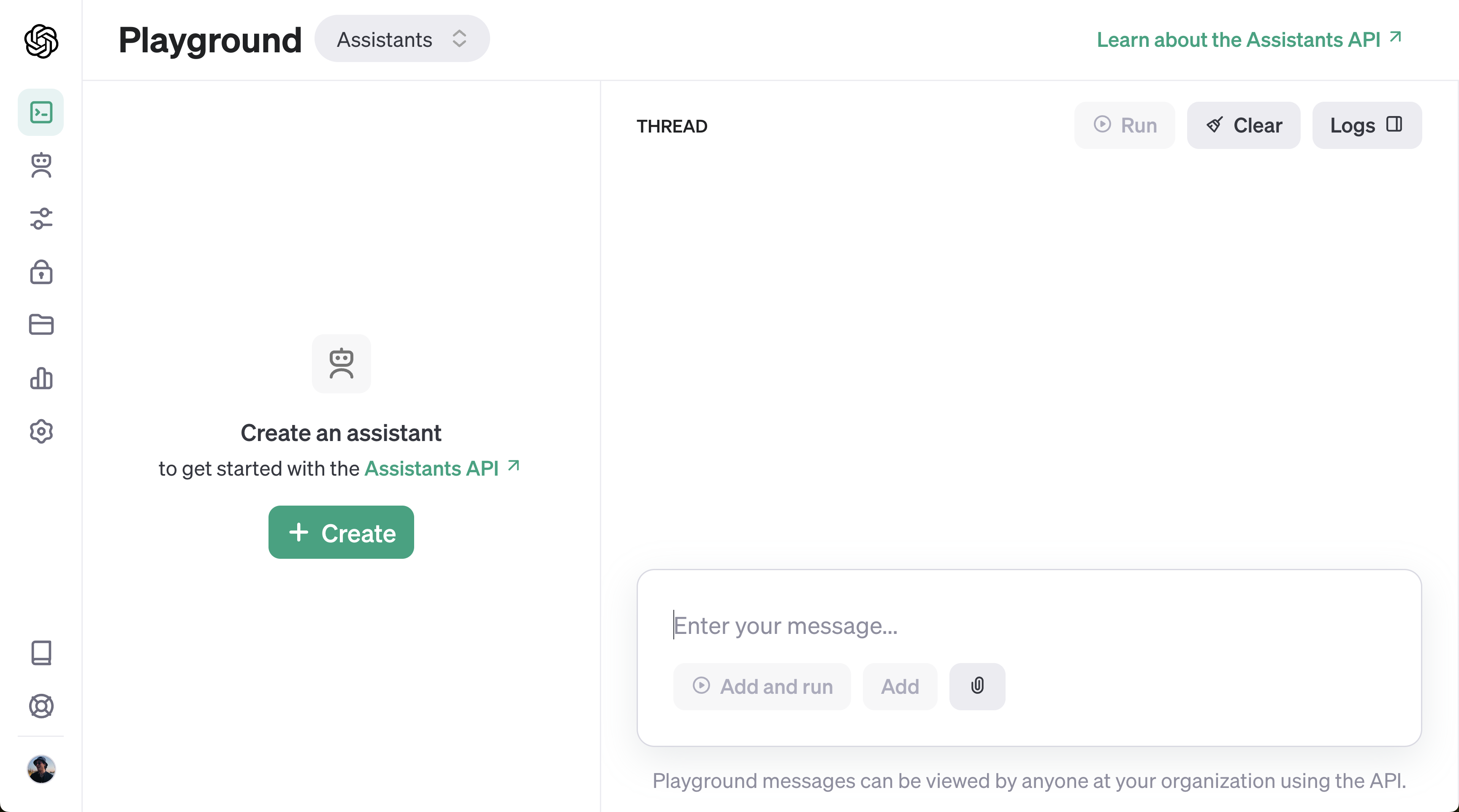
让我们从创建一个助手开始!我们将创建一个数学导师,就像我们的文档中那样。
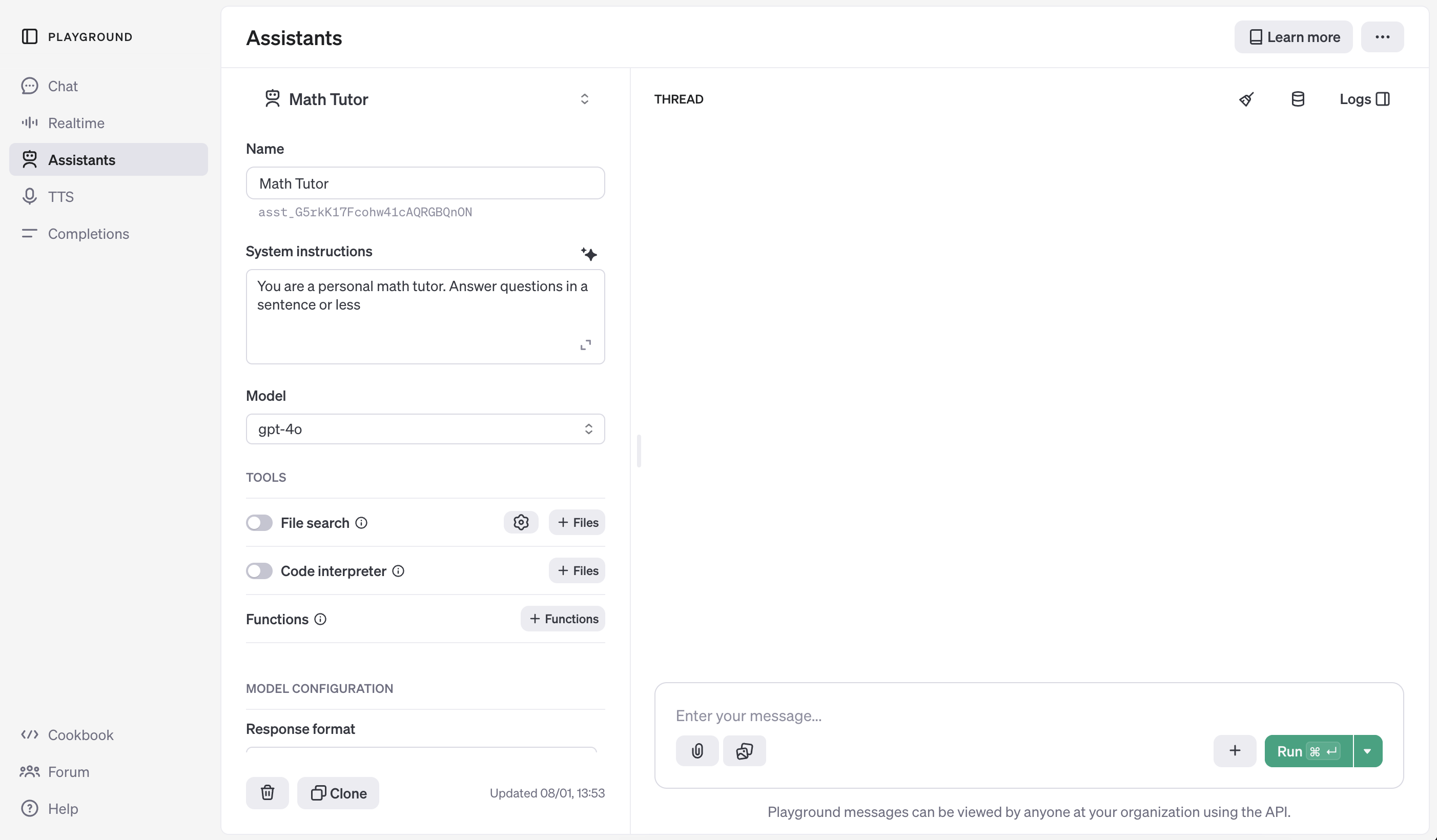
你也可以直接通过Assistants API创建助手,如下所示:
from openai import OpenAI
import os

client = OpenAI(api_key=os.environ.get("OPENAI_API_KEY", "<your OpenAI API key if not set as env var>"))


assistant = client.beta.assistants.create(
    name="Math Tutor",
    instructions="You are a personal math tutor. Answer questions briefly, in a sentence or less.",
    model="gpt-4o",
)
show_json(assistant)
{'id': 'asst_qvXmYlZV8zhABI2RtPzDfV6z',
'created_at': 1736340398,
'description': None,
'instructions': 'You are a personal math tutor. Answer questions briefly, in a sentence or less.',
'metadata': {},
'model': 'gpt-4o',
'name': 'Math Tutor',
'object': 'assistant',
'tools': [],
'response_format': 'auto',
'temperature': 1.0,
'tool_resources': {'code_interpreter': None, 'file_search': None},
'top_p': 1.0} 'tools': [],
'response_format': 'auto',
'temperature': 1.0,
'tool_resources': {'code_interpreter': None, 'file_search': None},
'top_p': 1.0}无论您是通过仪表板还是API创建您的Assistant,都需要记录下Assistant ID。这是在Threads和Runs中引用您的Assistant的方式。
接下来,我们将创建一个新的Thread并添加一条Message。这将保存我们对话的状态,这样我们就不必每次都重新发送整个消息历史记录。
Threads
创建一个新线程:
thread = client.beta.threads.create()
show_json(thread)
{'id': 'thread_j4dc1TiHPfkviKUHNi4aAsA6',
'created_at': 1736340398,
'metadata': {},
'object': 'thread',
'tool_resources': {'code_interpreter': None, 'file_search': None}} 'object': 'thread',
'tool_resources': {'code_interpreter': None, 'file_search': None}}然后将消息添加到线程中:
message = client.beta.threads.messages.create(
    thread_id=thread.id,
    role="user",
    content="I need to solve the equation `3x + 11 = 14`. Can you help me?",
)
show_json(message)
{'id': 'msg_1q4Y7ZZ9gIcPoAKSx9UtrrKJ',
'assistant_id': None,
'attachments': [],
'completed_at': None,
'attachments': [],
'completed_at': None,
'content': [{'text': {'annotations': [],
'value': 'I need to solve the equation `3x + 11 = 14`. Can you help me?'},
'type': 'text'}],
'created_at': 1736340400,
'incomplete_at': None,
'incomplete_details': None,
'metadata': {},
'object': 'thread.message',
'role': 'user',
'run_id': None,
'status': None,
'thread_id': 'thread_j4dc1TiHPfkviKUHNi4aAsA6'}注意 尽管您不再需要每次发送完整的对话历史记录,但每次运行仍会对整个对话历史记录的所有token进行计费。
运行记录
请注意,我们创建的Thread并未与之前创建的Assistant关联!Thread独立于Assistant存在,这可能与您使用ChatGPT时的预期不同(在ChatGPT中线程会绑定特定模型/GPT)。
要从智能体获取针对特定线程的完成结果,我们必须创建一个运行。创建运行将指示智能体查看线程中的消息并采取行动:要么添加单个响应,要么使用工具。
注意 运行(Runs)是Assistants API与Chat Completions API之间的关键区别。在Chat Completions中,模型只会返回单个消息响应,而在Assistants API中,一次运行可能导致智能体使用一个或多个工具,并可能向线程添加多条消息。
为了让我们的Assistant响应用户,让我们创建Run。如前所述,您必须同时指定Assistant和Thread。
run = client.beta.threads.runs.create(
thread_id=thread.id,
assistant_id=assistant.id,
)
show_json(run){'id': 'run_qVYsWok6OCjHxkajpIrdHuVP',
'assistant_id': 'asst_qvXmYlZV8zhABI2RtPzDfV6z',
'cancelled_at': None,
'completed_at': None,
'created_at': 1736340403,
'expires_at': 1736341003,
'failed_at': None,
'incomplete_details': None,
'incomplete_details': None,
'instructions': 'You are a personal math tutor. Answer questions briefly, in a sentence or less.',
'last_error': None,
'max_completion_tokens': None,
'max_prompt_tokens': None,
'max_completion_tokens': None,
'max_prompt_tokens': None,
'metadata': {},
'model': 'gpt-4o',
'object': 'thread.run',
'parallel_tool_calls': True,
'parallel_tool_calls': True,
'required_action': None,
'response_format': 'auto',
'response_format': 'auto',
'started_at': None,
'status': 'queued',
'thread_id': 'thread_j4dc1TiHPfkviKUHNi4aAsA6',
'tool_choice': 'auto',
'tools': [],
'truncation_strategy': {'type': 'auto', 'last_messages': None},
'usage': None,
'temperature': 1.0,
'top_p': 1.0,
'tool_resources': {}}与在聊天补全API中创建补全不同,创建运行是一个异步操作。它会立即返回运行的元数据,其中包含一个初始状态设为queued的status。当智能体执行操作(如使用工具和添加消息)时,status将会更新。
要了解Assistant何时完成处理,我们可以循环轮询Run状态(流式传输支持即将推出!)。虽然这里我们只检查queued或in_progress状态,但实际上Run可能会经历各种状态变化,您可以选择向用户展示这些变化(这些被称为Steps,将在后面介绍)。
import time
def wait_on_run(run, thread):
while run.status == "queued" or run.status == "in_progress":
run = client.beta.threads.runs.retrieve(
thread_id=thread.id,
run_id=run.id,
)
time.sleep(0.5)
return runrun = wait_on_run(run, thread)
show_json(run){'id': 'run_qVYsWok6OCjHxkajpIrdHuVP',
'assistant_id': 'asst_qvXmYlZV8zhABI2RtPzDfV6z',
'cancelled_at': None,
'completed_at': 1736340406,
'created_at': 1736340403,
'expires_at': None,
'failed_at': None,
'incomplete_details': None,
'incomplete_details': None,
'instructions': 'You are a personal math tutor. Answer questions briefly, in a sentence or less.',
'last_error': None,
'max_completion_tokens': None,
'max_prompt_tokens': None,
'max_completion_tokens': None,
'max_prompt_tokens': None,
'metadata': {},
'model': 'gpt-4o',
'object': 'thread.run',
'parallel_tool_calls': True,
'parallel_tool_calls': True,
'required_action': None,
'response_format': 'auto',
'started_at': 1736340405,
'status': 'completed',
'thread_id': 'thread_j4dc1TiHPfkviKUHNi4aAsA6',
'tool_choice': 'auto',
'tools': [],
'truncation_strategy': {'type': 'auto', 'last_messages': None},
'usage': {'completion_tokens': 35,
'prompt_tokens': 66,
'total_tokens': 101,
'prompt_token_details': {'cached_tokens': 0},
'completion_tokens_details': {'reasoning_tokens': 0}},
'temperature': 1.0,
'top_p': 1.0,
'tool_resources': {}}消息
现在运行已完成,我们可以列出线程中的消息,查看助手添加了哪些内容。
messages = client.beta.threads.messages.list(thread_id=thread.id)
show_json(messages){'data': [{'id': 'msg_A5eAN6ZAJDmFBOYutEm5DFCy',
'assistant_id': 'asst_qvXmYlZV8zhABI2RtPzDfV6z',
'attachments': [],
'completed_at': None,
'content': [{'text': {'annotations': [],
'value': 'Sure! Subtract 11 from both sides to get \\(3x = 3\\), then divide by 3 to find \\(x = 1\\).'},
'type': 'text'}],
'created_at': 1736340405,
'incomplete_at': None,
'incomplete_details': None,
'metadata': {},
'object': 'thread.message',
'role': 'assistant',
'run_id': 'run_qVYsWok6OCjHxkajpIrdHuVP',
'status': None,
'thread_id': 'thread_j4dc1TiHPfkviKUHNi4aAsA6'},
{'id': 'msg_1q4Y7ZZ9gIcPoAKSx9UtrrKJ',
 'assistant_id': None,
 'attachments': [],
 'completed_at': None,
 'attachments': [],
 'completed_at': None,
 'content': [{'text': {'annotations': [],
    'value': 'I need to solve the equation `3x + 11 = 14`. Can you help me?'},
   'type': 'text'}],
 'created_at': 1736340400,
 'incomplete_at': None,
 'incomplete_details': None,
 'metadata': {},
 'object': 'thread.message',
 'role': 'user',
 'run_id': None,
 'status': None,
'thread_id': 'thread_j4dc1TiHPfkviKUHNi4aAsA6'}],
'object': 'list',
'first_id': 'msg_A5eAN6ZAJDmFBOYutEm5DFCy',
'last_id': 'msg_1q4Y7ZZ9gIcPoAKSx9UtrrKJ',
'has_more': False}如您所见,消息按时间倒序排列——这样设计是为了确保最新结果始终显示在第一page(因为结果可能分页显示)。请务必注意这一点,因为这与Chat Completions API中的消息顺序相反。
让我们请助手进一步解释一下结果!
# Create a message to append to our thread
message = client.beta.threads.messages.create(
    thread_id=thread.id, role="user", content="Could you explain this to me?"
)

# Execute our run
run = client.beta.threads.runs.create(
    thread_id=thread.id,
    assistant_id=assistant.id,
)

# Wait for completion
wait_on_run(run, thread)

# Retrieve all the messages added after our last user message
messages = client.beta.threads.messages.list(
    thread_id=thread.id, order="asc", after=message.id
)
show_json(messages)
{'data': [{'id': 'msg_wSHHvaMnaWktZWsKs6gyoPUB',
'assistant_id': 'asst_qvXmYlZV8zhABI2RtPzDfV6z',
'attachments': [],
'completed_at': None,
'content': [{'text': {'annotations': [],
'value': 'Certainly! To isolate \\(x\\), first subtract 11 from both sides of the equation \\(3x + 11 = 14\\), resulting in \\(3x = 3\\). Then, divide both sides by 3 to solve for \\(x\\), giving you \\(x = 1\\).'},
'type': 'text'}],
'created_at': 1736340414,
'incomplete_at': None,
'incomplete_details': None,
'metadata': {},
'object': 'thread.message',
'role': 'assistant',
'run_id': 'run_lJsumsDtPTmdG3Enx2CfYrrq',
'status': None,
'thread_id': 'thread_j4dc1TiHPfkviKUHNi4aAsA6'}],
'object': 'list',
'first_id': 'msg_wSHHvaMnaWktZWsKs6gyoPUB',
'last_id': 'msg_wSHHvaMnaWktZWsKs6gyoPUB',
'has_more': False}要获得一个回复可能需要经历很多步骤,尤其是对于这个简单的例子来说。不过,很快你就会发现,我们几乎不需要修改太多代码,就能为我们的助手添加非常强大的功能!
示例
让我们来看看如何将所有这些整合在一起。以下是使用您创建的Assistant所需的全部代码。
由于我们已经创建了Math Assistant,我已将其ID保存在MATH_ASSISTANT_ID中。然后我定义了两个函数:
submit_message: 在Thread上创建一条Message,然后启动(并返回)一个新的Runget_response: 返回线程中的消息列表
from openai import OpenAI

MATH_ASSISTANT_ID = assistant.id  # or a hard-coded ID like "asst-..."

client = OpenAI(api_key=os.environ.get("OPENAI_API_KEY", "<your OpenAI API key if not set as env var>"))

def submit_message(assistant_id, thread, user_message):
    client.beta.threads.messages.create(
        thread_id=thread.id, role="user", content=user_message
    )
    return client.beta.threads.runs.create(
        thread_id=thread.id,
        assistant_id=assistant_id,
    )


def get_response(thread):
return client.beta.threads.messages.list(thread_id=thread.id, order="asc")我还定义了一个可以重复使用的create_thread_and_run函数(实际上这个函数与API中的复合函数client.beta.threads.create_and_run几乎完全相同 ;))。最后,我们可以将模拟用户请求分别提交到新的Thread中。
请注意所有这些API调用都是异步操作;这意味着我们实际上在代码中获得了异步行为,而无需使用异步库!(例如asyncio)
def create_thread_and_run(user_input):
    thread = client.beta.threads.create()
    run = submit_message(MATH_ASSISTANT_ID, thread, user_input)
    return thread, run


# Emulating concurrent user requests
thread1, run1 = create_thread_and_run(
    "I need to solve the equation `3x + 11 = 14`. Can you help me?"
)
thread2, run2 = create_thread_and_run("Could you explain linear algebra to me?")
thread3, run3 = create_thread_and_run("I don't like math. What can I do?")

# Now all Runs are executing...
一旦所有运行都启动后,我们可以等待每个运行并获取响应。
import time

# Pretty printing helper
def pretty_print(messages):
    print("# Messages")
    for m in messages:
        print(f"{m.role}: {m.content[0].text.value}")
    print()


# Waiting in a loop
def wait_on_run(run, thread):
    while run.status == "queued" or run.status == "in_progress":
        run = client.beta.threads.runs.retrieve(
            thread_id=thread.id,
            run_id=run.id,
        )
        time.sleep(0.5)
    return run


# Wait for Run 1
run1 = wait_on_run(run1, thread1)
pretty_print(get_response(thread1))

# Wait for Run 2
run2 = wait_on_run(run2, thread2)
pretty_print(get_response(thread2))

# Wait for Run 3
run3 = wait_on_run(run3, thread3)
pretty_print(get_response(thread3))

# Thank our assistant on Thread 3 :)
run4 = submit_message(MATH_ASSISTANT_ID, thread3, "Thank you!")
run4 = wait_on_run(run4, thread3)
pretty_print(get_response(thread3))
# Messages user: I need to solve the equation `3x + 11 = 14`. Can you help me? assistant: Sure! Subtract 11 from both sides to get \(3x = 3\), then divide by 3 to find \(x = 1\). # Messages user: Could you explain linear algebra to me? assistant: Linear algebra is the branch of mathematics concerning vector spaces, linear transformations, and systems of linear equations, often represented with matrices. # Messages user: I don't like math. What can I do? assistant: Try relating math to real-life interests or hobbies, practice with fun games or apps, and gradually build confidence with easier problems. # Messages user: I don't like math. What can I do? assistant: Try relating math to real-life interests or hobbies, practice with fun games or apps, and gradually build confidence with easier problems. user: Thank you! assistant: You're welcome! If you have any more questions, feel free to ask!
瞧!
你可能已经注意到,这段代码实际上并不特定于我们的数学助手...只需更改助手ID,这段代码就能适用于你创建的任何新助手!这就是Assistants API的强大之处。
工具
Assistants API 的一个关键特性是能够为我们的助手配备各种工具,例如代码解释器、文件搜索和自定义函数。让我们逐一了解。
代码解释器
让我们为数学导师配备代码解释器工具,这可以通过仪表板完成...

...或通过API,使用Assistant ID。
assistant = client.beta.assistants.update(
    MATH_ASSISTANT_ID,
    tools=[{"type": "code_interpreter"}],
)
show_json(assistant)
{'id': 'asst_qvXmYlZV8zhABI2RtPzDfV6z',
'created_at': 1736340398,
'description': None,
'instructions': 'You are a personal math tutor. Answer questions briefly, in a sentence or less.',
'metadata': {},
'model': 'gpt-4o',
'name': 'Math Tutor',
'object': 'assistant',
'tools': [{'type': 'code_interpreter'}],
'response_format': 'auto',
'temperature': 1.0,
'tool_resources': {'code_interpreter': {'file_ids': []}, 'file_search': None},
'top_p': 1.0} 'tools': [{'type': 'code_interpreter'}],
'response_format': 'auto',
'temperature': 1.0,
'tool_resources': {'code_interpreter': {'file_ids': []}, 'file_search': None},
'top_p': 1.0}现在,让我们要求助手使用它的新工具。
thread, run = create_thread_and_run(
    "Generate the first 20 fibbonaci numbers with code."
)
run = wait_on_run(run, thread)
pretty_print(get_response(thread))
# Messages user: Generate the first 20 fibbonaci numbers with code. assistant: The first 20 Fibonacci numbers are: 0, 1, 1, 2, 3, 5, 8, 13, 21, 34, 55, 89, 144, 233, 377, 610, 987, 1597, 2584, 4181.
就这样!Assistant 在后台使用了 Code Interpreter,并给出了最终响应。
对于某些用例来说,这可能已经足够——然而,如果我们想更详细地了解Assistant具体在做什么,我们可以查看Run的步骤。
步骤
一个运行(Run)由一个或多个步骤(Step)组成。与运行类似,每个步骤都有一个可查询的status状态。这对于向用户展示步骤进度非常有用(例如当智能体正在编写代码或执行检索时显示加载动画)。
run_steps = client.beta.threads.runs.steps.list(
    thread_id=thread.id, run_id=run.id, order="asc"
)让我们来看看每个步骤的step_details。
for step in run_steps.data:
    step_details = step.step_details
    print(json.dumps(show_json(step_details), indent=4))
{'tool_calls': [{'id': 'call_E1EE1loDmcWoc7FpkOMKYj6n',
'code_interpreter': {'input': 'def generate_fibonacci(n):\n fib_sequence = [0, 1]\n while len(fib_sequence) < n:\n next_value = fib_sequence[-1] + fib_sequence[-2]\n fib_sequence.append(next_value)\n return fib_sequence\n\n# Generate the first 20 Fibonacci numbers\nfirst_20_fibonacci = generate_fibonacci(20)\nfirst_20_fibonacci',
'outputs': []},
'type': 'code_interpreter'}],
'type': 'tool_calls'}null
{'message_creation': {'message_id': 'msg_RzTnbBMmzDYHk79a0x9qM5uU'},
 'type': 'message_creation'}
null
我们可以看到两个步骤的step_details:
tool_calls(复数形式,因为在单个步骤中可能有多个调用)message_creation
第一步是一个tool_calls,具体使用了包含以下内容的code_interpreter:
input,即在调用工具之前生成的Python代码,以及output,即运行代码解释器后得到的结果。
第二步是message_creation,其中包含添加到Thread中用于向用户传达结果的message。
文件搜索
Assistants API中的另一个强大工具是File search。它允许将文件上传到Assistant,在回答问题时用作知识库。
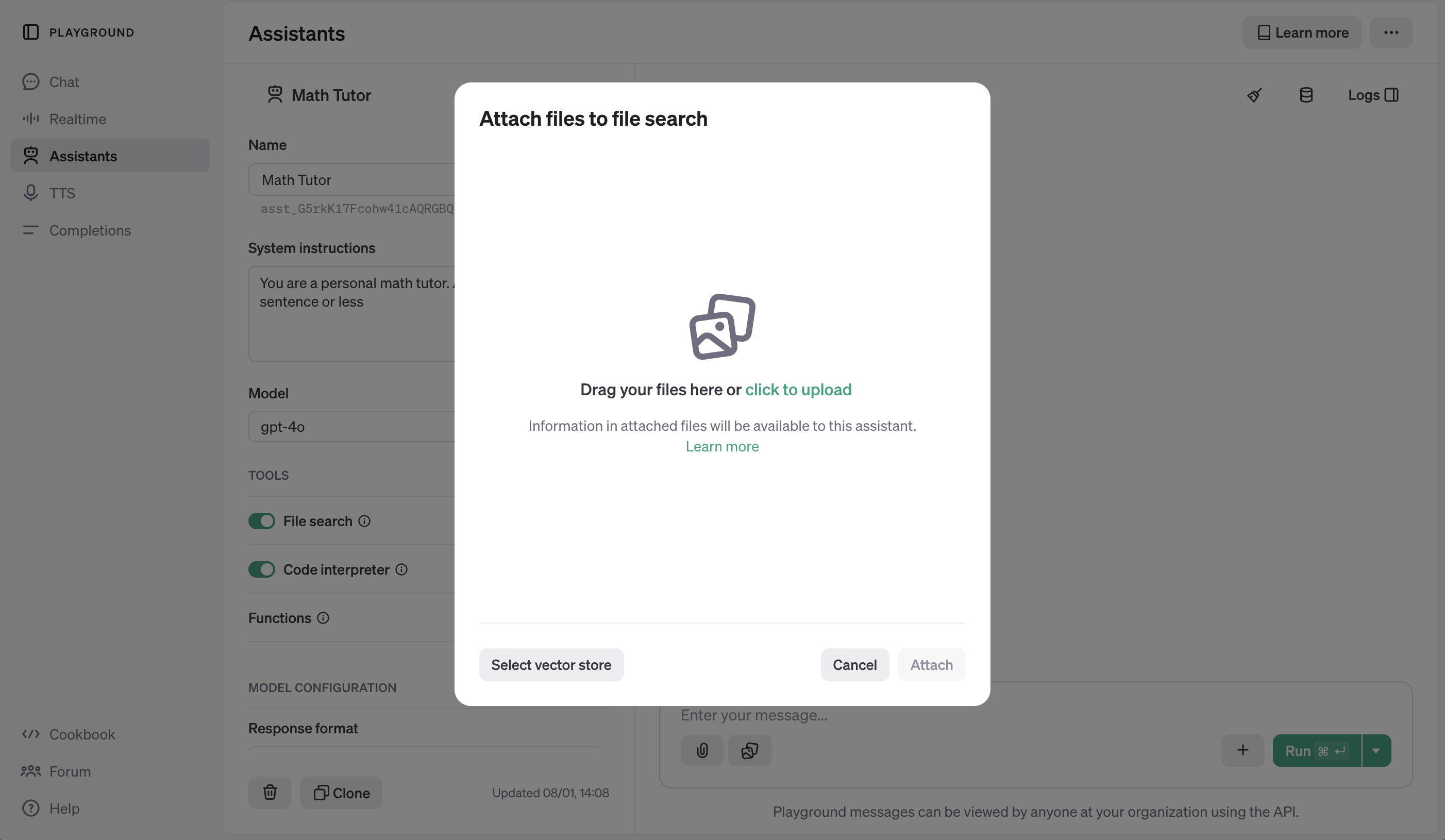
# Upload the file
file = client.files.create(
    file=open(
        "data/language_models_are_unsupervised_multitask_learners.pdf",
        "rb",
    ),
    purpose="assistants",
)

# Create a vector store
vector_store = client.beta.vector_stores.create(
    name="language_models_are_unsupervised_multitask_learners",
)

# Add the file to the vector store
vector_store_file = client.beta.vector_stores.files.create_and_poll(
    vector_store_id=vector_store.id,
    file_id=file.id,
)

# Confirm the file was added
while vector_store_file.status == "in_progress":
    time.sleep(1)
if vector_store_file.status == "completed":
    print("File added to vector store")
elif vector_store_file.status == "failed":
    raise Exception("Failed to add file to vector store")

# Update Assistant
assistant = client.beta.assistants.update(
    MATH_ASSISTANT_ID,
    tools=[{"type": "code_interpreter"}, {"type": "file_search"}],
    tool_resources={
        "file_search":{
            "vector_store_ids": [vector_store.id]
        },
        "code_interpreter": {
            "file_ids": [file.id]
        }
    },
)
show_json(assistant)
File added to vector store
{'id': 'asst_qvXmYlZV8zhABI2RtPzDfV6z',
 'created_at': 1736340398,
 'description': None,
 'instructions': 'You are a personal math tutor. Answer questions briefly, in a sentence or less.',
 'metadata': {},
 'model': 'gpt-4o',
 'name': 'Math Tutor',
 'object': 'assistant',
 'tools': [{'type': 'code_interpreter'},
  {'type': 'file_search',
   'file_search': {'max_num_results': None,
    'ranking_options': {'score_threshold': 0.0,
     'ranker': 'default_2024_08_21'}}}],
 'response_format': 'auto',
 'temperature': 1.0,
 'tool_resources': {'code_interpreter': {'file_ids': ['file-GQFm2i7N8LrAQatefWKEsE']},
  'file_search': {'vector_store_ids': ['vs_dEArILZSJh7J799QACi3QhuU']}},
 'top_p': 1.0}
thread, run = create_thread_and_run(
"What are some cool math concepts behind this ML paper pdf? Explain in two sentences."
)
run = wait_on_run(run, thread)
pretty_print(get_response(thread))# Messages
user: What are some cool math concepts behind this ML paper pdf? Explain in two sentences.
assistant: The paper explores the concept of multitask learning where a single model is used to perform various tasks, modeling the conditional distribution \( p(\text{output} | \text{input, task}) \), inspired by probabilistic approaches【6:10†source】. It also discusses the use of Transformer-based architectures and parallel corpus substitution in language models, enhancing their ability to generalize across domain tasks without explicit task-specific supervision【6:2†source】【6:5†source】.
注意 文件搜索功能还有更多复杂细节,比如Annotations,可能会在另一本指南中介绍。
# Delete the vector store
client.beta.vector_stores.delete(vector_store.id)
VectorStoreDeleted(id='vs_dEArILZSJh7J799QACi3QhuU', deleted=True, object='vector_store.deleted')
功能
作为您助手的最后一个强大工具,您可以指定自定义Functions(类似于聊天补全API中的Function Calling功能)。在运行过程中,助手可以表明它想要调用您指定的一个或多个函数。然后您需要负责调用该函数,并将输出结果返回给助手。
让我们通过为数学导师定义一个display_quiz()函数来看一个示例。
该函数将接收一个title和一个question数组,显示测验内容,并获取用户对每个问题的输入:
titlequestionsquestion_textquestion_type: [MULTIPLE_CHOICE,FREE_RESPONSE]choices: ["选项1", "选项2", ...]
我将使用get_mock_response...来模拟响应。这里本应获取用户的真实输入。
def get_mock_response_from_user_multiple_choice():
    return "a"


def get_mock_response_from_user_free_response():
    return "I don't know."


def display_quiz(title, questions):
    print("Quiz:", title)
    print()
    responses = []

    for q in questions:
        print(q["question_text"])
        response = ""

        # If multiple choice, print options
        if q["question_type"] == "MULTIPLE_CHOICE":
            for i, choice in enumerate(q["choices"]):
                print(f"{i}. {choice}")
            response = get_mock_response_from_user_multiple_choice()

        # Otherwise, just get response
        elif q["question_type"] == "FREE_RESPONSE":
            response = get_mock_response_from_user_free_response()

        responses.append(response)
        print()

    return responses
以下是一个示例测验的样子:
responses = display_quiz(
    "Sample Quiz",
    [
        {"question_text": "What is your name?", "question_type": "FREE_RESPONSE"},
        {
            "question_text": "What is your favorite color?",
            "question_type": "MULTIPLE_CHOICE",
            "choices": ["Red", "Blue", "Green", "Yellow"],
        },
    ],
)
print("Responses:", responses)
Quiz: Sample Quiz What is your name? What is your favorite color? 0. Red 1. Blue 2. Green 3. Yellow Responses: ["I don't know.", 'a']
现在,让我们用JSON格式定义这个函数的接口,以便我们的助手可以调用它:
function_json = {
    "name": "display_quiz",
    "description": "Displays a quiz to the student, and returns the student's response. A single quiz can have multiple questions.",
    "parameters": {
        "type": "object",
        "properties": {
            "title": {"type": "string"},
            "questions": {
                "type": "array",
                "description": "An array of questions, each with a title and potentially options (if multiple choice).",
                "items": {
                    "type": "object",
                    "properties": {
                        "question_text": {"type": "string"},
                        "question_type": {
                            "type": "string",
                            "enum": ["MULTIPLE_CHOICE", "FREE_RESPONSE"]
                        },
                        "choices": {"type": "array", "items": {"type": "string"}}
                    },
                    "required": ["question_text"]
                }
            }
        },
        "required": ["title", "questions"]
    }
}
让我们再次通过仪表板或API更新我们的Assistant。
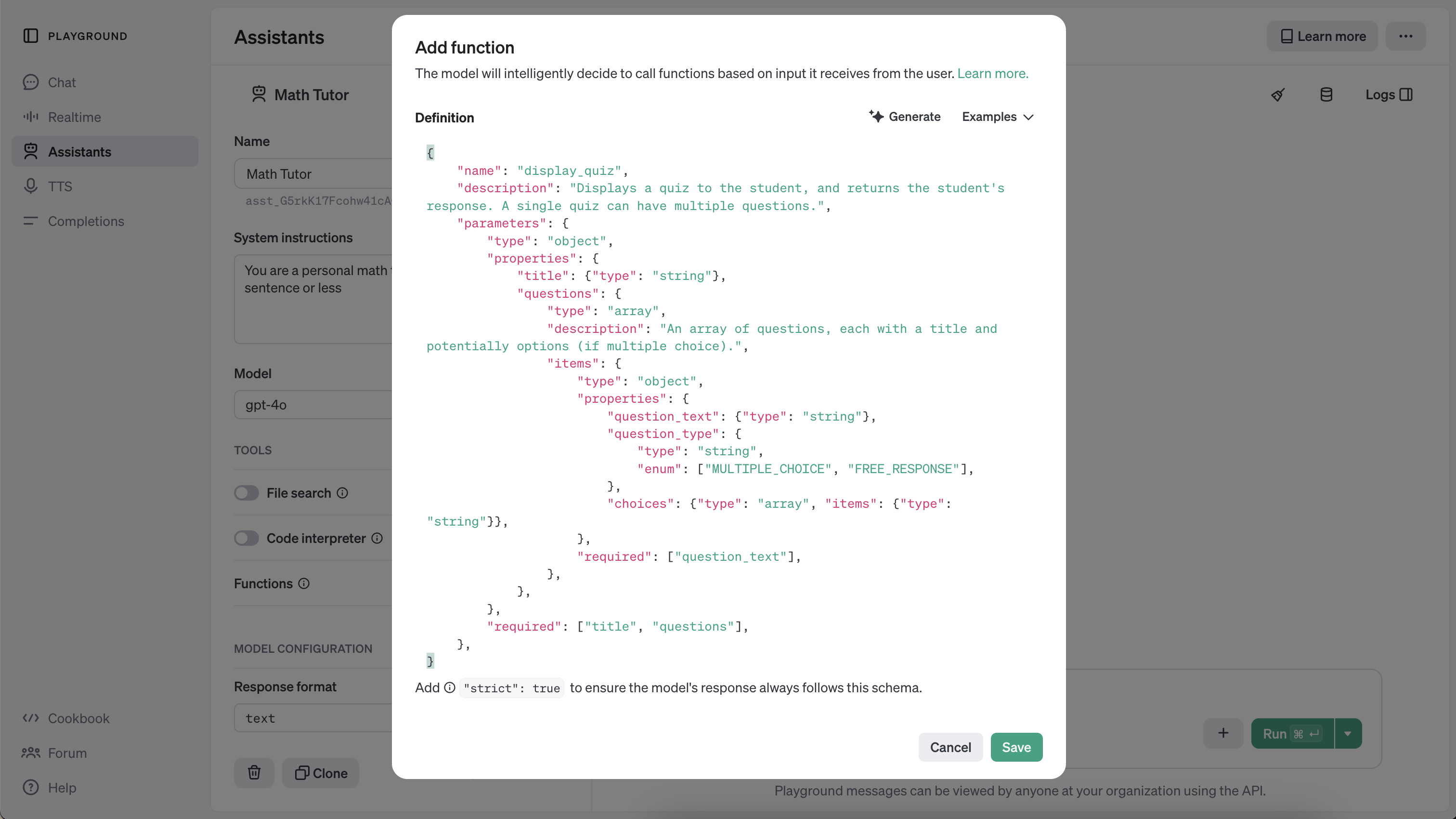
注意 由于缩进等问题,将函数JSON粘贴到仪表板时有点棘手。我只是让ChatGPT按照仪表板上某个示例的格式来格式化我的函数 :)。
assistant = client.beta.assistants.update(
    MATH_ASSISTANT_ID,
    tools=[
        {"type": "code_interpreter"},
        {"type": "file_search"},
        {"type": "function", "function": function_json},
    ],
)
show_json(assistant)
{'id': 'asst_qvXmYlZV8zhABI2RtPzDfV6z',
'created_at': 1736340398,
'description': None,
'instructions': 'You are a personal math tutor. Answer questions briefly, in a sentence or less.',
'metadata': {},
'model': 'gpt-4o',
'name': 'Math Tutor',
'object': 'assistant',
'tools': [{'type': 'code_interpreter'},
{'type': 'file_search',
'file_search': {'max_num_results': None,
'ranking_options': {'score_threshold': 0.0,
'ranker': 'default_2024_08_21'}}},
{'function': {'name': 'display_quiz',
'description': "Displays a quiz to the student, and returns the student's response. A single quiz can have multiple questions.",
'description': "Displays a quiz to the student, and returns the student's response. A single quiz can have multiple questions.",
'parameters': {'type': 'object',
'properties': {'title': {'type': 'string'},
'questions': {'type': 'array',
'description': 'An array of questions, each with a title and potentially options (if multiple choice).',
'items': {'type': 'object',
'properties': {'question_text': {'type': 'string'},
'question_type': {'type': 'string',
'enum': ['MULTIPLE_CHOICE', 'FREE_RESPONSE']},
'choices': {'type': 'array', 'items': {'type': 'string'}}},
'required': ['question_text']}}},
'required': ['title', 'questions']},
'strict': False},
'type': 'function'}],
'response_format': 'auto',
'temperature': 1.0,
'tool_resources': {'code_interpreter': {'file_ids': ['file-GQFm2i7N8LrAQatefWKEsE']},
'file_search': {'vector_store_ids': []}},
'top_p': 1.0}现在,我们请求一个测验。
thread, run = create_thread_and_run(
    "Make a quiz with 2 questions: One open ended, one multiple choice. Then, give me feedback for the responses."
)
run = wait_on_run(run, thread)
run.status
'requires_action'
然而现在,当我们检查运行状态时,发现状态显示为requires_action!让我们仔细看看。
show_json(run){'id': 'run_ekMRSI2h35asEzKirRf4BTwZ',
'assistant_id': 'asst_qvXmYlZV8zhABI2RtPzDfV6z',
'cancelled_at': None,
'completed_at': None,
'created_at': 1736341020,
'expires_at': 1736341620,
'failed_at': None,
'incomplete_details': None,
'incomplete_details': None,
'instructions': 'You are a personal math tutor. Answer questions briefly, in a sentence or less.',
'last_error': None,
'max_completion_tokens': None,
'max_prompt_tokens': None,
'max_completion_tokens': None,
'max_prompt_tokens': None,
'metadata': {},
'model': 'gpt-4o',
'object': 'thread.run',
'parallel_tool_calls': True,
'required_action': {'submit_tool_outputs': {'tool_calls': [{'id': 'call_uvJEn0fxM4sgmzek8wahBGLi',
'function': {'arguments': '{"title":"Math Quiz","questions":[{"question_text":"What is the derivative of the function f(x) = 3x^2 + 2x - 5?","question_type":"FREE_RESPONSE"},{"question_text":"What is the value of \\\\( \\\\int_{0}^{1} 2x \\\\, dx \\\\)?","question_type":"MULTIPLE_CHOICE","choices":["0","1","2","3"]}]}',
'name': 'display_quiz'},
'type': 'function'}]},
'type': 'submit_tool_outputs'},
'response_format': 'auto',
'started_at': 1736341022,
'status': 'requires_action',
'thread_id': 'thread_8bK2PXfoeijEHBVEzYuJXt17',
'tool_choice': 'auto',
'tools': [{'type': 'code_interpreter'},
{'type': 'file_search',
'file_search': {'max_num_results': None,
'ranking_options': {'score_threshold': 0.0,
'ranker': 'default_2024_08_21'}}},
{'function': {'name': 'display_quiz',
'description': "Displays a quiz to the student, and returns the student's response. A single quiz can have multiple questions.",
'description': "Displays a quiz to the student, and returns the student's response. A single quiz can have multiple questions.",
'parameters': {'type': 'object',
'properties': {'title': {'type': 'string'},
'questions': {'type': 'array',
'description': 'An array of questions, each with a title and potentially options (if multiple choice).',
'items': {'type': 'object',
'properties': {'question_text': {'type': 'string'},
'question_type': {'type': 'string',
'enum': ['MULTIPLE_CHOICE', 'FREE_RESPONSE']},
'choices': {'type': 'array', 'items': {'type': 'string'}}},
'required': ['question_text']}}},
'required': ['title', 'questions']},
'strict': False},
'type': 'function'}],
'truncation_strategy': {'type': 'auto', 'last_messages': None},
'usage': None,
'temperature': 1.0,
'top_p': 1.0,
'tool_resources': {}} 'strict': False},
'type': 'function'}],
'truncation_strategy': {'type': 'auto', 'last_messages': None},
'usage': None,
'temperature': 1.0,
'top_p': 1.0,
'tool_resources': {}}required_action 字段表示有一个工具正在等待我们运行它并将其输出提交回Assistant。具体来说,就是display_quiz函数!让我们先从解析name和arguments开始。
注意 虽然在这个例子中我们知道只有一个工具调用,但在实际应用中,智能体可能会选择调用多个工具。
# Extract single tool call
tool_call = run.required_action.submit_tool_outputs.tool_calls[0]
name = tool_call.function.name
arguments = json.loads(tool_call.function.arguments)

print("Function Name:", name)
print("Function Arguments:")
arguments
Function Name: display_quiz Function Arguments:
{'title': 'Math Quiz',
 'questions': [{'question_text': 'What is the derivative of the function f(x) = 3x^2 + 2x - 5?',
   'question_type': 'FREE_RESPONSE'},
  {'question_text': 'What is the value of \\( \\int_{0}^{1} 2x \\, dx \\)?',
   'question_type': 'MULTIPLE_CHOICE',
'choices': ['0', '1', '2', '3']}]}现在让我们实际调用display_quiz函数,使用由Assistant提供的参数:
responses = display_quiz(arguments["title"], arguments["questions"])
print("Responses:", responses)
Quiz: Math Quiz
Quiz: Math Quiz
What is the derivative of the function f(x) = 3x^2 + 2x - 5?
What is the value of \( \int_{0}^{1} 2x \, dx \)?
0. 0
1. 1
2. 2
3. 3
Responses: ["I don't know.", 'a']
太好了!(请记住这些响应是我们之前模拟的。实际上,我们会通过这个函数调用从后端获取输入。)
现在我们有了响应结果,接下来需要将它们提交回Assistant。我们需要用到之前解析出的tool_call中的ID,还需要将响应list编码成str格式。
run = client.beta.threads.runs.submit_tool_outputs(
    thread_id=thread.id,
    run_id=run.id,
    tool_outputs=tool_outputs
)
show_json(run)
{'id': 'run_ekMRSI2h35asEzKirRf4BTwZ',
'assistant_id': 'asst_qvXmYlZV8zhABI2RtPzDfV6z',
'cancelled_at': None,
'completed_at': None,
'created_at': 1736341020,
'expires_at': 1736341620,
'failed_at': None,
'incomplete_details': None,
'incomplete_details': None,
'instructions': 'You are a personal math tutor. Answer questions briefly, in a sentence or less.',
'last_error': None,
'max_completion_tokens': None,
'max_prompt_tokens': None,
'max_completion_tokens': None,
'max_prompt_tokens': None,
'metadata': {},
'model': 'gpt-4o',
'object': 'thread.run',
'parallel_tool_calls': True,
'parallel_tool_calls': True,
'required_action': None,
'response_format': 'auto',
'started_at': 1736341022,
'status': 'queued',
'thread_id': 'thread_8bK2PXfoeijEHBVEzYuJXt17',
'tool_choice': 'auto',
'tools': [{'type': 'code_interpreter'},
{'type': 'file_search',
'file_search': {'max_num_results': None,
'ranking_options': {'score_threshold': 0.0,
'ranker': 'default_2024_08_21'}}},
{'function': {'name': 'display_quiz',
'description': "Displays a quiz to the student, and returns the student's response. A single quiz can have multiple questions.",
'description': "Displays a quiz to the student, and returns the student's response. A single quiz can have multiple questions.",
'parameters': {'type': 'object',
'properties': {'title': {'type': 'string'},
'questions': {'type': 'array',
'description': 'An array of questions, each with a title and potentially options (if multiple choice).',
'items': {'type': 'object',
'properties': {'question_text': {'type': 'string'},
'question_type': {'type': 'string',
'enum': ['MULTIPLE_CHOICE', 'FREE_RESPONSE']},
'choices': {'type': 'array', 'items': {'type': 'string'}}},
'required': ['question_text']}}},
'required': ['title', 'questions']},
'strict': False},
'type': 'function'}],
'truncation_strategy': {'type': 'auto', 'last_messages': None},
'usage': None,
'temperature': 1.0,
'top_p': 1.0,
'tool_resources': {}} 'strict': False},
'type': 'function'}],
'truncation_strategy': {'type': 'auto', 'last_messages': None},
'usage': None,
'temperature': 1.0,
'top_p': 1.0,
'tool_resources': {}}我们现在可以再次等待运行完成,并检查我们的线程!
run = wait_on_run(run, thread)
pretty_print(get_response(thread))
# Messages
user: Make a quiz with 2 questions: One open ended, one multiple choice. Then, give me feedback for the responses.
assistant: Since no specific information was found in the uploaded file, I'll create a general math quiz for you:
1. **Open-ended Question**: What is the derivative of the function \( f(x) = 3x^2 + 2x - 5 \)?
2. **Multiple Choice Question**: What is the value of \( \int_{0}^{1} 2x \, dx \)?
- A) 0
- B) 1
- C) 2
- D) 3
I will now present the quiz to you for response.
assistant: Here is the feedback for your responses:
1. **Derivative Question**:
- Your Response: "I don't know."
- Feedback: The derivative of \( f(x) = 3x^2 + 2x - 5 \) is \( f'(x) = 6x + 2 \).
2. **Integration Question**:
- Your Response: A) 0
- Feedback: The correct answer is B) 1. The integration \(\int_{0}^{1} 2x \, dx \) evaluates to 1.
哇呼 🎉
结论
我们在本笔记本中涵盖了大量内容,给自己一个击掌鼓励吧!希望你现在已经掌握了坚实的基础,能够利用诸如Code Interpreter、Retrieval和Functions等工具构建强大的状态化体验!
为了简洁起见,我们未涵盖以下几个部分,以下是进一步探索的资源:
- Annotations: 解析文件引用
- 文件: 线程范围 vs 助手范围
- 并行函数调用: 在单个步骤中调用多个工具
- 多智能体线程运行:单个线程中包含来自多个智能体的消息
- 流式传输:即将推出!
现在就去打造一些令人惊叹的东西吧!