目录
-
通用应用信息 - Canvas学习管理系统的概述、其功能特点,以及ChatGPT自定义操作通过AI集成提升教育体验的作用。
-
从ChatGPT到Canvas的身份验证 - 解释将ChatGPT连接到Canvas的身份验证方法(OAuth和用户生成的访问令牌),并提供设置每个选项的详细说明。
-
示例用例:学生课程助手 - 详细展示如何使用ChatGPT帮助学生进行课程导航、考试准备和个性化反馈,包括具体的API调用和工作流程。
-
其他考虑的使用场景 - 使用Canvas API的其他潜在集成方案,例如课堂分析和报告生成。
通用应用信息
Canvas 是一个广泛使用的学习管理系统(LMS),旨在支持在线学习和教学。它提供了一套强大的工具,用于课程管理、内容交付、评估和学生协作。通过Canvas REST API,Canvas 允许与第三方应用(包括像 ChatGPT 这样的 AI 工具)进行广泛的定制和集成。
ChatGPT的自定义操作与Canvas结合,使教育工作者能够利用AI增强课程内容、自动化任务,并为学生提供个性化学习路径。例如基于活跃课程的虚拟教学助手,因为这些功能非常适合从Canvas提取信息以创建教育对话。带有自定义操作的ChatGPT并非旨在自动化整个Canvas体验,也不能替代许多更适合在Canvas应用中完成的功能。
从ChatGPT到Canvas的身份验证
有关自定义操作中身份验证的概述,请参阅操作身份验证文档。
Canvas中有两种认证选项:1) OAuth 和 2) 用户生成的访问令牌。
- 对于大规模部署,需要使用OAuth进行操作认证。
- 如果用户考虑单用户部署或无法访问管理员设置,可以考虑使用用户生成的访问令牌。需要注意的是,该操作发出的所有请求都将使用用户生成的令牌,因此Canvas会将所有请求记录为用户活动,并使用用户的权限来完成这些请求。
为Canvas实现OAuth认证
虽然本Canvas操作手册未使用OAuth,但任何多用户部署都必须采用该认证方式。详见OAuth for Canvas Documentation获取详细操作指南。
在Canvas自定义操作中实现OAuth时需要注意以下几点:
- 为了获取客户端ID和客户端密钥,Canvas的管理员设置需要开启OAuth访问权限。
- 授权URL将如下所示(请确保更新Canvas安装URL):https:///login/oauth2/auth
- 令牌URL将类似于(请确保更新Canvas安装URL):ttps:///login/oauth2/token
- 在自定义操作中可能不需要定义作用域。如果开发者密钥不需要作用域且未指定scope参数,访问令牌将拥有所有作用域的访问权限。如果开发者密钥确实需要作用域但未指定scope参数,Canvas将返回"invalid_scope"错误。更多关于开发者密钥的信息请点击这里,端点信息请点击这里。
- 令牌交换方法为默认(POST请求)
- Canvas使用术语
redirect_uri,而ChatGPT使用术语Callback URL来表示认证成功后完成重定向流程的URL。
使用用户生成的访问令牌实现身份验证
在某些情况下,使用用户生成的访问令牌进行Canvas自定义操作认证可能是合适的。以下是具体操作步骤:
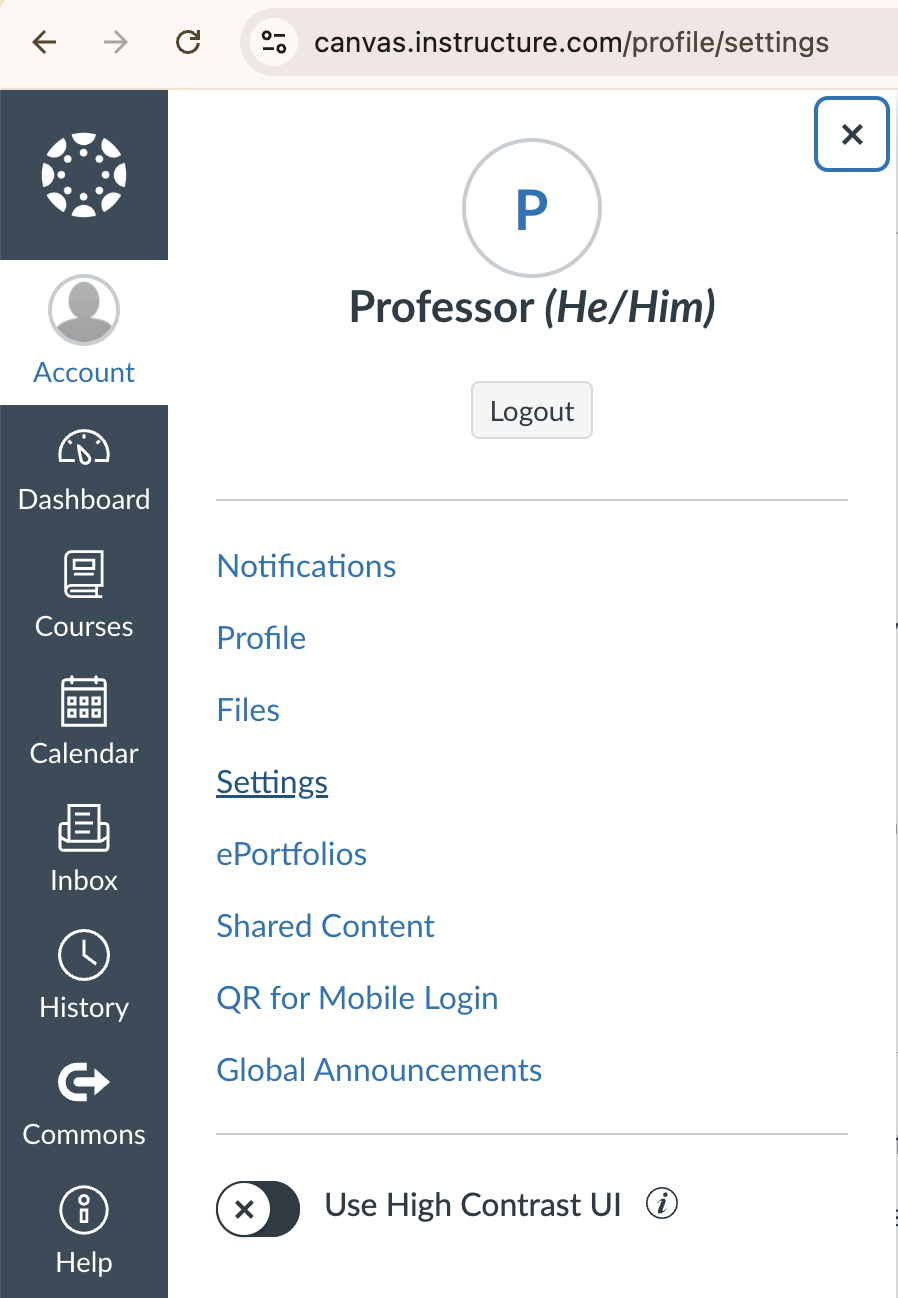
- 前往此处显示的Canvas账户设置:
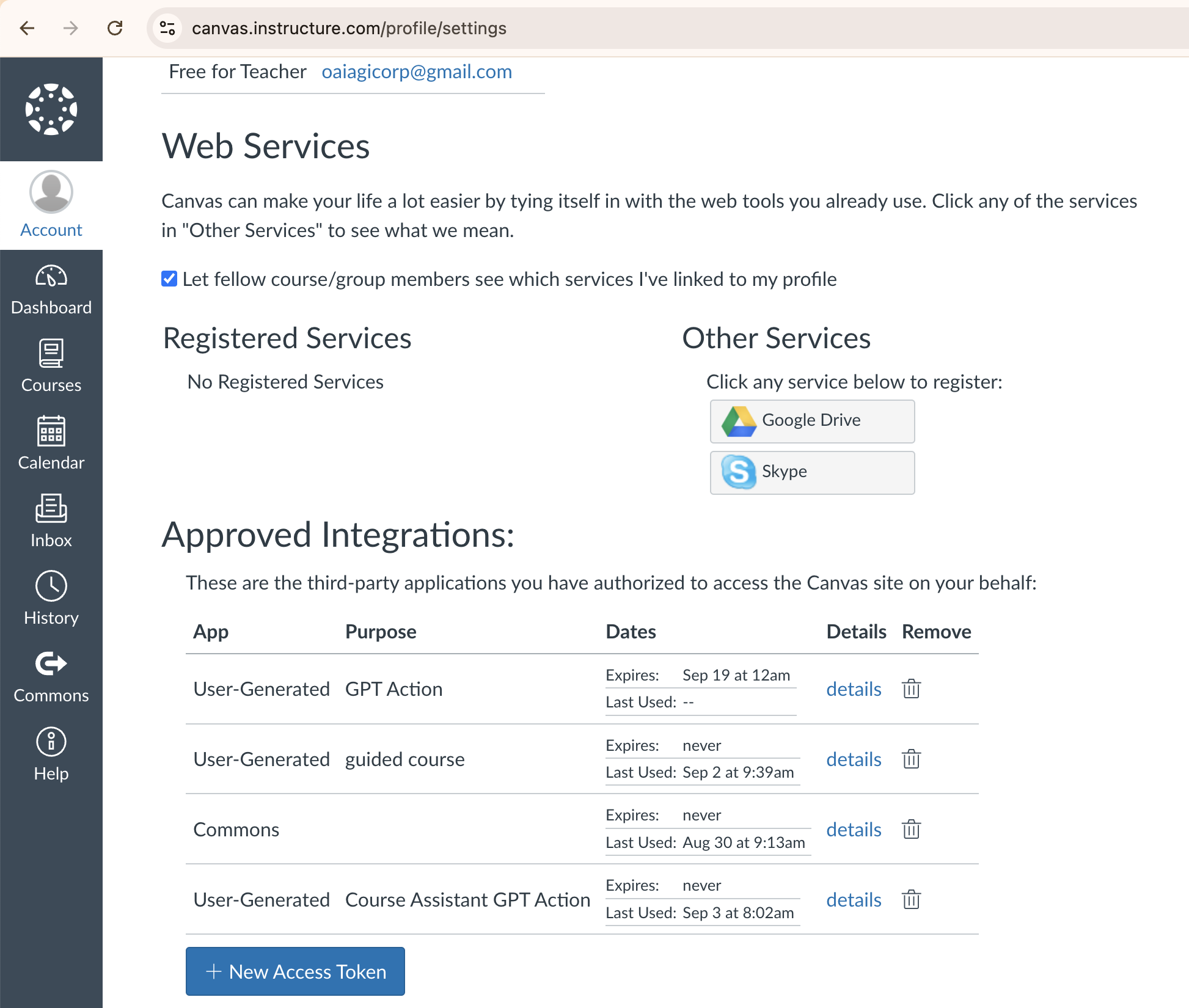
- 向下滚动至此处显示的令牌列表:
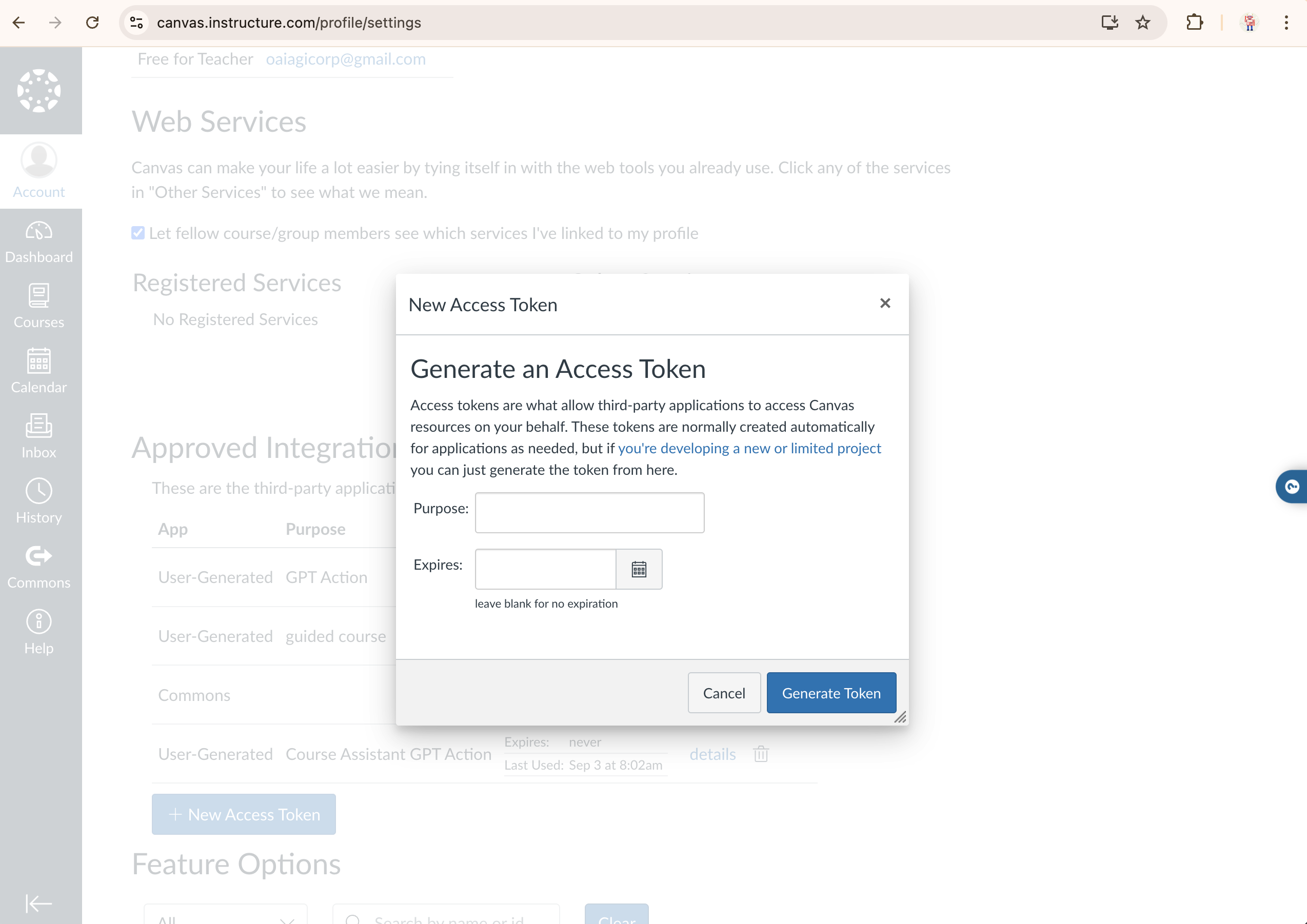
- 生成一个新的令牌,并保存此令牌。之后将无法再次查看。
示例用例:学生课程助手
概述
通过提供详细信息、生成个性化模拟考试并提供建设性反馈来增强学习效果,帮助学生更好地理解和掌握课程内容。
注意事项
- Some information like the Syllabus is returned as an HTML page when requested by the API. This renders it impossible to show in ChatGPT. Instead, reference course description, modules, and the assignments to guide the user.
- 可以通过使用
include[]查询参数来修改请求以获取特定信息。如果需要请求关于课程的特定信息,请在GPT指令中提供一个示例。
GPT 使用说明
编写这些指令可以有多种方法。参见此处获取关于提示工程策略和最佳实践的指导。
# **Context:** You support college students by providing detailed information about their courses hosted on the Canvas Learning Management System. You help them understand course content, generate practice exams based on provided materials, and offer insightful feedback to aid their learning journey. Assume the students are familiar with basic academic terminologies.

# **Instructions:**

## Scenarios

### - When the user asks for information about a specific course, follow this 5 step process:
1. Ask the user to specify the course they want assistance with and the particular area of focus (e.g., overall course overview, specific module).
2. If you do not know the Course ID for the course requested, use the listYourCourses to find the right course and corresponding ID in Canvas. If none of the courses listed returned courses that seem to match the course request, use the searchCourses to see if there are any similarly named course.
3. Retrieve the course information from Canvas using the getSingleCourse API call and the listModules API call.
4. Ask the user which module(s) they would like to focus on and use the listModuleItems to retrieve the requested module items. For any assignments, share links to them.
5. Ask if the user needs more information or if they need to prepare for an exam.

### When a user asks to take a practice test or practice exam for a specific course, follow this 6 step process:
1. Ask how many questions
2. Ask which chapters or topics they want to be tested on, provide a couple examples from the course modules in Canvas.
3. Ask 1 question at a time, be sure the questions are multiple choice (do not generate the next question until the question is answered)
4. When the user answers, tell them if its right or wrong and give a description for the correct answer
5. Ask the user if they want to export the test results and write the code to create the PDF
6. Offer additional resources and study tips tailored to the user's needs and progress, and inquire if they require further assistance with other courses or topics.

### When a user asks to create a study guide
- Format the generated study guide in a table
OpenAPI 规范
- API Calls Featured
- [GET] listYourCourses
- [GET] getSingleCourse
- [GET] listModules
- [GET] listModuleItems
- [GET] searchCourses
以下内容由Canvas API参考文档和ActionsGPT共同生成。
openapi: 3.1.0
info:
title: Canvas API
description: API for interacting with Canvas LMS, including courses, modules, module items, and search functionalities.
version: 1.0.0
servers:
- url: https://canvas.instructure.com/api/v1
description: Canvas LMS API server
variables:
domain:
default: canvas.instructure.com
description: The domain of your Canvas instance
paths:
/courses:
get:
operationId: listYourCourses
summary: List your courses
description: Retrieves a paginated list of active courses for the current user.
parameters:
- name: enrollment_type
in: query
description: Filter by enrollment type (e.g., "teacher", "student").
schema:
type: string
- name: enrollment_role
in: query
description: Filter by role type. Requires admin permissions.
schema:
type: string
- name: enrollment_state
in: query
description: Filter by enrollment state (e.g., "active", "invited").
schema:
type: string
- name: exclude_blueprint_courses
in: query
description: Exclude Blueprint courses if true.
schema:
type: boolean
- name: include
in: query
description: Array of additional information to include (e.g., "term", "teachers").
schema:
type: array
items:
type: string
- name: per_page
in: query
description: The number of results to return per page.
schema:
type: integer
example: 10
- name: page
in: query
description: The page number to return.
schema:
type: integer
example: 1
responses:
'200':
description: A list of courses.
content:
application/json:
schema:
type: array
items:
type: object
properties:
id:
type: integer
description: The ID of the course.
name:
type: string
description: The name of the course.
account_id:
type: integer
description: The ID of the account associated with the course.
enrollment_term_id:
type: integer
description: The ID of the term associated with the course.
start_at:
type: string
format: date-time
description: The start date of the course.
end_at:
type: string
format: date-time
description: The end date of the course.
course_code:
type: string
description: The course code.
state:
type: string
description: The current state of the course (e.g., "unpublished", "available").
'400':
description: Bad request, possibly due to invalid query parameters.
'401':
description: Unauthorized, likely due to invalid authentication credentials.
/courses/{course_id}:
get:
operationId: getSingleCourse
summary: Get a single course
description: Retrieves the details of a specific course by its ID.
parameters:
- name: course_id
in: path
required: true
description: The ID of the course.
schema:
type: integer
- name: include
in: query
description: Array of additional information to include (e.g., "term", "teachers").
schema:
type: array
items:
type: string
responses:
'200':
description: A single course object.
content:
application/json:
schema:
type: object
properties:
id:
type: integer
description: The ID of the course.
name:
type: string
description: The name of the course.
account_id:
type: integer
description: The ID of the account associated with the course.
enrollment_term_id:
type: integer
description: The ID of the term associated with the course.
start_at:
type: string
format: date-time
description: The start date of the course.
end_at:
type: string
format: date-time
description: The end date of the course.
course_code:
type: string
description: The course code.
state:
type: string
description: The current state of the course (e.g., "unpublished", "available").
is_public:
type: boolean
description: Whether the course is public.
syllabus_body:
type: string
description: The syllabus content of the course.
term:
type: object
description: The term associated with the course.
properties:
id:
type: integer
name:
type: string
start_at:
type: string
format: date-time
end_at:
type: string
format: date-time
'400':
description: Bad request, possibly due to an invalid course ID or query parameters.
'401':
description: Unauthorized, likely due to invalid authentication credentials.
'404':
description: Course not found, possibly due to an invalid course ID.
/courses/{course_id}/modules:
get:
operationId: listModules
summary: List modules in a course
description: Retrieves the list of modules for a given course in Canvas.
parameters:
- name: course_id
in: path
required: true
description: The ID of the course.
schema:
type: integer
- name: include
in: query
description: Include additional information such as items in the response.
schema:
type: array
items:
type: string
example: ["items"]
- name: search_term
in: query
description: The partial title of the module to match and return.
schema:
type: string
- name: student_id
in: query
description: Return module completion information for the student with this ID.
schema:
type: integer
- name: per_page
in: query
description: The number of results to return per page.
schema:
type: integer
example: 10
- name: page
in: query
description: The page number to return.
schema:
type: integer
example: 1
responses:
'200':
description: A list of modules in the course.
content:
application/json:
schema:
type: array
items:
type: object
properties:
id:
type: integer
description: The ID of the module.
name:
type: string
description: The name of the module.
items_count:
type: integer
description: The number of items in the module.
state:
type: string
description: The state of the module (e.g., "active", "locked").
'400':
description: Bad request, possibly due to an invalid course ID or query parameters.
'401':
description: Unauthorized, likely due to invalid authentication credentials.
'404':
description: Course not found, possibly due to an invalid course ID.
/courses/{course_id}/modules/{module_id}/items:
get:
operationId: listModuleItems
summary: List items in a module
description: Retrieves the list of items within a specific module in a Canvas course.
parameters:
- name: course_id
in: path
required: true
description: The ID of the course.
schema:
type: integer
- name: module_id
in: path
required: true
description: The ID of the module.
schema:
type: integer
- name: include
in: query
description: Include additional information in the response, such as content details.
schema:
type: array
items:
type: string
example: ["content_details"]
- name: student_id
in: query
description: Return completion information for the student with this ID.
schema:
type: integer
- name: per_page
in: query
description: The number of results to return per page.
schema:
type: integer
example: 10
- name: page
in: query
description: The page number to return.
schema:
type: integer
example: 1
responses:
'200':
description: A list of items in the module.
content:
application/json:
schema:
type: array
items:
type: object
properties:
id:
type: integer
description: The ID of the module item.
title:
type: string
description: The title of the module item.
type:
type: string
description: The type of the module item (e.g., "Assignment", "File").
position:
type: integer
description: The position of the item within the module.
indent:
type: integer
description: The level of indentation of the item in the module.
completion_requirement:
type: object
description: The completion requirement for the item.
properties:
type:
type: string
min_score:
type: integer
content_id:
type: integer
description: The ID of the associated content item (e.g., assignment, file).
state:
type: string
description: The state of the item (e.g., "active", "locked").
'400':
description: Bad request, possibly due to an invalid module ID or query parameters.
'401':
description: Unauthorized, likely due to invalid authentication credentials.
'404':
description: Module or course not found, possibly due to an invalid module or course ID.
/search/all_courses:
get:
operationId: searchCourses
summary: Search for courses
description: Searches for public courses in Canvas.
parameters:
- name: search
in: query
description: The search term to filter courses.
schema:
type: string
- name: public_only
in: query
description: If true, only returns public courses.
schema:
type: boolean
- name: open_enrollment_only
in: query
description: If true, only returns courses with open enrollment.
schema:
type: boolean
- name: enrollment_type
in: query
description: Filter by enrollment type (e.g., "teacher", "student").
schema:
type: string
- name: sort
in: query
description: Sort the results by "asc" or "desc" order.
schema:
type: string
enum:
- asc
- desc
- name: per_page
in: query
description: The number of results to return per page.
schema:
type: integer
example: 10
- name: page
in: query
description: The page number to return.
schema:
type: integer
example: 1
responses:
'200':
description: A list of courses matching the search criteria.
content:
application/json:
schema:
type: array
items:
type: object
properties:
id:
type: integer
description: The ID of the course.
name:
type: string
description: The name of the course.
account_id:
type: integer
description: The ID of the account associated with the course.
enrollment_term_id:
type: integer
description: The ID of the term associated with the course.
start_at:
type: string
format: date-time
description: The start date of the course.
end_at:
type: string
format: date-time
description: The end date of the course.
course_code:
type: string
description: The course code.
state:
type: string
description: The current state of the course (e.g., "unpublished", "available").
is_public:
type: boolean
description: Whether the course is public.
term:
type: object
description: The term associated with the course.
properties:
id:
type: integer
name:
type: string
start_at:
type: string
format: date-time
end_at:
type: string
format: date-time
'400':
description: Bad request, possibly due to invalid query parameters.
'401':
description: Unauthorized, likely due to invalid authentication credentials.
'404':
description: No courses found matching the criteria.示例对话开场白
- 帮我进行模拟考试练习。
- 概述我的一门课程。
- 列出我所有的课程。
GPT 功能
- [开启] 网页浏览
- [开启] DALL·E 图像生成
- [开启] 代码解释器 & 数据分析
其他值得考虑的使用场景
以下是可以利用Canvas API探索的额外用例的非详尽列表。每个用例的基本框架已提供,但GPT指令和具体引用的API调用则有意留待您作为用户根据自身需求决定最适合的方案。
课堂分析与报告
使用场景: 为教师提供关于学生参与度、成绩和课堂互动的全面分析与表现报告。通过利用这些数据,教师可以做出明智决策,调整课程教学方式,识别有风险的学生,并提升整体课堂效果。
API资源:
已评分作业的审阅与改进指南
使用场景:为学生提供一个工具,用于回顾已评分的作业、分析他们的表现,并在知识薄弱领域获得有针对性的改进指导。该工具可以突出显示学生遇到困难的具体问题或部分,并推荐额外的学习资源或练习材料以帮助他们提升。
API资源:
- 提交内容 和 测验提交: 获取学生的提交内容及相关成绩。
- 作业: 获取作业的详细信息,包括评分标准和评分细则。
- 评分标准评估: 查看详细反馈和评分标准评估
- 模块: 使用List modules API推荐针对学生薄弱环节的额外学习模块。
- 测验: 推荐练习测验帮助学生改进特定的知识短板
恭喜!
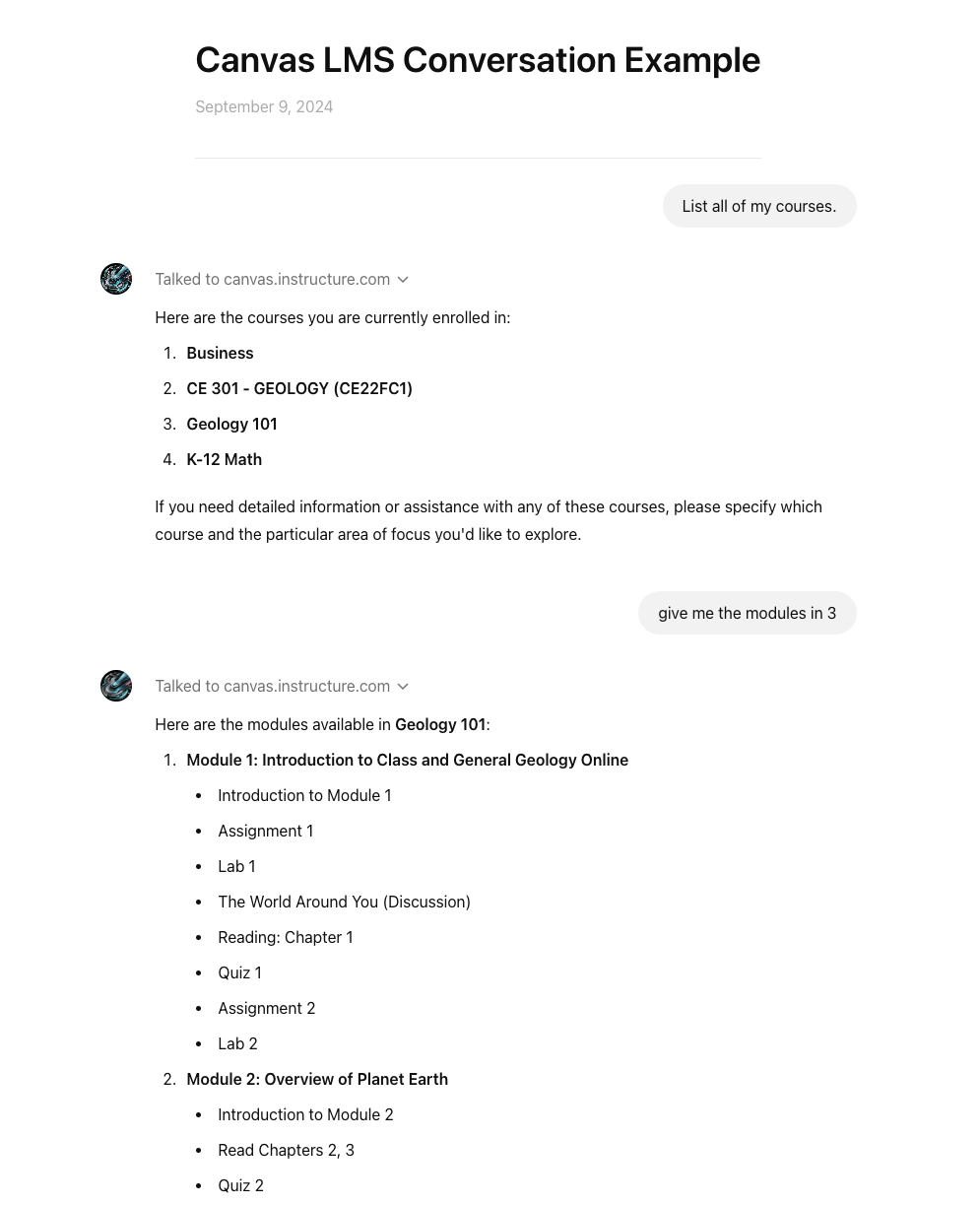
您已成功创建了一个带有Canvas LMS工作自定义操作的Custom GPT。您应该能够进行类似于下方截图的对话。干得漂亮,继续加油!