本页面为开发者提供构建特定应用GPT Action的说明与指南。在继续之前,请确保您已熟悉以下信息:
这个特定的GPT操作概述了如何连接到Confluence——Atlassian的协作与文档平台。该操作会接收用户的问题,扫描相关Confluence空间和页面以收集必要信息,然后制定响应来回答用户的提问。本指南不涉及直接从ChatGPT更新Confluence内容,但通过额外的操作和权限范围在技术上是可行的。
价值与示例商业应用场景
值
用户现在可以利用ChatGPT的自然语言能力直接连接到Confluence,实现与组织知识库的无缝交互。
示例用例
- 知识工作者: 轻松从Confluence页面和空间中检索信息,以回答问题或为报告和演示收集详细信息。
- 项目经理: 快速访问存储在Confluence中的项目文档和更新,无需手动翻阅页面。
- 客户支持团队: 通过从Confluence知识库提取相关信息,为客户咨询提供准确及时的响应。
- 所有用户:更清晰地了解公司范围内的文档、政策和流程,促进协作与知识共享。
应用信息
应用密钥链接
在开始之前,请查看应用程序中的这些链接:
应用前提条件
在开始之前,请确保您已在应用程序环境中完成以下步骤:
- 确保您拥有在Atlassian开发者门户中创建应用的权限
- 确定您希望您的GPT执行哪些交互操作(搜索、读取、编辑等)
ChatGPT 步骤
自定义GPT指令
创建自定义GPT后,请将以下文本复制到指令面板中。有问题吗?查看入门示例详细了解此步骤的操作方法。
You are a "Confluence Savant", equipped with the ability to search our company's Product Wiki in Confluence to answer product-related questions.

You must ALWAYS perform the "getAccessibleResources" Action first to get the "cloudid" value you will need in subsequent Actions.

Your job is to provide accurate and detailed responses by retrieving information from the Product Wiki. Your responses should be clear, concise, and directly address the question asked. You have the capability to execute an action named "performConfluenceSearch" that allows you to search for content within our Confluence Product Wiki using specific terms or phrases related to the user's question.

    - When you receive a query about product information, use the "performConfluenceSearch" action to retrieve relevant content from the Product Wiki. Formulate your search query based on the user's question, using specific keywords or phrases to find the most pertinent information.
    - Once you receive the search results, review the content to ensure it matches the user's query. If necessary, refine your search query to retrieve more accurate results.
    - Provide a response that synthesizes the information from the Product Wiki, clearly answering the user's question. Your response should be easy to understand and directly related to the query.
    - If the query is complex or requires clarification, ask follow-up questions to the user to refine your understanding and improve the accuracy of your search.
    - If the information needed to answer the question is not available in the Product Wiki, inform the user and guide them to where they might find the answer, such as contacting a specific department or person in the company.

    Here is an example of how you might respond to a query:

    User: "What are the latest features of our XYZ product?"
    You: "The latest features of the XYZ product, as detailed in our Product Wiki, include [feature 1], [feature 2], and [feature 3]. These features were added in the recent update to enhance [specific functionalities]. For more detailed information, you can refer to the Product Wiki page [link to the specific Confluence page]."

Remember, your goal is to provide helpful, accurate, and relevant information to the user's query by effectively leveraging the Confluence Product Wiki.
OpenAPI 规范
创建自定义GPT后,在操作面板中复制以下文本。有问题吗?查看入门示例了解此步骤的详细操作方式。
openapi: 3.1.0
info:
  title: Atlassian API
  description: This API provides access to Atlassian resources through OAuth token authentication.
  version: 1.0.0
servers:
  - url: https://api.atlassian.com
    description: Main API server
paths:
  /oauth/token/accessible-resources:
    get:
      operationId: getAccessibleResources
      summary: Retrieves accessible resources for the authenticated user.
      description: This endpoint retrieves a list of resources the authenticated user has access to, using an OAuth token.
      security:
        - bearerAuth: []
      responses:
        '200':
          description: A JSON array of accessible resources.
          content:
            application/json:
              schema:
                $ref: '#/components/schemas/ResourceArray'
  /ex/confluence/{cloudid}/wiki/rest/api/search:
    get:
      operationId: performConfluenceSearch
      summary: Performs a search in Confluence based on a query.
      description: This endpoint allows searching within Confluence using the CQL (Confluence Query Language).
      parameters:
        - in: query
          name: cql
          required: true
          description: The Confluence Query Language expression to evaluate.
          schema:
            type: string
        - in: path
          name: cloudid
          required: true
          schema:
            type: string
          description: The cloudid retrieved from the getAccessibleResources Action
        - in: query
          name: cqlcontext
          description: The context to limit the search, specified as JSON.
          schema:
            type: string
        - in: query
          name: expand
          description: A comma-separated list of properties to expand on the search result.
          schema:
            type: string
      responses:
        '200':
          description: A list of search results matching the query.
          content:
            application/json:
              schema:
                $ref: '#/components/schemas/SearchResults'
components:
  securitySchemes:
    bearerAuth:
      type: http
      scheme: bearer
      bearerFormat: JWT
  schemas:
    ResourceArray:
      type: array
      items:
        $ref: '#/components/schemas/Resource'
    Resource:
      type: object
      required:
        - id
        - name
        - type
      properties:
        id:
          type: string
          description: The unique identifier for the resource.
        name:
          type: string
          description: The name of the resource.
        type:
          type: string
          description: The type of the resource.
    SearchResults:
      type: object
      properties:
        results:
          type: array
          items:
            $ref: '#/components/schemas/SearchResult'
    SearchResult:
      type: object
      properties:
        id:
          type: string
          description: The unique identifier of the content.
        title:
          type: string
          description: The title of the content.
        type:
          type: string
          description: The type of the content (e.g., page, blog post).
        space:
          type: object
          properties:
            id:
              type: string
              description: The space ID where the content is located.
            name:
              type: string
              description: The name of the space.
认证说明
以下是设置与这个第三方应用程序进行身份验证的说明。有问题吗?查看入门示例以更详细地了解此步骤的工作原理。
预操作步骤
在ChatGPT中设置身份验证之前,请确保您已在Atlassian开发者门户中完成以下步骤来创建您的Confluence应用:
- 选择创建下拉菜单
- 选择OAuth 2.0集成
- 输入名称,同意条款,然后点击创建
- 在左侧菜单中选择"Distribution"并点击"编辑"
- 将单选按钮更改为"共享"
- 填写必填字段并保存更改
- 在左侧菜单中选择"Permissions"(权限)
- 添加您希望包含的范围(例如,用户身份API和Confluence API,以便应用程序可以知道用户有权访问什么并从Confluence获取数据)
- 在左侧菜单中选择"Authorization"(授权)
- 在OAuth 2.0所在行中点击"Add"按钮
- 输入来自您的GPT的回调URL(注意:您现在可能需要先添加一个占位符,待您在GPT中创建Action和OAuth并获取最终回调URL后,再回来修改此处)
- 在左侧菜单中选择"设置"
- 在GPT的OAuth设置中为我们复制您的客户端ID和密钥
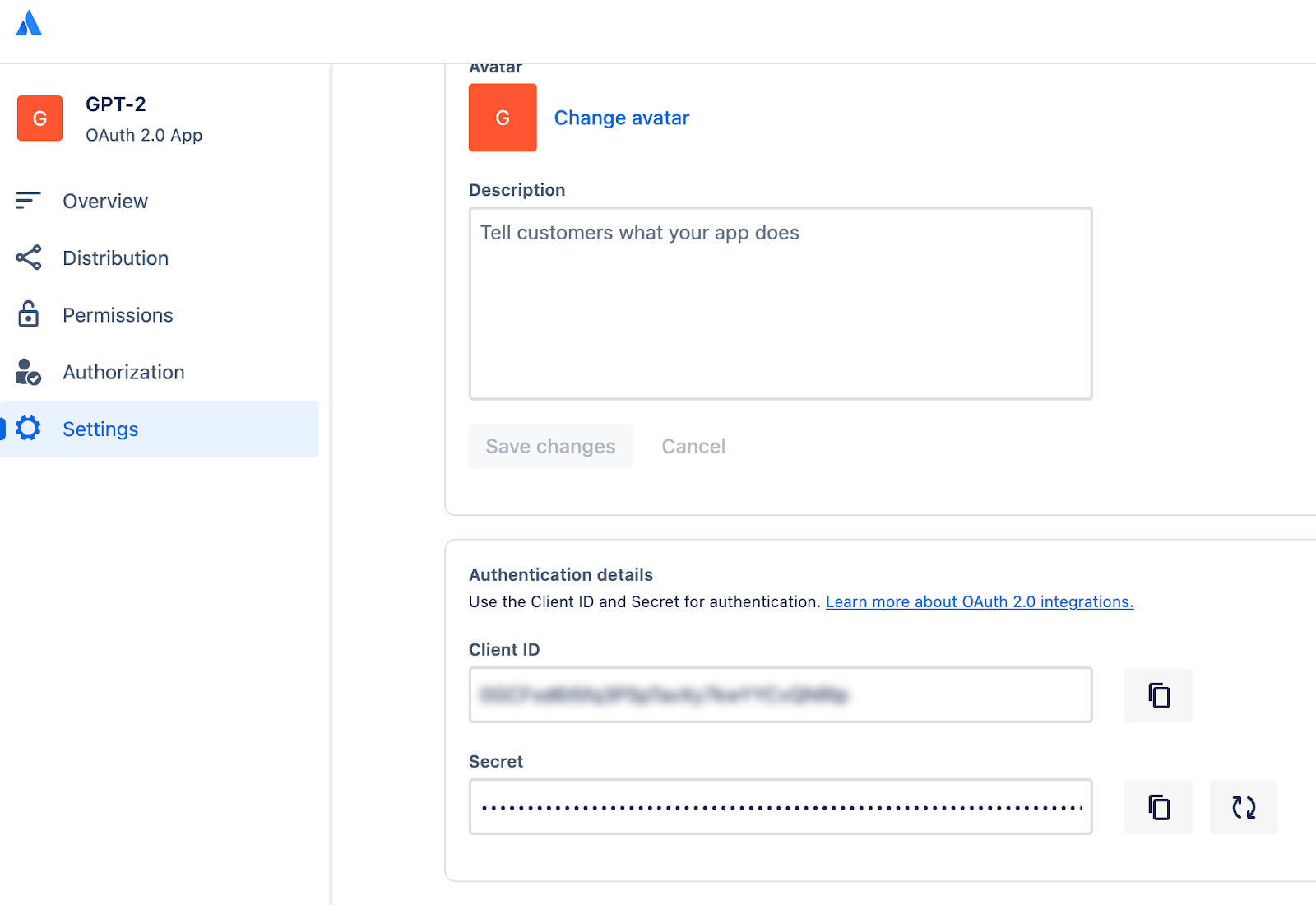
在ChatGPT中
在ChatGPT中,点击"认证"并选择"OAuth"。输入以下信息。
- 客户端ID: 使用上述步骤中的客户端ID
- 客户端密钥: 使用上述步骤中的客户端密钥
- 授权URL: https://auth.atlassian.com/authorize
- 令牌URL: https://auth.atlassian.com/oauth/token
- 范围: read:confluence-content.all search:confluence
- Token: 默认 (POST)
后续操作步骤
在ChatGPT中设置好身份验证后,按照应用程序中的以下步骤完成Action的最终设置。
- 从GPT Action复制回调URL
- 在“Authorized redirect URIs”(见上方截图)中,添加您的回调URL
常见问题与故障排除
- 回调URL错误: 如果您在ChatGPT中遇到回调URL错误,请仔细查看上面的截图。您需要直接将回调URL添加到您的Confluence应用中,才能使操作正确完成身份验证
- Schema调用了错误的项目或数据集: 如果ChatGPT调用了错误的项目或数据集,建议更新您的指令,使其更明确地指出(a)应该调用哪个项目/数据集,或者(b)要求在运行查询前用户必须提供这些确切细节
- 循环操作: 您可能没有为应用程序授予完成其预期目的所需的权限范围
是否有您希望我们优先考虑的集成方案?我们的集成是否存在错误?请在GitHub上提交PR或问题,我们会尽快查看。