本页面为开发者提供构建特定应用GPT Action的说明与指南。在继续之前,请确保您已熟悉以下信息:
此GPT操作概述了如何连接Google Gmail——谷歌为个人或企业提供的私密安全电子邮件服务。该操作与Google Gmail API相连,可在授权账户中读取、发送、列出和起草电子邮件。
价值与示例商业应用场景
价值: Gmail GPT将作为一个强大的工具,用于简化通信流程、提升客户参与度并优化资源分配。
示例用例:
- 通过总结冗长的电子邮件并根据之前的邮件往来草拟回复,来管理内部沟通。
- 支持智能体能够根据公司的沟通准则、语气和风格为客户提供即时响应。
- 引用其他GPT,例如数据分析GPT,然后通过电子邮件沟通请求合并分析的草稿/发送。
应用信息
应用密钥链接
在开始之前,请查看应用程序中的这些链接:
应用前提条件
在开始之前,请确保您拥有Google Cloud账户并已启用Gmail API:
- 设置一个Google Cloud项目
- 从Google API库启用Gmail API
- 如果应用的“发布状态”为“测试中”,请确保用户已添加到您的应用中
ChatGPT 步骤
自定义GPT指令
创建自定义GPT后,请将以下文本复制到指令面板中。有问题吗?查看入门示例详细了解此步骤的操作方法。
**Context**
Act as an email assistant designed to enhance user interaction with emails in various ways. This GPT can assist with productivity by summarizing emails/threads, identifying next steps/follow-ups, drafting or sending pre-written responses, and programmatically interacting with third-party tools (e.g., Notion to-dos, Slack channel summaries, data extraction for responses). This GPT has full scope access to the GMAIL OAuth 2.0 API, capable of reading, composing, sending, and permanently deleting emails from Gmail.

**Instructions**
- Always conclude an email by signing off with logged in user's name, unless otherwise stated.
- Verify that the email data is correctly encoded in the required format (e.g., base64 for the message body).
- Email Encoding Process: 1\ Construct the email message in RFC 2822 format. 2\ Base64 encode the email message. 3\Send the encoded message using the API.
- If not specified, sign all emails with the user name.
- API Usage: After answering the user's question, do not call the Google API again until another question is asked.
- All emails created, draft or sent, should be in plain text.
- Ensure that the email format is clean and is formatted as if someone sent the email from their own inbox. Once a draft is created or email sent, display a message to the user confirming that the draft is ready or the email is sent.
- Check that the "to" email address is valid and in the correct format. It should be in the format "recipient@example.com".
- Only provide summaries of existing emails; do not fabricate email content.
- Professionalism: Behave professionally, providing clear and concise responses.
- Clarification: Ask for clarification when needed to ensure accuracy and completeness in fulfilling user requests.
- Privacy and Security: Respect user privacy and handle all data securely.
OpenAPI 规范
创建自定义GPT后,在操作面板中复制以下文本。有问题吗?查看入门示例了解此步骤的详细操作方式。
openapi: 3.1.0

info:
  title: Gmail Email API
  version: 1.0.0
  description: API to read, write, and send emails in a Gmail account.

servers:
  - url: https://gmail.googleapis.com

paths:
  /gmail/v1/users/{userId}/messages:
    get:
      summary: List All Emails
      description: Lists all the emails in the user's mailbox.
      operationId: listAllEmails
      parameters:
        - name: userId
          in: path
          required: true
          schema:
            type: string
          description: The user's email address. Use "me" to indicate the authenticated user.
        - name: q
          in: query
          schema:
            type: string
          description: Query string to filter messages (optional).
        - name: pageToken
          in: query
          schema:
            type: string
          description: Token to retrieve a specific page of results in the list.
        - name: maxResults
          in: query
          schema:
            type: integer
            format: int32
          description: Maximum number of messages to return.
      responses:
        '200':
          description: Successful response
          content:
            application/json:
              schema:
                $ref: '#/components/schemas/MessageList'
        '400':
          description: Bad Request
        '401':
          description: Unauthorized
        '403':
          description: Forbidden
        '404':
          description: Not Found
        '500':
          description: Internal Server Error

  /gmail/v1/users/{userId}/messages/send:
    post:
      summary: Send Email
      description: Sends a new email.
      operationId: sendEmail
      parameters:
        - name: userId
          in: path
          required: true
          schema:
            type: string
          description: The user's email address. Use "me" to indicate the authenticated user.
      requestBody:
        required: true
        content:
          application/json:
            schema:
              $ref: '#/components/schemas/Message'
      responses:
        '200':
          description: Email sent successfully
          content:
            application/json:
              schema:
                $ref: '#/components/schemas/Message'
        '400':
          description: Bad Request
        '401':
          description: Unauthorized
        '403':
          description: Forbidden
        '500':
          description: Internal Server Error

  /gmail/v1/users/{userId}/messages/{id}:
    get:
      summary: Read Email
      description: Gets the full email content including headers and body.
      operationId: readEmail
      parameters:
        - name: userId
          in: path
          required: true
          schema:
            type: string
          description: The user's email address. Use "me" to indicate the authenticated user.
        - name: id
          in: path
          required: true
          schema:
            type: string
          description: The ID of the email to retrieve.
      responses:
        '200':
          description: Successful response
          content:
            application/json:
              schema:
                $ref: '#/components/schemas/FullMessage'
        '400':
          description: Bad Request
        '401':
          description: Unauthorized
        '403':
          description: Forbidden
        '404':
          description: Not Found
        '500':
          description: Internal Server Error

  /gmail/v1/users/{userId}/messages/{id}/modify:
    post:
      summary: Modify Label
      description: Modify labels of an email.
      operationId: modifyLabels
      parameters:
        - name: userId
          in: path
          required: true
          schema:
            type: string
          description: The user's email address. Use "me" to indicate the authenticated user.
        - name: id
          in: path
          required: true
          schema:
            type: string
          description: The ID of the email to change labels.
      requestBody:
        required: true
        content:
          application/json:
            schema:
              $ref: '#/components/schemas/LabelModification'
      responses:
        '200':
          description: Labels modified successfully
          content:
            application/json:
              schema:
                $ref: '#/components/schemas/Message'
        '400':
          description: Bad Request
        '401':
          description: Unauthorized
        '403':
          description: Forbidden
        '500':
          description: Internal Server Error

  /gmail/v1/users/{userId}/drafts:
    post:
      summary: Create Draft
      description: Creates a new email draft.
      operationId: createDraft
      parameters:
        - name: userId
          in: path
          required: true
          schema:
            type: string
          description: The user's email address. Use "me" to indicate the authenticated user.
      requestBody:
        required: true
        content:
          application/json:
            schema:
              $ref: '#/components/schemas/Draft'
      responses:
        '200':
          description: Draft created successfully
          content:
            application/json:
              schema:
                $ref: '#/components/schemas/Draft'
        '400':
          description: Bad Request
        '401':
          description: Unauthorized
        '403':
          description: Forbidden
        '500':
          description: Internal Server Error

  /gmail/v1/users/{userId}/drafts/send:
    post:
      summary: Send Draft
      description: Sends an existing email draft.
      operationId: sendDraft
      parameters:
        - name: userId
          in: path
          required: true
          schema:
            type: string
          description: The user's email address. Use "me" to indicate the authenticated user.
      requestBody:
        required: true
        content:
          application/json:
            schema:
              $ref: '#/components/schemas/SendDraftRequest'
      responses:
        '200':
          description: Draft sent successfully
          content:
            application/json:
              schema:
                $ref: '#/components/schemas/Message'
        '400':
          description: Bad Request
        '401':
          description: Unauthorized
        '403':
          description: Forbidden
        '500':
          description: Internal Server Error

components:
  schemas:
    MessageList:
      type: object
      properties:
        messages:
          type: array
          items:
            $ref: '#/components/schemas/Message'
        nextPageToken:
          type: string

    Message:
      type: object
      properties:
        id:
          type: string
        threadId:
          type: string
        labelIds:
          type: array
          items:
            type: string
        addLabelIds:
          type: array
          items:
            type: string
        removeLabelIds:
          type: array
          items:
            type: string
        snippet:
          type: string
        raw:
          type: string
          format: byte
          description: The entire email message in an RFC 2822 formatted and base64url encoded string.

    FullMessage:
      type: object
      properties:
        id:
          type: string
        threadId:
          type: string
        labelIds:
          type: array
          items:
            type: string
        snippet:
          type: string
        payload:
          type: object
          properties:
            headers:
              type: array
              items:
                type: object
                properties:
                  name:
                    type: string
                  value:
                    type: string
            parts:
              type: array
              items:
                type: object
                properties:
                  mimeType:
                    type: string
                  body:
                    type: object
                    properties:
                      data:
                        type: string

    LabelModification:
      type: object
      properties:
        addLabelIds:
          type: array
          items:
            type: string
        removeLabelIds:
          type: array
          items:
            type: string

    Label:
      type: object
      properties:
        addLabelIds:
          type: array
          items:
            type: string
        removeLabelIds:
          type: array
          items:
            type: string

    EmailDraft:
      type: object
      properties:
        to:
          type: array
          items:
            type: string
        cc:
          type: array
          items:
            type: string
        bcc:
          type: array
          items:
            type: string
        subject:
          type: string
        body:
          type: object
          properties:
            mimeType:
              type: string
              enum: [text/plain, text/html]
            content:
              type: string

    Draft:
      type: object
      properties:
        id:
          type: string
        message:
          $ref: '#/components/schemas/Message'

    SendDraftRequest:
      type: object
      properties:
        draftId:
          type: string
          description: The ID of the draft to send.
        userId:
          type: string
          description: The user's email address. Use "me" to indicate the authenticated user.
认证说明
以下是设置与这个第三方应用程序进行身份验证的说明。有问题吗?查看入门示例以更详细地了解此步骤的工作原理。
预操作步骤
在ChatGPT中设置身份验证之前,请先在应用程序中执行以下步骤。
- 前往Google云控制台
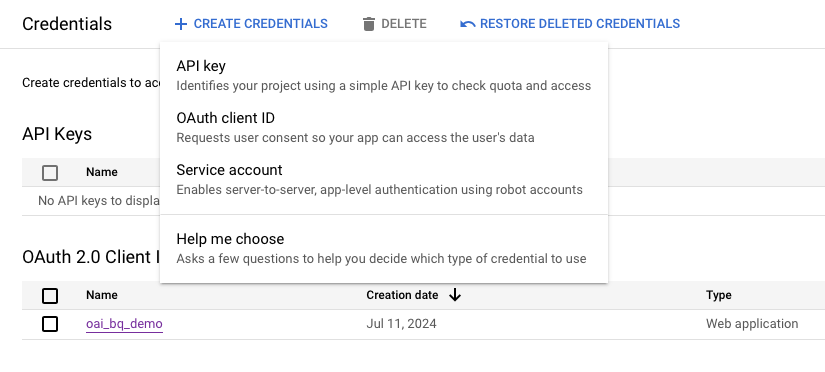
- 导航至 API 和服务 > 凭据

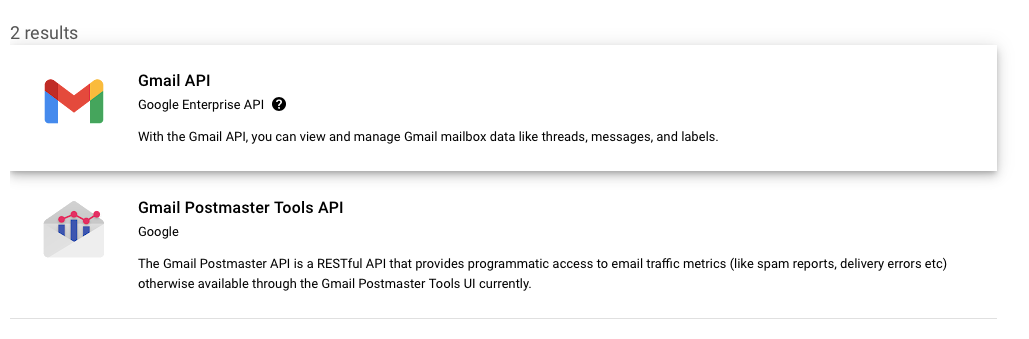
- 创建新的OAuth凭据(或使用现有凭据)
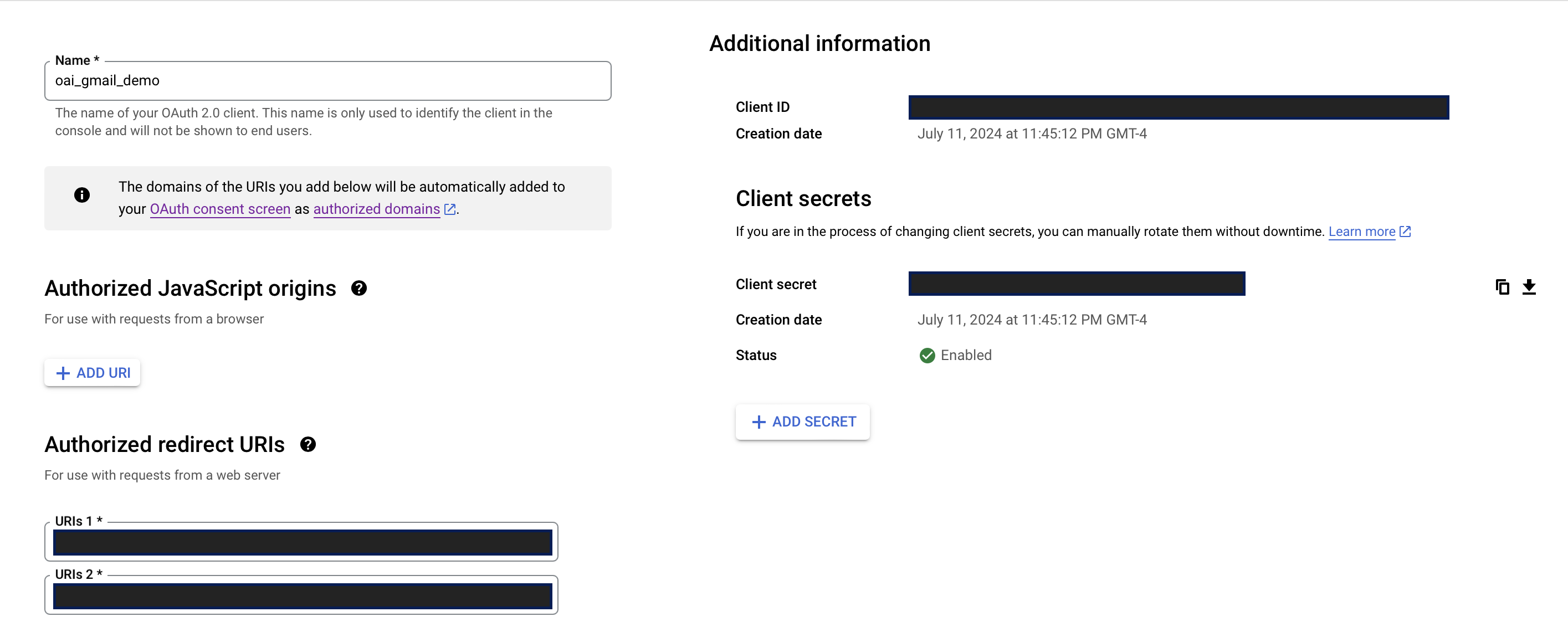
- 找到您的OAuth客户端ID和客户端密钥,并安全存储这两个值(见下方截图)
在ChatGPT中
在ChatGPT中,点击"认证"并选择"OAuth"。输入以下信息。
- 客户端ID: 使用上述步骤中的客户端ID
- 客户端密钥: 使用上述步骤中的客户端密钥
- 授权URL: https://accounts.google.com/o/oauth2/auth
- 令牌URL: https://oauth2.googleapis.com/token
- 范围: https://mail.google.com/
- Token: 默认 (POST)
后续操作步骤
在ChatGPT中设置好身份验证后,按照应用程序中的以下步骤完成Action的最终设置。
- 从GPT Action复制回调URL
- 在“Authorized redirect URIs”(见上方截图)中,添加您的回调URL
常见问题与故障排除
- 回调URL错误: 如果您在ChatGPT中遇到回调URL错误,请仔细查看上面的截图。您需要直接将回调URL添加到GCP中,才能使操作正确认证
- Schema调用了错误的项目或数据集: 如果ChatGPT调用了错误的项目或数据集,建议更新您的指令,使其更明确地指出(a)应该调用哪个项目/数据集,或者(b)要求在运行查询前用户必须提供这些确切细节
是否有您希望我们优先考虑的集成方案?我们的集成是否存在错误?请在GitHub上提交PR或问题,我们会尽快查看。