PySide6.QtGui.QTextTable
- class QTextTable
QTextTable类表示QTextDocument中的一个表格。更多…概要
方法
def
__init__()def
appendColumns()def
appendRows()def
cellAt()def
columns()def
format()def
insertColumns()def
insertRows()def
mergeCells()def
removeColumns()def
removeRows()def
resize()def
rowEnd()def
rowStart()def
rows()def
setFormat()def
splitCell()
注意
本文档可能包含从C++自动翻译到Python的代码片段。我们始终欢迎对代码片段翻译的贡献。如果您发现翻译问题,您也可以通过在我们的https:/bugreports.qt.io/projects/PYSIDE上创建工单来告知我们。
详细描述
警告
本节包含从C++自动翻译到Python的代码片段,可能包含错误。
表格是由单元格按行和列排列而成的组。每个表格至少包含一行和一列。每个单元格包含一个块,并被一个框架包围。
通常使用
insertTable()函数创建表格并将其插入文档中。例如,我们可以使用以下代码行在编辑器的当前光标位置插入一个三行两列的表格:cursor = QTextCursor(editor.textCursor()) cursor.movePosition(QTextCursor.Start) table = cursor.insertTable(rows, columns, tableFormat)
表格格式可以在创建表格时定义,或者稍后使用
setFormat()进行更改。光标当前正在编辑的表格可以通过
currentTable()找到。这允许在将其插入文档后更改其格式或尺寸。表格的大小可以通过
resize()来改变,或者通过使用insertRows()、insertColumns()、removeRows()或removeColumns()来改变。使用cellAt()来检索表格单元格。表格行的起始和结束位置可以通过在表格内移动光标,并使用
rowStart()和rowEnd()函数来获取每行起始和结束位置的光标。在
QTextTable中的行和列可以使用mergeCells()和splitCell()函数进行合并和拆分。然而,只有跨越多行或多列的单元格才能被拆分。(合并或拆分不会增加或减少行和列的数量。)请注意,如果您已将多个列和行合并到一个单元格中,您将无法将合并的单元格拆分为跨越多行或多列的新单元格。要能够拆分跨越多行和多列的单元格,您需要在多次迭代中进行此操作。
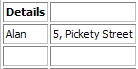 原始表格
原始表格假设我们有一个2x3的姓名和地址表格。要合并第一行中的两列,我们调用
mergeCells(),其中row= 0,column= 0,numRows= 1,numColumns= 2。table.mergeCells(0, 0, 1, 2)
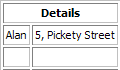
这给了我们以下表格。要将表格的第一行重新拆分为两个单元格,我们调用
splitCell()函数,其中numRows和numCols= 1。table.splitCell(0, 0, 1, 1)
分割表格这将导致原始表格。
另请参阅
- __init__(doc)
- Parameters:
文档 –
QTextDocument
- appendColumns(count)
- Parameters:
count – int
在表格的右侧追加
count列。- appendRows(count)
- Parameters:
count – int
在表格底部追加
count行。- cellAt(c)
- Parameters:
c –
QTextCursor- Return type:
这是一个重载函数。
返回包含给定
cursor的表格单元格。- cellAt(position)
- Parameters:
position – int
- Return type:
这是一个重载函数。
返回包含文档中给定
position处字符的表格单元格。- cellAt(row, col)
- Parameters:
row – int
col – 整数
- Return type:
返回表中给定
行和列的单元格。- columns()
- Return type:
整数
返回表中的列数。
另请参阅
- format()
- Return type:
返回表的格式。
另请参阅
- insertColumns(pos, num)
- Parameters:
pos – 整数
num – 整数
在指定
index的列之前插入多个columns。- insertRows(pos, num)
- Parameters:
pos – 整数
num – 整数
在指定
index的行之前插入若干rows。- mergeCells(cursor)
- Parameters:
光标 –
QTextCursor
这是一个重载函数。
合并由提供的
cursor选择的单元格。另请参阅
- mergeCells(row, col, numRows, numCols)
- Parameters:
row – int
col – 整数
numRows – int
numCols – 整数
将指定
行和列的单元格与相邻的单元格合并为一个单元格。新单元格将跨越numRows行和numCols列。如果numRows或numCols小于单元格当前跨越的行数或列数,则此方法不执行任何操作。另请参阅
- removeColumns(pos, num)
- Parameters:
pos – 整数
num – 整数
从指定的
index开始移除多个columns。- removeRows(pos, num)
- Parameters:
pos – 整数
num – 整数
从指定的
index开始移除一定数量的rows。- resize(rows, cols)
- Parameters:
rows – int
cols – 整数
调整表格大小以包含所需的
行和列数量。- rowEnd(c)
- Parameters:
c –
QTextCursor- Return type:
返回一个指向包含给定
cursor的行末尾的光标。另请参阅
- rowStart(c)
- Parameters:
c –
QTextCursor- Return type:
返回一个指向包含给定
cursor的行的起始位置的光标。另请参阅
- rows()
- Return type:
整数
返回表中的行数。
另请参阅
- setFormat(format)
- Parameters:
格式 –
QTextTableFormat
设置表格的
format。另请参阅
- splitCell(row, col, numRows, numCols)
- Parameters:
row – int
col – 整数
numRows – int
numCols – 整数
将指定的单元格在
row和column处分割成一个由numRows和numCols指定维度的多个单元格数组。