跳至内容

标注工具

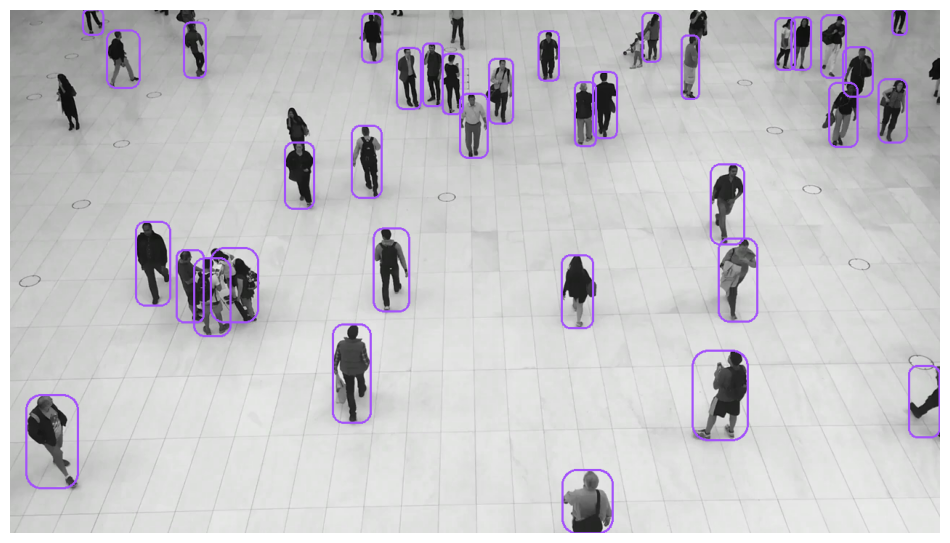
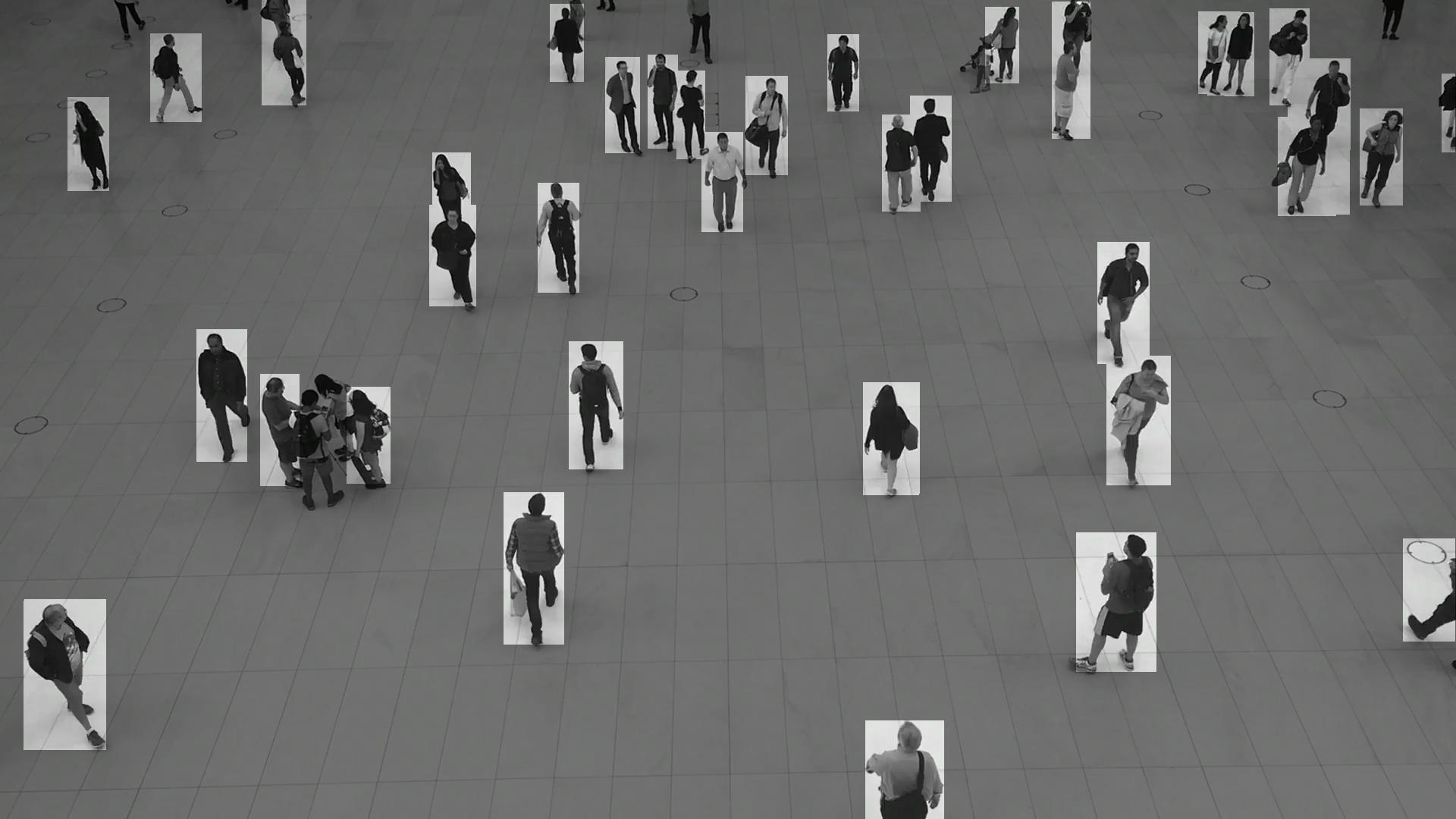
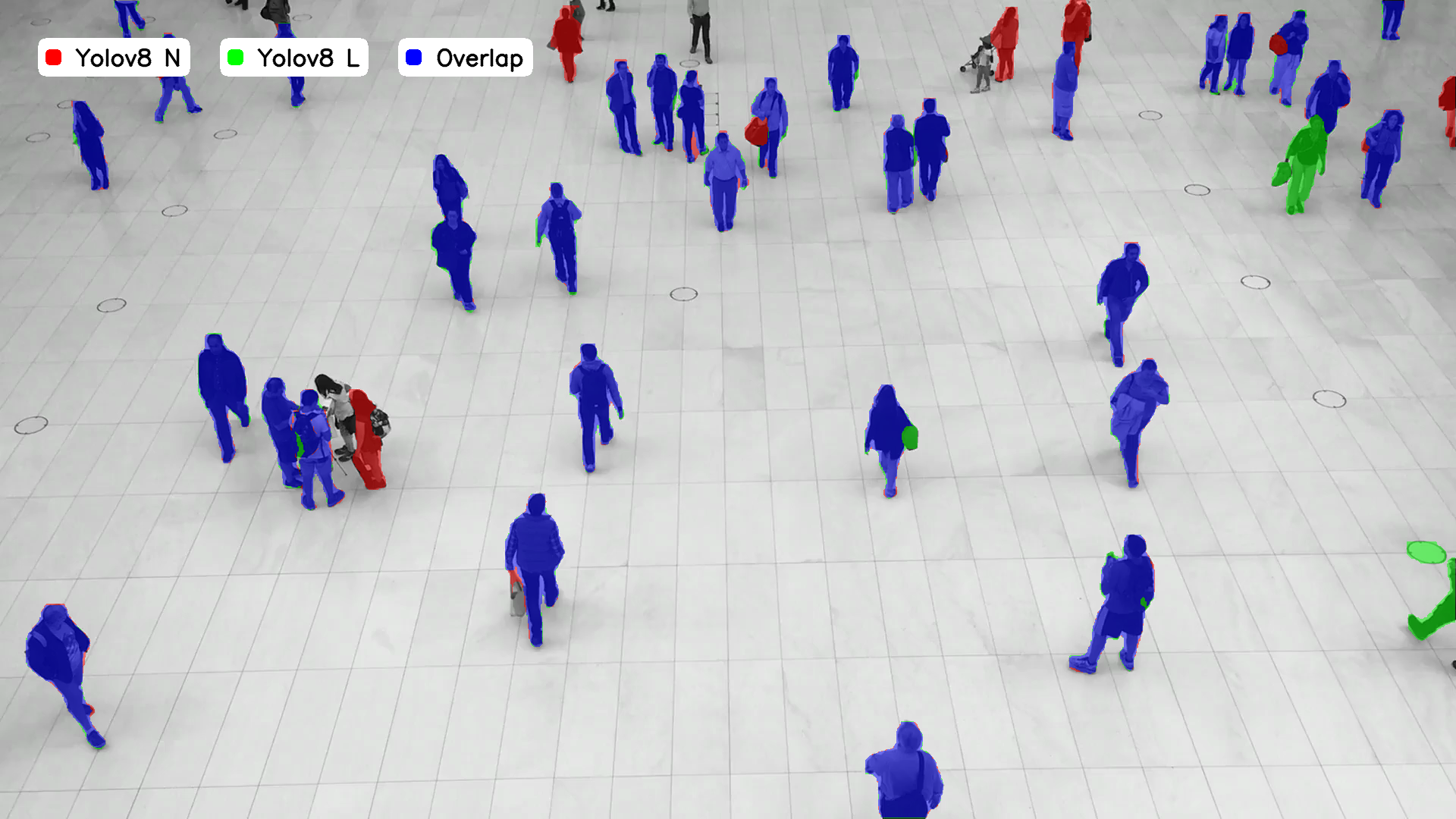
标注器接收检测结果并对检测应用框或遮罩可视化。标注器提供多种可用样式。

import supervision as sv

image = ...
detections = sv.Detections(...)

box_annotator = sv.BoxAnnotator()
annotated_frame = box_annotator.annotate(
    scene=image.copy(),
    detections=detections
)
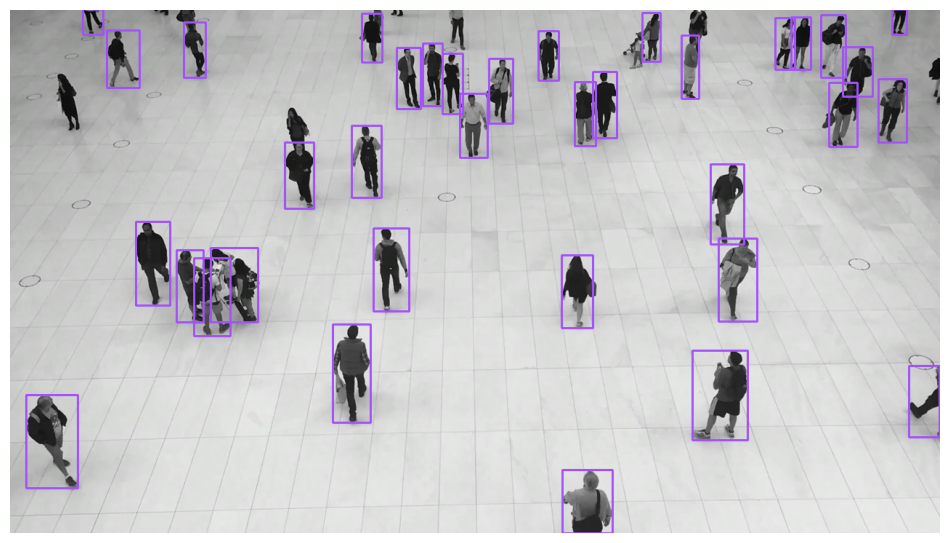
bounding-box-annotator-example

<!--</p>

import supervision as sv

image = ...
detections = sv.Detections(...)

round_box_annotator = sv.RoundBoxAnnotator()
annotated_frame = round_box_annotator.annotate(
    scene=image.copy(),
    detections=detections
)

round-box-annotator-example

-->

import supervision as sv

image = ...
detections = sv.Detections(...)

corner_annotator = sv.BoxCornerAnnotator()
annotated_frame = corner_annotator.annotate(
    scene=image.copy(),
    detections=detections
)
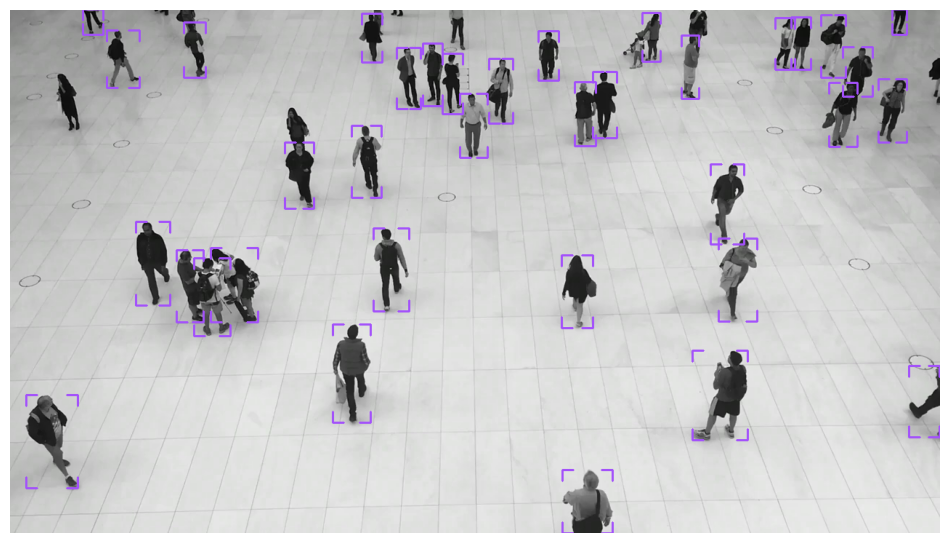
box-corner-annotator-example

import supervision as sv

image = ...
detections = sv.Detections(...)

color_annotator = sv.ColorAnnotator()
annotated_frame = color_annotator.annotate(
    scene=image.copy(),
    detections=detections
)
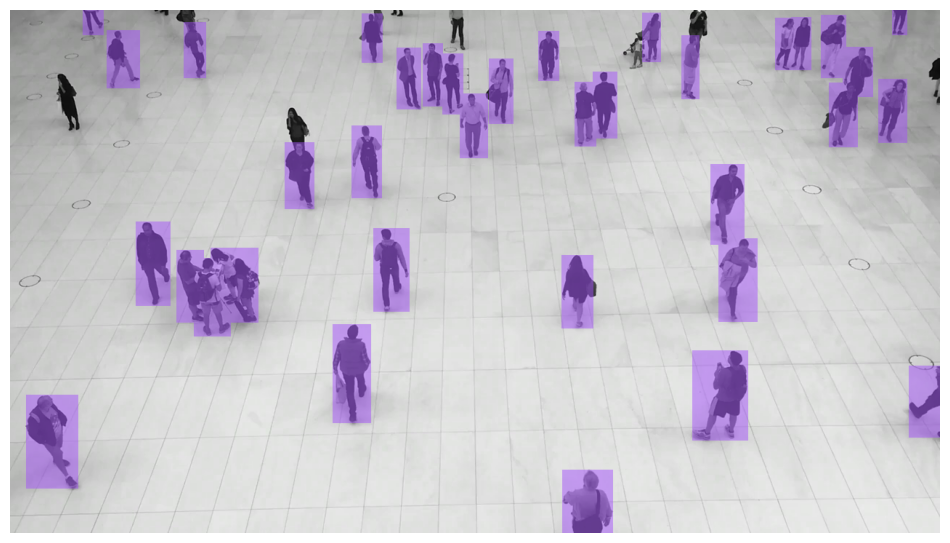
box-mask-annotator-example

import supervision as sv

image = ...
detections = sv.Detections(...)

circle_annotator = sv.CircleAnnotator()
annotated_frame = circle_annotator.annotate(
    scene=image.copy(),
    detections=detections
)
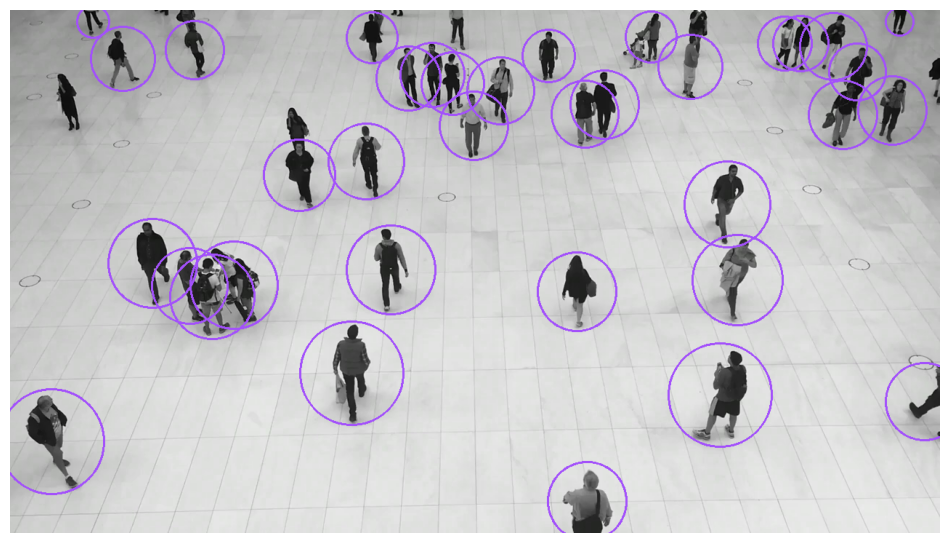
circle-annotator-example

import supervision as sv

image = ...
detections = sv.Detections(...)

dot_annotator = sv.DotAnnotator()
annotated_frame = dot_annotator.annotate(
    scene=image.copy(),
    detections=detections
)
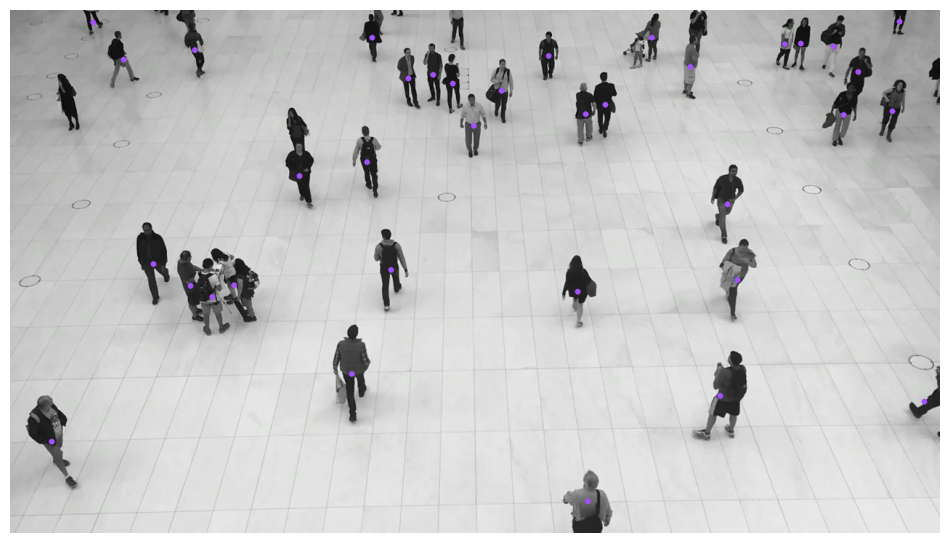
dot-annotator-example

import supervision as sv

image = ...
detections = sv.Detections(...)

triangle_annotator = sv.TriangleAnnotator()
annotated_frame = triangle_annotator.annotate(
    scene=image.copy(),
    detections=detections
)
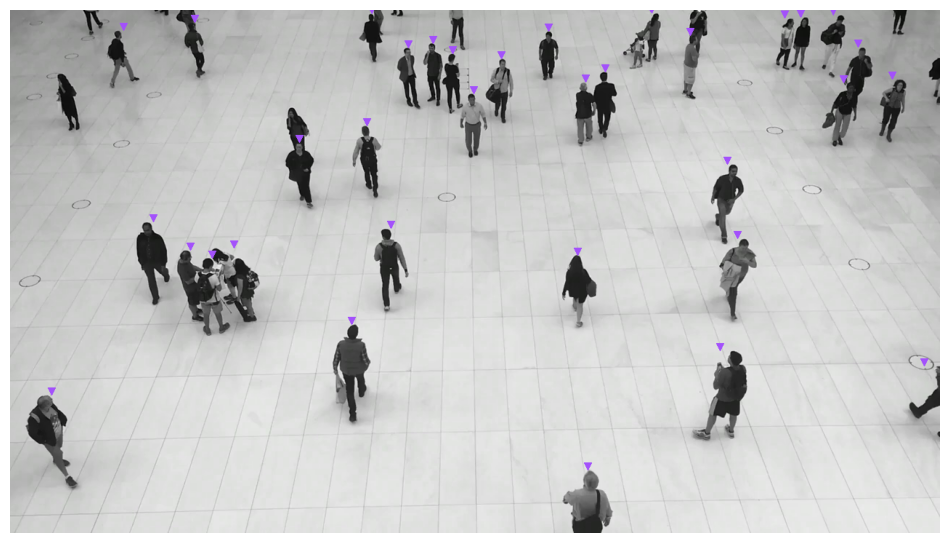
triangle-annotator-example

import supervision as sv

image = ...
detections = sv.Detections(...)

ellipse_annotator = sv.EllipseAnnotator()
annotated_frame = ellipse_annotator.annotate(
    scene=image.copy(),
    detections=detections
)
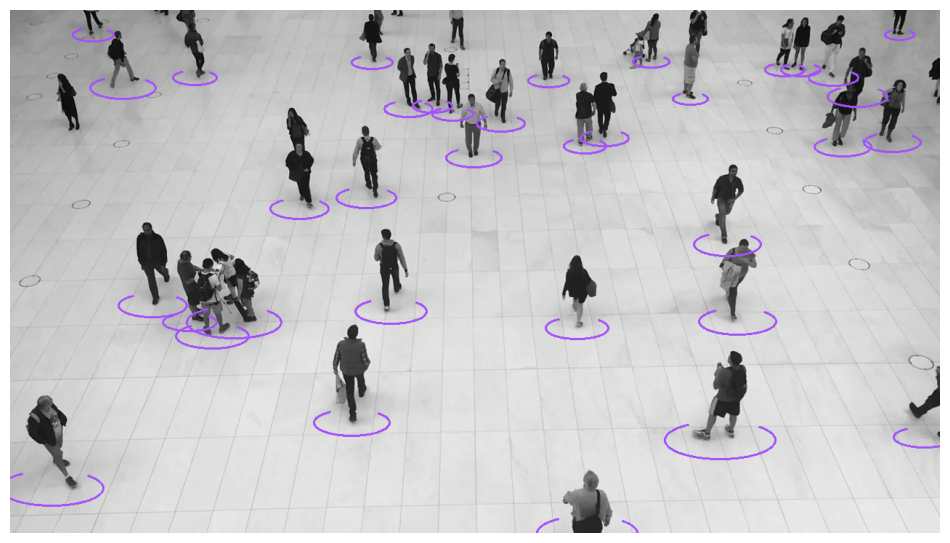
ellipse-annotator-example

import supervision as sv

image = ...
detections = sv.Detections(...)

halo_annotator = sv.HaloAnnotator()
annotated_frame = halo_annotator.annotate(
    scene=image.copy(),
    detections=detections
)
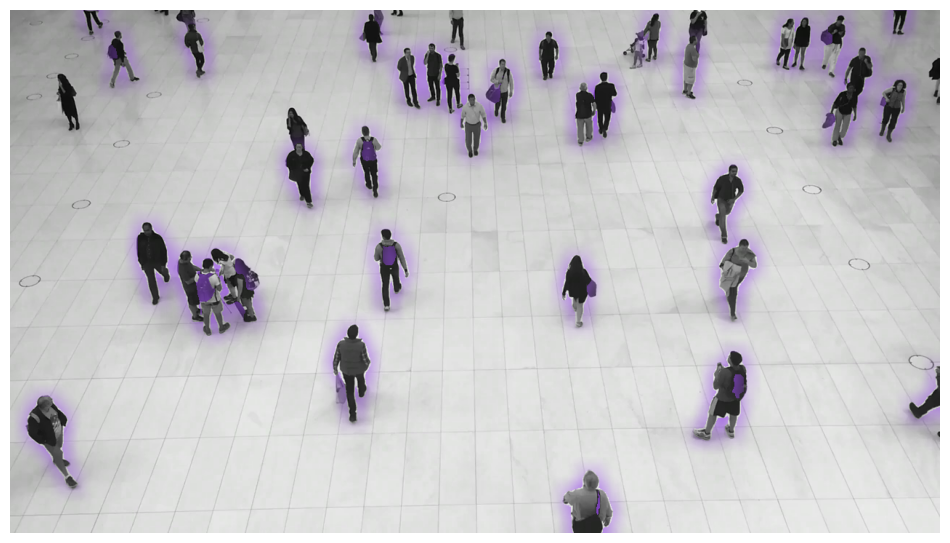
halo-annotator-example

import supervision as sv

image = ...
detections = sv.Detections(...)

percentage_bar_annotator = sv.PercentageBarAnnotator()
annotated_frame = percentage_bar_annotator.annotate(
    scene=image.copy(),
    detections=detections
)
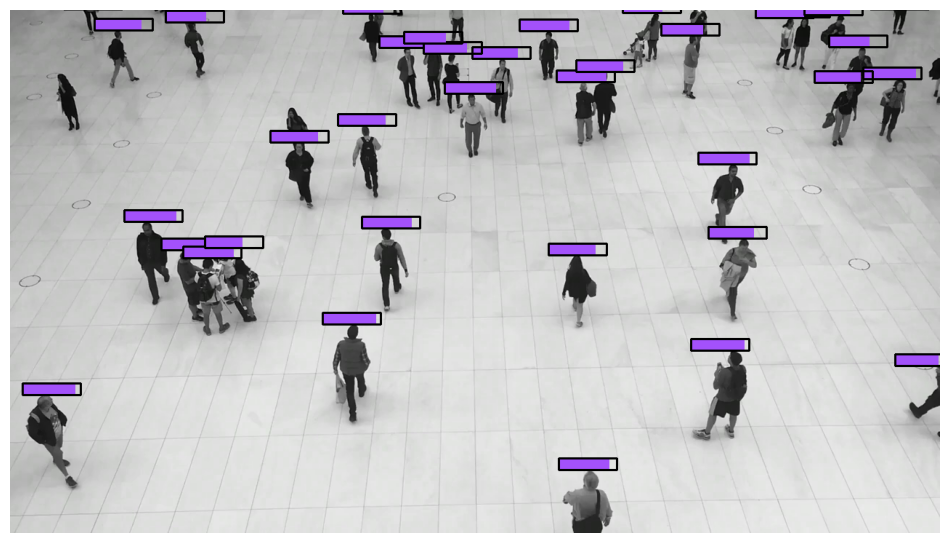
percentage-bar-annotator-example

import supervision as sv

image = ...
detections = sv.Detections(...)

mask_annotator = sv.MaskAnnotator()
annotated_frame = mask_annotator.annotate(
    scene=image.copy(),
    detections=detections
)
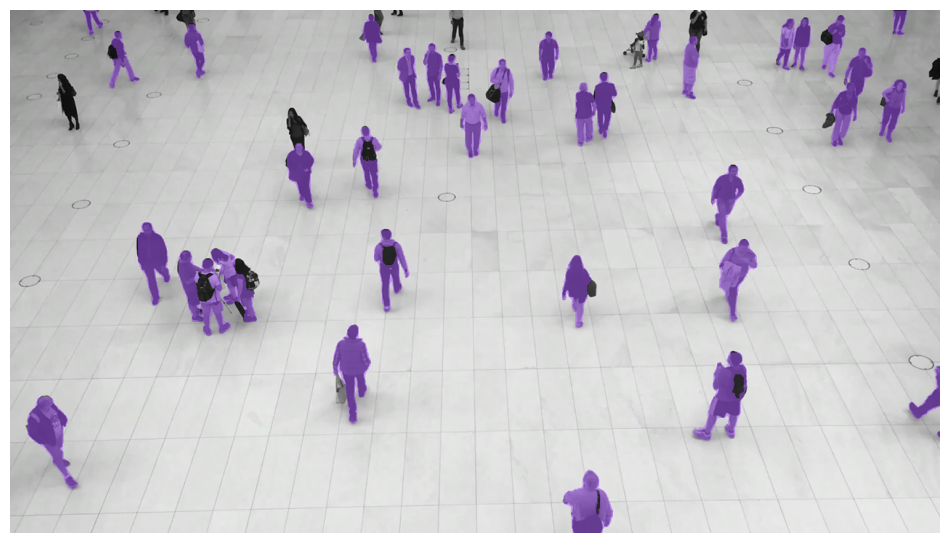
mask-annotator-example

import supervision as sv

image = ...
detections = sv.Detections(...)

polygon_annotator = sv.PolygonAnnotator()
annotated_frame = polygon_annotator.annotate(
    scene=image.copy(),
    detections=detections
)
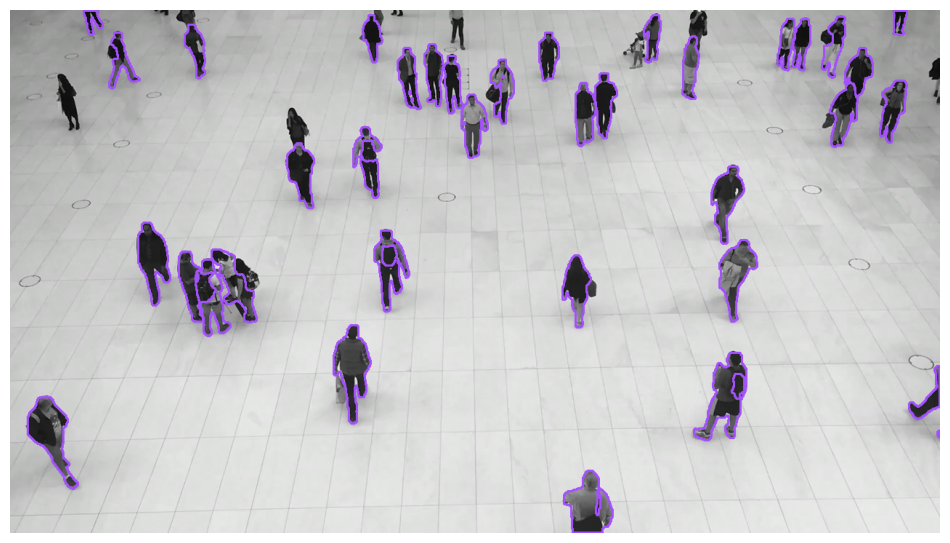
polygon-annotator-example

import supervision as sv

image = ...
detections = sv.Detections(...)

labels = [
    f"{class_name} {confidence:.2f}"
    for class_name, confidence
    in zip(detections['class_name'], detections.confidence)
]

label_annotator = sv.LabelAnnotator(text_position=sv.Position.CENTER)
annotated_frame = label_annotator.annotate(
    scene=image.copy(),
    detections=detections,
    labels=labels
)
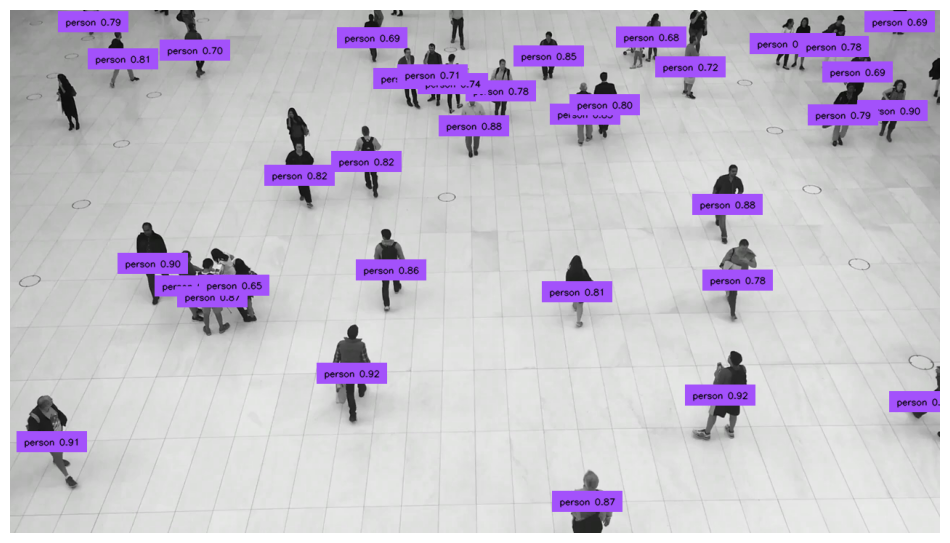
label-annotator-example

import supervision as sv

image = ...
detections = sv.Detections(...)

labels = [
    f"{class_name} {confidence:.2f}"
    for class_name, confidence
    in zip(detections['class_name'], detections.confidence)
]

rich_label_annotator = sv.RichLabelAnnotator(
    font_path="<TTF_FONT_PATH>",
    text_position=sv.Position.CENTER
)
annotated_frame = rich_label_annotator.annotate(
    scene=image.copy(),
    detections=detections,
    labels=labels
)

label-annotator-example

import supervision as sv

image = ...
detections = sv.Detections(...)

icon_paths = [
    "<ICON_PATH>"
    for _ in detections
]

icon_annotator = sv.IconAnnotator()
annotated_frame = icon_annotator.annotate(
    scene=image.copy(),
    detections=detections,
    icon_path=icon_paths
)
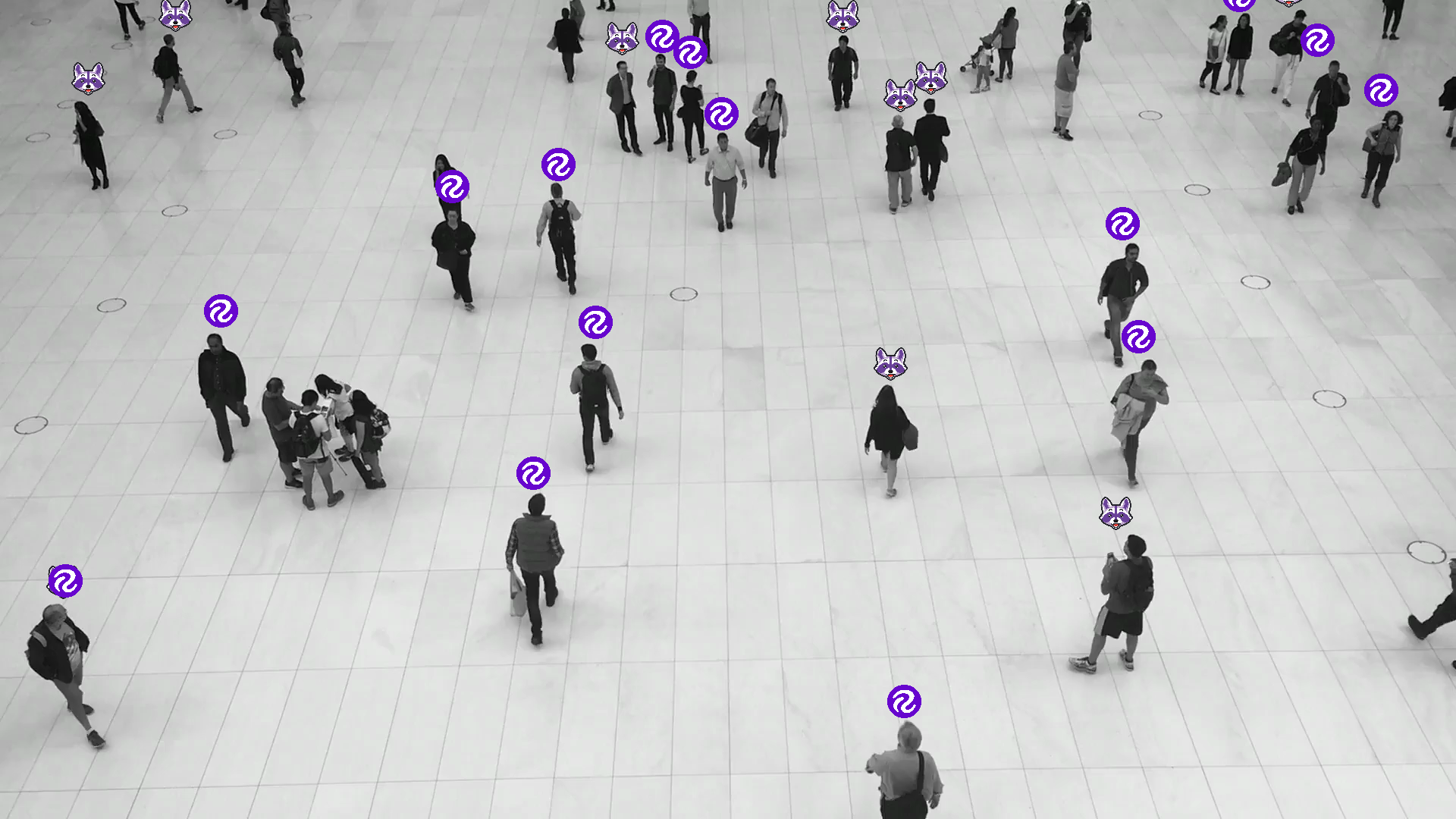
icon-annotator-example

<!-- === "裁剪"</p>

```python
import supervision as sv

image = ...
detections = sv.Detections(...)

crop_annotator = sv.CropAnnotator()
annotated_frame = crop_annotator.annotate(
    scene=image.copy(),
    detections=detections
)
```
<div class="result" markdown>

![crop-annotator-example](https://media.roboflow.com/supervision-annotator-examples/
crop-annotator-example.png){ align=center width="800" }

</div>

-->

import supervision as sv

image = ...
detections = sv.Detections(...)

blur_annotator = sv.BlurAnnotator()
annotated_frame = blur_annotator.annotate(
    scene=image.copy(),
    detections=detections
)
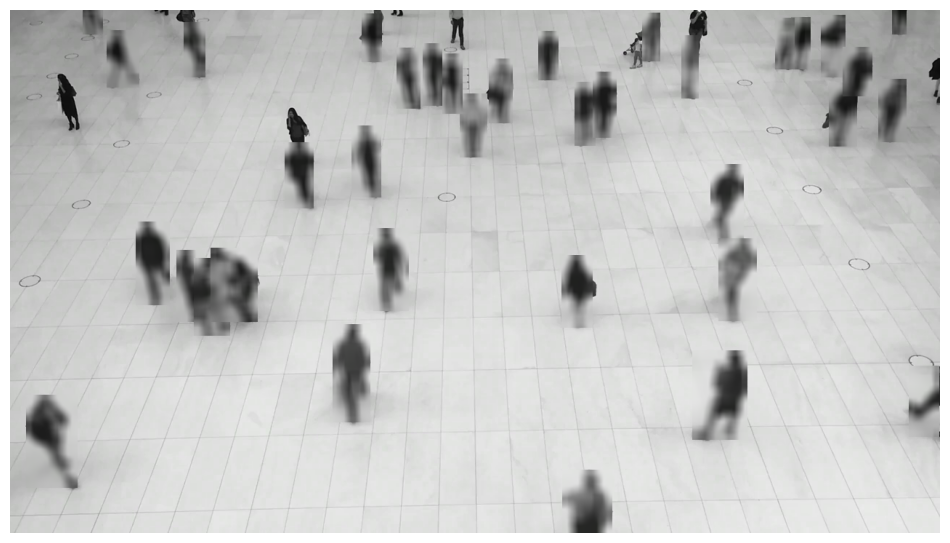
blur-annotator-example

import supervision as sv

image = ...
detections = sv.Detections(...)

pixelate_annotator = sv.PixelateAnnotator()
annotated_frame = pixelate_annotator.annotate(
    scene=image.copy(),
    detections=detections
)
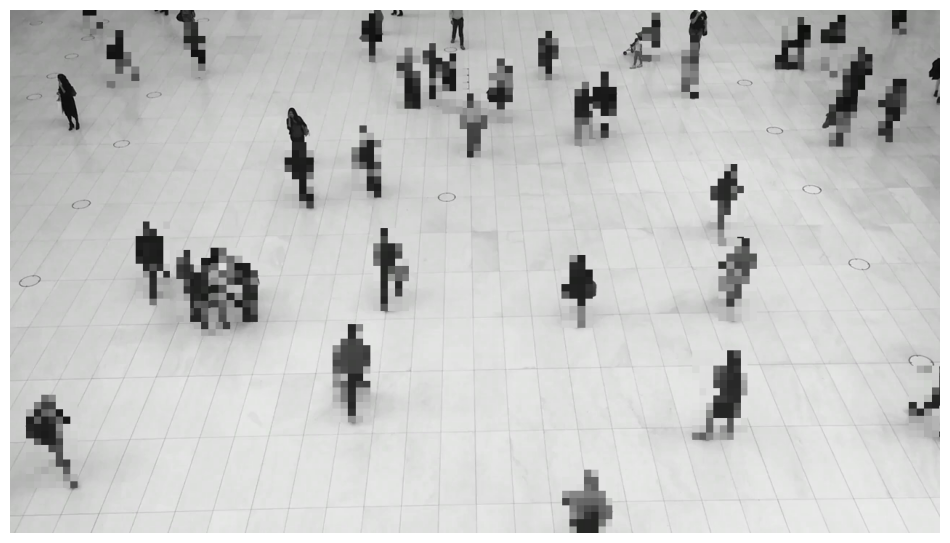
pixelate-annotator-example

import supervision as sv
from ultralytics import YOLO

model = YOLO('yolov8x.pt')

trace_annotator = sv.TraceAnnotator()

video_info = sv.VideoInfo.from_video_path(video_path='...')
frames_generator = sv.get_video_frames_generator(source_path='...')
tracker = sv.ByteTrack()

with sv.VideoSink(target_path='...', video_info=video_info) as sink:
    for frame in frames_generator:
        result = model(frame)[0]
        detections = sv.Detections.from_ultralytics(result)
        detections = tracker.update_with_detections(detections)
        annotated_frame = trace_annotator.annotate(
            scene=frame.copy(),
            detections=detections)
        sink.write_frame(frame=annotated_frame)
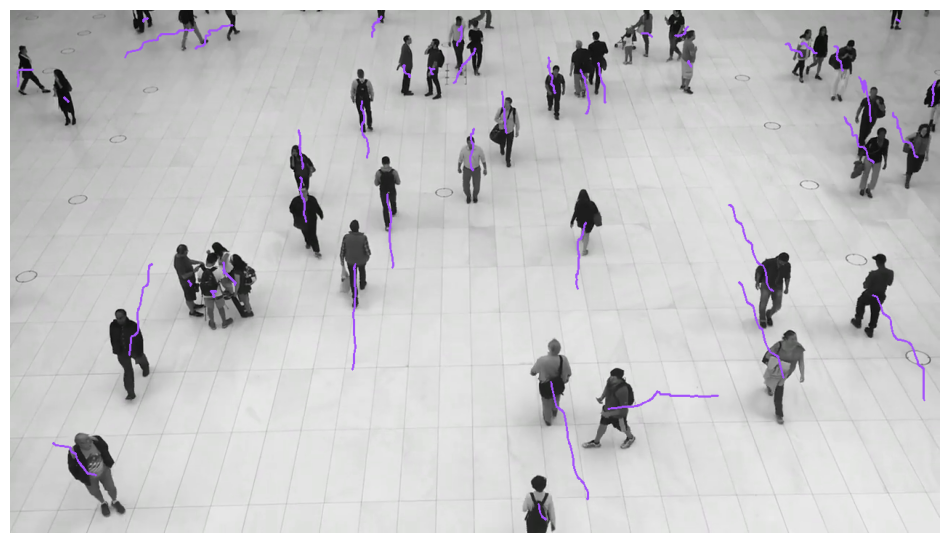
trace-annotator-example

import supervision as sv
from ultralytics import YOLO

model = YOLO('yolov8x.pt')

heat_map_annotator = sv.HeatMapAnnotator()

video_info = sv.VideoInfo.from_video_path(video_path='...')
frames_generator = sv.get_video_frames_generator(source_path='...')

with sv.VideoSink(target_path='...', video_info=video_info) as sink:
    for frame in frames_generator:
        result = model(frame)[0]
        detections = sv.Detections.from_ultralytics(result)
        annotated_frame = heat_map_annotator.annotate(
            scene=frame.copy(),
            detections=detections)
        sink.write_frame(frame=annotated_frame)
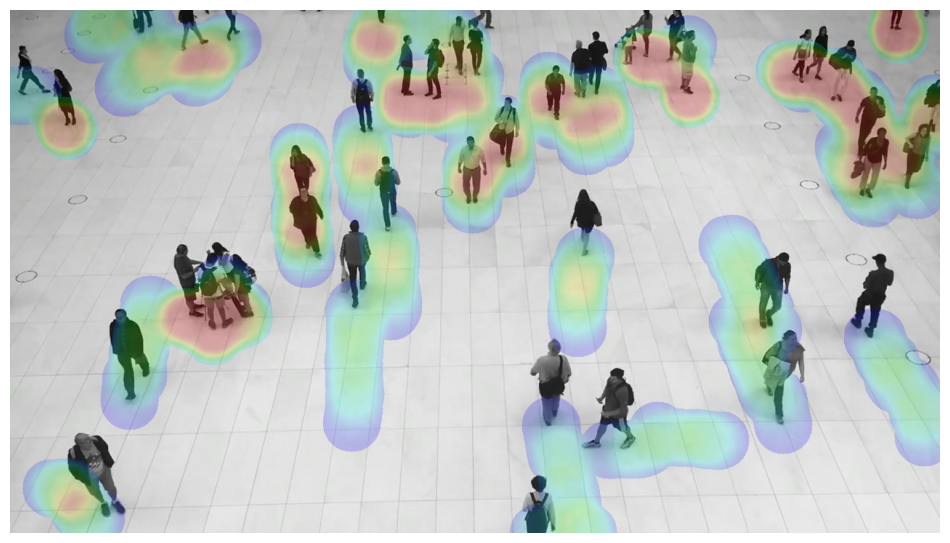
heat-map-annotator-example

import supervision as sv

image = ...
detections = sv.Detections(...)

background_overlay_annotator = sv.BackgroundOverlayAnnotator()
annotated_frame = background_overlay_annotator.annotate(
    scene=image.copy(),
    detections=detections
)

background-overlay-annotator-example

import supervision as sv

image = ...
detections_1 = sv.Detections(...)
detections_2 = sv.Detections(...)

comparison_annotator = sv.ComparisonAnnotator()
annotated_frame = comparison_annotator.annotate(
    scene=image.copy(),
    detections_1=detections_1,
    detections_2=detections_2
)

comparison-annotator-example

在您自己的图像上尝试Supervision标注工具

Visualize annotators on images with COCO classes such as people, vehicles, animals, household items.

基类: BaseAnnotator

一个用于根据提供的检测结果在图像上绘制边界框的类。

Source code in supervision/annotators/core.py
class BoxAnnotator(BaseAnnotator):
    """
    A class for drawing bounding boxes on an image using provided detections.
    """

    def __init__(
        self,
        color: Union[Color, ColorPalette] = ColorPalette.DEFAULT,
        thickness: int = 2,
        color_lookup: ColorLookup = ColorLookup.CLASS,
    ):
        """
        Args:
            color (Union[Color, ColorPalette]): The color or color palette to use for
                annotating detections.
            thickness (int): Thickness of the bounding box lines.
            color_lookup (ColorLookup): Strategy for mapping colors to annotations.
                Options are `INDEX`, `CLASS`, `TRACK`.
        """
        self.color: Union[Color, ColorPalette] = color
        self.thickness: int = thickness
        self.color_lookup: ColorLookup = color_lookup

    @ensure_cv2_image_for_annotation
    def annotate(
        self,
        scene: ImageType,
        detections: Detections,
        custom_color_lookup: Optional[np.ndarray] = None,
    ) -> ImageType:
        """
        Annotates the given scene with bounding boxes based on the provided detections.

        Args:
            scene (ImageType): The image where bounding boxes will be drawn. `ImageType`
                is a flexible type, accepting either `numpy.ndarray` or
                `PIL.Image.Image`.
            detections (Detections): Object detections to annotate.
            custom_color_lookup (Optional[np.ndarray]): Custom color lookup array.
                Allows to override the default color mapping strategy.

        Returns:
            The annotated image, matching the type of `scene` (`numpy.ndarray`
                or `PIL.Image.Image`)

        Example:
            ```python
            import supervision as sv

            image = ...
            detections = sv.Detections(...)

            box_annotator = sv.BoxAnnotator()
            annotated_frame = box_annotator.annotate(
                scene=image.copy(),
                detections=detections
            )
            ```

        ![bounding-box-annotator-example](https://media.roboflow.com/
        supervision-annotator-examples/bounding-box-annotator-example-purple.png)
        """
        assert isinstance(scene, np.ndarray)
        for detection_idx in range(len(detections)):
            x1, y1, x2, y2 = detections.xyxy[detection_idx].astype(int)
            color = resolve_color(
                color=self.color,
                detections=detections,
                detection_idx=detection_idx,
                color_lookup=self.color_lookup
                if custom_color_lookup is None
                else custom_color_lookup,
            )
            cv2.rectangle(
                img=scene,
                pt1=(x1, y1),
                pt2=(x2, y2),
                color=color.as_bgr(),
                thickness=self.thickness,
            )
        return scene

函数

__init__(color=ColorPalette.DEFAULT, thickness=2, color_lookup=ColorLookup.CLASS)

参数:

名称 类型 描述 默认值

color

Union[Color, ColorPalette]

用于标注检测结果的颜色或调色板。

DEFAULT

thickness

int

边界框线条的粗细。

2

color_lookup

ColorLookup

为标注映射颜色的策略。 可选参数为 INDEX, CLASS, TRACK

CLASS
Source code in supervision/annotators/core.py
def __init__(
    self,
    color: Union[Color, ColorPalette] = ColorPalette.DEFAULT,
    thickness: int = 2,
    color_lookup: ColorLookup = ColorLookup.CLASS,
):
    """
    Args:
        color (Union[Color, ColorPalette]): The color or color palette to use for
            annotating detections.
        thickness (int): Thickness of the bounding box lines.
        color_lookup (ColorLookup): Strategy for mapping colors to annotations.
            Options are `INDEX`, `CLASS`, `TRACK`.
    """
    self.color: Union[Color, ColorPalette] = color
    self.thickness: int = thickness
    self.color_lookup: ColorLookup = color_lookup

annotate(scene, detections, custom_color_lookup=None)

基于提供的检测结果,用边界框标注给定场景。

参数:

名称 类型 描述 默认值

scene

ImageType

将在其上绘制边界框的图像。ImageType 是一种灵活的类型,可以接受numpy.ndarrayPIL.Image.Image

required

detections

Detections

用于标注的目标检测结果。

required

custom_color_lookup

Optional[ndarray]

自定义颜色查找数组。 允许覆盖默认的颜色映射策略。

None

返回:

类型 描述
ImageType

标注后的图像,与scene的类型匹配(numpy.ndarrayPIL.Image.Image

Example
import supervision as sv

image = ...
detections = sv.Detections(...)

box_annotator = sv.BoxAnnotator()
annotated_frame = box_annotator.annotate(
    scene=image.copy(),
    detections=detections
)

bounding-box-annotator-example

Source code in supervision/annotators/core.py
@ensure_cv2_image_for_annotation
def annotate(
    self,
    scene: ImageType,
    detections: Detections,
    custom_color_lookup: Optional[np.ndarray] = None,
) -> ImageType:
    """
    Annotates the given scene with bounding boxes based on the provided detections.

    Args:
        scene (ImageType): The image where bounding boxes will be drawn. `ImageType`
            is a flexible type, accepting either `numpy.ndarray` or
            `PIL.Image.Image`.
        detections (Detections): Object detections to annotate.
        custom_color_lookup (Optional[np.ndarray]): Custom color lookup array.
            Allows to override the default color mapping strategy.

    Returns:
        The annotated image, matching the type of `scene` (`numpy.ndarray`
            or `PIL.Image.Image`)

    Example:
        ```python
        import supervision as sv

        image = ...
        detections = sv.Detections(...)

        box_annotator = sv.BoxAnnotator()
        annotated_frame = box_annotator.annotate(
            scene=image.copy(),
            detections=detections
        )
        ```

    ![bounding-box-annotator-example](https://media.roboflow.com/
    supervision-annotator-examples/bounding-box-annotator-example-purple.png)
    """
    assert isinstance(scene, np.ndarray)
    for detection_idx in range(len(detections)):
        x1, y1, x2, y2 = detections.xyxy[detection_idx].astype(int)
        color = resolve_color(
            color=self.color,
            detections=detections,
            detection_idx=detection_idx,
            color_lookup=self.color_lookup
            if custom_color_lookup is None
            else custom_color_lookup,
        )
        cv2.rectangle(
            img=scene,
            pt1=(x1, y1),
            pt2=(x2, y2),
            color=color.as_bgr(),
            thickness=self.thickness,
        )
    return scene

基类: BaseAnnotator

一个用于在图像上绘制圆角边界框的类,使用提供的检测结果。

Source code in supervision/annotators/core.py
class RoundBoxAnnotator(BaseAnnotator):
    """
    A class for drawing bounding boxes with round edges on an image
    using provided detections.
    """

    def __init__(
        self,
        color: Union[Color, ColorPalette] = ColorPalette.DEFAULT,
        thickness: int = 2,
        color_lookup: ColorLookup = ColorLookup.CLASS,
        roundness: float = 0.6,
    ):
        """
        Args:
            color (Union[Color, ColorPalette]): The color or color palette to use for
                annotating detections.
            thickness (int): Thickness of the bounding box lines.
            color_lookup (ColorLookup): Strategy for mapping colors to annotations.
                Options are `INDEX`, `CLASS`, `TRACK`.
            roundness (float): Percent of roundness for edges of bounding box.
                Value must be float 0 < roundness <= 1.0
                By default roundness percent is calculated based on smaller side
                length (width or height).
        """
        self.color: Union[Color, ColorPalette] = color
        self.thickness: int = thickness
        self.color_lookup: ColorLookup = color_lookup
        if not 0 < roundness <= 1.0:
            raise ValueError("roundness attribute must be float between (0, 1.0]")
        self.roundness: float = roundness

    @ensure_cv2_image_for_annotation
    def annotate(
        self,
        scene: ImageType,
        detections: Detections,
        custom_color_lookup: Optional[np.ndarray] = None,
    ) -> ImageType:
        """
        Annotates the given scene with bounding boxes with rounded edges
        based on the provided detections.

        Args:
            scene (ImageType): The image where rounded bounding boxes will be drawn.
                `ImageType` is a flexible type, accepting either `numpy.ndarray`
                or `PIL.Image.Image`.
            detections (Detections): Object detections to annotate.
            custom_color_lookup (Optional[np.ndarray]): Custom color lookup array.
                Allows to override the default color mapping strategy.

        Returns:
            The annotated image, matching the type of `scene` (`numpy.ndarray`
                or `PIL.Image.Image`)

        Example:
            ```python
            import supervision as sv

            image = ...
            detections = sv.Detections(...)

            round_box_annotator = sv.RoundBoxAnnotator()
            annotated_frame = round_box_annotator.annotate(
                scene=image.copy(),
                detections=detections
            )
            ```

        ![round-box-annotator-example](https://media.roboflow.com/
        supervision-annotator-examples/round-box-annotator-example-purple.png)
        """
        assert isinstance(scene, np.ndarray)
        for detection_idx in range(len(detections)):
            x1, y1, x2, y2 = detections.xyxy[detection_idx].astype(int)
            color = resolve_color(
                color=self.color,
                detections=detections,
                detection_idx=detection_idx,
                color_lookup=self.color_lookup
                if custom_color_lookup is None
                else custom_color_lookup,
            )

            radius = (
                int((x2 - x1) // 2 * self.roundness)
                if abs(x1 - x2) < abs(y1 - y2)
                else int((y2 - y1) // 2 * self.roundness)
            )

            circle_coordinates = [
                ((x1 + radius), (y1 + radius)),
                ((x2 - radius), (y1 + radius)),
                ((x2 - radius), (y2 - radius)),
                ((x1 + radius), (y2 - radius)),
            ]

            line_coordinates = [
                ((x1 + radius, y1), (x2 - radius, y1)),
                ((x2, y1 + radius), (x2, y2 - radius)),
                ((x1 + radius, y2), (x2 - radius, y2)),
                ((x1, y1 + radius), (x1, y2 - radius)),
            ]

            start_angles = (180, 270, 0, 90)
            end_angles = (270, 360, 90, 180)

            for center_coordinates, line, start_angle, end_angle in zip(
                circle_coordinates, line_coordinates, start_angles, end_angles
            ):
                cv2.ellipse(
                    img=scene,
                    center=center_coordinates,
                    axes=(radius, radius),
                    angle=0,
                    startAngle=start_angle,
                    endAngle=end_angle,
                    color=color.as_bgr(),
                    thickness=self.thickness,
                )

                cv2.line(
                    img=scene,
                    pt1=line[0],
                    pt2=line[1],
                    color=color.as_bgr(),
                    thickness=self.thickness,
                )

        return scene

函数

__init__(color=ColorPalette.DEFAULT, thickness=2, color_lookup=ColorLookup.CLASS, roundness=0.6)

参数:

名称 类型 描述 默认值

color

Union[Color, ColorPalette]

用于标注检测结果的颜色或调色板。

DEFAULT

thickness

int

边界框线条的粗细。

2

color_lookup

ColorLookup

为标注映射颜色的策略。 可选参数为 INDEX, CLASS, TRACK

CLASS

roundness

float

边界框边缘的圆角百分比。 值必须为浮点数 0 < 圆角率 <= 1.0 默认情况下,圆角百分比是基于较短边 长度(宽度或高度)计算的。

0.6
Source code in supervision/annotators/core.py
def __init__(
    self,
    color: Union[Color, ColorPalette] = ColorPalette.DEFAULT,
    thickness: int = 2,
    color_lookup: ColorLookup = ColorLookup.CLASS,
    roundness: float = 0.6,
):
    """
    Args:
        color (Union[Color, ColorPalette]): The color or color palette to use for
            annotating detections.
        thickness (int): Thickness of the bounding box lines.
        color_lookup (ColorLookup): Strategy for mapping colors to annotations.
            Options are `INDEX`, `CLASS`, `TRACK`.
        roundness (float): Percent of roundness for edges of bounding box.
            Value must be float 0 < roundness <= 1.0
            By default roundness percent is calculated based on smaller side
            length (width or height).
    """
    self.color: Union[Color, ColorPalette] = color
    self.thickness: int = thickness
    self.color_lookup: ColorLookup = color_lookup
    if not 0 < roundness <= 1.0:
        raise ValueError("roundness attribute must be float between (0, 1.0]")
    self.roundness: float = roundness

annotate(scene, detections, custom_color_lookup=None)

基于提供的检测结果,使用圆角边界框对给定场景进行标注。

参数:

名称 类型 描述 默认值

scene

ImageType

将绘制圆角边界框的图像。 ImageType是一种灵活的类型,可接受numpy.ndarrayPIL.Image.Image

required

detections

Detections

用于标注的目标检测结果。

required

custom_color_lookup

Optional[ndarray]

自定义颜色查找数组。 允许覆盖默认的颜色映射策略。

None

返回:

类型 描述
ImageType

标注后的图像,与scene的类型匹配(numpy.ndarrayPIL.Image.Image

Example
import supervision as sv

image = ...
detections = sv.Detections(...)

round_box_annotator = sv.RoundBoxAnnotator()
annotated_frame = round_box_annotator.annotate(
    scene=image.copy(),
    detections=detections
)

round-box-annotator-example

Source code in supervision/annotators/core.py
@ensure_cv2_image_for_annotation
def annotate(
    self,
    scene: ImageType,
    detections: Detections,
    custom_color_lookup: Optional[np.ndarray] = None,
) -> ImageType:
    """
    Annotates the given scene with bounding boxes with rounded edges
    based on the provided detections.

    Args:
        scene (ImageType): The image where rounded bounding boxes will be drawn.
            `ImageType` is a flexible type, accepting either `numpy.ndarray`
            or `PIL.Image.Image`.
        detections (Detections): Object detections to annotate.
        custom_color_lookup (Optional[np.ndarray]): Custom color lookup array.
            Allows to override the default color mapping strategy.

    Returns:
        The annotated image, matching the type of `scene` (`numpy.ndarray`
            or `PIL.Image.Image`)

    Example:
        ```python
        import supervision as sv

        image = ...
        detections = sv.Detections(...)

        round_box_annotator = sv.RoundBoxAnnotator()
        annotated_frame = round_box_annotator.annotate(
            scene=image.copy(),
            detections=detections
        )
        ```

    ![round-box-annotator-example](https://media.roboflow.com/
    supervision-annotator-examples/round-box-annotator-example-purple.png)
    """
    assert isinstance(scene, np.ndarray)
    for detection_idx in range(len(detections)):
        x1, y1, x2, y2 = detections.xyxy[detection_idx].astype(int)
        color = resolve_color(
            color=self.color,
            detections=detections,
            detection_idx=detection_idx,
            color_lookup=self.color_lookup
            if custom_color_lookup is None
            else custom_color_lookup,
        )

        radius = (
            int((x2 - x1) // 2 * self.roundness)
            if abs(x1 - x2) < abs(y1 - y2)
            else int((y2 - y1) // 2 * self.roundness)
        )

        circle_coordinates = [
            ((x1 + radius), (y1 + radius)),
            ((x2 - radius), (y1 + radius)),
            ((x2 - radius), (y2 - radius)),
            ((x1 + radius), (y2 - radius)),
        ]

        line_coordinates = [
            ((x1 + radius, y1), (x2 - radius, y1)),
            ((x2, y1 + radius), (x2, y2 - radius)),
            ((x1 + radius, y2), (x2 - radius, y2)),
            ((x1, y1 + radius), (x1, y2 - radius)),
        ]

        start_angles = (180, 270, 0, 90)
        end_angles = (270, 360, 90, 180)

        for center_coordinates, line, start_angle, end_angle in zip(
            circle_coordinates, line_coordinates, start_angles, end_angles
        ):
            cv2.ellipse(
                img=scene,
                center=center_coordinates,
                axes=(radius, radius),
                angle=0,
                startAngle=start_angle,
                endAngle=end_angle,
                color=color.as_bgr(),
                thickness=self.thickness,
            )

            cv2.line(
                img=scene,
                pt1=line[0],
                pt2=line[1],
                color=color.as_bgr(),
                thickness=self.thickness,
            )

    return scene

基类: BaseAnnotator

一个用于在图像上根据提供的检测结果绘制矩形框角的类。

Source code in supervision/annotators/core.py
class BoxCornerAnnotator(BaseAnnotator):
    """
    A class for drawing box corners on an image using provided detections.
    """

    def __init__(
        self,
        color: Union[Color, ColorPalette] = ColorPalette.DEFAULT,
        thickness: int = 4,
        corner_length: int = 15,
        color_lookup: ColorLookup = ColorLookup.CLASS,
    ):
        """
        Args:
            color (Union[Color, ColorPalette]): The color or color palette to use for
                annotating detections.
            thickness (int): Thickness of the corner lines.
            corner_length (int): Length of each corner line.
            color_lookup (ColorLookup): Strategy for mapping colors to annotations.
                Options are `INDEX`, `CLASS`, `TRACK`.
        """
        self.color: Union[Color, ColorPalette] = color
        self.thickness: int = thickness
        self.corner_length: int = corner_length
        self.color_lookup: ColorLookup = color_lookup

    @ensure_cv2_image_for_annotation
    def annotate(
        self,
        scene: ImageType,
        detections: Detections,
        custom_color_lookup: Optional[np.ndarray] = None,
    ) -> ImageType:
        """
        Annotates the given scene with box corners based on the provided detections.

        Args:
            scene (ImageType): The image where box corners will be drawn.
                `ImageType` is a flexible type, accepting either `numpy.ndarray`
                or `PIL.Image.Image`.
            detections (Detections): Object detections to annotate.
            custom_color_lookup (Optional[np.ndarray]): Custom color lookup array.
                Allows to override the default color mapping strategy.

        Returns:
            The annotated image, matching the type of `scene` (`numpy.ndarray`
                or `PIL.Image.Image`)

        Example:
            ```python
            import supervision as sv

            image = ...
            detections = sv.Detections(...)

            corner_annotator = sv.BoxCornerAnnotator()
            annotated_frame = corner_annotator.annotate(
                scene=image.copy(),
                detections=detections
            )
            ```

        ![box-corner-annotator-example](https://media.roboflow.com/
        supervision-annotator-examples/box-corner-annotator-example-purple.png)
        """
        assert isinstance(scene, np.ndarray)
        for detection_idx in range(len(detections)):
            x1, y1, x2, y2 = detections.xyxy[detection_idx].astype(int)
            color = resolve_color(
                color=self.color,
                detections=detections,
                detection_idx=detection_idx,
                color_lookup=self.color_lookup
                if custom_color_lookup is None
                else custom_color_lookup,
            )
            corners = [(x1, y1), (x2, y1), (x1, y2), (x2, y2)]

            for x, y in corners:
                x_end = x + self.corner_length if x == x1 else x - self.corner_length
                cv2.line(
                    scene, (x, y), (x_end, y), color.as_bgr(), thickness=self.thickness
                )

                y_end = y + self.corner_length if y == y1 else y - self.corner_length
                cv2.line(
                    scene, (x, y), (x, y_end), color.as_bgr(), thickness=self.thickness
                )
        return scene

函数

__init__(color=ColorPalette.DEFAULT, thickness=4, corner_length=15, color_lookup=ColorLookup.CLASS)

参数:

名称 类型 描述 默认值

color

Union[Color, ColorPalette]

用于标注检测结果的颜色或调色板。

DEFAULT

thickness

int

角线的粗细。

4

corner_length

int

每个角线的长度。

15

color_lookup

ColorLookup

为标注映射颜色的策略。 可选参数为 INDEX, CLASS, TRACK

CLASS
Source code in supervision/annotators/core.py
def __init__(
    self,
    color: Union[Color, ColorPalette] = ColorPalette.DEFAULT,
    thickness: int = 4,
    corner_length: int = 15,
    color_lookup: ColorLookup = ColorLookup.CLASS,
):
    """
    Args:
        color (Union[Color, ColorPalette]): The color or color palette to use for
            annotating detections.
        thickness (int): Thickness of the corner lines.
        corner_length (int): Length of each corner line.
        color_lookup (ColorLookup): Strategy for mapping colors to annotations.
            Options are `INDEX`, `CLASS`, `TRACK`.
    """
    self.color: Union[Color, ColorPalette] = color
    self.thickness: int = thickness
    self.corner_length: int = corner_length
    self.color_lookup: ColorLookup = color_lookup

annotate(scene, detections, custom_color_lookup=None)

根据提供的检测结果,用方框角标注给定场景。

参数:

名称 类型 描述 默认值

scene

ImageType

将绘制框角的图像。 ImageType是一种灵活的类型,可接受numpy.ndarrayPIL.Image.Image

required

detections

Detections

用于标注的目标检测结果。

required

custom_color_lookup

Optional[ndarray]

自定义颜色查找数组。 允许覆盖默认的颜色映射策略。

None

返回:

类型 描述
ImageType

标注后的图像,与scene的类型匹配(numpy.ndarrayPIL.Image.Image

Example
import supervision as sv

image = ...
detections = sv.Detections(...)

corner_annotator = sv.BoxCornerAnnotator()
annotated_frame = corner_annotator.annotate(
    scene=image.copy(),
    detections=detections
)

box-corner-annotator-example

Source code in supervision/annotators/core.py
@ensure_cv2_image_for_annotation
def annotate(
    self,
    scene: ImageType,
    detections: Detections,
    custom_color_lookup: Optional[np.ndarray] = None,
) -> ImageType:
    """
    Annotates the given scene with box corners based on the provided detections.

    Args:
        scene (ImageType): The image where box corners will be drawn.
            `ImageType` is a flexible type, accepting either `numpy.ndarray`
            or `PIL.Image.Image`.
        detections (Detections): Object detections to annotate.
        custom_color_lookup (Optional[np.ndarray]): Custom color lookup array.
            Allows to override the default color mapping strategy.

    Returns:
        The annotated image, matching the type of `scene` (`numpy.ndarray`
            or `PIL.Image.Image`)

    Example:
        ```python
        import supervision as sv

        image = ...
        detections = sv.Detections(...)

        corner_annotator = sv.BoxCornerAnnotator()
        annotated_frame = corner_annotator.annotate(
            scene=image.copy(),
            detections=detections
        )
        ```

    ![box-corner-annotator-example](https://media.roboflow.com/
    supervision-annotator-examples/box-corner-annotator-example-purple.png)
    """
    assert isinstance(scene, np.ndarray)
    for detection_idx in range(len(detections)):
        x1, y1, x2, y2 = detections.xyxy[detection_idx].astype(int)
        color = resolve_color(
            color=self.color,
            detections=detections,
            detection_idx=detection_idx,
            color_lookup=self.color_lookup
            if custom_color_lookup is None
            else custom_color_lookup,
        )
        corners = [(x1, y1), (x2, y1), (x1, y2), (x2, y2)]

        for x, y in corners:
            x_end = x + self.corner_length if x == x1 else x - self.corner_length
            cv2.line(
                scene, (x, y), (x_end, y), color.as_bgr(), thickness=self.thickness
            )

            y_end = y + self.corner_length if y == y1 else y - self.corner_length
            cv2.line(
                scene, (x, y), (x, y_end), color.as_bgr(), thickness=self.thickness
            )
    return scene

基类: BaseAnnotator

一个用于在图像上使用提供的检测结果绘制定向边界框的类。

Source code in supervision/annotators/core.py
class OrientedBoxAnnotator(BaseAnnotator):
    """
    A class for drawing oriented bounding boxes on an image using provided detections.
    """

    def __init__(
        self,
        color: Union[Color, ColorPalette] = ColorPalette.DEFAULT,
        thickness: int = 2,
        color_lookup: ColorLookup = ColorLookup.CLASS,
    ):
        """
        Args:
            color (Union[Color, ColorPalette]): The color or color palette to use for
                annotating detections.
            thickness (int): Thickness of the bounding box lines.
            color_lookup (ColorLookup): Strategy for mapping colors to annotations.
                Options are `INDEX`, `CLASS`, `TRACK`.
        """
        self.color: Union[Color, ColorPalette] = color
        self.thickness: int = thickness
        self.color_lookup: ColorLookup = color_lookup

    @ensure_cv2_image_for_annotation
    def annotate(
        self,
        scene: ImageType,
        detections: Detections,
        custom_color_lookup: Optional[np.ndarray] = None,
    ) -> ImageType:
        """
        Annotates the given scene with oriented bounding boxes based on the provided detections.

        Args:
            scene (ImageType): The image where bounding boxes will be drawn.
                `ImageType` is a flexible type, accepting either `numpy.ndarray`
                or `PIL.Image.Image`.
            detections (Detections): Object detections to annotate.
            custom_color_lookup (Optional[np.ndarray]): Custom color lookup array.
                Allows to override the default color mapping strategy.

        Returns:
            The annotated image, matching the type of `scene` (`numpy.ndarray`
                or `PIL.Image.Image`)

        Example:
            ```python
            import cv2
            import supervision as sv
            from ultralytics import YOLO

            image = cv2.imread(<SOURCE_IMAGE_PATH>)
            model = YOLO("yolov8n-obb.pt")

            result = model(image)[0]
            detections = sv.Detections.from_ultralytics(result)

            oriented_box_annotator = sv.OrientedBoxAnnotator()
            annotated_frame = oriented_box_annotator.annotate(
                scene=image.copy(),
                detections=detections
            )
            ```
        """  # noqa E501 // docs
        assert isinstance(scene, np.ndarray)
        if detections.data is None or ORIENTED_BOX_COORDINATES not in detections.data:
            return scene
        obb_boxes = np.array(detections.data[ORIENTED_BOX_COORDINATES]).astype(int)

        for detection_idx in range(len(detections)):
            obb = obb_boxes[detection_idx]
            color = resolve_color(
                color=self.color,
                detections=detections,
                detection_idx=detection_idx,
                color_lookup=self.color_lookup
                if custom_color_lookup is None
                else custom_color_lookup,
            )

            cv2.drawContours(scene, [obb], 0, color.as_bgr(), self.thickness)

        return scene

函数

__init__(color=ColorPalette.DEFAULT, thickness=2, color_lookup=ColorLookup.CLASS)

参数:

名称 类型 描述 默认值

color

Union[Color, ColorPalette]

用于标注检测结果的颜色或调色板。

DEFAULT

thickness

int

边界框线条的粗细。

2

color_lookup

ColorLookup

为标注映射颜色的策略。 可选参数为 INDEX, CLASS, TRACK

CLASS
Source code in supervision/annotators/core.py
def __init__(
    self,
    color: Union[Color, ColorPalette] = ColorPalette.DEFAULT,
    thickness: int = 2,
    color_lookup: ColorLookup = ColorLookup.CLASS,
):
    """
    Args:
        color (Union[Color, ColorPalette]): The color or color palette to use for
            annotating detections.
        thickness (int): Thickness of the bounding box lines.
        color_lookup (ColorLookup): Strategy for mapping colors to annotations.
            Options are `INDEX`, `CLASS`, `TRACK`.
    """
    self.color: Union[Color, ColorPalette] = color
    self.thickness: int = thickness
    self.color_lookup: ColorLookup = color_lookup

annotate(scene, detections, custom_color_lookup=None)

基于提供的检测结果,使用定向边界框标注给定场景。

参数:

名称 类型 描述 默认值

scene

ImageType

绘制边界框的图像。 ImageType是一种灵活的类型,可接受numpy.ndarrayPIL.Image.Image

required

detections

Detections

用于标注的目标检测结果。

required

custom_color_lookup

Optional[ndarray]

自定义颜色查找数组。 允许覆盖默认的颜色映射策略。

None

返回:

类型 描述
ImageType

标注后的图像,与scene的类型匹配(numpy.ndarrayPIL.Image.Image

Example
import cv2
import supervision as sv
from ultralytics import YOLO

image = cv2.imread(<SOURCE_IMAGE_PATH>)
model = YOLO("yolov8n-obb.pt")

result = model(image)[0]
detections = sv.Detections.from_ultralytics(result)

oriented_box_annotator = sv.OrientedBoxAnnotator()
annotated_frame = oriented_box_annotator.annotate(
    scene=image.copy(),
    detections=detections
)
Source code in supervision/annotators/core.py
@ensure_cv2_image_for_annotation
def annotate(
    self,
    scene: ImageType,
    detections: Detections,
    custom_color_lookup: Optional[np.ndarray] = None,
) -> ImageType:
    """
    Annotates the given scene with oriented bounding boxes based on the provided detections.

    Args:
        scene (ImageType): The image where bounding boxes will be drawn.
            `ImageType` is a flexible type, accepting either `numpy.ndarray`
            or `PIL.Image.Image`.
        detections (Detections): Object detections to annotate.
        custom_color_lookup (Optional[np.ndarray]): Custom color lookup array.
            Allows to override the default color mapping strategy.

    Returns:
        The annotated image, matching the type of `scene` (`numpy.ndarray`
            or `PIL.Image.Image`)

    Example:
        ```python
        import cv2
        import supervision as sv
        from ultralytics import YOLO

        image = cv2.imread(<SOURCE_IMAGE_PATH>)
        model = YOLO("yolov8n-obb.pt")

        result = model(image)[0]
        detections = sv.Detections.from_ultralytics(result)

        oriented_box_annotator = sv.OrientedBoxAnnotator()
        annotated_frame = oriented_box_annotator.annotate(
            scene=image.copy(),
            detections=detections
        )
        ```
    """  # noqa E501 // docs
    assert isinstance(scene, np.ndarray)
    if detections.data is None or ORIENTED_BOX_COORDINATES not in detections.data:
        return scene
    obb_boxes = np.array(detections.data[ORIENTED_BOX_COORDINATES]).astype(int)

    for detection_idx in range(len(detections)):
        obb = obb_boxes[detection_idx]
        color = resolve_color(
            color=self.color,
            detections=detections,
            detection_idx=detection_idx,
            color_lookup=self.color_lookup
            if custom_color_lookup is None
            else custom_color_lookup,
        )

        cv2.drawContours(scene, [obb], 0, color.as_bgr(), self.thickness)

    return scene

基类: BaseAnnotator

一个用于使用提供的检测在图像上绘制框掩码的类。

Source code in supervision/annotators/core.py
class ColorAnnotator(BaseAnnotator):
    """
    A class for drawing box masks on an image using provided detections.
    """

    def __init__(
        self,
        color: Union[Color, ColorPalette] = ColorPalette.DEFAULT,
        opacity: float = 0.5,
        color_lookup: ColorLookup = ColorLookup.CLASS,
    ):
        """
        Args:
            color (Union[Color, ColorPalette]): The color or color palette to use for
                annotating detections.
            opacity (float): Opacity of the overlay mask. Must be between `0` and `1`.
            color_lookup (ColorLookup): Strategy for mapping colors to annotations.
                Options are `INDEX`, `CLASS`, `TRACK`.
        """
        self.color: Union[Color, ColorPalette] = color
        self.color_lookup: ColorLookup = color_lookup
        self.opacity = opacity

    @ensure_cv2_image_for_annotation
    def annotate(
        self,
        scene: ImageType,
        detections: Detections,
        custom_color_lookup: Optional[np.ndarray] = None,
    ) -> ImageType:
        """
        Annotates the given scene with box masks based on the provided detections.

        Args:
            scene (ImageType): The image where bounding boxes will be drawn.
                `ImageType` is a flexible type, accepting either `numpy.ndarray`
                or `PIL.Image.Image`.
            detections (Detections): Object detections to annotate.
            custom_color_lookup (Optional[np.ndarray]): Custom color lookup array.
                Allows to override the default color mapping strategy.

        Returns:
            The annotated image, matching the type of `scene` (`numpy.ndarray`
                or `PIL.Image.Image`)

        Example:
            ```python
            import supervision as sv

            image = ...
            detections = sv.Detections(...)

            color_annotator = sv.ColorAnnotator()
            annotated_frame = color_annotator.annotate(
                scene=image.copy(),
                detections=detections
            )
            ```

        ![box-mask-annotator-example](https://media.roboflow.com/
        supervision-annotator-examples/box-mask-annotator-example-purple.png)
        """
        assert isinstance(scene, np.ndarray)
        scene_with_boxes = scene.copy()
        for detection_idx in range(len(detections)):
            x1, y1, x2, y2 = detections.xyxy[detection_idx].astype(int)
            color = resolve_color(
                color=self.color,
                detections=detections,
                detection_idx=detection_idx,
                color_lookup=self.color_lookup
                if custom_color_lookup is None
                else custom_color_lookup,
            )
            cv2.rectangle(
                img=scene_with_boxes,
                pt1=(x1, y1),
                pt2=(x2, y2),
                color=color.as_bgr(),
                thickness=-1,
            )

        cv2.addWeighted(
            scene_with_boxes, self.opacity, scene, 1 - self.opacity, gamma=0, dst=scene
        )
        return scene

函数

__init__(color=ColorPalette.DEFAULT, opacity=0.5, color_lookup=ColorLookup.CLASS)

参数:

名称 类型 描述 默认值

color

Union[Color, ColorPalette]

用于标注检测结果的颜色或调色板。

DEFAULT

opacity

float

覆盖遮罩的不透明度。必须在01之间。

0.5

color_lookup

ColorLookup

为标注映射颜色的策略。 可选参数为 INDEX, CLASS, TRACK

CLASS
Source code in supervision/annotators/core.py
def __init__(
    self,
    color: Union[Color, ColorPalette] = ColorPalette.DEFAULT,
    opacity: float = 0.5,
    color_lookup: ColorLookup = ColorLookup.CLASS,
):
    """
    Args:
        color (Union[Color, ColorPalette]): The color or color palette to use for
            annotating detections.
        opacity (float): Opacity of the overlay mask. Must be between `0` and `1`.
        color_lookup (ColorLookup): Strategy for mapping colors to annotations.
            Options are `INDEX`, `CLASS`, `TRACK`.
    """
    self.color: Union[Color, ColorPalette] = color
    self.color_lookup: ColorLookup = color_lookup
    self.opacity = opacity

annotate(scene, detections, custom_color_lookup=None)

基于提供的检测结果,用方框遮罩标注给定场景。

参数:

名称 类型 描述 默认值

scene

ImageType

将绘制边界框的图像。 ImageType是一种灵活的类型,可接受numpy.ndarrayPIL.Image.Image

required

detections

Detections

用于标注的目标检测结果。

required

custom_color_lookup

Optional[ndarray]

自定义颜色查找数组。 允许覆盖默认的颜色映射策略。

None

返回:

类型 描述
ImageType

标注后的图像,与scene的类型匹配(numpy.ndarrayPIL.Image.Image

Example
import supervision as sv

image = ...
detections = sv.Detections(...)

color_annotator = sv.ColorAnnotator()
annotated_frame = color_annotator.annotate(
    scene=image.copy(),
    detections=detections
)

box-mask-annotator-example

Source code in supervision/annotators/core.py
@ensure_cv2_image_for_annotation
def annotate(
    self,
    scene: ImageType,
    detections: Detections,
    custom_color_lookup: Optional[np.ndarray] = None,
) -> ImageType:
    """
    Annotates the given scene with box masks based on the provided detections.

    Args:
        scene (ImageType): The image where bounding boxes will be drawn.
            `ImageType` is a flexible type, accepting either `numpy.ndarray`
            or `PIL.Image.Image`.
        detections (Detections): Object detections to annotate.
        custom_color_lookup (Optional[np.ndarray]): Custom color lookup array.
            Allows to override the default color mapping strategy.

    Returns:
        The annotated image, matching the type of `scene` (`numpy.ndarray`
            or `PIL.Image.Image`)

    Example:
        ```python
        import supervision as sv

        image = ...
        detections = sv.Detections(...)

        color_annotator = sv.ColorAnnotator()
        annotated_frame = color_annotator.annotate(
            scene=image.copy(),
            detections=detections
        )
        ```

    ![box-mask-annotator-example](https://media.roboflow.com/
    supervision-annotator-examples/box-mask-annotator-example-purple.png)
    """
    assert isinstance(scene, np.ndarray)
    scene_with_boxes = scene.copy()
    for detection_idx in range(len(detections)):
        x1, y1, x2, y2 = detections.xyxy[detection_idx].astype(int)
        color = resolve_color(
            color=self.color,
            detections=detections,
            detection_idx=detection_idx,
            color_lookup=self.color_lookup
            if custom_color_lookup is None
            else custom_color_lookup,
        )
        cv2.rectangle(
            img=scene_with_boxes,
            pt1=(x1, y1),
            pt2=(x2, y2),
            color=color.as_bgr(),
            thickness=-1,
        )

    cv2.addWeighted(
        scene_with_boxes, self.opacity, scene, 1 - self.opacity, gamma=0, dst=scene
    )
    return scene

基类: BaseAnnotator

一个用于在图像上根据提供的检测结果绘制圆形的类。

Source code in supervision/annotators/core.py
class CircleAnnotator(BaseAnnotator):
    """
    A class for drawing circle on an image using provided detections.
    """

    def __init__(
        self,
        color: Union[Color, ColorPalette] = ColorPalette.DEFAULT,
        thickness: int = 2,
        color_lookup: ColorLookup = ColorLookup.CLASS,
    ):
        """
        Args:
            color (Union[Color, ColorPalette]): The color or color palette to use for
                annotating detections.
            thickness (int): Thickness of the circle line.
            color_lookup (ColorLookup): Strategy for mapping colors to annotations.
                Options are `INDEX`, `CLASS`, `TRACK`.
        """

        self.color: Union[Color, ColorPalette] = color
        self.thickness: int = thickness
        self.color_lookup: ColorLookup = color_lookup

    @ensure_cv2_image_for_annotation
    def annotate(
        self,
        scene: ImageType,
        detections: Detections,
        custom_color_lookup: Optional[np.ndarray] = None,
    ) -> ImageType:
        """
        Annotates the given scene with circles based on the provided detections.

        Args:
            scene (ImageType): The image where box corners will be drawn.
                `ImageType` is a flexible type, accepting either `numpy.ndarray`
                or `PIL.Image.Image`.
            detections (Detections): Object detections to annotate.
            custom_color_lookup (Optional[np.ndarray]): Custom color lookup array.
                Allows to override the default color mapping strategy.

        Returns:
            The annotated image, matching the type of `scene` (`numpy.ndarray`
                or `PIL.Image.Image`)

        Example:
            ```python
            import supervision as sv

            image = ...
            detections = sv.Detections(...)

            circle_annotator = sv.CircleAnnotator()
            annotated_frame = circle_annotator.annotate(
                scene=image.copy(),
                detections=detections
            )
            ```


        ![circle-annotator-example](https://media.roboflow.com/
        supervision-annotator-examples/circle-annotator-example-purple.png)
        """
        assert isinstance(scene, np.ndarray)
        for detection_idx in range(len(detections)):
            x1, y1, x2, y2 = detections.xyxy[detection_idx].astype(int)
            center = ((x1 + x2) // 2, (y1 + y2) // 2)
            distance = sqrt((x1 - center[0]) ** 2 + (y1 - center[1]) ** 2)
            color = resolve_color(
                color=self.color,
                detections=detections,
                detection_idx=detection_idx,
                color_lookup=self.color_lookup
                if custom_color_lookup is None
                else custom_color_lookup,
            )
            cv2.circle(
                img=scene,
                center=center,
                radius=int(distance),
                color=color.as_bgr(),
                thickness=self.thickness,
            )

        return scene

函数

__init__(color=ColorPalette.DEFAULT, thickness=2, color_lookup=ColorLookup.CLASS)

参数:

名称 类型 描述 默认值

color

Union[Color, ColorPalette]

用于标注检测结果的颜色或调色板。

DEFAULT

thickness

int

圆圈线条的粗细。

2

color_lookup

ColorLookup

为标注映射颜色的策略。 可选参数为 INDEX, CLASS, TRACK

CLASS
Source code in supervision/annotators/core.py
def __init__(
    self,
    color: Union[Color, ColorPalette] = ColorPalette.DEFAULT,
    thickness: int = 2,
    color_lookup: ColorLookup = ColorLookup.CLASS,
):
    """
    Args:
        color (Union[Color, ColorPalette]): The color or color palette to use for
            annotating detections.
        thickness (int): Thickness of the circle line.
        color_lookup (ColorLookup): Strategy for mapping colors to annotations.
            Options are `INDEX`, `CLASS`, `TRACK`.
    """

    self.color: Union[Color, ColorPalette] = color
    self.thickness: int = thickness
    self.color_lookup: ColorLookup = color_lookup

annotate(scene, detections, custom_color_lookup=None)

基于提供的检测结果,用圆圈标注给定场景。

参数:

名称 类型 描述 默认值

scene

ImageType

将绘制框角的图像。 ImageType是一种灵活的类型,可接受numpy.ndarrayPIL.Image.Image

required

detections

Detections

用于标注的目标检测结果。

required

custom_color_lookup

Optional[ndarray]

自定义颜色查找数组。 允许覆盖默认的颜色映射策略。

None

返回:

类型 描述
ImageType

标注后的图像,与scene的类型匹配(numpy.ndarrayPIL.Image.Image

Example
import supervision as sv

image = ...
detections = sv.Detections(...)

circle_annotator = sv.CircleAnnotator()
annotated_frame = circle_annotator.annotate(
    scene=image.copy(),
    detections=detections
)

circle-annotator-example

Source code in supervision/annotators/core.py
@ensure_cv2_image_for_annotation
def annotate(
    self,
    scene: ImageType,
    detections: Detections,
    custom_color_lookup: Optional[np.ndarray] = None,
) -> ImageType:
    """
    Annotates the given scene with circles based on the provided detections.

    Args:
        scene (ImageType): The image where box corners will be drawn.
            `ImageType` is a flexible type, accepting either `numpy.ndarray`
            or `PIL.Image.Image`.
        detections (Detections): Object detections to annotate.
        custom_color_lookup (Optional[np.ndarray]): Custom color lookup array.
            Allows to override the default color mapping strategy.

    Returns:
        The annotated image, matching the type of `scene` (`numpy.ndarray`
            or `PIL.Image.Image`)

    Example:
        ```python
        import supervision as sv

        image = ...
        detections = sv.Detections(...)

        circle_annotator = sv.CircleAnnotator()
        annotated_frame = circle_annotator.annotate(
            scene=image.copy(),
            detections=detections
        )
        ```


    ![circle-annotator-example](https://media.roboflow.com/
    supervision-annotator-examples/circle-annotator-example-purple.png)
    """
    assert isinstance(scene, np.ndarray)
    for detection_idx in range(len(detections)):
        x1, y1, x2, y2 = detections.xyxy[detection_idx].astype(int)
        center = ((x1 + x2) // 2, (y1 + y2) // 2)
        distance = sqrt((x1 - center[0]) ** 2 + (y1 - center[1]) ** 2)
        color = resolve_color(
            color=self.color,
            detections=detections,
            detection_idx=detection_idx,
            color_lookup=self.color_lookup
            if custom_color_lookup is None
            else custom_color_lookup,
        )
        cv2.circle(
            img=scene,
            center=center,
            radius=int(distance),
            color=color.as_bgr(),
            thickness=self.thickness,
        )

    return scene

基类: BaseAnnotator

一个用于根据提供的检测结果在图像特定坐标上绘制点的类。

Source code in supervision/annotators/core.py
class DotAnnotator(BaseAnnotator):
    """
    A class for drawing dots on an image at specific coordinates based on provided
    detections.
    """

    def __init__(
        self,
        color: Union[Color, ColorPalette] = ColorPalette.DEFAULT,
        radius: int = 4,
        position: Position = Position.CENTER,
        color_lookup: ColorLookup = ColorLookup.CLASS,
        outline_thickness: int = 0,
        outline_color: Union[Color, ColorPalette] = Color.BLACK,
    ):
        """
        Args:
            color (Union[Color, ColorPalette]): The color or color palette to use for
                annotating detections.
            radius (int): Radius of the drawn dots.
            position (Position): The anchor position for placing the dot.
            color_lookup (ColorLookup): Strategy for mapping colors to annotations.
                Options are `INDEX`, `CLASS`, `TRACK`.
            outline_thickness (int): Thickness of the outline of the dot.
            outline_color (Union[Color, ColorPalette]): The color or color palette to
                use for outline. It is activated by setting outline_thickness to a value
                greater than 0.
        """
        self.color: Union[Color, ColorPalette] = color
        self.radius: int = radius
        self.position: Position = position
        self.color_lookup: ColorLookup = color_lookup
        self.outline_thickness = outline_thickness
        self.outline_color: Union[Color, ColorPalette] = outline_color

    @ensure_cv2_image_for_annotation
    def annotate(
        self,
        scene: ImageType,
        detections: Detections,
        custom_color_lookup: Optional[np.ndarray] = None,
    ) -> ImageType:
        """
        Annotates the given scene with dots based on the provided detections.

        Args:
            scene (ImageType): The image where dots will be drawn.
                `ImageType` is a flexible type, accepting either `numpy.ndarray`
                or `PIL.Image.Image`.
            detections (Detections): Object detections to annotate.
            custom_color_lookup (Optional[np.ndarray]): Custom color lookup array.
                Allows to override the default color mapping strategy.

        Returns:
            The annotated image, matching the type of `scene` (`numpy.ndarray`
                or `PIL.Image.Image`)

        Example:
            ```python
            import supervision as sv

            image = ...
            detections = sv.Detections(...)

            dot_annotator = sv.DotAnnotator()
            annotated_frame = dot_annotator.annotate(
                scene=image.copy(),
                detections=detections
            )
            ```

        ![dot-annotator-example](https://media.roboflow.com/
        supervision-annotator-examples/dot-annotator-example-purple.png)
        """
        assert isinstance(scene, np.ndarray)
        xy = detections.get_anchors_coordinates(anchor=self.position)
        for detection_idx in range(len(detections)):
            color = resolve_color(
                color=self.color,
                detections=detections,
                detection_idx=detection_idx,
                color_lookup=self.color_lookup
                if custom_color_lookup is None
                else custom_color_lookup,
            )
            center = (int(xy[detection_idx, 0]), int(xy[detection_idx, 1]))

            cv2.circle(scene, center, self.radius, color.as_bgr(), -1)
            if self.outline_thickness:
                outline_color = resolve_color(
                    color=self.outline_color,
                    detections=detections,
                    detection_idx=detection_idx,
                    color_lookup=self.color_lookup
                    if custom_color_lookup is None
                    else custom_color_lookup,
                )
                cv2.circle(
                    scene,
                    center,
                    self.radius,
                    outline_color.as_bgr(),
                    self.outline_thickness,
                )
        return scene

函数

__init__(color=ColorPalette.DEFAULT, radius=4, position=Position.CENTER, color_lookup=ColorLookup.CLASS, outline_thickness=0, outline_color=Color.BLACK)

参数:

名称 类型 描述 默认值

color

Union[Color, ColorPalette]

用于标注检测结果的颜色或调色板。

DEFAULT

radius

int

绘制圆点的半径。

4

position

Position

放置点的锚点位置。

CENTER

color_lookup

ColorLookup

为标注映射颜色的策略。 可选参数为 INDEX, CLASS, TRACK

CLASS

outline_thickness

int

点轮廓的厚度。

0

outline_color

Union[Color, ColorPalette]

用于轮廓的颜色或调色板。通过将outline_thickness设置为大于0的值来激活。

BLACK
Source code in supervision/annotators/core.py
def __init__(
    self,
    color: Union[Color, ColorPalette] = ColorPalette.DEFAULT,
    radius: int = 4,
    position: Position = Position.CENTER,
    color_lookup: ColorLookup = ColorLookup.CLASS,
    outline_thickness: int = 0,
    outline_color: Union[Color, ColorPalette] = Color.BLACK,
):
    """
    Args:
        color (Union[Color, ColorPalette]): The color or color palette to use for
            annotating detections.
        radius (int): Radius of the drawn dots.
        position (Position): The anchor position for placing the dot.
        color_lookup (ColorLookup): Strategy for mapping colors to annotations.
            Options are `INDEX`, `CLASS`, `TRACK`.
        outline_thickness (int): Thickness of the outline of the dot.
        outline_color (Union[Color, ColorPalette]): The color or color palette to
            use for outline. It is activated by setting outline_thickness to a value
            greater than 0.
    """
    self.color: Union[Color, ColorPalette] = color
    self.radius: int = radius
    self.position: Position = position
    self.color_lookup: ColorLookup = color_lookup
    self.outline_thickness = outline_thickness
    self.outline_color: Union[Color, ColorPalette] = outline_color

annotate(scene, detections, custom_color_lookup=None)

根据提供的检测结果,在给定场景中用点进行标注。

参数:

名称 类型 描述 默认值

scene

ImageType

绘制点的图像。 ImageType是一种灵活的类型,可以接受numpy.ndarrayPIL.Image.Image

required

detections

Detections

用于标注的目标检测结果。

required

custom_color_lookup

Optional[ndarray]

自定义颜色查找数组。 允许覆盖默认的颜色映射策略。

None

返回:

类型 描述
ImageType

标注后的图像,与scene的类型匹配(numpy.ndarrayPIL.Image.Image

Example
import supervision as sv

image = ...
detections = sv.Detections(...)

dot_annotator = sv.DotAnnotator()
annotated_frame = dot_annotator.annotate(
    scene=image.copy(),
    detections=detections
)

dot-annotator-example

Source code in supervision/annotators/core.py
@ensure_cv2_image_for_annotation
def annotate(
    self,
    scene: ImageType,
    detections: Detections,
    custom_color_lookup: Optional[np.ndarray] = None,
) -> ImageType:
    """
    Annotates the given scene with dots based on the provided detections.

    Args:
        scene (ImageType): The image where dots will be drawn.
            `ImageType` is a flexible type, accepting either `numpy.ndarray`
            or `PIL.Image.Image`.
        detections (Detections): Object detections to annotate.
        custom_color_lookup (Optional[np.ndarray]): Custom color lookup array.
            Allows to override the default color mapping strategy.

    Returns:
        The annotated image, matching the type of `scene` (`numpy.ndarray`
            or `PIL.Image.Image`)

    Example:
        ```python
        import supervision as sv

        image = ...
        detections = sv.Detections(...)

        dot_annotator = sv.DotAnnotator()
        annotated_frame = dot_annotator.annotate(
            scene=image.copy(),
            detections=detections
        )
        ```

    ![dot-annotator-example](https://media.roboflow.com/
    supervision-annotator-examples/dot-annotator-example-purple.png)
    """
    assert isinstance(scene, np.ndarray)
    xy = detections.get_anchors_coordinates(anchor=self.position)
    for detection_idx in range(len(detections)):
        color = resolve_color(
            color=self.color,
            detections=detections,
            detection_idx=detection_idx,
            color_lookup=self.color_lookup
            if custom_color_lookup is None
            else custom_color_lookup,
        )
        center = (int(xy[detection_idx, 0]), int(xy[detection_idx, 1]))

        cv2.circle(scene, center, self.radius, color.as_bgr(), -1)
        if self.outline_thickness:
            outline_color = resolve_color(
                color=self.outline_color,
                detections=detections,
                detection_idx=detection_idx,
                color_lookup=self.color_lookup
                if custom_color_lookup is None
                else custom_color_lookup,
            )
            cv2.circle(
                scene,
                center,
                self.radius,
                outline_color.as_bgr(),
                self.outline_thickness,
            )
    return scene

基类: BaseAnnotator

一个用于根据提供的检测结果在图像上特定坐标处绘制三角形标记的类。

Source code in supervision/annotators/core.py
class TriangleAnnotator(BaseAnnotator):
    """
    A class for drawing triangle markers on an image at specific coordinates based on
    provided detections.
    """

    def __init__(
        self,
        color: Union[Color, ColorPalette] = ColorPalette.DEFAULT,
        base: int = 10,
        height: int = 10,
        position: Position = Position.TOP_CENTER,
        color_lookup: ColorLookup = ColorLookup.CLASS,
        outline_thickness: int = 0,
        outline_color: Union[Color, ColorPalette] = Color.BLACK,
    ):
        """
        Args:
            color (Union[Color, ColorPalette]): The color or color palette to use for
                annotating detections.
            base (int): The base width of the triangle.
            height (int): The height of the triangle.
            position (Position): The anchor position for placing the triangle.
            color_lookup (ColorLookup): Strategy for mapping colors to annotations.
                Options are `INDEX`, `CLASS`, `TRACK`.
            outline_thickness (int): Thickness of the outline of the triangle.
            outline_color (Union[Color, ColorPalette]): The color or color palette to
                use for outline. It is activated by setting outline_thickness to a value
                greater than 0.
        """
        self.color: Union[Color, ColorPalette] = color
        self.base: int = base
        self.height: int = height
        self.position: Position = position
        self.color_lookup: ColorLookup = color_lookup
        self.outline_thickness: int = outline_thickness
        self.outline_color: Union[Color, ColorPalette] = outline_color

    @ensure_cv2_image_for_annotation
    def annotate(
        self,
        scene: ImageType,
        detections: Detections,
        custom_color_lookup: Optional[np.ndarray] = None,
    ) -> ImageType:
        """
        Annotates the given scene with triangles based on the provided detections.

        Args:
            scene (ImageType): The image where triangles will be drawn.
                `ImageType` is a flexible type, accepting either `numpy.ndarray`
                or `PIL.Image.Image`.
            detections (Detections): Object detections to annotate.
            custom_color_lookup (Optional[np.ndarray]): Custom color lookup array.
                Allows to override the default color mapping strategy.

        Returns:
            The annotated image, matching the type of `scene` (`numpy.ndarray`
                or `PIL.Image.Image`)

        Example:
            ```python
            import supervision as sv

            image = ...
            detections = sv.Detections(...)

            triangle_annotator = sv.TriangleAnnotator()
            annotated_frame = triangle_annotator.annotate(
                scene=image.copy(),
                detections=detections
            )
            ```

        ![triangle-annotator-example](https://media.roboflow.com/
        supervision-annotator-examples/triangle-annotator-example.png)
        """
        assert isinstance(scene, np.ndarray)
        xy = detections.get_anchors_coordinates(anchor=self.position)
        for detection_idx in range(len(detections)):
            color = resolve_color(
                color=self.color,
                detections=detections,
                detection_idx=detection_idx,
                color_lookup=self.color_lookup
                if custom_color_lookup is None
                else custom_color_lookup,
            )
            tip_x, tip_y = int(xy[detection_idx, 0]), int(xy[detection_idx, 1])
            vertices = np.array(
                [
                    [tip_x - self.base // 2, tip_y - self.height],
                    [tip_x + self.base // 2, tip_y - self.height],
                    [tip_x, tip_y],
                ],
                np.int32,
            )

            cv2.fillPoly(scene, [vertices], color.as_bgr())
            if self.outline_thickness:
                outline_color = resolve_color(
                    color=self.outline_color,
                    detections=detections,
                    detection_idx=detection_idx,
                    color_lookup=self.color_lookup
                    if custom_color_lookup is None
                    else custom_color_lookup,
                )
                cv2.polylines(
                    scene,
                    [vertices],
                    True,
                    outline_color.as_bgr(),
                    thickness=self.outline_thickness,
                )
        return scene

函数

__init__(color=ColorPalette.DEFAULT, base=10, height=10, position=Position.TOP_CENTER, color_lookup=ColorLookup.CLASS, outline_thickness=0, outline_color=Color.BLACK)

参数:

名称 类型 描述 默认值

color

Union[Color, ColorPalette]

用于标注检测结果的颜色或调色板。

DEFAULT

base

int

三角形的基础宽度。

10

height

int

三角形的高度。

10

position

Position

放置三角形的锚点位置。

TOP_CENTER

color_lookup

ColorLookup

为标注映射颜色的策略。 可选参数为 INDEX, CLASS, TRACK

CLASS

outline_thickness

int

三角形轮廓的厚度。

0

outline_color

Union[Color, ColorPalette]

用于轮廓的颜色或调色板。通过将outline_thickness设置为大于0的值来激活。

BLACK
Source code in supervision/annotators/core.py
def __init__(
    self,
    color: Union[Color, ColorPalette] = ColorPalette.DEFAULT,
    base: int = 10,
    height: int = 10,
    position: Position = Position.TOP_CENTER,
    color_lookup: ColorLookup = ColorLookup.CLASS,
    outline_thickness: int = 0,
    outline_color: Union[Color, ColorPalette] = Color.BLACK,
):
    """
    Args:
        color (Union[Color, ColorPalette]): The color or color palette to use for
            annotating detections.
        base (int): The base width of the triangle.
        height (int): The height of the triangle.
        position (Position): The anchor position for placing the triangle.
        color_lookup (ColorLookup): Strategy for mapping colors to annotations.
            Options are `INDEX`, `CLASS`, `TRACK`.
        outline_thickness (int): Thickness of the outline of the triangle.
        outline_color (Union[Color, ColorPalette]): The color or color palette to
            use for outline. It is activated by setting outline_thickness to a value
            greater than 0.
    """
    self.color: Union[Color, ColorPalette] = color
    self.base: int = base
    self.height: int = height
    self.position: Position = position
    self.color_lookup: ColorLookup = color_lookup
    self.outline_thickness: int = outline_thickness
    self.outline_color: Union[Color, ColorPalette] = outline_color

annotate(scene, detections, custom_color_lookup=None)

根据提供的检测结果,用三角形标注给定场景。

参数:

名称 类型 描述 默认值

scene

ImageType

将在其上绘制三角形的图像。 ImageType是一种灵活的类型,可接受numpy.ndarrayPIL.Image.Image

required

detections

Detections

用于标注的目标检测结果。

required

custom_color_lookup

Optional[ndarray]

自定义颜色查找数组。 允许覆盖默认的颜色映射策略。

None

返回:

类型 描述
ImageType

标注后的图像,与scene的类型匹配(numpy.ndarrayPIL.Image.Image

Example
import supervision as sv

image = ...
detections = sv.Detections(...)

triangle_annotator = sv.TriangleAnnotator()
annotated_frame = triangle_annotator.annotate(
    scene=image.copy(),
    detections=detections
)

triangle-annotator-example

Source code in supervision/annotators/core.py
@ensure_cv2_image_for_annotation
def annotate(
    self,
    scene: ImageType,
    detections: Detections,
    custom_color_lookup: Optional[np.ndarray] = None,
) -> ImageType:
    """
    Annotates the given scene with triangles based on the provided detections.

    Args:
        scene (ImageType): The image where triangles will be drawn.
            `ImageType` is a flexible type, accepting either `numpy.ndarray`
            or `PIL.Image.Image`.
        detections (Detections): Object detections to annotate.
        custom_color_lookup (Optional[np.ndarray]): Custom color lookup array.
            Allows to override the default color mapping strategy.

    Returns:
        The annotated image, matching the type of `scene` (`numpy.ndarray`
            or `PIL.Image.Image`)

    Example:
        ```python
        import supervision as sv

        image = ...
        detections = sv.Detections(...)

        triangle_annotator = sv.TriangleAnnotator()
        annotated_frame = triangle_annotator.annotate(
            scene=image.copy(),
            detections=detections
        )
        ```

    ![triangle-annotator-example](https://media.roboflow.com/
    supervision-annotator-examples/triangle-annotator-example.png)
    """
    assert isinstance(scene, np.ndarray)
    xy = detections.get_anchors_coordinates(anchor=self.position)
    for detection_idx in range(len(detections)):
        color = resolve_color(
            color=self.color,
            detections=detections,
            detection_idx=detection_idx,
            color_lookup=self.color_lookup
            if custom_color_lookup is None
            else custom_color_lookup,
        )
        tip_x, tip_y = int(xy[detection_idx, 0]), int(xy[detection_idx, 1])
        vertices = np.array(
            [
                [tip_x - self.base // 2, tip_y - self.height],
                [tip_x + self.base // 2, tip_y - self.height],
                [tip_x, tip_y],
            ],
            np.int32,
        )

        cv2.fillPoly(scene, [vertices], color.as_bgr())
        if self.outline_thickness:
            outline_color = resolve_color(
                color=self.outline_color,
                detections=detections,
                detection_idx=detection_idx,
                color_lookup=self.color_lookup
                if custom_color_lookup is None
                else custom_color_lookup,
            )
            cv2.polylines(
                scene,
                [vertices],
                True,
                outline_color.as_bgr(),
                thickness=self.outline_thickness,
            )
    return scene

基类: BaseAnnotator

一个用于根据提供的检测结果在图像上绘制椭圆的类。

Source code in supervision/annotators/core.py
class EllipseAnnotator(BaseAnnotator):
    """
    A class for drawing ellipses on an image using provided detections.
    """

    def __init__(
        self,
        color: Union[Color, ColorPalette] = ColorPalette.DEFAULT,
        thickness: int = 2,
        start_angle: int = -45,
        end_angle: int = 235,
        color_lookup: ColorLookup = ColorLookup.CLASS,
    ):
        """
        Args:
            color (Union[Color, ColorPalette]): The color or color palette to use for
                annotating detections.
            thickness (int): Thickness of the ellipse lines.
            start_angle (int): Starting angle of the ellipse.
            end_angle (int): Ending angle of the ellipse.
            color_lookup (ColorLookup): Strategy for mapping colors to annotations.
                Options are `INDEX`, `CLASS`, `TRACK`.
        """
        self.color: Union[Color, ColorPalette] = color
        self.thickness: int = thickness
        self.start_angle: int = start_angle
        self.end_angle: int = end_angle
        self.color_lookup: ColorLookup = color_lookup

    @ensure_cv2_image_for_annotation
    def annotate(
        self,
        scene: ImageType,
        detections: Detections,
        custom_color_lookup: Optional[np.ndarray] = None,
    ) -> ImageType:
        """
        Annotates the given scene with ellipses based on the provided detections.

        Args:
            scene (ImageType): The image where ellipses will be drawn.
                `ImageType` is a flexible type, accepting either `numpy.ndarray`
                or `PIL.Image.Image`.
            detections (Detections): Object detections to annotate.
            custom_color_lookup (Optional[np.ndarray]): Custom color lookup array.
                Allows to override the default color mapping strategy.

        Returns:
            The annotated image, matching the type of `scene` (`numpy.ndarray`
                or `PIL.Image.Image`)

        Example:
            ```python
            import supervision as sv

            image = ...
            detections = sv.Detections(...)

            ellipse_annotator = sv.EllipseAnnotator()
            annotated_frame = ellipse_annotator.annotate(
                scene=image.copy(),
                detections=detections
            )
            ```

        ![ellipse-annotator-example](https://media.roboflow.com/
        supervision-annotator-examples/ellipse-annotator-example-purple.png)
        """
        assert isinstance(scene, np.ndarray)
        for detection_idx in range(len(detections)):
            x1, y1, x2, y2 = detections.xyxy[detection_idx].astype(int)
            color = resolve_color(
                color=self.color,
                detections=detections,
                detection_idx=detection_idx,
                color_lookup=self.color_lookup
                if custom_color_lookup is None
                else custom_color_lookup,
            )
            center = (int((x1 + x2) / 2), y2)
            width = x2 - x1
            cv2.ellipse(
                scene,
                center=center,
                axes=(int(width), int(0.35 * width)),
                angle=0.0,
                startAngle=self.start_angle,
                endAngle=self.end_angle,
                color=color.as_bgr(),
                thickness=self.thickness,
                lineType=cv2.LINE_4,
            )
        return scene

函数

__init__(color=ColorPalette.DEFAULT, thickness=2, start_angle=-45, end_angle=235, color_lookup=ColorLookup.CLASS)

参数:

名称 类型 描述 默认值

color

Union[Color, ColorPalette]

用于标注检测结果的颜色或调色板。

DEFAULT

thickness

int

椭圆线条的粗细。

2

start_angle

int

椭圆的起始角度。

-45

end_angle

int

椭圆的结束角度。

235

color_lookup

ColorLookup

为标注映射颜色的策略。 可选参数为 INDEX, CLASS, TRACK

CLASS
Source code in supervision/annotators/core.py
def __init__(
    self,
    color: Union[Color, ColorPalette] = ColorPalette.DEFAULT,
    thickness: int = 2,
    start_angle: int = -45,
    end_angle: int = 235,
    color_lookup: ColorLookup = ColorLookup.CLASS,
):
    """
    Args:
        color (Union[Color, ColorPalette]): The color or color palette to use for
            annotating detections.
        thickness (int): Thickness of the ellipse lines.
        start_angle (int): Starting angle of the ellipse.
        end_angle (int): Ending angle of the ellipse.
        color_lookup (ColorLookup): Strategy for mapping colors to annotations.
            Options are `INDEX`, `CLASS`, `TRACK`.
    """
    self.color: Union[Color, ColorPalette] = color
    self.thickness: int = thickness
    self.start_angle: int = start_angle
    self.end_angle: int = end_angle
    self.color_lookup: ColorLookup = color_lookup

annotate(scene, detections, custom_color_lookup=None)

根据提供的检测结果,使用椭圆标注给定场景。

参数:

名称 类型 描述 默认值

scene

ImageType

将在其上绘制椭圆的图像。 ImageType是一种灵活的类型,可以接受numpy.ndarrayPIL.Image.Image

required

detections

Detections

用于标注的目标检测结果。

required

custom_color_lookup

Optional[ndarray]

自定义颜色查找数组。 允许覆盖默认的颜色映射策略。

None

返回:

类型 描述
ImageType

标注后的图像,与scene的类型匹配(numpy.ndarrayPIL.Image.Image

Example
import supervision as sv

image = ...
detections = sv.Detections(...)

ellipse_annotator = sv.EllipseAnnotator()
annotated_frame = ellipse_annotator.annotate(
    scene=image.copy(),
    detections=detections
)

ellipse-annotator-example

Source code in supervision/annotators/core.py
@ensure_cv2_image_for_annotation
def annotate(
    self,
    scene: ImageType,
    detections: Detections,
    custom_color_lookup: Optional[np.ndarray] = None,
) -> ImageType:
    """
    Annotates the given scene with ellipses based on the provided detections.

    Args:
        scene (ImageType): The image where ellipses will be drawn.
            `ImageType` is a flexible type, accepting either `numpy.ndarray`
            or `PIL.Image.Image`.
        detections (Detections): Object detections to annotate.
        custom_color_lookup (Optional[np.ndarray]): Custom color lookup array.
            Allows to override the default color mapping strategy.

    Returns:
        The annotated image, matching the type of `scene` (`numpy.ndarray`
            or `PIL.Image.Image`)

    Example:
        ```python
        import supervision as sv

        image = ...
        detections = sv.Detections(...)

        ellipse_annotator = sv.EllipseAnnotator()
        annotated_frame = ellipse_annotator.annotate(
            scene=image.copy(),
            detections=detections
        )
        ```

    ![ellipse-annotator-example](https://media.roboflow.com/
    supervision-annotator-examples/ellipse-annotator-example-purple.png)
    """
    assert isinstance(scene, np.ndarray)
    for detection_idx in range(len(detections)):
        x1, y1, x2, y2 = detections.xyxy[detection_idx].astype(int)
        color = resolve_color(
            color=self.color,
            detections=detections,
            detection_idx=detection_idx,
            color_lookup=self.color_lookup
            if custom_color_lookup is None
            else custom_color_lookup,
        )
        center = (int((x1 + x2) / 2), y2)
        width = x2 - x1
        cv2.ellipse(
            scene,
            center=center,
            axes=(int(width), int(0.35 * width)),
            angle=0.0,
            startAngle=self.start_angle,
            endAngle=self.end_angle,
            color=color.as_bgr(),
            thickness=self.thickness,
            lineType=cv2.LINE_4,
        )
    return scene

基类: BaseAnnotator

一个用于在图像上使用提供的检测结果绘制光晕的类。

警告

该标注器使用 sv.Detections.mask

Source code in supervision/annotators/core.py
class HaloAnnotator(BaseAnnotator):
    """
    A class for drawing Halos on an image using provided detections.

    !!! warning

        This annotator uses `sv.Detections.mask`.
    """

    def __init__(
        self,
        color: Union[Color, ColorPalette] = ColorPalette.DEFAULT,
        opacity: float = 0.8,
        kernel_size: int = 40,
        color_lookup: ColorLookup = ColorLookup.CLASS,
    ):
        """
        Args:
            color (Union[Color, ColorPalette]): The color or color palette to use for
                annotating detections.
            opacity (float): Opacity of the overlay mask. Must be between `0` and `1`.
            kernel_size (int): The size of the average pooling kernel used for creating
                the halo.
            color_lookup (ColorLookup): Strategy for mapping colors to annotations.
                Options are `INDEX`, `CLASS`, `TRACK`.
        """
        self.color: Union[Color, ColorPalette] = color
        self.opacity = opacity
        self.color_lookup: ColorLookup = color_lookup
        self.kernel_size: int = kernel_size

    @ensure_cv2_image_for_annotation
    def annotate(
        self,
        scene: ImageType,
        detections: Detections,
        custom_color_lookup: Optional[np.ndarray] = None,
    ) -> ImageType:
        """
        Annotates the given scene with halos based on the provided detections.

        Args:
            scene (ImageType): The image where masks will be drawn.
                `ImageType` is a flexible type, accepting either `numpy.ndarray`
                or `PIL.Image.Image`.
            detections (Detections): Object detections to annotate.
            custom_color_lookup (Optional[np.ndarray]): Custom color lookup array.
                Allows to override the default color mapping strategy.

        Returns:
            The annotated image, matching the type of `scene` (`numpy.ndarray`
                or `PIL.Image.Image`)

        Example:
            ```python
            import supervision as sv

            image = ...
            detections = sv.Detections(...)

            halo_annotator = sv.HaloAnnotator()
            annotated_frame = halo_annotator.annotate(
                scene=image.copy(),
                detections=detections
            )
            ```

        ![halo-annotator-example](https://media.roboflow.com/
        supervision-annotator-examples/halo-annotator-example-purple.png)
        """
        assert isinstance(scene, np.ndarray)
        if detections.mask is None:
            return scene
        colored_mask = np.zeros_like(scene, dtype=np.uint8)
        fmask = np.array([False] * scene.shape[0] * scene.shape[1]).reshape(
            scene.shape[0], scene.shape[1]
        )

        for detection_idx in np.flip(np.argsort(detections.area)):
            color = resolve_color(
                color=self.color,
                detections=detections,
                detection_idx=detection_idx,
                color_lookup=self.color_lookup
                if custom_color_lookup is None
                else custom_color_lookup,
            )
            mask = detections.mask[detection_idx]
            fmask = np.logical_or(fmask, mask)
            color_bgr = color.as_bgr()
            colored_mask[mask] = color_bgr

        colored_mask = cv2.blur(colored_mask, (self.kernel_size, self.kernel_size))
        colored_mask[fmask] = [0, 0, 0]
        gray = cv2.cvtColor(colored_mask, cv2.COLOR_BGR2GRAY)
        alpha = self.opacity * gray / gray.max()
        alpha_mask = alpha[:, :, np.newaxis]
        blended_scene = np.uint8(scene * (1 - alpha_mask) + colored_mask * self.opacity)
        np.copyto(scene, blended_scene)
        return scene

函数

__init__(color=ColorPalette.DEFAULT, opacity=0.8, kernel_size=40, color_lookup=ColorLookup.CLASS)

参数:

名称 类型 描述 默认值

color

Union[Color, ColorPalette]

用于标注检测结果的颜色或调色板。

DEFAULT

opacity

float

覆盖遮罩的不透明度。必须在01之间。

0.8

kernel_size

int

用于创建光环的平均池化核的大小。

40

color_lookup

ColorLookup

为标注映射颜色的策略。 可选参数为 INDEX, CLASS, TRACK

CLASS
Source code in supervision/annotators/core.py
def __init__(
    self,
    color: Union[Color, ColorPalette] = ColorPalette.DEFAULT,
    opacity: float = 0.8,
    kernel_size: int = 40,
    color_lookup: ColorLookup = ColorLookup.CLASS,
):
    """
    Args:
        color (Union[Color, ColorPalette]): The color or color palette to use for
            annotating detections.
        opacity (float): Opacity of the overlay mask. Must be between `0` and `1`.
        kernel_size (int): The size of the average pooling kernel used for creating
            the halo.
        color_lookup (ColorLookup): Strategy for mapping colors to annotations.
            Options are `INDEX`, `CLASS`, `TRACK`.
    """
    self.color: Union[Color, ColorPalette] = color
    self.opacity = opacity
    self.color_lookup: ColorLookup = color_lookup
    self.kernel_size: int = kernel_size

annotate(scene, detections, custom_color_lookup=None)

根据提供的检测结果,用光晕标注给定的场景。

参数:

名称 类型 描述 默认值

scene

ImageType

将在其上绘制遮罩的图像。 ImageType是一种灵活类型,可接受numpy.ndarrayPIL.Image.Image

required

detections

Detections

用于标注的目标检测结果。

required

custom_color_lookup

Optional[ndarray]

自定义颜色查找数组。 允许覆盖默认的颜色映射策略。

None

返回:

类型 描述
ImageType

标注后的图像,与scene的类型匹配(numpy.ndarrayPIL.Image.Image

Example
import supervision as sv

image = ...
detections = sv.Detections(...)

halo_annotator = sv.HaloAnnotator()
annotated_frame = halo_annotator.annotate(
    scene=image.copy(),
    detections=detections
)

halo-annotator-example

Source code in supervision/annotators/core.py
@ensure_cv2_image_for_annotation
def annotate(
    self,
    scene: ImageType,
    detections: Detections,
    custom_color_lookup: Optional[np.ndarray] = None,
) -> ImageType:
    """
    Annotates the given scene with halos based on the provided detections.

    Args:
        scene (ImageType): The image where masks will be drawn.
            `ImageType` is a flexible type, accepting either `numpy.ndarray`
            or `PIL.Image.Image`.
        detections (Detections): Object detections to annotate.
        custom_color_lookup (Optional[np.ndarray]): Custom color lookup array.
            Allows to override the default color mapping strategy.

    Returns:
        The annotated image, matching the type of `scene` (`numpy.ndarray`
            or `PIL.Image.Image`)

    Example:
        ```python
        import supervision as sv

        image = ...
        detections = sv.Detections(...)

        halo_annotator = sv.HaloAnnotator()
        annotated_frame = halo_annotator.annotate(
            scene=image.copy(),
            detections=detections
        )
        ```

    ![halo-annotator-example](https://media.roboflow.com/
    supervision-annotator-examples/halo-annotator-example-purple.png)
    """
    assert isinstance(scene, np.ndarray)
    if detections.mask is None:
        return scene
    colored_mask = np.zeros_like(scene, dtype=np.uint8)
    fmask = np.array([False] * scene.shape[0] * scene.shape[1]).reshape(
        scene.shape[0], scene.shape[1]
    )

    for detection_idx in np.flip(np.argsort(detections.area)):
        color = resolve_color(
            color=self.color,
            detections=detections,
            detection_idx=detection_idx,
            color_lookup=self.color_lookup
            if custom_color_lookup is None
            else custom_color_lookup,
        )
        mask = detections.mask[detection_idx]
        fmask = np.logical_or(fmask, mask)
        color_bgr = color.as_bgr()
        colored_mask[mask] = color_bgr

    colored_mask = cv2.blur(colored_mask, (self.kernel_size, self.kernel_size))
    colored_mask[fmask] = [0, 0, 0]
    gray = cv2.cvtColor(colored_mask, cv2.COLOR_BGR2GRAY)
    alpha = self.opacity * gray / gray.max()
    alpha_mask = alpha[:, :, np.newaxis]
    blended_scene = np.uint8(scene * (1 - alpha_mask) + colored_mask * self.opacity)
    np.copyto(scene, blended_scene)
    return scene

基类: BaseAnnotator

一个用于在图像上根据提供的检测结果绘制百分比条的类。

Source code in supervision/annotators/core.py
class PercentageBarAnnotator(BaseAnnotator):
    """
    A class for drawing percentage bars on an image using provided detections.
    """

    def __init__(
        self,
        height: int = 16,
        width: int = 80,
        color: Union[Color, ColorPalette] = ColorPalette.DEFAULT,
        border_color: Color = Color.BLACK,
        position: Position = Position.TOP_CENTER,
        color_lookup: ColorLookup = ColorLookup.CLASS,
        border_thickness: Optional[int] = None,
    ):
        """
        Args:
            height (int): The height in pixels of the percentage bar.
            width (int): The width in pixels of the percentage bar.
            color (Union[Color, ColorPalette]): The color or color palette to use for
                annotating detections.
            border_color (Color): The color of the border lines.
            position (Position): The anchor position of drawing the percentage bar.
            color_lookup (ColorLookup): Strategy for mapping colors to annotations.
                Options are `INDEX`, `CLASS`, `TRACK`.
            border_thickness (Optional[int]): The thickness of the border lines.
        """
        self.height: int = height
        self.width: int = width
        self.color: Union[Color, ColorPalette] = color
        self.border_color: Color = border_color
        self.position: Position = position
        self.color_lookup: ColorLookup = color_lookup

        if border_thickness is None:
            self.border_thickness = int(0.15 * self.height)

    @ensure_cv2_image_for_annotation
    def annotate(
        self,
        scene: ImageType,
        detections: Detections,
        custom_color_lookup: Optional[np.ndarray] = None,
        custom_values: Optional[np.ndarray] = None,
    ) -> ImageType:
        """
        Annotates the given scene with percentage bars based on the provided
        detections. The percentage bars visually represent the confidence or custom
        values associated with each detection.

        Args:
            scene (ImageType): The image where percentage bars will be drawn.
                `ImageType` is a flexible type, accepting either `numpy.ndarray`
                or `PIL.Image.Image`.
            detections (Detections): Object detections to annotate.
            custom_color_lookup (Optional[np.ndarray]): Custom color lookup array.
                Allows to override the default color mapping strategy.
            custom_values (Optional[np.ndarray]): Custom values array to use instead
                of the default detection confidences. This array should have the
                same length as the number of detections and contain a value between
                0 and 1 (inclusive) for each detection, representing the percentage
                to be displayed.

        Returns:
            The annotated image, matching the type of `scene` (`numpy.ndarray`
                or `PIL.Image.Image`)

        Example:
            ```python
            import supervision as sv

            image = ...
            detections = sv.Detections(...)

            percentage_bar_annotator = sv.PercentageBarAnnotator()
            annotated_frame = percentage_bar_annotator.annotate(
                scene=image.copy(),
                detections=detections
            )
            ```

        ![percentage-bar-example](https://media.roboflow.com/
        supervision-annotator-examples/percentage-bar-annotator-example-purple.png)
        """
        assert isinstance(scene, np.ndarray)
        self.validate_custom_values(custom_values=custom_values, detections=detections)

        anchors = detections.get_anchors_coordinates(anchor=self.position)
        for detection_idx in range(len(detections)):
            anchor = anchors[detection_idx]
            border_coordinates = self.calculate_border_coordinates(
                anchor_xy=(int(anchor[0]), int(anchor[1])),
                border_wh=(self.width, self.height),
                position=self.position,
            )
            border_width = border_coordinates[1][0] - border_coordinates[0][0]

            if custom_values is not None:
                value = custom_values[detection_idx]
            else:
                assert detections.confidence is not None  # MyPy type hint
                value = detections.confidence[detection_idx]

            color = resolve_color(
                color=self.color,
                detections=detections,
                detection_idx=detection_idx,
                color_lookup=self.color_lookup
                if custom_color_lookup is None
                else custom_color_lookup,
            )
            cv2.rectangle(
                img=scene,
                pt1=border_coordinates[0],
                pt2=(
                    border_coordinates[0][0] + int(border_width * value),
                    border_coordinates[1][1],
                ),
                color=color.as_bgr(),
                thickness=-1,
            )
            cv2.rectangle(
                img=scene,
                pt1=border_coordinates[0],
                pt2=border_coordinates[1],
                color=self.border_color.as_bgr(),
                thickness=self.border_thickness,
            )
        return scene

    @staticmethod
    def calculate_border_coordinates(
        anchor_xy: Tuple[int, int], border_wh: Tuple[int, int], position: Position
    ) -> Tuple[Tuple[int, int], Tuple[int, int]]:
        cx, cy = anchor_xy
        width, height = border_wh

        if position == Position.TOP_LEFT:
            return (cx - width, cy - height), (cx, cy)
        elif position == Position.TOP_CENTER:
            return (cx - width // 2, cy), (cx + width // 2, cy - height)
        elif position == Position.TOP_RIGHT:
            return (cx, cy), (cx + width, cy - height)
        elif position == Position.CENTER_LEFT:
            return (cx - width, cy - height // 2), (cx, cy + height // 2)
        elif position == Position.CENTER or position == Position.CENTER_OF_MASS:
            return (
                (cx - width // 2, cy - height // 2),
                (cx + width // 2, cy + height // 2),
            )
        elif position == Position.CENTER_RIGHT:
            return (cx, cy - height // 2), (cx + width, cy + height // 2)
        elif position == Position.BOTTOM_LEFT:
            return (cx - width, cy), (cx, cy + height)
        elif position == Position.BOTTOM_CENTER:
            return (cx - width // 2, cy), (cx + width // 2, cy + height)
        elif position == Position.BOTTOM_RIGHT:
            return (cx, cy), (cx + width, cy + height)

    @staticmethod
    def validate_custom_values(
        custom_values: Optional[Union[np.ndarray, List[float]]], detections: Detections
    ) -> None:
        if custom_values is None:
            if detections.confidence is None:
                raise ValueError(
                    "The provided detections do not contain confidence values. "
                    "Please provide `custom_values` or ensure that the detections "
                    "contain confidence values (e.g. by using a different model)."
                )

        else:
            if not isinstance(custom_values, (np.ndarray, list)):
                raise TypeError(
                    "custom_values must be either a numpy array or a list of floats."
                )

            if len(custom_values) != len(detections):
                raise ValueError(
                    "The length of custom_values must match the number of detections."
                )

            if not all(0 <= value <= 1 for value in custom_values):
                raise ValueError("All values in custom_values must be between 0 and 1.")

函数

__init__(height=16, width=80, color=ColorPalette.DEFAULT, border_color=Color.BLACK, position=Position.TOP_CENTER, color_lookup=ColorLookup.CLASS, border_thickness=None)

参数:

名称 类型 描述 默认值

height

int

百分比条的高度(以像素为单位)。

16

width

int

百分比条的宽度(以像素为单位)。

80

color

Union[Color, ColorPalette]

用于标注检测结果的颜色或调色板。

DEFAULT

border_color

Color

边框线条的颜色。

BLACK

position

Position

绘制百分比条的锚点位置。

TOP_CENTER

color_lookup

ColorLookup

为标注映射颜色的策略。 可选参数为 INDEX, CLASS, TRACK

CLASS

border_thickness

Optional[int]

边框线条的粗细。

None
Source code in supervision/annotators/core.py
def __init__(
    self,
    height: int = 16,
    width: int = 80,
    color: Union[Color, ColorPalette] = ColorPalette.DEFAULT,
    border_color: Color = Color.BLACK,
    position: Position = Position.TOP_CENTER,
    color_lookup: ColorLookup = ColorLookup.CLASS,
    border_thickness: Optional[int] = None,
):
    """
    Args:
        height (int): The height in pixels of the percentage bar.
        width (int): The width in pixels of the percentage bar.
        color (Union[Color, ColorPalette]): The color or color palette to use for
            annotating detections.
        border_color (Color): The color of the border lines.
        position (Position): The anchor position of drawing the percentage bar.
        color_lookup (ColorLookup): Strategy for mapping colors to annotations.
            Options are `INDEX`, `CLASS`, `TRACK`.
        border_thickness (Optional[int]): The thickness of the border lines.
    """
    self.height: int = height
    self.width: int = width
    self.color: Union[Color, ColorPalette] = color
    self.border_color: Color = border_color
    self.position: Position = position
    self.color_lookup: ColorLookup = color_lookup

    if border_thickness is None:
        self.border_thickness = int(0.15 * self.height)

annotate(scene, detections, custom_color_lookup=None, custom_values=None)

基于提供的检测结果,用百分比条标注给定场景。这些百分比条直观地展示了每个检测结果关联的置信度或自定义值。

参数:

名称 类型 描述 默认值

scene

ImageType

将绘制百分比条形的图像。 ImageType是一种灵活类型,可接受numpy.ndarrayPIL.Image.Image

required

detections

Detections

用于标注的目标检测结果。

required

custom_color_lookup

Optional[ndarray]

自定义颜色查找数组。 允许覆盖默认的颜色映射策略。

None

custom_values

Optional[ndarray]

自定义数值数组,用于替代默认的检测置信度。该数组长度应与检测数量相同,并为每个检测包含一个0到1(含)之间的值,代表要显示的百分比。

None

返回:

类型 描述
ImageType

标注后的图像,与scene的类型匹配(numpy.ndarrayPIL.Image.Image

Example
import supervision as sv

image = ...
detections = sv.Detections(...)

percentage_bar_annotator = sv.PercentageBarAnnotator()
annotated_frame = percentage_bar_annotator.annotate(
    scene=image.copy(),
    detections=detections
)

percentage-bar-example

Source code in supervision/annotators/core.py
@ensure_cv2_image_for_annotation
def annotate(
    self,
    scene: ImageType,
    detections: Detections,
    custom_color_lookup: Optional[np.ndarray] = None,
    custom_values: Optional[np.ndarray] = None,
) -> ImageType:
    """
    Annotates the given scene with percentage bars based on the provided
    detections. The percentage bars visually represent the confidence or custom
    values associated with each detection.

    Args:
        scene (ImageType): The image where percentage bars will be drawn.
            `ImageType` is a flexible type, accepting either `numpy.ndarray`
            or `PIL.Image.Image`.
        detections (Detections): Object detections to annotate.
        custom_color_lookup (Optional[np.ndarray]): Custom color lookup array.
            Allows to override the default color mapping strategy.
        custom_values (Optional[np.ndarray]): Custom values array to use instead
            of the default detection confidences. This array should have the
            same length as the number of detections and contain a value between
            0 and 1 (inclusive) for each detection, representing the percentage
            to be displayed.

    Returns:
        The annotated image, matching the type of `scene` (`numpy.ndarray`
            or `PIL.Image.Image`)

    Example:
        ```python
        import supervision as sv

        image = ...
        detections = sv.Detections(...)

        percentage_bar_annotator = sv.PercentageBarAnnotator()
        annotated_frame = percentage_bar_annotator.annotate(
            scene=image.copy(),
            detections=detections
        )
        ```

    ![percentage-bar-example](https://media.roboflow.com/
    supervision-annotator-examples/percentage-bar-annotator-example-purple.png)
    """
    assert isinstance(scene, np.ndarray)
    self.validate_custom_values(custom_values=custom_values, detections=detections)

    anchors = detections.get_anchors_coordinates(anchor=self.position)
    for detection_idx in range(len(detections)):
        anchor = anchors[detection_idx]
        border_coordinates = self.calculate_border_coordinates(
            anchor_xy=(int(anchor[0]), int(anchor[1])),
            border_wh=(self.width, self.height),
            position=self.position,
        )
        border_width = border_coordinates[1][0] - border_coordinates[0][0]

        if custom_values is not None:
            value = custom_values[detection_idx]
        else:
            assert detections.confidence is not None  # MyPy type hint
            value = detections.confidence[detection_idx]

        color = resolve_color(
            color=self.color,
            detections=detections,
            detection_idx=detection_idx,
            color_lookup=self.color_lookup
            if custom_color_lookup is None
            else custom_color_lookup,
        )
        cv2.rectangle(
            img=scene,
            pt1=border_coordinates[0],
            pt2=(
                border_coordinates[0][0] + int(border_width * value),
                border_coordinates[1][1],
            ),
            color=color.as_bgr(),
            thickness=-1,
        )
        cv2.rectangle(
            img=scene,
            pt1=border_coordinates[0],
            pt2=border_coordinates[1],
            color=self.border_color.as_bgr(),
            thickness=self.border_thickness,
        )
    return scene

基类: BaseAnnotator

一个用于基于提供的检测结果在图像上绘制热图的类。 热量会随时间累积,并以半透明模糊圆圈的叠加层形式绘制。

Source code in supervision/annotators/core.py
class HeatMapAnnotator(BaseAnnotator):
    """
    A class for drawing heatmaps on an image based on provided detections.
    Heat accumulates over time and is drawn as a semi-transparent overlay
    of blurred circles.
    """

    def __init__(
        self,
        position: Position = Position.BOTTOM_CENTER,
        opacity: float = 0.2,
        radius: int = 40,
        kernel_size: int = 25,
        top_hue: int = 0,
        low_hue: int = 125,
    ):
        """
        Args:
            position (Position): The position of the heatmap. Defaults to
                `BOTTOM_CENTER`.
            opacity (float): Opacity of the overlay mask, between 0 and 1.
            radius (int): Radius of the heat circle.
            kernel_size (int): Kernel size for blurring the heatmap.
            top_hue (int): Hue at the top of the heatmap. Defaults to 0 (red).
            low_hue (int): Hue at the bottom of the heatmap. Defaults to 125 (blue).
        """
        self.position = position
        self.opacity = opacity
        self.radius = radius
        self.kernel_size = kernel_size
        self.top_hue = top_hue
        self.low_hue = low_hue
        self.heat_mask: Optional[npt.NDArray[np.float32]] = None

    @ensure_cv2_image_for_annotation
    def annotate(self, scene: ImageType, detections: Detections) -> ImageType:
        """
        Annotates the scene with a heatmap based on the provided detections.

        Args:
            scene (ImageType): The image where the heatmap will be drawn.
                `ImageType` is a flexible type, accepting either `numpy.ndarray`
                or `PIL.Image.Image`.
            detections (Detections): Object detections to annotate.

        Returns:
            The annotated image, matching the type of `scene` (`numpy.ndarray`
                or `PIL.Image.Image`)

        Example:
            ```python
            import supervision as sv
            from ultralytics import YOLO

            model = YOLO('yolov8x.pt')

            heat_map_annotator = sv.HeatMapAnnotator()

            video_info = sv.VideoInfo.from_video_path(video_path='...')
            frames_generator = sv.get_video_frames_generator(source_path='...')

            with sv.VideoSink(target_path='...', video_info=video_info) as sink:
               for frame in frames_generator:
                   result = model(frame)[0]
                   detections = sv.Detections.from_ultralytics(result)
                   annotated_frame = heat_map_annotator.annotate(
                       scene=frame.copy(),
                       detections=detections)
                   sink.write_frame(frame=annotated_frame)
            ```

        ![heatmap-annotator-example](https://media.roboflow.com/
        supervision-annotator-examples/heat-map-annotator-example-purple.png)
        """
        assert isinstance(scene, np.ndarray)
        if self.heat_mask is None:
            self.heat_mask = np.zeros(scene.shape[:2], dtype=np.float32)

        mask = np.zeros(scene.shape[:2])
        for xy in detections.get_anchors_coordinates(self.position):
            x, y = int(xy[0]), int(xy[1])
            cv2.circle(
                img=mask,
                center=(x, y),
                radius=self.radius,
                color=(1,),
                thickness=-1,  # fill
            )
        self.heat_mask = mask + self.heat_mask
        temp = self.heat_mask.copy()
        temp = self.low_hue - temp / temp.max() * (self.low_hue - self.top_hue)
        temp = temp.astype(np.uint8)
        if self.kernel_size is not None:
            temp = cv2.blur(temp, (self.kernel_size, self.kernel_size))
        hsv = np.full(scene.shape, 255, dtype=np.uint8)
        hsv[..., 0] = temp
        temp = cv2.cvtColor(hsv, cv2.COLOR_HSV2BGR)
        mask = cv2.cvtColor(self.heat_mask.astype(np.uint8), cv2.COLOR_GRAY2BGR) > 0
        scene[mask] = cv2.addWeighted(temp, self.opacity, scene, 1 - self.opacity, 0)[
            mask
        ]
        return scene

函数

__init__(position=Position.BOTTOM_CENTER, opacity=0.2, radius=40, kernel_size=25, top_hue=0, low_hue=125)

参数:

名称 类型 描述 默认值

position

Position

热力图的位置。默认为 BOTTOM_CENTER

BOTTOM_CENTER

opacity

float

覆盖遮罩的不透明度,介于0到1之间。

0.2

radius

int

热力圈的半径。

40

kernel_size

int

用于模糊热图的核大小。

25

top_hue

int

热图顶部的色调。默认为0(红色)。

0

low_hue

int

热图底部的色调。默认为125(蓝色)。

125
Source code in supervision/annotators/core.py
def __init__(
    self,
    position: Position = Position.BOTTOM_CENTER,
    opacity: float = 0.2,
    radius: int = 40,
    kernel_size: int = 25,
    top_hue: int = 0,
    low_hue: int = 125,
):
    """
    Args:
        position (Position): The position of the heatmap. Defaults to
            `BOTTOM_CENTER`.
        opacity (float): Opacity of the overlay mask, between 0 and 1.
        radius (int): Radius of the heat circle.
        kernel_size (int): Kernel size for blurring the heatmap.
        top_hue (int): Hue at the top of the heatmap. Defaults to 0 (red).
        low_hue (int): Hue at the bottom of the heatmap. Defaults to 125 (blue).
    """
    self.position = position
    self.opacity = opacity
    self.radius = radius
    self.kernel_size = kernel_size
    self.top_hue = top_hue
    self.low_hue = low_hue
    self.heat_mask: Optional[npt.NDArray[np.float32]] = None

annotate(scene, detections)

基于提供的检测结果,用热力图标注场景。

参数:

名称 类型 描述 默认值

scene

ImageType

将绘制热力图的图像。 ImageType是一种灵活的类型,可以接受numpy.ndarrayPIL.Image.Image

required

detections

Detections

用于标注的目标检测结果。

required

返回:

类型 描述
ImageType

标注后的图像,与scene的类型匹配(numpy.ndarrayPIL.Image.Image

Example
import supervision as sv
from ultralytics import YOLO

model = YOLO('yolov8x.pt')

heat_map_annotator = sv.HeatMapAnnotator()

video_info = sv.VideoInfo.from_video_path(video_path='...')
frames_generator = sv.get_video_frames_generator(source_path='...')

with sv.VideoSink(target_path='...', video_info=video_info) as sink:
   for frame in frames_generator:
       result = model(frame)[0]
       detections = sv.Detections.from_ultralytics(result)
       annotated_frame = heat_map_annotator.annotate(
           scene=frame.copy(),
           detections=detections)
       sink.write_frame(frame=annotated_frame)

heatmap-annotator-example

Source code in supervision/annotators/core.py
@ensure_cv2_image_for_annotation
def annotate(self, scene: ImageType, detections: Detections) -> ImageType:
    """
    Annotates the scene with a heatmap based on the provided detections.

    Args:
        scene (ImageType): The image where the heatmap will be drawn.
            `ImageType` is a flexible type, accepting either `numpy.ndarray`
            or `PIL.Image.Image`.
        detections (Detections): Object detections to annotate.

    Returns:
        The annotated image, matching the type of `scene` (`numpy.ndarray`
            or `PIL.Image.Image`)

    Example:
        ```python
        import supervision as sv
        from ultralytics import YOLO

        model = YOLO('yolov8x.pt')

        heat_map_annotator = sv.HeatMapAnnotator()

        video_info = sv.VideoInfo.from_video_path(video_path='...')
        frames_generator = sv.get_video_frames_generator(source_path='...')

        with sv.VideoSink(target_path='...', video_info=video_info) as sink:
           for frame in frames_generator:
               result = model(frame)[0]
               detections = sv.Detections.from_ultralytics(result)
               annotated_frame = heat_map_annotator.annotate(
                   scene=frame.copy(),
                   detections=detections)
               sink.write_frame(frame=annotated_frame)
        ```

    ![heatmap-annotator-example](https://media.roboflow.com/
    supervision-annotator-examples/heat-map-annotator-example-purple.png)
    """
    assert isinstance(scene, np.ndarray)
    if self.heat_mask is None:
        self.heat_mask = np.zeros(scene.shape[:2], dtype=np.float32)

    mask = np.zeros(scene.shape[:2])
    for xy in detections.get_anchors_coordinates(self.position):
        x, y = int(xy[0]), int(xy[1])
        cv2.circle(
            img=mask,
            center=(x, y),
            radius=self.radius,
            color=(1,),
            thickness=-1,  # fill
        )
    self.heat_mask = mask + self.heat_mask
    temp = self.heat_mask.copy()
    temp = self.low_hue - temp / temp.max() * (self.low_hue - self.top_hue)
    temp = temp.astype(np.uint8)
    if self.kernel_size is not None:
        temp = cv2.blur(temp, (self.kernel_size, self.kernel_size))
    hsv = np.full(scene.shape, 255, dtype=np.uint8)
    hsv[..., 0] = temp
    temp = cv2.cvtColor(hsv, cv2.COLOR_HSV2BGR)
    mask = cv2.cvtColor(self.heat_mask.astype(np.uint8), cv2.COLOR_GRAY2BGR) > 0
    scene[mask] = cv2.addWeighted(temp, self.opacity, scene, 1 - self.opacity, 0)[
        mask
    ]
    return scene

基类: BaseAnnotator

一个用于在图像上根据提供的检测结果绘制掩码的类。

警告

该标注器使用 sv.Detections.mask

Source code in supervision/annotators/core.py
class MaskAnnotator(BaseAnnotator):
    """
    A class for drawing masks on an image using provided detections.

    !!! warning

        This annotator uses `sv.Detections.mask`.
    """

    def __init__(
        self,
        color: Union[Color, ColorPalette] = ColorPalette.DEFAULT,
        opacity: float = 0.5,
        color_lookup: ColorLookup = ColorLookup.CLASS,
    ):
        """
        Args:
            color (Union[Color, ColorPalette]): The color or color palette to use for
                annotating detections.
            opacity (float): Opacity of the overlay mask. Must be between `0` and `1`.
            color_lookup (ColorLookup): Strategy for mapping colors to annotations.
                Options are `INDEX`, `CLASS`, `TRACK`.
        """
        self.color: Union[Color, ColorPalette] = color
        self.opacity = opacity
        self.color_lookup: ColorLookup = color_lookup

    @ensure_cv2_image_for_annotation
    def annotate(
        self,
        scene: ImageType,
        detections: Detections,
        custom_color_lookup: Optional[np.ndarray] = None,
    ) -> ImageType:
        """
        Annotates the given scene with masks based on the provided detections.

        Args:
            scene (ImageType): The image where masks will be drawn.
                `ImageType` is a flexible type, accepting either `numpy.ndarray`
                or `PIL.Image.Image`.
            detections (Detections): Object detections to annotate.
            custom_color_lookup (Optional[np.ndarray]): Custom color lookup array.
                Allows to override the default color mapping strategy.

        Returns:
            The annotated image, matching the type of `scene` (`numpy.ndarray`
                or `PIL.Image.Image`)

        Example:
            ```python
            import supervision as sv

            image = ...
            detections = sv.Detections(...)

            mask_annotator = sv.MaskAnnotator()
            annotated_frame = mask_annotator.annotate(
                scene=image.copy(),
                detections=detections
            )
            ```

        ![mask-annotator-example](https://media.roboflow.com/
        supervision-annotator-examples/mask-annotator-example-purple.png)
        """
        assert isinstance(scene, np.ndarray)
        if detections.mask is None:
            return scene

        colored_mask = np.array(scene, copy=True, dtype=np.uint8)

        for detection_idx in np.flip(np.argsort(detections.area)):
            color = resolve_color(
                color=self.color,
                detections=detections,
                detection_idx=detection_idx,
                color_lookup=self.color_lookup
                if custom_color_lookup is None
                else custom_color_lookup,
            )
            mask = detections.mask[detection_idx]
            colored_mask[mask] = color.as_bgr()

        cv2.addWeighted(
            colored_mask, self.opacity, scene, 1 - self.opacity, 0, dst=scene
        )
        return scene

函数

__init__(color=ColorPalette.DEFAULT, opacity=0.5, color_lookup=ColorLookup.CLASS)

参数:

名称 类型 描述 默认值

color

Union[Color, ColorPalette]

用于标注检测结果的颜色或调色板。

DEFAULT

opacity

float

覆盖遮罩的不透明度。必须在01之间。

0.5

color_lookup

ColorLookup

为标注映射颜色的策略。 可选参数为 INDEX, CLASS, TRACK

CLASS
Source code in supervision/annotators/core.py
def __init__(
    self,
    color: Union[Color, ColorPalette] = ColorPalette.DEFAULT,
    opacity: float = 0.5,
    color_lookup: ColorLookup = ColorLookup.CLASS,
):
    """
    Args:
        color (Union[Color, ColorPalette]): The color or color palette to use for
            annotating detections.
        opacity (float): Opacity of the overlay mask. Must be between `0` and `1`.
        color_lookup (ColorLookup): Strategy for mapping colors to annotations.
            Options are `INDEX`, `CLASS`, `TRACK`.
    """
    self.color: Union[Color, ColorPalette] = color
    self.opacity = opacity
    self.color_lookup: ColorLookup = color_lookup

annotate(scene, detections, custom_color_lookup=None)

基于提供的检测结果,用掩码标注给定场景。

参数:

名称 类型 描述 默认值

scene

ImageType

将在其上绘制遮罩的图像。 ImageType是一种灵活类型,可接受numpy.ndarrayPIL.Image.Image

required

detections

Detections

用于标注的目标检测结果。

required

custom_color_lookup

Optional[ndarray]

自定义颜色查找数组。 允许覆盖默认的颜色映射策略。

None

返回:

类型 描述
ImageType

标注后的图像,与scene的类型匹配(numpy.ndarrayPIL.Image.Image

Example
import supervision as sv

image = ...
detections = sv.Detections(...)

mask_annotator = sv.MaskAnnotator()
annotated_frame = mask_annotator.annotate(
    scene=image.copy(),
    detections=detections
)

mask-annotator-example

Source code in supervision/annotators/core.py
@ensure_cv2_image_for_annotation
def annotate(
    self,
    scene: ImageType,
    detections: Detections,
    custom_color_lookup: Optional[np.ndarray] = None,
) -> ImageType:
    """
    Annotates the given scene with masks based on the provided detections.

    Args:
        scene (ImageType): The image where masks will be drawn.
            `ImageType` is a flexible type, accepting either `numpy.ndarray`
            or `PIL.Image.Image`.
        detections (Detections): Object detections to annotate.
        custom_color_lookup (Optional[np.ndarray]): Custom color lookup array.
            Allows to override the default color mapping strategy.

    Returns:
        The annotated image, matching the type of `scene` (`numpy.ndarray`
            or `PIL.Image.Image`)

    Example:
        ```python
        import supervision as sv

        image = ...
        detections = sv.Detections(...)

        mask_annotator = sv.MaskAnnotator()
        annotated_frame = mask_annotator.annotate(
            scene=image.copy(),
            detections=detections
        )
        ```

    ![mask-annotator-example](https://media.roboflow.com/
    supervision-annotator-examples/mask-annotator-example-purple.png)
    """
    assert isinstance(scene, np.ndarray)
    if detections.mask is None:
        return scene

    colored_mask = np.array(scene, copy=True, dtype=np.uint8)

    for detection_idx in np.flip(np.argsort(detections.area)):
        color = resolve_color(
            color=self.color,
            detections=detections,
            detection_idx=detection_idx,
            color_lookup=self.color_lookup
            if custom_color_lookup is None
            else custom_color_lookup,
        )
        mask = detections.mask[detection_idx]
        colored_mask[mask] = color.as_bgr()

    cv2.addWeighted(
        colored_mask, self.opacity, scene, 1 - self.opacity, 0, dst=scene
    )
    return scene

基类: BaseAnnotator

一个用于在图像上使用提供的检测结果绘制多边形的类。

警告

该标注器使用 sv.Detections.mask

Source code in supervision/annotators/core.py
class PolygonAnnotator(BaseAnnotator):
    """
    A class for drawing polygons on an image using provided detections.

    !!! warning

        This annotator uses `sv.Detections.mask`.
    """

    def __init__(
        self,
        color: Union[Color, ColorPalette] = ColorPalette.DEFAULT,
        thickness: int = 2,
        color_lookup: ColorLookup = ColorLookup.CLASS,
    ):
        """
        Args:
            color (Union[Color, ColorPalette]): The color or color palette to use for
                annotating detections.
            thickness (int): Thickness of the polygon lines.
            color_lookup (ColorLookup): Strategy for mapping colors to annotations.
                Options are `INDEX`, `CLASS`, `TRACK`.
        """
        self.color: Union[Color, ColorPalette] = color
        self.thickness: int = thickness
        self.color_lookup: ColorLookup = color_lookup

    @ensure_cv2_image_for_annotation
    def annotate(
        self,
        scene: ImageType,
        detections: Detections,
        custom_color_lookup: Optional[np.ndarray] = None,
    ) -> ImageType:
        """
        Annotates the given scene with polygons based on the provided detections.

        Args:
            scene (ImageType): The image where polygons will be drawn.
                `ImageType` is a flexible type, accepting either `numpy.ndarray`
                or `PIL.Image.Image`.
            detections (Detections): Object detections to annotate.
            custom_color_lookup (Optional[np.ndarray]): Custom color lookup array.
                Allows to override the default color mapping strategy.

        Returns:
            The annotated image, matching the type of `scene` (`numpy.ndarray`
                or `PIL.Image.Image`)

        Example:
            ```python
            import supervision as sv

            image = ...
            detections = sv.Detections(...)

            polygon_annotator = sv.PolygonAnnotator()
            annotated_frame = polygon_annotator.annotate(
                scene=image.copy(),
                detections=detections
            )
            ```

        ![polygon-annotator-example](https://media.roboflow.com/
        supervision-annotator-examples/polygon-annotator-example-purple.png)
        """
        assert isinstance(scene, np.ndarray)
        if detections.mask is None:
            return scene

        for detection_idx in range(len(detections)):
            mask = detections.mask[detection_idx]
            color = resolve_color(
                color=self.color,
                detections=detections,
                detection_idx=detection_idx,
                color_lookup=self.color_lookup
                if custom_color_lookup is None
                else custom_color_lookup,
            )
            for polygon in mask_to_polygons(mask=mask):
                scene = draw_polygon(
                    scene=scene,
                    polygon=polygon,
                    color=color,
                    thickness=self.thickness,
                )

        return scene

函数

__init__(color=ColorPalette.DEFAULT, thickness=2, color_lookup=ColorLookup.CLASS)

参数:

名称 类型 描述 默认值

color

Union[Color, ColorPalette]

用于标注检测结果的颜色或调色板。

DEFAULT

thickness

int

多边形线条的厚度。

2

color_lookup

ColorLookup

为标注映射颜色的策略。 可选参数为 INDEX, CLASS, TRACK

CLASS
Source code in supervision/annotators/core.py
def __init__(
    self,
    color: Union[Color, ColorPalette] = ColorPalette.DEFAULT,
    thickness: int = 2,
    color_lookup: ColorLookup = ColorLookup.CLASS,
):
    """
    Args:
        color (Union[Color, ColorPalette]): The color or color palette to use for
            annotating detections.
        thickness (int): Thickness of the polygon lines.
        color_lookup (ColorLookup): Strategy for mapping colors to annotations.
            Options are `INDEX`, `CLASS`, `TRACK`.
    """
    self.color: Union[Color, ColorPalette] = color
    self.thickness: int = thickness
    self.color_lookup: ColorLookup = color_lookup

annotate(scene, detections, custom_color_lookup=None)

基于提供的检测结果,用多边形标注给定场景。

参数:

名称 类型 描述 默认值

scene

ImageType

将在其上绘制多边形的图像。 ImageType是一种灵活的类型,可接受numpy.ndarrayPIL.Image.Image

required

detections

Detections

用于标注的目标检测结果。

required

custom_color_lookup

Optional[ndarray]

自定义颜色查找数组。 允许覆盖默认的颜色映射策略。

None

返回:

类型 描述
ImageType

标注后的图像,与scene的类型匹配(numpy.ndarrayPIL.Image.Image

Example
import supervision as sv

image = ...
detections = sv.Detections(...)

polygon_annotator = sv.PolygonAnnotator()
annotated_frame = polygon_annotator.annotate(
    scene=image.copy(),
    detections=detections
)

polygon-annotator-example

Source code in supervision/annotators/core.py
@ensure_cv2_image_for_annotation
def annotate(
    self,
    scene: ImageType,
    detections: Detections,
    custom_color_lookup: Optional[np.ndarray] = None,
) -> ImageType:
    """
    Annotates the given scene with polygons based on the provided detections.

    Args:
        scene (ImageType): The image where polygons will be drawn.
            `ImageType` is a flexible type, accepting either `numpy.ndarray`
            or `PIL.Image.Image`.
        detections (Detections): Object detections to annotate.
        custom_color_lookup (Optional[np.ndarray]): Custom color lookup array.
            Allows to override the default color mapping strategy.

    Returns:
        The annotated image, matching the type of `scene` (`numpy.ndarray`
            or `PIL.Image.Image`)

    Example:
        ```python
        import supervision as sv

        image = ...
        detections = sv.Detections(...)

        polygon_annotator = sv.PolygonAnnotator()
        annotated_frame = polygon_annotator.annotate(
            scene=image.copy(),
            detections=detections
        )
        ```

    ![polygon-annotator-example](https://media.roboflow.com/
    supervision-annotator-examples/polygon-annotator-example-purple.png)
    """
    assert isinstance(scene, np.ndarray)
    if detections.mask is None:
        return scene

    for detection_idx in range(len(detections)):
        mask = detections.mask[detection_idx]
        color = resolve_color(
            color=self.color,
            detections=detections,
            detection_idx=detection_idx,
            color_lookup=self.color_lookup
            if custom_color_lookup is None
            else custom_color_lookup,
        )
        for polygon in mask_to_polygons(mask=mask):
            scene = draw_polygon(
                scene=scene,
                polygon=polygon,
                color=color,
                thickness=self.thickness,
            )

    return scene

基类: BaseAnnotator

一个用于通过提供的检测结果在图像上标注标签的类。

Source code in supervision/annotators/core.py
class LabelAnnotator(BaseAnnotator):
    """
    A class for annotating labels on an image using provided detections.
    """

    def __init__(
        self,
        color: Union[Color, ColorPalette] = ColorPalette.DEFAULT,
        text_color: Union[Color, ColorPalette] = Color.WHITE,
        text_scale: float = 0.5,
        text_thickness: int = 1,
        text_padding: int = 10,
        text_position: Position = Position.TOP_LEFT,
        color_lookup: ColorLookup = ColorLookup.CLASS,
        border_radius: int = 0,
        smart_position: bool = False,
    ):
        """
        Args:
            color (Union[Color, ColorPalette]): The color or color palette to use for
                annotating the text background.
            text_color (Union[Color, ColorPalette]): The color or color palette to use
                for the text.
            text_scale (float): Font scale for the text.
            text_thickness (int): Thickness of the text characters.
            text_padding (int): Padding around the text within its background box.
            text_position (Position): Position of the text relative to the detection.
                Possible values are defined in the `Position` enum.
            color_lookup (ColorLookup): Strategy for mapping colors to annotations.
                Options are `INDEX`, `CLASS`, `TRACK`.
            border_radius (int): The radius to apply round edges. If the selected
                value is higher than the lower dimension, width or height, is clipped.
            smart_position (bool): Spread out the labels to avoid overlapping.
        """
        self.border_radius: int = border_radius
        self.color: Union[Color, ColorPalette] = color
        self.text_color: Union[Color, ColorPalette] = text_color
        self.text_scale: float = text_scale
        self.text_thickness: int = text_thickness
        self.text_padding: int = text_padding
        self.text_anchor: Position = text_position
        self.color_lookup: ColorLookup = color_lookup
        self.smart_position = smart_position

    @ensure_cv2_image_for_annotation
    def annotate(
        self,
        scene: ImageType,
        detections: Detections,
        labels: Optional[List[str]] = None,
        custom_color_lookup: Optional[np.ndarray] = None,
    ) -> ImageType:
        """
        Annotates the given scene with labels based on the provided detections.

        Args:
            scene (ImageType): The image where labels will be drawn.
                `ImageType` is a flexible type, accepting either `numpy.ndarray`
                or `PIL.Image.Image`.
            detections (Detections): Object detections to annotate.
            labels (Optional[List[str]]): Custom labels for each detection.
            custom_color_lookup (Optional[np.ndarray]): Custom color lookup array.
                Allows to override the default color mapping strategy.

        Returns:
            The annotated image, matching the type of `scene` (`numpy.ndarray`
                or `PIL.Image.Image`)

        Example:
            ```python
            import supervision as sv

            image = ...
            detections = sv.Detections(...)

            labels = [
                f"{class_name} {confidence:.2f}"
                for class_name, confidence
                in zip(detections['class_name'], detections.confidence)
            ]

            label_annotator = sv.LabelAnnotator(text_position=sv.Position.CENTER)
            annotated_frame = label_annotator.annotate(
                scene=image.copy(),
                detections=detections,
                labels=labels
            )
            ```

        ![label-annotator-example](https://media.roboflow.com/
        supervision-annotator-examples/label-annotator-example-purple.png)
        """

        assert isinstance(scene, np.ndarray)
        self._validate_labels(labels, detections)

        labels = self._get_labels_text(detections, labels)
        label_properties = self._get_label_properties(detections, labels)

        if self.smart_position:
            xyxy = label_properties[:, :4]
            xyxy = spread_out_boxes(xyxy)
            label_properties[:, :4] = xyxy

        self._draw_labels(
            scene=scene,
            labels=labels,
            label_properties=label_properties,
            detections=detections,
            custom_color_lookup=custom_color_lookup,
        )

        return scene

    def _validate_labels(self, labels: Optional[List[str]], detections: Detections):
        if labels is not None and len(labels) != len(detections):
            raise ValueError(
                f"The number of labels ({len(labels)}) does not match the "
                f"number of detections ({len(detections)}). Each detection "
                f"should have exactly 1 label."
            )

    def _get_label_properties(
        self,
        detections: Detections,
        labels: List[str],
    ) -> np.ndarray:
        """
        Calculate the numerical properties required to draw the labels on the image.

        Returns:
            (np.ndarray): An array of label properties, containing columns:
                `min_x`, `min_y`, `max_x`, `max_y`, `padded_text_height`.
        """
        label_properties = []
        anchors_coordinates = detections.get_anchors_coordinates(
            anchor=self.text_anchor
        ).astype(int)

        for label, center_coords in zip(labels, anchors_coordinates):
            (text_w, text_h) = cv2.getTextSize(
                text=label,
                fontFace=CV2_FONT,
                fontScale=self.text_scale,
                thickness=self.text_thickness,
            )[0]

            width_padded = text_w + 2 * self.text_padding
            height_padded = text_h + 2 * self.text_padding

            text_background_xyxy = resolve_text_background_xyxy(
                center_coordinates=tuple(center_coords),
                text_wh=(width_padded, height_padded),
                position=self.text_anchor,
            )

            label_properties.append(
                [
                    *text_background_xyxy,
                    text_h,
                ]
            )

        return np.array(label_properties).reshape(-1, 5)

    @staticmethod
    def _get_labels_text(
        detections: Detections, custom_labels: Optional[List[str]]
    ) -> List[str]:
        if custom_labels is not None:
            return custom_labels

        labels = []
        for idx in range(len(detections)):
            if CLASS_NAME_DATA_FIELD in detections.data:
                labels.append(detections.data[CLASS_NAME_DATA_FIELD][idx])
            elif detections.class_id is not None:
                labels.append(str(detections.class_id[idx]))
            else:
                labels.append(str(idx))
        return labels

    def _draw_labels(
        self,
        scene: np.ndarray,
        labels: List[str],
        label_properties: np.ndarray,
        detections: Detections,
        custom_color_lookup: Optional[np.ndarray],
    ) -> None:
        assert len(labels) == len(label_properties) == len(detections), (
            f"Number of label properties ({len(label_properties)}), "
            f"labels ({len(labels)}) and detections ({len(detections)}) "
            "do not match."
        )

        color_lookup = (
            custom_color_lookup
            if custom_color_lookup is not None
            else self.color_lookup
        )

        for idx, label_property in enumerate(label_properties):
            background_color = resolve_color(
                color=self.color,
                detections=detections,
                detection_idx=idx,
                color_lookup=color_lookup,
            )
            text_color = resolve_color(
                color=self.text_color,
                detections=detections,
                detection_idx=idx,
                color_lookup=color_lookup,
            )

            box_xyxy = label_property[:4]
            text_height_padded = label_property[4]
            self.draw_rounded_rectangle(
                scene=scene,
                xyxy=box_xyxy,
                color=background_color.as_bgr(),
                border_radius=self.border_radius,
            )

            text_x = box_xyxy[0] + self.text_padding
            text_y = box_xyxy[1] + self.text_padding + text_height_padded
            cv2.putText(
                img=scene,
                text=labels[idx],
                org=(text_x, text_y),
                fontFace=CV2_FONT,
                fontScale=self.text_scale,
                color=text_color.as_bgr(),
                thickness=self.text_thickness,
                lineType=cv2.LINE_AA,
            )

    @staticmethod
    def draw_rounded_rectangle(
        scene: np.ndarray,
        xyxy: Tuple[int, int, int, int],
        color: Tuple[int, int, int],
        border_radius: int,
    ) -> np.ndarray:
        x1, y1, x2, y2 = xyxy
        width = x2 - x1
        height = y2 - y1

        border_radius = min(border_radius, min(width, height) // 2)

        rectangle_coordinates = [
            ((x1 + border_radius, y1), (x2 - border_radius, y2)),
            ((x1, y1 + border_radius), (x2, y2 - border_radius)),
        ]
        circle_centers = [
            (x1 + border_radius, y1 + border_radius),
            (x2 - border_radius, y1 + border_radius),
            (x1 + border_radius, y2 - border_radius),
            (x2 - border_radius, y2 - border_radius),
        ]

        for coordinates in rectangle_coordinates:
            cv2.rectangle(
                img=scene,
                pt1=coordinates[0],
                pt2=coordinates[1],
                color=color,
                thickness=-1,
            )
        for center in circle_centers:
            cv2.circle(
                img=scene,
                center=center,
                radius=border_radius,
                color=color,
                thickness=-1,
            )
        return scene

函数

__init__(color=ColorPalette.DEFAULT, text_color=Color.WHITE, text_scale=0.5, text_thickness=1, text_padding=10, text_position=Position.TOP_LEFT, color_lookup=ColorLookup.CLASS, border_radius=0, smart_position=False)

参数:

名称 类型 描述 默认值

color

Union[Color, ColorPalette]

用于标注文本背景的颜色或调色板。

DEFAULT

text_color

Union[Color, ColorPalette]

用于文本的颜色或调色板。

WHITE

text_scale

float

文本的字体缩放比例。

0.5

text_thickness

int

文本字符的粗细。

1

text_padding

int

文本在其背景框内的内边距。

10

text_position

Position

文本相对于检测框的位置。 可选值定义在Position枚举中。

TOP_LEFT

color_lookup

ColorLookup

为标注映射颜色的策略。 可选参数为 INDEX, CLASS, TRACK

CLASS

border_radius

int

用于应用圆角的半径。如果所选值大于较小的尺寸(宽度或高度),则会被裁剪。

0

smart_position

bool

分散标签以避免重叠。

False
Source code in supervision/annotators/core.py
def __init__(
    self,
    color: Union[Color, ColorPalette] = ColorPalette.DEFAULT,
    text_color: Union[Color, ColorPalette] = Color.WHITE,
    text_scale: float = 0.5,
    text_thickness: int = 1,
    text_padding: int = 10,
    text_position: Position = Position.TOP_LEFT,
    color_lookup: ColorLookup = ColorLookup.CLASS,
    border_radius: int = 0,
    smart_position: bool = False,
):
    """
    Args:
        color (Union[Color, ColorPalette]): The color or color palette to use for
            annotating the text background.
        text_color (Union[Color, ColorPalette]): The color or color palette to use
            for the text.
        text_scale (float): Font scale for the text.
        text_thickness (int): Thickness of the text characters.
        text_padding (int): Padding around the text within its background box.
        text_position (Position): Position of the text relative to the detection.
            Possible values are defined in the `Position` enum.
        color_lookup (ColorLookup): Strategy for mapping colors to annotations.
            Options are `INDEX`, `CLASS`, `TRACK`.
        border_radius (int): The radius to apply round edges. If the selected
            value is higher than the lower dimension, width or height, is clipped.
        smart_position (bool): Spread out the labels to avoid overlapping.
    """
    self.border_radius: int = border_radius
    self.color: Union[Color, ColorPalette] = color
    self.text_color: Union[Color, ColorPalette] = text_color
    self.text_scale: float = text_scale
    self.text_thickness: int = text_thickness
    self.text_padding: int = text_padding
    self.text_anchor: Position = text_position
    self.color_lookup: ColorLookup = color_lookup
    self.smart_position = smart_position

annotate(scene, detections, labels=None, custom_color_lookup=None)

根据提供的检测结果,用标签标注给定场景。

参数:

名称 类型 描述 默认值

scene

ImageType

将绘制标签的图像。 ImageType是一种灵活的类型,可以接受numpy.ndarrayPIL.Image.Image

required

detections

Detections

用于标注的目标检测结果。

required

labels

Optional[List[str]]

每个检测的自定义标签。

None

custom_color_lookup

Optional[ndarray]

自定义颜色查找数组。 允许覆盖默认的颜色映射策略。

None

返回:

类型 描述
ImageType

标注后的图像,与scene的类型匹配(numpy.ndarrayPIL.Image.Image

Example
import supervision as sv

image = ...
detections = sv.Detections(...)

labels = [
    f"{class_name} {confidence:.2f}"
    for class_name, confidence
    in zip(detections['class_name'], detections.confidence)
]

label_annotator = sv.LabelAnnotator(text_position=sv.Position.CENTER)
annotated_frame = label_annotator.annotate(
    scene=image.copy(),
    detections=detections,
    labels=labels
)

label-annotator-example

Source code in supervision/annotators/core.py
@ensure_cv2_image_for_annotation
def annotate(
    self,
    scene: ImageType,
    detections: Detections,
    labels: Optional[List[str]] = None,
    custom_color_lookup: Optional[np.ndarray] = None,
) -> ImageType:
    """
    Annotates the given scene with labels based on the provided detections.

    Args:
        scene (ImageType): The image where labels will be drawn.
            `ImageType` is a flexible type, accepting either `numpy.ndarray`
            or `PIL.Image.Image`.
        detections (Detections): Object detections to annotate.
        labels (Optional[List[str]]): Custom labels for each detection.
        custom_color_lookup (Optional[np.ndarray]): Custom color lookup array.
            Allows to override the default color mapping strategy.

    Returns:
        The annotated image, matching the type of `scene` (`numpy.ndarray`
            or `PIL.Image.Image`)

    Example:
        ```python
        import supervision as sv

        image = ...
        detections = sv.Detections(...)

        labels = [
            f"{class_name} {confidence:.2f}"
            for class_name, confidence
            in zip(detections['class_name'], detections.confidence)
        ]

        label_annotator = sv.LabelAnnotator(text_position=sv.Position.CENTER)
        annotated_frame = label_annotator.annotate(
            scene=image.copy(),
            detections=detections,
            labels=labels
        )
        ```

    ![label-annotator-example](https://media.roboflow.com/
    supervision-annotator-examples/label-annotator-example-purple.png)
    """

    assert isinstance(scene, np.ndarray)
    self._validate_labels(labels, detections)

    labels = self._get_labels_text(detections, labels)
    label_properties = self._get_label_properties(detections, labels)

    if self.smart_position:
        xyxy = label_properties[:, :4]
        xyxy = spread_out_boxes(xyxy)
        label_properties[:, :4] = xyxy

    self._draw_labels(
        scene=scene,
        labels=labels,
        label_properties=label_properties,
        detections=detections,
        custom_color_lookup=custom_color_lookup,
    )

    return scene

基类: BaseAnnotator

一个用于通过提供的检测结果在图像上标注标签的类,支持通过自定义字体使用Unicode字符。

Source code in supervision/annotators/core.py
class RichLabelAnnotator(BaseAnnotator):
    """
    A class for annotating labels on an image using provided detections,
    with support for Unicode characters by using a custom font.
    """

    def __init__(
        self,
        color: Union[Color, ColorPalette] = ColorPalette.DEFAULT,
        text_color: Union[Color, ColorPalette] = Color.WHITE,
        font_path: Optional[str] = None,
        font_size: int = 10,
        text_padding: int = 10,
        text_position: Position = Position.TOP_LEFT,
        color_lookup: ColorLookup = ColorLookup.CLASS,
        border_radius: int = 0,
        smart_position: bool = False,
    ):
        """
        Args:
            color (Union[Color, ColorPalette]): The color or color palette to use for
                annotating the text background.
            text_color (Union[Color, ColorPalette]): The color to use for the text.
            font_path (Optional[str]): Path to the font file (e.g., ".ttf" or ".otf")
                to use for rendering text. If `None`, the default PIL font will be used.
            font_size (int): Font size for the text.
            text_padding (int): Padding around the text within its background box.
            text_position (Position): Position of the text relative to the detection.
                Possible values are defined in the `Position` enum.
            color_lookup (ColorLookup): Strategy for mapping colors to annotations.
                Options are `INDEX`, `CLASS`, `TRACK`.
            border_radius (int): The radius to apply round edges. If the selected
                value is higher than the lower dimension, width or height, is clipped.
            smart_position (bool): Spread out the labels to avoid overlapping.
        """
        self.color = color
        self.text_color = text_color
        self.text_padding = text_padding
        self.text_anchor = text_position
        self.color_lookup = color_lookup
        self.border_radius = border_radius
        self.smart_position = smart_position
        self.font = self._load_font(font_size, font_path)

    @ensure_pil_image_for_annotation
    def annotate(
        self,
        scene: ImageType,
        detections: Detections,
        labels: Optional[List[str]] = None,
        custom_color_lookup: Optional[np.ndarray] = None,
    ) -> ImageType:
        """
        Annotates the given scene with labels based on the provided
        detections, with support for Unicode characters.

        Args:
            scene (ImageType): The image where labels will be drawn.
                `ImageType` is a flexible type, accepting either `numpy.ndarray`
                or `PIL.Image.Image`.
            detections (Detections): Object detections to annotate.
            labels (Optional[List[str]]): Custom labels for each detection.
            custom_color_lookup (Optional[np.ndarray]): Custom color lookup array.
                Allows to override the default color mapping strategy.

        Returns:
            The annotated image, matching the type of `scene` (`numpy.ndarray`
                or `PIL.Image.Image`)

        Example:
            ```python
            import supervision as sv

            image = ...
            detections = sv.Detections(...)

            labels = [
                f"{class_name} {confidence:.2f}"
                for class_name, confidence
                in zip(detections['class_name'], detections.confidence)
            ]

            rich_label_annotator = sv.RichLabelAnnotator(font_path="path/to/font.ttf")
            annotated_frame = label_annotator.annotate(
                scene=image.copy(),
                detections=detections,
                labels=labels
            )
            ```

        """
        assert isinstance(scene, Image.Image)
        self._validate_labels(labels, detections)

        draw = ImageDraw.Draw(scene)
        labels = self._get_labels_text(detections, labels)
        label_properties = self._get_label_properties(draw, detections, labels)

        if self.smart_position:
            xyxy = label_properties[:, :4]
            xyxy = spread_out_boxes(xyxy)
            label_properties[:, :4] = xyxy

        self._draw_labels(
            draw=draw,
            labels=labels,
            label_properties=label_properties,
            detections=detections,
            custom_color_lookup=custom_color_lookup,
        )

        return scene

    def _validate_labels(self, labels: Optional[List[str]], detections: Detections):
        if labels is not None and len(labels) != len(detections):
            raise ValueError(
                f"The number of labels ({len(labels)}) does not match the "
                f"number of detections ({len(detections)}). Each detection "
                f"should have exactly 1 label."
            )

    def _get_label_properties(
        self, draw, detections: Detections, labels: List[str]
    ) -> np.ndarray:
        """
        Calculate the numerical properties required to draw the labels on the image.

        Returns:
            (np.ndarray): An array of label properties, containing columns:
                `min_x`, `min_y`, `max_x`, `max_y`, `text_left_coordinate`,
                `text_top_coordinate`. The first 4 values are already padded
                with `text_padding`.
        """
        label_properties = []

        anchor_coordinates = detections.get_anchors_coordinates(
            anchor=self.text_anchor
        ).astype(int)

        for label, center_coords in zip(labels, anchor_coordinates):
            text_left, text_top, text_right, text_bottom = draw.textbbox(
                (0, 0), label, font=self.font
            )
            text_width = text_right - text_left
            text_height = text_bottom - text_top
            width_padded = text_width + 2 * self.text_padding
            height_padded = text_height + 2 * self.text_padding

            text_background_xyxy = resolve_text_background_xyxy(
                center_coordinates=tuple(center_coords),
                text_wh=(width_padded, height_padded),
                position=self.text_anchor,
            )

            label_properties.append([*text_background_xyxy, text_left, text_top])

        return np.array(label_properties).reshape(-1, 6)

    @staticmethod
    def _get_labels_text(
        detections: Detections, custom_labels: Optional[List[str]]
    ) -> List[str]:
        if custom_labels is not None:
            return custom_labels

        labels = []
        for idx in range(len(detections)):
            if CLASS_NAME_DATA_FIELD in detections.data:
                labels.append(detections.data[CLASS_NAME_DATA_FIELD][idx])
            elif detections.class_id is not None:
                labels.append(str(detections.class_id[idx]))
            else:
                labels.append(str(idx))
        return labels

    def _draw_labels(
        self,
        draw,
        labels: List[str],
        label_properties: np.ndarray,
        detections: Detections,
        custom_color_lookup: Optional[np.ndarray],
    ) -> None:
        assert len(labels) == len(label_properties) == len(detections), (
            f"Number of label properties ({len(label_properties)}), "
            f"labels ({len(labels)}) and detections ({len(detections)}) "
            "do not match."
        )
        color_lookup = (
            custom_color_lookup
            if custom_color_lookup is not None
            else self.color_lookup
        )

        for idx, label_property in enumerate(label_properties):
            background_color = resolve_color(
                color=self.color,
                detections=detections,
                detection_idx=idx,
                color_lookup=color_lookup,
            )
            text_color = resolve_color(
                color=self.text_color,
                detections=detections,
                detection_idx=idx,
                color_lookup=color_lookup,
            )

            box_xyxy = label_property[:4]
            text_left = label_property[4]
            text_top = label_property[5]
            label_x_position = box_xyxy[0] + self.text_padding - text_left
            label_y_position = box_xyxy[1] + self.text_padding - text_top

            draw.rounded_rectangle(
                tuple(box_xyxy),
                radius=self.border_radius,
                fill=background_color.as_rgb(),
                outline=None,
            )
            draw.text(
                xy=(label_x_position, label_y_position),
                text=labels[idx],
                font=self.font,
                fill=text_color.as_rgb(),
            )

    @staticmethod
    def _load_font(font_size: int, font_path: Optional[str]):
        def load_default_font(size):
            try:
                return ImageFont.load_default(size)
            except TypeError:
                return ImageFont.load_default()

        if font_path is None:
            return load_default_font(font_size)

        try:
            return ImageFont.truetype(font_path, font_size)
        except OSError:
            print(f"Font path '{font_path}' not found. Using PIL's default font.")
            return load_default_font(font_size)

函数

__init__(color=ColorPalette.DEFAULT, text_color=Color.WHITE, font_path=None, font_size=10, text_padding=10, text_position=Position.TOP_LEFT, color_lookup=ColorLookup.CLASS, border_radius=0, smart_position=False)

参数:

名称 类型 描述 默认值

color

Union[Color, ColorPalette]

用于标注文本背景的颜色或调色板。

DEFAULT

text_color

Union[Color, ColorPalette]

用于文本的颜色。

WHITE

font_path

Optional[str]

用于渲染文本的字体文件路径(例如".ttf"或".otf")。如果设为None,将使用默认的PIL字体。

None

font_size

int

文本的字体大小。

10

text_padding

int

文本在其背景框内的内边距。

10

text_position

Position

文本相对于检测框的位置。 可选值定义在Position枚举中。

TOP_LEFT

color_lookup

ColorLookup

为标注映射颜色的策略。 可选参数为 INDEX, CLASS, TRACK

CLASS

border_radius

int

用于应用圆角的半径。如果所选值大于较小的尺寸(宽度或高度),则会被裁剪。

0

smart_position

bool

分散标签以避免重叠。

False
Source code in supervision/annotators/core.py
def __init__(
    self,
    color: Union[Color, ColorPalette] = ColorPalette.DEFAULT,
    text_color: Union[Color, ColorPalette] = Color.WHITE,
    font_path: Optional[str] = None,
    font_size: int = 10,
    text_padding: int = 10,
    text_position: Position = Position.TOP_LEFT,
    color_lookup: ColorLookup = ColorLookup.CLASS,
    border_radius: int = 0,
    smart_position: bool = False,
):
    """
    Args:
        color (Union[Color, ColorPalette]): The color or color palette to use for
            annotating the text background.
        text_color (Union[Color, ColorPalette]): The color to use for the text.
        font_path (Optional[str]): Path to the font file (e.g., ".ttf" or ".otf")
            to use for rendering text. If `None`, the default PIL font will be used.
        font_size (int): Font size for the text.
        text_padding (int): Padding around the text within its background box.
        text_position (Position): Position of the text relative to the detection.
            Possible values are defined in the `Position` enum.
        color_lookup (ColorLookup): Strategy for mapping colors to annotations.
            Options are `INDEX`, `CLASS`, `TRACK`.
        border_radius (int): The radius to apply round edges. If the selected
            value is higher than the lower dimension, width or height, is clipped.
        smart_position (bool): Spread out the labels to avoid overlapping.
    """
    self.color = color
    self.text_color = text_color
    self.text_padding = text_padding
    self.text_anchor = text_position
    self.color_lookup = color_lookup
    self.border_radius = border_radius
    self.smart_position = smart_position
    self.font = self._load_font(font_size, font_path)

annotate(scene, detections, labels=None, custom_color_lookup=None)

基于提供的检测结果,用标签标注给定场景,并支持Unicode字符。

参数:

名称 类型 描述 默认值

scene

ImageType

将绘制标签的图像。 ImageType是一种灵活的类型,可以接受numpy.ndarrayPIL.Image.Image

required

detections

Detections

用于标注的目标检测结果。

required

labels

Optional[List[str]]

每个检测的自定义标签。

None

custom_color_lookup

Optional[ndarray]

自定义颜色查找数组。 允许覆盖默认的颜色映射策略。

None

返回:

类型 描述
ImageType

标注后的图像,与scene的类型匹配(numpy.ndarrayPIL.Image.Image

Example
import supervision as sv

image = ...
detections = sv.Detections(...)

labels = [
    f"{class_name} {confidence:.2f}"
    for class_name, confidence
    in zip(detections['class_name'], detections.confidence)
]

rich_label_annotator = sv.RichLabelAnnotator(font_path="path/to/font.ttf")
annotated_frame = label_annotator.annotate(
    scene=image.copy(),
    detections=detections,
    labels=labels
)
Source code in supervision/annotators/core.py
@ensure_pil_image_for_annotation
def annotate(
    self,
    scene: ImageType,
    detections: Detections,
    labels: Optional[List[str]] = None,
    custom_color_lookup: Optional[np.ndarray] = None,
) -> ImageType:
    """
    Annotates the given scene with labels based on the provided
    detections, with support for Unicode characters.

    Args:
        scene (ImageType): The image where labels will be drawn.
            `ImageType` is a flexible type, accepting either `numpy.ndarray`
            or `PIL.Image.Image`.
        detections (Detections): Object detections to annotate.
        labels (Optional[List[str]]): Custom labels for each detection.
        custom_color_lookup (Optional[np.ndarray]): Custom color lookup array.
            Allows to override the default color mapping strategy.

    Returns:
        The annotated image, matching the type of `scene` (`numpy.ndarray`
            or `PIL.Image.Image`)

    Example:
        ```python
        import supervision as sv

        image = ...
        detections = sv.Detections(...)

        labels = [
            f"{class_name} {confidence:.2f}"
            for class_name, confidence
            in zip(detections['class_name'], detections.confidence)
        ]

        rich_label_annotator = sv.RichLabelAnnotator(font_path="path/to/font.ttf")
        annotated_frame = label_annotator.annotate(
            scene=image.copy(),
            detections=detections,
            labels=labels
        )
        ```

    """
    assert isinstance(scene, Image.Image)
    self._validate_labels(labels, detections)

    draw = ImageDraw.Draw(scene)
    labels = self._get_labels_text(detections, labels)
    label_properties = self._get_label_properties(draw, detections, labels)

    if self.smart_position:
        xyxy = label_properties[:, :4]
        xyxy = spread_out_boxes(xyxy)
        label_properties[:, :4] = xyxy

    self._draw_labels(
        draw=draw,
        labels=labels,
        label_properties=label_properties,
        detections=detections,
        custom_color_lookup=custom_color_lookup,
    )

    return scene

基类: BaseAnnotator

一个用于在图像上绘制图标的类,使用提供的检测结果。

Source code in supervision/annotators/core.py
class IconAnnotator(BaseAnnotator):
    """
    A class for drawing an icon on an image, using provided detections.
    """

    def __init__(
        self,
        icon_resolution_wh: Tuple[int, int] = (64, 64),
        icon_position: Position = Position.TOP_CENTER,
        offset_xy: Tuple[int, int] = (0, 0),
    ):
        """
        Args:
            icon_resolution_wh (Tuple[int, int]): The size of drawn icons.
                All icons will be resized to this resolution, keeping the aspect ratio.
            icon_position (Position): The position of the icon.
            offset_xy (Tuple[int, int]): The offset to apply to the icon position,
                in pixels. Can be both positive and negative.
        """
        self.icon_resolution_wh = icon_resolution_wh
        self.position = icon_position
        self.offset_xy = offset_xy

    @ensure_cv2_image_for_annotation
    def annotate(
        self, scene: ImageType, detections: Detections, icon_path: Union[str, List[str]]
    ) -> ImageType:
        """
        Annotates the given scene with given icons.

        Args:
            scene (ImageType): The image where labels will be drawn.
                `ImageType` is a flexible type, accepting either `numpy.ndarray`
                or `PIL.Image.Image`.
            detections (Detections): Object detections to annotate.
            icon_path (Union[str, List[str]]): The path to the PNG image to use as an
                icon. Must be a single path or a list of paths, one for each detection.
                Pass an empty string `""` to draw nothing.

        Returns:
            The annotated image, matching the type of `scene` (`numpy.ndarray`
                or `PIL.Image.Image`)

        Example:
            ```python
            import supervision as sv

            image = ...
            detections = sv.Detections(...)

            available_icons = ["roboflow.png", "lenny.png"]
            icon_paths = [np.random.choice(available_icons) for _ in detections]

            icon_annotator = sv.IconAnnotator()
            annotated_frame = icon_annotator.annotate(
                scene=image.copy(),
                detections=detections,
                icon_path=icon_paths
            )
            ```

        ![icon-annotator-example](https://media.roboflow.com/
        supervision-annotator-examples/icon-annotator-example.png)
        """
        assert isinstance(scene, np.ndarray)
        if isinstance(icon_path, list) and len(icon_path) != len(detections):
            raise ValueError(
                f"The number of icon paths provided ({len(icon_path)}) does not match "
                f"the number of detections ({len(detections)}). Either provide a single"
                f" icon path or one for each detection."
            )

        xy = detections.get_anchors_coordinates(anchor=self.position).astype(int)

        for detection_idx in range(len(detections)):
            current_path = (
                icon_path if isinstance(icon_path, str) else icon_path[detection_idx]
            )
            if current_path == "":
                continue
            icon = self._load_icon(current_path)
            icon_h, icon_w = icon.shape[:2]

            x = int(xy[detection_idx, 0] - icon_w / 2 + self.offset_xy[0])
            y = int(xy[detection_idx, 1] - icon_h / 2 + self.offset_xy[1])

            scene[:] = overlay_image(scene, icon, (x, y))
        return scene

    @lru_cache
    def _load_icon(self, icon_path: str) -> np.ndarray:
        icon = cv2.imread(icon_path, cv2.IMREAD_UNCHANGED)
        if icon is None:
            raise FileNotFoundError(
                f"Error: Couldn't load the icon image from {icon_path}"
            )
        icon = letterbox_image(image=icon, resolution_wh=self.icon_resolution_wh)
        return icon

函数

__init__(icon_resolution_wh=(64, 64), icon_position=Position.TOP_CENTER, offset_xy=(0, 0))

参数:

名称 类型 描述 默认值

icon_resolution_wh

Tuple[int, int]

绘制图标的大小。 所有图标都将调整为此分辨率,同时保持宽高比。

(64, 64)

icon_position

Position

图标的位置。

TOP_CENTER

offset_xy

Tuple[int, int]

应用于图标位置的偏移量,单位为像素。可以是正值也可以是负值。

(0, 0)
Source code in supervision/annotators/core.py
def __init__(
    self,
    icon_resolution_wh: Tuple[int, int] = (64, 64),
    icon_position: Position = Position.TOP_CENTER,
    offset_xy: Tuple[int, int] = (0, 0),
):
    """
    Args:
        icon_resolution_wh (Tuple[int, int]): The size of drawn icons.
            All icons will be resized to this resolution, keeping the aspect ratio.
        icon_position (Position): The position of the icon.
        offset_xy (Tuple[int, int]): The offset to apply to the icon position,
            in pixels. Can be both positive and negative.
    """
    self.icon_resolution_wh = icon_resolution_wh
    self.position = icon_position
    self.offset_xy = offset_xy

annotate(scene, detections, icon_path)

使用给定的图标对给定场景进行标注。

参数:

名称 类型 描述 默认值

scene

ImageType

将绘制标签的图像。 ImageType是一种灵活的类型,可以接受numpy.ndarrayPIL.Image.Image

required

detections

Detections

用于标注的目标检测结果。

required

icon_path

Union[str, List[str]]

用作图标的PNG图像路径。必须为单个路径或路径列表(每个检测对应一个路径)。传入空字符串""表示不绘制任何内容。

required

返回:

类型 描述
ImageType

标注后的图像,与scene的类型匹配(numpy.ndarrayPIL.Image.Image

Example
import supervision as sv

image = ...
detections = sv.Detections(...)

available_icons = ["roboflow.png", "lenny.png"]
icon_paths = [np.random.choice(available_icons) for _ in detections]

icon_annotator = sv.IconAnnotator()
annotated_frame = icon_annotator.annotate(
    scene=image.copy(),
    detections=detections,
    icon_path=icon_paths
)

icon-annotator-example

Source code in supervision/annotators/core.py
@ensure_cv2_image_for_annotation
def annotate(
    self, scene: ImageType, detections: Detections, icon_path: Union[str, List[str]]
) -> ImageType:
    """
    Annotates the given scene with given icons.

    Args:
        scene (ImageType): The image where labels will be drawn.
            `ImageType` is a flexible type, accepting either `numpy.ndarray`
            or `PIL.Image.Image`.
        detections (Detections): Object detections to annotate.
        icon_path (Union[str, List[str]]): The path to the PNG image to use as an
            icon. Must be a single path or a list of paths, one for each detection.
            Pass an empty string `""` to draw nothing.

    Returns:
        The annotated image, matching the type of `scene` (`numpy.ndarray`
            or `PIL.Image.Image`)

    Example:
        ```python
        import supervision as sv

        image = ...
        detections = sv.Detections(...)

        available_icons = ["roboflow.png", "lenny.png"]
        icon_paths = [np.random.choice(available_icons) for _ in detections]

        icon_annotator = sv.IconAnnotator()
        annotated_frame = icon_annotator.annotate(
            scene=image.copy(),
            detections=detections,
            icon_path=icon_paths
        )
        ```

    ![icon-annotator-example](https://media.roboflow.com/
    supervision-annotator-examples/icon-annotator-example.png)
    """
    assert isinstance(scene, np.ndarray)
    if isinstance(icon_path, list) and len(icon_path) != len(detections):
        raise ValueError(
            f"The number of icon paths provided ({len(icon_path)}) does not match "
            f"the number of detections ({len(detections)}). Either provide a single"
            f" icon path or one for each detection."
        )

    xy = detections.get_anchors_coordinates(anchor=self.position).astype(int)

    for detection_idx in range(len(detections)):
        current_path = (
            icon_path if isinstance(icon_path, str) else icon_path[detection_idx]
        )
        if current_path == "":
            continue
        icon = self._load_icon(current_path)
        icon_h, icon_w = icon.shape[:2]

        x = int(xy[detection_idx, 0] - icon_w / 2 + self.offset_xy[0])
        y = int(xy[detection_idx, 1] - icon_h / 2 + self.offset_xy[1])

        scene[:] = overlay_image(scene, icon, (x, y))
    return scene

基类: BaseAnnotator

一个使用提供的检测结果对图像中的区域进行模糊处理的类。

Source code in supervision/annotators/core.py
class BlurAnnotator(BaseAnnotator):
    """
    A class for blurring regions in an image using provided detections.
    """

    def __init__(self, kernel_size: int = 15):
        """
        Args:
            kernel_size (int): The size of the average pooling kernel used for blurring.
        """
        self.kernel_size: int = kernel_size

    @ensure_cv2_image_for_annotation
    def annotate(
        self,
        scene: ImageType,
        detections: Detections,
    ) -> ImageType:
        """
        Annotates the given scene by blurring regions based on the provided detections.

        Args:
            scene (ImageType): The image where blurring will be applied.
                `ImageType` is a flexible type, accepting either `numpy.ndarray`
                or `PIL.Image.Image`.
            detections (Detections): Object detections to annotate.

        Returns:
            The annotated image, matching the type of `scene` (`numpy.ndarray`
                or `PIL.Image.Image`)

        Example:
            ```python
            import supervision as sv

            image = ...
            detections = sv.Detections(...)

            blur_annotator = sv.BlurAnnotator()
            annotated_frame = circle_annotator.annotate(
                scene=image.copy(),
                detections=detections
            )
            ```

        ![blur-annotator-example](https://media.roboflow.com/
        supervision-annotator-examples/blur-annotator-example-purple.png)
        """
        assert isinstance(scene, np.ndarray)
        image_height, image_width = scene.shape[:2]
        clipped_xyxy = clip_boxes(
            xyxy=detections.xyxy, resolution_wh=(image_width, image_height)
        ).astype(int)

        for x1, y1, x2, y2 in clipped_xyxy:
            roi = scene[y1:y2, x1:x2]
            roi = cv2.blur(roi, (self.kernel_size, self.kernel_size))
            scene[y1:y2, x1:x2] = roi

        return scene

函数

__init__(kernel_size=15)

参数:

名称 类型 描述 默认值

kernel_size

int

用于模糊处理的平均池化核的大小。

15
Source code in supervision/annotators/core.py
def __init__(self, kernel_size: int = 15):
    """
    Args:
        kernel_size (int): The size of the average pooling kernel used for blurring.
    """
    self.kernel_size: int = kernel_size

annotate(scene, detections)

通过根据提供的检测结果模糊区域来标注给定场景。

参数:

名称 类型 描述 默认值

scene

ImageType

将应用模糊处理的图像。 ImageType是一种灵活的类型,可接受numpy.ndarrayPIL.Image.Image

required

detections

Detections

用于标注的目标检测结果。

required

返回:

类型 描述
ImageType

标注后的图像,与scene的类型匹配(numpy.ndarrayPIL.Image.Image

Example
import supervision as sv

image = ...
detections = sv.Detections(...)

blur_annotator = sv.BlurAnnotator()
annotated_frame = circle_annotator.annotate(
    scene=image.copy(),
    detections=detections
)

blur-annotator-example

Source code in supervision/annotators/core.py
@ensure_cv2_image_for_annotation
def annotate(
    self,
    scene: ImageType,
    detections: Detections,
) -> ImageType:
    """
    Annotates the given scene by blurring regions based on the provided detections.

    Args:
        scene (ImageType): The image where blurring will be applied.
            `ImageType` is a flexible type, accepting either `numpy.ndarray`
            or `PIL.Image.Image`.
        detections (Detections): Object detections to annotate.

    Returns:
        The annotated image, matching the type of `scene` (`numpy.ndarray`
            or `PIL.Image.Image`)

    Example:
        ```python
        import supervision as sv

        image = ...
        detections = sv.Detections(...)

        blur_annotator = sv.BlurAnnotator()
        annotated_frame = circle_annotator.annotate(
            scene=image.copy(),
            detections=detections
        )
        ```

    ![blur-annotator-example](https://media.roboflow.com/
    supervision-annotator-examples/blur-annotator-example-purple.png)
    """
    assert isinstance(scene, np.ndarray)
    image_height, image_width = scene.shape[:2]
    clipped_xyxy = clip_boxes(
        xyxy=detections.xyxy, resolution_wh=(image_width, image_height)
    ).astype(int)

    for x1, y1, x2, y2 in clipped_xyxy:
        roi = scene[y1:y2, x1:x2]
        roi = cv2.blur(roi, (self.kernel_size, self.kernel_size))
        scene[y1:y2, x1:x2] = roi

    return scene

基类: BaseAnnotator

一个类,用于使用提供的检测结果对图像中的区域进行像素化处理。

Source code in supervision/annotators/core.py
class PixelateAnnotator(BaseAnnotator):
    """
    A class for pixelating regions in an image using provided detections.
    """

    def __init__(self, pixel_size: int = 20):
        """
        Args:
            pixel_size (int): The size of the pixelation.
        """
        self.pixel_size: int = pixel_size

    @ensure_cv2_image_for_annotation
    def annotate(
        self,
        scene: ImageType,
        detections: Detections,
    ) -> ImageType:
        """
        Annotates the given scene by pixelating regions based on the provided
            detections.

        Args:
            scene (ImageType): The image where pixelating will be applied.
                `ImageType` is a flexible type, accepting either `numpy.ndarray`
                or `PIL.Image.Image`.
            detections (Detections): Object detections to annotate.

        Returns:
            The annotated image, matching the type of `scene` (`numpy.ndarray`
                or `PIL.Image.Image`)

        Example:
            ```python
            import supervision as sv

            image = ...
            detections = sv.Detections(...)

            pixelate_annotator = sv.PixelateAnnotator()
            annotated_frame = pixelate_annotator.annotate(
                scene=image.copy(),
                detections=detections
            )
            ```

        ![pixelate-annotator-example](https://media.roboflow.com/
        supervision-annotator-examples/pixelate-annotator-example-10.png)
        """
        assert isinstance(scene, np.ndarray)
        image_height, image_width = scene.shape[:2]
        clipped_xyxy = clip_boxes(
            xyxy=detections.xyxy, resolution_wh=(image_width, image_height)
        ).astype(int)

        for x1, y1, x2, y2 in clipped_xyxy:
            roi = scene[y1:y2, x1:x2]
            scaled_up_roi = cv2.resize(
                src=roi, dsize=None, fx=1 / self.pixel_size, fy=1 / self.pixel_size
            )
            scaled_down_roi = cv2.resize(
                src=scaled_up_roi,
                dsize=(roi.shape[1], roi.shape[0]),
                interpolation=cv2.INTER_NEAREST,
            )

            scene[y1:y2, x1:x2] = scaled_down_roi

        return scene

函数

__init__(pixel_size=20)

参数:

名称 类型 描述 默认值

pixel_size

int

像素化的大小。

20
Source code in supervision/annotators/core.py
def __init__(self, pixel_size: int = 20):
    """
    Args:
        pixel_size (int): The size of the pixelation.
    """
    self.pixel_size: int = pixel_size

annotate(scene, detections)

通过基于提供的检测结果对区域进行像素化处理,对给定场景进行标注。

参数:

名称 类型 描述 默认值

scene

ImageType

将应用像素化处理的图像。 ImageType是一种灵活的类型,可接受numpy.ndarrayPIL.Image.Image

required

detections

Detections

用于标注的目标检测结果。

required

返回:

类型 描述
ImageType

标注后的图像,与scene的类型匹配(numpy.ndarrayPIL.Image.Image

Example
import supervision as sv

image = ...
detections = sv.Detections(...)

pixelate_annotator = sv.PixelateAnnotator()
annotated_frame = pixelate_annotator.annotate(
    scene=image.copy(),
    detections=detections
)

pixelate-annotator-example

Source code in supervision/annotators/core.py
@ensure_cv2_image_for_annotation
def annotate(
    self,
    scene: ImageType,
    detections: Detections,
) -> ImageType:
    """
    Annotates the given scene by pixelating regions based on the provided
        detections.

    Args:
        scene (ImageType): The image where pixelating will be applied.
            `ImageType` is a flexible type, accepting either `numpy.ndarray`
            or `PIL.Image.Image`.
        detections (Detections): Object detections to annotate.

    Returns:
        The annotated image, matching the type of `scene` (`numpy.ndarray`
            or `PIL.Image.Image`)

    Example:
        ```python
        import supervision as sv

        image = ...
        detections = sv.Detections(...)

        pixelate_annotator = sv.PixelateAnnotator()
        annotated_frame = pixelate_annotator.annotate(
            scene=image.copy(),
            detections=detections
        )
        ```

    ![pixelate-annotator-example](https://media.roboflow.com/
    supervision-annotator-examples/pixelate-annotator-example-10.png)
    """
    assert isinstance(scene, np.ndarray)
    image_height, image_width = scene.shape[:2]
    clipped_xyxy = clip_boxes(
        xyxy=detections.xyxy, resolution_wh=(image_width, image_height)
    ).astype(int)

    for x1, y1, x2, y2 in clipped_xyxy:
        roi = scene[y1:y2, x1:x2]
        scaled_up_roi = cv2.resize(
            src=roi, dsize=None, fx=1 / self.pixel_size, fy=1 / self.pixel_size
        )
        scaled_down_roi = cv2.resize(
            src=scaled_up_roi,
            dsize=(roi.shape[1], roi.shape[0]),
            interpolation=cv2.INTER_NEAREST,
        )

        scene[y1:y2, x1:x2] = scaled_down_roi

    return scene

基类: BaseAnnotator

一个基于检测坐标在图像上绘制轨迹路径的类。

警告

该标注器使用sv.Detections.tracker_id。请参阅 此处了解如何将 跟踪功能集成到您的推理流程中。

Source code in supervision/annotators/core.py
class TraceAnnotator(BaseAnnotator):
    """
    A class for drawing trace paths on an image based on detection coordinates.

    !!! warning

        This annotator uses the `sv.Detections.tracker_id`. Read
        [here](/latest/trackers/) to learn how to plug
        tracking into your inference pipeline.
    """

    def __init__(
        self,
        color: Union[Color, ColorPalette] = ColorPalette.DEFAULT,
        position: Position = Position.CENTER,
        trace_length: int = 30,
        thickness: int = 2,
        color_lookup: ColorLookup = ColorLookup.CLASS,
    ):
        """
        Args:
            color (Union[Color, ColorPalette]): The color to draw the trace, can be
                a single color or a color palette.
            position (Position): The position of the trace.
                Defaults to `CENTER`.
            trace_length (int): The maximum length of the trace in terms of historical
                points. Defaults to `30`.
            thickness (int): The thickness of the trace lines. Defaults to `2`.
            color_lookup (ColorLookup): Strategy for mapping colors to annotations.
                Options are `INDEX`, `CLASS`, `TRACK`.
        """
        self.color: Union[Color, ColorPalette] = color
        self.trace = Trace(max_size=trace_length, anchor=position)
        self.thickness = thickness
        self.color_lookup: ColorLookup = color_lookup

    @ensure_cv2_image_for_annotation
    def annotate(
        self,
        scene: ImageType,
        detections: Detections,
        custom_color_lookup: Optional[np.ndarray] = None,
    ) -> ImageType:
        """
        Draws trace paths on the frame based on the detection coordinates provided.

        Args:
            scene (ImageType): The image on which the traces will be drawn.
                `ImageType` is a flexible type, accepting either `numpy.ndarray`
                or `PIL.Image.Image`.
            detections (Detections): The detections which include coordinates for
                which the traces will be drawn.
            custom_color_lookup (Optional[np.ndarray]): Custom color lookup array.
                Allows to override the default color mapping strategy.

        Returns:
            The annotated image, matching the type of `scene` (`numpy.ndarray`
                or `PIL.Image.Image`)

        Example:
            ```python
            import supervision as sv
            from ultralytics import YOLO

            model = YOLO('yolov8x.pt')
            trace_annotator = sv.TraceAnnotator()

            video_info = sv.VideoInfo.from_video_path(video_path='...')
            frames_generator = sv.get_video_frames_generator(source_path='...')
            tracker = sv.ByteTrack()

            with sv.VideoSink(target_path='...', video_info=video_info) as sink:
               for frame in frames_generator:
                   result = model(frame)[0]
                   detections = sv.Detections.from_ultralytics(result)
                   detections = tracker.update_with_detections(detections)
                   annotated_frame = trace_annotator.annotate(
                       scene=frame.copy(),
                       detections=detections)
                   sink.write_frame(frame=annotated_frame)
            ```

        ![trace-annotator-example](https://media.roboflow.com/
        supervision-annotator-examples/trace-annotator-example-purple.png)
        """
        assert isinstance(scene, np.ndarray)
        if detections.tracker_id is None:
            raise ValueError(
                "The `tracker_id` field is missing in the provided detections."
                " See more: https://supervision.roboflow.com/latest/how_to/track_objects"
            )

        self.trace.put(detections)
        for detection_idx in range(len(detections)):
            tracker_id = int(detections.tracker_id[detection_idx])
            color = resolve_color(
                color=self.color,
                detections=detections,
                detection_idx=detection_idx,
                color_lookup=self.color_lookup
                if custom_color_lookup is None
                else custom_color_lookup,
            )
            xy = self.trace.get(tracker_id=tracker_id)
            if len(xy) > 1:
                scene = cv2.polylines(
                    scene,
                    [xy.astype(np.int32)],
                    False,
                    color=color.as_bgr(),
                    thickness=self.thickness,
                )
        return scene

函数

__init__(color=ColorPalette.DEFAULT, position=Position.CENTER, trace_length=30, thickness=2, color_lookup=ColorLookup.CLASS)

参数:

名称 类型 描述 默认值

color

Union[Color, ColorPalette]

绘制轨迹的颜色,可以是单一颜色或调色板。

DEFAULT

position

Position

追踪点的位置。 默认为 CENTER

CENTER

trace_length

int

追踪历史点的最大长度。默认为30

30

thickness

int

轨迹线条的粗细。默认为2

2

color_lookup

ColorLookup

为标注映射颜色的策略。 可选参数为 INDEX, CLASS, TRACK

CLASS
Source code in supervision/annotators/core.py
def __init__(
    self,
    color: Union[Color, ColorPalette] = ColorPalette.DEFAULT,
    position: Position = Position.CENTER,
    trace_length: int = 30,
    thickness: int = 2,
    color_lookup: ColorLookup = ColorLookup.CLASS,
):
    """
    Args:
        color (Union[Color, ColorPalette]): The color to draw the trace, can be
            a single color or a color palette.
        position (Position): The position of the trace.
            Defaults to `CENTER`.
        trace_length (int): The maximum length of the trace in terms of historical
            points. Defaults to `30`.
        thickness (int): The thickness of the trace lines. Defaults to `2`.
        color_lookup (ColorLookup): Strategy for mapping colors to annotations.
            Options are `INDEX`, `CLASS`, `TRACK`.
    """
    self.color: Union[Color, ColorPalette] = color
    self.trace = Trace(max_size=trace_length, anchor=position)
    self.thickness = thickness
    self.color_lookup: ColorLookup = color_lookup

annotate(scene, detections, custom_color_lookup=None)

根据提供的检测坐标在帧上绘制追踪路径。

参数:

名称 类型 描述 默认值

scene

ImageType

将在其上绘制轨迹的图像。 ImageType是一种灵活的类型,可以接受numpy.ndarrayPIL.Image.Image

required

detections

Detections

包含坐标的检测结果,将用于绘制轨迹。

required

custom_color_lookup

Optional[ndarray]

自定义颜色查找数组。 允许覆盖默认的颜色映射策略。

None

返回:

类型 描述
ImageType

标注后的图像,与scene的类型匹配(numpy.ndarrayPIL.Image.Image

Example
import supervision as sv
from ultralytics import YOLO

model = YOLO('yolov8x.pt')
trace_annotator = sv.TraceAnnotator()

video_info = sv.VideoInfo.from_video_path(video_path='...')
frames_generator = sv.get_video_frames_generator(source_path='...')
tracker = sv.ByteTrack()

with sv.VideoSink(target_path='...', video_info=video_info) as sink:
   for frame in frames_generator:
       result = model(frame)[0]
       detections = sv.Detections.from_ultralytics(result)
       detections = tracker.update_with_detections(detections)
       annotated_frame = trace_annotator.annotate(
           scene=frame.copy(),
           detections=detections)
       sink.write_frame(frame=annotated_frame)

trace-annotator-example

Source code in supervision/annotators/core.py
@ensure_cv2_image_for_annotation
def annotate(
    self,
    scene: ImageType,
    detections: Detections,
    custom_color_lookup: Optional[np.ndarray] = None,
) -> ImageType:
    """
    Draws trace paths on the frame based on the detection coordinates provided.

    Args:
        scene (ImageType): The image on which the traces will be drawn.
            `ImageType` is a flexible type, accepting either `numpy.ndarray`
            or `PIL.Image.Image`.
        detections (Detections): The detections which include coordinates for
            which the traces will be drawn.
        custom_color_lookup (Optional[np.ndarray]): Custom color lookup array.
            Allows to override the default color mapping strategy.

    Returns:
        The annotated image, matching the type of `scene` (`numpy.ndarray`
            or `PIL.Image.Image`)

    Example:
        ```python
        import supervision as sv
        from ultralytics import YOLO

        model = YOLO('yolov8x.pt')
        trace_annotator = sv.TraceAnnotator()

        video_info = sv.VideoInfo.from_video_path(video_path='...')
        frames_generator = sv.get_video_frames_generator(source_path='...')
        tracker = sv.ByteTrack()

        with sv.VideoSink(target_path='...', video_info=video_info) as sink:
           for frame in frames_generator:
               result = model(frame)[0]
               detections = sv.Detections.from_ultralytics(result)
               detections = tracker.update_with_detections(detections)
               annotated_frame = trace_annotator.annotate(
                   scene=frame.copy(),
                   detections=detections)
               sink.write_frame(frame=annotated_frame)
        ```

    ![trace-annotator-example](https://media.roboflow.com/
    supervision-annotator-examples/trace-annotator-example-purple.png)
    """
    assert isinstance(scene, np.ndarray)
    if detections.tracker_id is None:
        raise ValueError(
            "The `tracker_id` field is missing in the provided detections."
            " See more: https://supervision.roboflow.com/latest/how_to/track_objects"
        )

    self.trace.put(detections)
    for detection_idx in range(len(detections)):
        tracker_id = int(detections.tracker_id[detection_idx])
        color = resolve_color(
            color=self.color,
            detections=detections,
            detection_idx=detection_idx,
            color_lookup=self.color_lookup
            if custom_color_lookup is None
            else custom_color_lookup,
        )
        xy = self.trace.get(tracker_id=tracker_id)
        if len(xy) > 1:
            scene = cv2.polylines(
                scene,
                [xy.astype(np.int32)],
                False,
                color=color.as_bgr(),
                thickness=self.thickness,
            )
    return scene

基类: BaseAnnotator

一个用于在场景上绘制放大检测区域的类。

Source code in supervision/annotators/core.py
class CropAnnotator(BaseAnnotator):
    """
    A class for drawing scaled up crops of detections on the scene.
    """

    def __init__(
        self,
        position: Position = Position.TOP_CENTER,
        scale_factor: float = 2.0,
        border_color: Union[Color, ColorPalette] = ColorPalette.DEFAULT,
        border_thickness: int = 2,
        border_color_lookup: ColorLookup = ColorLookup.CLASS,
    ):
        """
        Args:
            position (Position): The anchor position for placing the cropped and scaled
                part of the detection in the scene.
            scale_factor (float): The factor by which to scale the cropped image part. A
                factor of 2, for example, would double the size of the cropped area,
                allowing for a closer view of the detection.
            border_color (Union[Color, ColorPalette]): The color or color palette to
                use for annotating border around the cropped area.
            border_thickness (int): The thickness of the border around the cropped area.
            border_color_lookup (ColorLookup): Strategy for mapping colors to
                annotations. Options are `INDEX`, `CLASS`, `TRACK`.
        """
        self.position: Position = position
        self.scale_factor: float = scale_factor
        self.border_color: Union[Color, ColorPalette] = border_color
        self.border_thickness: int = border_thickness
        self.border_color_lookup: ColorLookup = border_color_lookup

    @ensure_cv2_image_for_annotation
    def annotate(
        self,
        scene: ImageType,
        detections: Detections,
        custom_color_lookup: Optional[np.ndarray] = None,
    ) -> ImageType:
        """
        Annotates the provided scene with scaled and cropped parts of the image based
        on the provided detections. Each detection is cropped from the original scene
        and scaled according to the annotator's scale factor before being placed back
        onto the scene at the specified position.


        Args:
            scene (ImageType): The image where cropped detection will be placed.
                `ImageType` is a flexible type, accepting either `numpy.ndarray`
                or `PIL.Image.Image`.
            detections (Detections): Object detections to annotate.
            custom_color_lookup (Optional[np.ndarray]): Custom color lookup array.
                Allows to override the default color mapping strategy.

        Returns:
            The annotated image.

        Example:
            ```python
            import supervision as sv

            image = ...
            detections = sv.Detections(...)

            crop_annotator = sv.CropAnnotator()
            annotated_frame = crop_annotator.annotate(
                scene=image.copy(),
                detections=detections
            )
            ```

        ![crop-annotator-example](https://media.roboflow.com/
        supervision-annotator-examples/crop-annotator-example.png)
        """
        assert isinstance(scene, np.ndarray)
        crops = [
            crop_image(image=scene, xyxy=xyxy) for xyxy in detections.xyxy.astype(int)
        ]
        resized_crops = [
            scale_image(image=crop, scale_factor=self.scale_factor) for crop in crops
        ]
        anchors = detections.get_anchors_coordinates(anchor=self.position).astype(int)

        for idx, (resized_crop, anchor) in enumerate(zip(resized_crops, anchors)):
            crop_wh = resized_crop.shape[1], resized_crop.shape[0]
            (x1, y1), (x2, y2) = self.calculate_crop_coordinates(
                anchor=anchor, crop_wh=crop_wh, position=self.position
            )
            scene = overlay_image(image=scene, overlay=resized_crop, anchor=(x1, y1))
            color = resolve_color(
                color=self.border_color,
                detections=detections,
                detection_idx=idx,
                color_lookup=self.border_color_lookup
                if custom_color_lookup is None
                else custom_color_lookup,
            )
            cv2.rectangle(
                img=scene,
                pt1=(x1, y1),
                pt2=(x2, y2),
                color=color.as_bgr(),
                thickness=self.border_thickness,
            )

        return scene

    @staticmethod
    def calculate_crop_coordinates(
        anchor: Tuple[int, int], crop_wh: Tuple[int, int], position: Position
    ) -> Tuple[Tuple[int, int], Tuple[int, int]]:
        anchor_x, anchor_y = anchor
        width, height = crop_wh

        if position == Position.TOP_LEFT:
            return (anchor_x - width, anchor_y - height), (anchor_x, anchor_y)
        elif position == Position.TOP_CENTER:
            return (
                (anchor_x - width // 2, anchor_y - height),
                (anchor_x + width // 2, anchor_y),
            )
        elif position == Position.TOP_RIGHT:
            return (anchor_x, anchor_y - height), (anchor_x + width, anchor_y)
        elif position == Position.CENTER_LEFT:
            return (
                (anchor_x - width, anchor_y - height // 2),
                (anchor_x, anchor_y + height // 2),
            )
        elif position == Position.CENTER or position == Position.CENTER_OF_MASS:
            return (
                (anchor_x - width // 2, anchor_y - height // 2),
                (anchor_x + width // 2, anchor_y + height // 2),
            )
        elif position == Position.CENTER_RIGHT:
            return (
                (anchor_x, anchor_y - height // 2),
                (anchor_x + width, anchor_y + height // 2),
            )
        elif position == Position.BOTTOM_LEFT:
            return (anchor_x - width, anchor_y), (anchor_x, anchor_y + height)
        elif position == Position.BOTTOM_CENTER:
            return (
                (anchor_x - width // 2, anchor_y),
                (anchor_x + width // 2, anchor_y + height),
            )
        elif position == Position.BOTTOM_RIGHT:
            return (anchor_x, anchor_y), (anchor_x + width, anchor_y + height)

函数

__init__(position=Position.TOP_CENTER, scale_factor=2.0, border_color=ColorPalette.DEFAULT, border_thickness=2, border_color_lookup=ColorLookup.CLASS)

参数:

名称 类型 描述 默认值

position

Position

检测结果在场景中放置裁剪和缩放部分的锚点位置。

TOP_CENTER

scale_factor

float

用于缩放裁剪图像部分的系数。例如,系数为2将使裁剪区域的尺寸加倍,从而可以更近距离地查看检测结果。

2.0

border_color

Union[Color, ColorPalette]

用于标注裁剪区域边框的颜色或调色板。

DEFAULT

border_thickness

int

裁剪区域周围边框的厚度。

2

border_color_lookup

ColorLookup

为注释映射颜色的策略。选项包括 INDEX, CLASS, TRACK

CLASS
Source code in supervision/annotators/core.py
def __init__(
    self,
    position: Position = Position.TOP_CENTER,
    scale_factor: float = 2.0,
    border_color: Union[Color, ColorPalette] = ColorPalette.DEFAULT,
    border_thickness: int = 2,
    border_color_lookup: ColorLookup = ColorLookup.CLASS,
):
    """
    Args:
        position (Position): The anchor position for placing the cropped and scaled
            part of the detection in the scene.
        scale_factor (float): The factor by which to scale the cropped image part. A
            factor of 2, for example, would double the size of the cropped area,
            allowing for a closer view of the detection.
        border_color (Union[Color, ColorPalette]): The color or color palette to
            use for annotating border around the cropped area.
        border_thickness (int): The thickness of the border around the cropped area.
        border_color_lookup (ColorLookup): Strategy for mapping colors to
            annotations. Options are `INDEX`, `CLASS`, `TRACK`.
    """
    self.position: Position = position
    self.scale_factor: float = scale_factor
    self.border_color: Union[Color, ColorPalette] = border_color
    self.border_thickness: int = border_thickness
    self.border_color_lookup: ColorLookup = border_color_lookup

annotate(scene, detections, custom_color_lookup=None)

根据提供的检测结果,使用图像的缩放和裁剪部分对场景进行标注。每个检测结果从原始场景中裁剪出来,并根据标注器的缩放因子进行缩放,然后放置在场景的指定位置上。

参数:

名称 类型 描述 默认值

scene

ImageType

裁剪后的检测结果将被放置的图像。 ImageType是一种灵活的类型,可接受numpy.ndarrayPIL.Image.Image

required

detections

Detections

用于标注的目标检测结果。

required

custom_color_lookup

Optional[ndarray]

自定义颜色查找数组。 允许覆盖默认的颜色映射策略。

None

返回:

类型 描述
ImageType

标注后的图像。

Example
import supervision as sv

image = ...
detections = sv.Detections(...)

crop_annotator = sv.CropAnnotator()
annotated_frame = crop_annotator.annotate(
    scene=image.copy(),
    detections=detections
)

crop-annotator-example

Source code in supervision/annotators/core.py
@ensure_cv2_image_for_annotation
def annotate(
    self,
    scene: ImageType,
    detections: Detections,
    custom_color_lookup: Optional[np.ndarray] = None,
) -> ImageType:
    """
    Annotates the provided scene with scaled and cropped parts of the image based
    on the provided detections. Each detection is cropped from the original scene
    and scaled according to the annotator's scale factor before being placed back
    onto the scene at the specified position.


    Args:
        scene (ImageType): The image where cropped detection will be placed.
            `ImageType` is a flexible type, accepting either `numpy.ndarray`
            or `PIL.Image.Image`.
        detections (Detections): Object detections to annotate.
        custom_color_lookup (Optional[np.ndarray]): Custom color lookup array.
            Allows to override the default color mapping strategy.

    Returns:
        The annotated image.

    Example:
        ```python
        import supervision as sv

        image = ...
        detections = sv.Detections(...)

        crop_annotator = sv.CropAnnotator()
        annotated_frame = crop_annotator.annotate(
            scene=image.copy(),
            detections=detections
        )
        ```

    ![crop-annotator-example](https://media.roboflow.com/
    supervision-annotator-examples/crop-annotator-example.png)
    """
    assert isinstance(scene, np.ndarray)
    crops = [
        crop_image(image=scene, xyxy=xyxy) for xyxy in detections.xyxy.astype(int)
    ]
    resized_crops = [
        scale_image(image=crop, scale_factor=self.scale_factor) for crop in crops
    ]
    anchors = detections.get_anchors_coordinates(anchor=self.position).astype(int)

    for idx, (resized_crop, anchor) in enumerate(zip(resized_crops, anchors)):
        crop_wh = resized_crop.shape[1], resized_crop.shape[0]
        (x1, y1), (x2, y2) = self.calculate_crop_coordinates(
            anchor=anchor, crop_wh=crop_wh, position=self.position
        )
        scene = overlay_image(image=scene, overlay=resized_crop, anchor=(x1, y1))
        color = resolve_color(
            color=self.border_color,
            detections=detections,
            detection_idx=idx,
            color_lookup=self.border_color_lookup
            if custom_color_lookup is None
            else custom_color_lookup,
        )
        cv2.rectangle(
            img=scene,
            pt1=(x1, y1),
            pt2=(x2, y2),
            color=color.as_bgr(),
            thickness=self.border_thickness,
        )

    return scene

基类: BaseAnnotator

一个用于在检测区域之外的图像背景上绘制彩色叠加层的类。

如果提供了遮罩,背景将在遮罩外部着色。 如果未提供遮罩,背景将在边界框外部着色。

您可以使用force_box参数强制标注器使用边界框。

警告

该标注器使用 sv.Detections.mask

Source code in supervision/annotators/core.py
class BackgroundOverlayAnnotator(BaseAnnotator):
    """
    A class for drawing a colored overlay on the background of an image outside
    the region of detections.

    If masks are provided, the background is colored outside the masks.
    If masks are not provided, the background is colored outside the bounding boxes.

    You can use the `force_box` parameter to force the annotator to use bounding boxes.

    !!! warning

        This annotator uses `sv.Detections.mask`.
    """

    def __init__(
        self,
        color: Color = Color.BLACK,
        opacity: float = 0.5,
        force_box: bool = False,
    ):
        """
        Args:
            color (Color): The color to use for annotating detections.
            opacity (float): Opacity of the overlay mask. Must be between `0` and `1`.
            force_box (bool): If `True`, forces the annotator to use bounding boxes when
                masks are provided in the supplied sv.Detections.
        """
        self.color: Color = color
        self.opacity = opacity
        self.force_box = force_box

    @ensure_cv2_image_for_annotation
    def annotate(self, scene: ImageType, detections: Detections) -> ImageType:
        """
        Applies a colored overlay to the scene outside of the detected regions.

        Args:
            scene (ImageType): The image where masks will be drawn.
                `ImageType` is a flexible type, accepting either `numpy.ndarray`
                or `PIL.Image.Image`.
            detections (Detections): Object detections to annotate.

        Returns:
            The annotated image, matching the type of `scene` (`numpy.ndarray`
                or `PIL.Image.Image`)

        Example:
            ```python
            import supervision as sv

            image = ...
            detections = sv.Detections(...)

            background_overlay_annotator = sv.BackgroundOverlayAnnotator()
            annotated_frame = background_overlay_annotator.annotate(
                scene=image.copy(),
                detections=detections
            )
            ```

        ![background-overlay-annotator-example](https://media.roboflow.com/
        supervision-annotator-examples/background-color-annotator-example-purple.png)
        """
        assert isinstance(scene, np.ndarray)
        colored_mask = np.full_like(scene, self.color.as_bgr(), dtype=np.uint8)

        cv2.addWeighted(
            scene, 1 - self.opacity, colored_mask, self.opacity, 0, dst=colored_mask
        )

        if detections.mask is None or self.force_box:
            for x1, y1, x2, y2 in detections.xyxy.astype(int):
                colored_mask[y1:y2, x1:x2] = scene[y1:y2, x1:x2]
        else:
            for mask in detections.mask:
                colored_mask[mask] = scene[mask]

        np.copyto(scene, colored_mask)
        return scene

函数

__init__(color=Color.BLACK, opacity=0.5, force_box=False)

参数:

名称 类型 描述 默认值

color

Color

用于标注检测结果的颜色。

BLACK

opacity

float

覆盖遮罩的不透明度。必须在01之间。

0.5

force_box

bool

如果为True,当提供的sv.Detections中包含掩码时,强制标注器使用边界框。

False
Source code in supervision/annotators/core.py
def __init__(
    self,
    color: Color = Color.BLACK,
    opacity: float = 0.5,
    force_box: bool = False,
):
    """
    Args:
        color (Color): The color to use for annotating detections.
        opacity (float): Opacity of the overlay mask. Must be between `0` and `1`.
        force_box (bool): If `True`, forces the annotator to use bounding boxes when
            masks are provided in the supplied sv.Detections.
    """
    self.color: Color = color
    self.opacity = opacity
    self.force_box = force_box

annotate(scene, detections)

在检测区域之外的场景上应用彩色叠加层。

参数:

名称 类型 描述 默认值

scene

ImageType

将在其上绘制遮罩的图像。 ImageType是一种灵活类型,可接受numpy.ndarrayPIL.Image.Image

required

detections

Detections

用于标注的目标检测结果。

required

返回:

类型 描述
ImageType

标注后的图像,与scene的类型匹配(numpy.ndarrayPIL.Image.Image

Example
import supervision as sv

image = ...
detections = sv.Detections(...)

background_overlay_annotator = sv.BackgroundOverlayAnnotator()
annotated_frame = background_overlay_annotator.annotate(
    scene=image.copy(),
    detections=detections
)

background-overlay-annotator-example

Source code in supervision/annotators/core.py
@ensure_cv2_image_for_annotation
def annotate(self, scene: ImageType, detections: Detections) -> ImageType:
    """
    Applies a colored overlay to the scene outside of the detected regions.

    Args:
        scene (ImageType): The image where masks will be drawn.
            `ImageType` is a flexible type, accepting either `numpy.ndarray`
            or `PIL.Image.Image`.
        detections (Detections): Object detections to annotate.

    Returns:
        The annotated image, matching the type of `scene` (`numpy.ndarray`
            or `PIL.Image.Image`)

    Example:
        ```python
        import supervision as sv

        image = ...
        detections = sv.Detections(...)

        background_overlay_annotator = sv.BackgroundOverlayAnnotator()
        annotated_frame = background_overlay_annotator.annotate(
            scene=image.copy(),
            detections=detections
        )
        ```

    ![background-overlay-annotator-example](https://media.roboflow.com/
    supervision-annotator-examples/background-color-annotator-example-purple.png)
    """
    assert isinstance(scene, np.ndarray)
    colored_mask = np.full_like(scene, self.color.as_bgr(), dtype=np.uint8)

    cv2.addWeighted(
        scene, 1 - self.opacity, colored_mask, self.opacity, 0, dst=colored_mask
    )

    if detections.mask is None or self.force_box:
        for x1, y1, x2, y2 in detections.xyxy.astype(int):
            colored_mask[y1:y2, x1:x2] = scene[y1:y2, x1:x2]
    else:
        for mask in detections.mask:
            colored_mask[mask] = scene[mask]

    np.copyto(scene, colored_mask)
    return scene

突出显示两组检测结果之间的差异。 可用于比较两个不同模型的结果,或真实标注与预测之间的差异。

如果存在,则使用定向边界框数据。 否则,如果存在,则使用掩码。 否则,使用边界框数据。

Source code in supervision/annotators/core.py
class ComparisonAnnotator:
    """
    Highlights the differences between two sets of detections.
    Useful for comparing results from two different models, or the difference
    between a ground truth and a prediction.

    If present, uses the oriented bounding box data.
    Otherwise, if present, uses a mask.
    Otherwise, uses the bounding box data.
    """

    def __init__(
        self,
        color_1: Color = Color.RED,
        color_2: Color = Color.GREEN,
        color_overlap: Color = Color.BLUE,
        *,
        opacity: float = 0.75,
        label_1: str = "",
        label_2: str = "",
        label_overlap: str = "",
        label_scale: float = 1.0,
    ):
        """
        Args:
            color_1 (Color): Color of areas only present in the first set of
                detections.
            color_2 (Color): Color of areas only present in the second set of
                detections.
            color_overlap (Color): Color of areas present in both sets of detections.
            opacity (float): Annotator opacity, from `0` to `1`.
            label_1 (str): Label for the first set of detections.
            label_2 (str): Label for the second set of detections.
            label_overlap (str): Label for areas present in both sets of detections.
            label_scale (float): Controls how large the labels are.
        """

        self.color_1 = color_1
        self.color_2 = color_2
        self.color_overlap = color_overlap

        self.opacity = opacity
        self.label_1 = label_1
        self.label_2 = label_2
        self.label_overlap = label_overlap
        self.label_scale = label_scale
        self.text_thickness = int(self.label_scale + 1.2)

    @ensure_cv2_image_for_annotation
    def annotate(
        self, scene: ImageType, detections_1: Detections, detections_2: Detections
    ) -> ImageType:
        """
        Highlights the differences between two sets of detections.

        Args:
            scene (ImageType): The image where detections will be drawn.
                `ImageType` is a flexible type, accepting either `numpy.ndarray`
                or `PIL.Image.Image`.
            detections_1 (Detections): The first set of detections or predictions.
            detections_2 (Detections): The second set of detections to compare or
                ground truth.

        Returns:
            The annotated image.

        Example:
            ```python
            import supervision as sv

            image = ...
            detections_1 = sv.Detections(...)
            detections_2 = sv.Detections(...)

            comparison_annotator = sv.ComparisonAnnotator()
            annotated_frame = comparison_annotator.annotate(
                scene=image.copy(),
                detections_1=detections_1,
                detections_2=detections_2
            )
            ```

        ![comparison-annotator-example](https://media.roboflow.com/
        supervision-annotator-examples/comparison-annotator-example.png)
        """
        assert isinstance(scene, np.ndarray)
        if detections_1.is_empty() and detections_2.is_empty():
            return scene

        use_obb = self._use_obb(detections_1, detections_2)
        use_mask = self._use_mask(detections_1, detections_2)

        if use_obb:
            mask_1 = self._mask_from_obb(scene, detections_1)
            mask_2 = self._mask_from_obb(scene, detections_2)

        elif use_mask:
            mask_1 = self._mask_from_mask(scene, detections_1)
            mask_2 = self._mask_from_mask(scene, detections_2)

        else:
            mask_1 = self._mask_from_xyxy(scene, detections_1)
            mask_2 = self._mask_from_xyxy(scene, detections_2)

        mask_overlap = mask_1 & mask_2
        mask_1 = mask_1 & ~mask_overlap
        mask_2 = mask_2 & ~mask_overlap

        color_layer = np.zeros_like(scene, dtype=np.uint8)
        color_layer[mask_overlap] = self.color_overlap.as_bgr()
        color_layer[mask_1] = self.color_1.as_bgr()
        color_layer[mask_2] = self.color_2.as_bgr()

        scene[mask_overlap] = (1 - self.opacity) * scene[
            mask_overlap
        ] + self.opacity * color_layer[mask_overlap]
        scene[mask_1] = (1 - self.opacity) * scene[mask_1] + self.opacity * color_layer[
            mask_1
        ]
        scene[mask_2] = (1 - self.opacity) * scene[mask_2] + self.opacity * color_layer[
            mask_2
        ]

        self._draw_labels(scene)

        return scene

    @staticmethod
    def _use_obb(detections_1: Detections, detections_2: Detections) -> bool:
        assert not detections_1.is_empty() or not detections_2.is_empty()
        is_obb_1 = ORIENTED_BOX_COORDINATES in detections_1.data
        is_obb_2 = ORIENTED_BOX_COORDINATES in detections_2.data
        return (
            (is_obb_1 and is_obb_2)
            or (is_obb_1 and detections_2.is_empty())
            or (detections_1.is_empty() and is_obb_2)
        )

    @staticmethod
    def _use_mask(detections_1: Detections, detections_2: Detections) -> bool:
        assert not detections_1.is_empty() or not detections_2.is_empty()
        is_mask_1 = detections_1.mask is not None
        is_mask_2 = detections_2.mask is not None
        return (
            (is_mask_1 and is_mask_2)
            or (is_mask_1 and detections_2.is_empty())
            or (detections_1.is_empty() and is_mask_2)
        )

    @staticmethod
    def _mask_from_xyxy(scene: np.ndarray, detections: Detections) -> np.ndarray:
        mask = np.zeros(scene.shape[:2], dtype=np.bool_)
        if detections.is_empty():
            return mask

        resolution_wh = scene.shape[1], scene.shape[0]
        polygons = xyxy_to_polygons(detections.xyxy)

        for polygon in polygons:
            polygon_mask = polygon_to_mask(polygon, resolution_wh=resolution_wh)
            mask |= polygon_mask.astype(np.bool_)
        return mask

    @staticmethod
    def _mask_from_obb(scene: np.ndarray, detections: Detections) -> np.ndarray:
        mask = np.zeros(scene.shape[:2], dtype=np.bool_)
        if detections.is_empty():
            return mask

        resolution_wh = scene.shape[1], scene.shape[0]

        for polygon in detections.data[ORIENTED_BOX_COORDINATES]:
            polygon_mask = polygon_to_mask(polygon, resolution_wh=resolution_wh)
            mask |= polygon_mask.astype(np.bool_)
        return mask

    @staticmethod
    def _mask_from_mask(scene: np.ndarray, detections: Detections) -> np.ndarray:
        mask = np.zeros(scene.shape[:2], dtype=np.bool_)
        if detections.is_empty():
            return mask
        assert detections.mask is not None

        for detections_mask in detections.mask:
            mask |= detections_mask.astype(np.bool_)
        return mask

    def _draw_labels(self, scene: np.ndarray) -> None:
        """
        Draw the labels, explaining what each color represents, with automatically
        computed positions.

        Args:
            scene (np.ndarray): The image where the labels will be drawn.
        """
        margin = int(50 * self.label_scale)
        gap = int(40 * self.label_scale)
        y0 = int(50 * self.label_scale)
        height = int(50 * self.label_scale)

        marker_size = int(20 * self.label_scale)
        padding = int(10 * self.label_scale)
        text_box_corner_radius = int(10 * self.label_scale)
        marker_corner_radius = int(4 * self.label_scale)
        text_scale = self.label_scale

        label_color_pairs = [
            (self.label_1, self.color_1),
            (self.label_2, self.color_2),
            (self.label_overlap, self.color_overlap),
        ]

        x0 = margin
        for text, color in label_color_pairs:
            if not text:
                continue

            (text_w, _) = cv2.getTextSize(
                text=text,
                fontFace=CV2_FONT,
                fontScale=self.label_scale,
                thickness=self.text_thickness,
            )[0]

            width = text_w + marker_size + padding * 4
            center_x = x0 + width // 2
            center_y = y0 + height // 2

            draw_rounded_rectangle(
                scene=scene,
                rect=Rect(x=x0, y=y0, width=width, height=height),
                color=Color.WHITE,
                border_radius=text_box_corner_radius,
            )

            draw_rounded_rectangle(
                scene=scene,
                rect=Rect(
                    x=x0 + padding,
                    y=center_y - marker_size / 2,
                    width=marker_size,
                    height=marker_size,
                ),
                color=color,
                border_radius=marker_corner_radius,
            )

            draw_text(
                scene,
                text,
                text_anchor=Point(x=center_x + marker_size, y=center_y),
                text_scale=text_scale,
                text_thickness=self.text_thickness,
            )

            x0 += width + gap

函数

__init__(color_1=Color.RED, color_2=Color.GREEN, color_overlap=Color.BLUE, *, opacity=0.75, label_1='', label_2='', label_overlap='', label_scale=1.0)

参数:

名称 类型 描述 默认值

color_1

Color

仅在第一组检测结果中出现的区域颜色。

RED

color_2

Color

仅在第二组检测结果中出现的区域颜色。

GREEN

color_overlap

Color

两组检测结果中都存在的区域颜色。

BLUE

opacity

float

标注器不透明度,范围从01

0.75

label_1

str

第一组检测的标签。

''

label_2

str

第二组检测的标签。

''

label_overlap

str

两组检测结果中都存在的区域的标签。

''

label_scale

float

控制标签显示的大小。

1.0
Source code in supervision/annotators/core.py
def __init__(
    self,
    color_1: Color = Color.RED,
    color_2: Color = Color.GREEN,
    color_overlap: Color = Color.BLUE,
    *,
    opacity: float = 0.75,
    label_1: str = "",
    label_2: str = "",
    label_overlap: str = "",
    label_scale: float = 1.0,
):
    """
    Args:
        color_1 (Color): Color of areas only present in the first set of
            detections.
        color_2 (Color): Color of areas only present in the second set of
            detections.
        color_overlap (Color): Color of areas present in both sets of detections.
        opacity (float): Annotator opacity, from `0` to `1`.
        label_1 (str): Label for the first set of detections.
        label_2 (str): Label for the second set of detections.
        label_overlap (str): Label for areas present in both sets of detections.
        label_scale (float): Controls how large the labels are.
    """

    self.color_1 = color_1
    self.color_2 = color_2
    self.color_overlap = color_overlap

    self.opacity = opacity
    self.label_1 = label_1
    self.label_2 = label_2
    self.label_overlap = label_overlap
    self.label_scale = label_scale
    self.text_thickness = int(self.label_scale + 1.2)

annotate(scene, detections_1, detections_2)

突出显示两组检测结果之间的差异。

参数:

名称 类型 描述 默认值

scene

ImageType

将在其上绘制检测结果的图像。 ImageType是一种灵活的类型,可接受numpy.ndarrayPIL.Image.Image

required

detections_1

Detections

第一组检测或预测结果。

required

detections_2

Detections

用于比较或作为基准的第二组检测结果。

required

返回:

类型 描述
ImageType

标注后的图像。

Example
import supervision as sv

image = ...
detections_1 = sv.Detections(...)
detections_2 = sv.Detections(...)

comparison_annotator = sv.ComparisonAnnotator()
annotated_frame = comparison_annotator.annotate(
    scene=image.copy(),
    detections_1=detections_1,
    detections_2=detections_2
)

comparison-annotator-example

Source code in supervision/annotators/core.py
@ensure_cv2_image_for_annotation
def annotate(
    self, scene: ImageType, detections_1: Detections, detections_2: Detections
) -> ImageType:
    """
    Highlights the differences between two sets of detections.

    Args:
        scene (ImageType): The image where detections will be drawn.
            `ImageType` is a flexible type, accepting either `numpy.ndarray`
            or `PIL.Image.Image`.
        detections_1 (Detections): The first set of detections or predictions.
        detections_2 (Detections): The second set of detections to compare or
            ground truth.

    Returns:
        The annotated image.

    Example:
        ```python
        import supervision as sv

        image = ...
        detections_1 = sv.Detections(...)
        detections_2 = sv.Detections(...)

        comparison_annotator = sv.ComparisonAnnotator()
        annotated_frame = comparison_annotator.annotate(
            scene=image.copy(),
            detections_1=detections_1,
            detections_2=detections_2
        )
        ```

    ![comparison-annotator-example](https://media.roboflow.com/
    supervision-annotator-examples/comparison-annotator-example.png)
    """
    assert isinstance(scene, np.ndarray)
    if detections_1.is_empty() and detections_2.is_empty():
        return scene

    use_obb = self._use_obb(detections_1, detections_2)
    use_mask = self._use_mask(detections_1, detections_2)

    if use_obb:
        mask_1 = self._mask_from_obb(scene, detections_1)
        mask_2 = self._mask_from_obb(scene, detections_2)

    elif use_mask:
        mask_1 = self._mask_from_mask(scene, detections_1)
        mask_2 = self._mask_from_mask(scene, detections_2)

    else:
        mask_1 = self._mask_from_xyxy(scene, detections_1)
        mask_2 = self._mask_from_xyxy(scene, detections_2)

    mask_overlap = mask_1 & mask_2
    mask_1 = mask_1 & ~mask_overlap
    mask_2 = mask_2 & ~mask_overlap

    color_layer = np.zeros_like(scene, dtype=np.uint8)
    color_layer[mask_overlap] = self.color_overlap.as_bgr()
    color_layer[mask_1] = self.color_1.as_bgr()
    color_layer[mask_2] = self.color_2.as_bgr()

    scene[mask_overlap] = (1 - self.opacity) * scene[
        mask_overlap
    ] + self.opacity * color_layer[mask_overlap]
    scene[mask_1] = (1 - self.opacity) * scene[mask_1] + self.opacity * color_layer[
        mask_1
    ]
    scene[mask_2] = (1 - self.opacity) * scene[mask_2] + self.opacity * color_layer[
        mask_2
    ]

    self._draw_labels(scene)

    return scene

基础类: Enum

用于定义将颜色映射到注释的策略的枚举类。

This enum supports three different lookup strategies
  • INDEX: 颜色由场景中检测结果的索引决定。
  • CLASS: 颜色由检测对象的类别标签决定。
  • TRACK: 颜色由对象的跟踪标识符确定。
Source code in supervision/annotators/utils.py
class ColorLookup(Enum):
    """
    Enumeration class to define strategies for mapping colors to annotations.

    This enum supports three different lookup strategies:
        - `INDEX`: Colors are determined by the index of the detection within the scene.
        - `CLASS`: Colors are determined by the class label of the detected object.
        - `TRACK`: Colors are determined by the tracking identifier of the object.
    """

    INDEX = "index"
    CLASS = "class"
    TRACK = "track"

    @classmethod
    def list(cls):
        return list(map(lambda c: c.value, cls))

评论