!pip install -Uqq nixtla交叉验证
from nixtla.utils import in_colabIN_COLAB = in_colab()if not IN_COLAB:
from nixtla.utils import colab_badge
from dotenv import load_dotenv时间序列预测中的主要挑战之一是固有的不确定性和随时间变化的可变性,这使得验证所使用模型的准确性和可靠性变得至关重要。交叉验证是一种强大的模型验证技术,特别适合于此任务,因为它提供了对模型在未见数据上预期表现的洞察,确保预测在实际场景中部署之前是可靠和稳定的。
TimeGPT理解时间序列预测的复杂需求,包含了cross_validation方法,旨在简化时间序列模型的验证过程。该功能使从业者能够严格测试其预测模型与历史数据的匹配程度,评估其有效性,同时对其进行调优以达到最佳性能。本教程将引导您完成在NixtlaClient类中进行交叉验证的微妙过程,确保您的时间序列预测模型不仅构建良好,还经过验证,具有可靠性和精确性。
if not IN_COLAB:
    load_dotenv()
    colab_badge('docs/tutorials/08_cross_validation')
1. 导入包
首先,我们安装并导入所需的包,并初始化Nixtla客户端。
我们首先初始化一个 NixtlaClient 的实例。
import pandas as pd
from nixtla import NixtlaClient

from IPython.display import display
nixtla_client = NixtlaClient(
# defaults to os.environ.get("NIXTLA_API_KEY")
api_key = 'my_api_key_provided_by_nixtla'
)👍 使用 Azure AI 端点
要使用 Azure AI 端点,请记得同时设置
base_url参数:
nixtla_client = NixtlaClient(base_url="你的 Azure AI 端点", api_key="你的 api_key")
if not IN_COLAB:
    nixtla_client = NixtlaClient()
2. 加载数据
让我们看一个例子,使用佩顿·曼宁数据集。
pm_df = pd.read_csv('https://raw.githubusercontent.com/Nixtla/transfer-learning-time-series/main/datasets/peyton_manning.csv')3. 交叉验证
TimeGPT 类中的 cross_validation 方法是一种高级功能,旨在对时间序列预测模型进行系统验证。该方法需要一个包含时间顺序数据的数据框,并采用滚动窗口方案,细致评估模型在不同时间段的表现,从而确保模型在时间上的可靠性和稳定性。下面的动画展示了 TimeGPT 如何执行交叉验证。
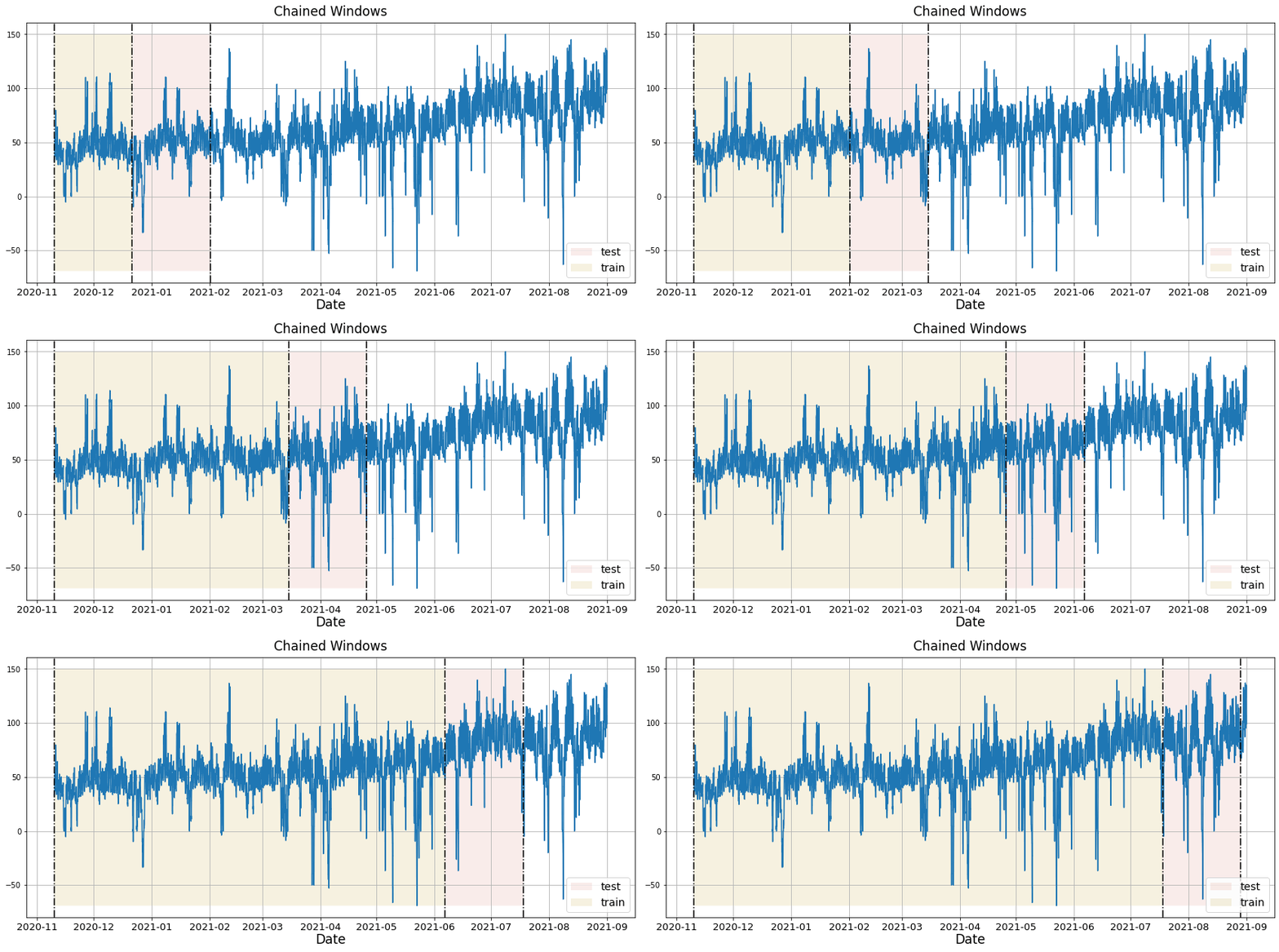
主要参数包括 freq,表示数据的频率,如果未指定,系统会自动推测。id_col、time_col 和 target_col 参数分别指定每个序列的标识符、时间步和目标值的相应列。该方法通过 n_windows 等参数提供自定义功能,n_windows 指示评估模型的独立时间窗口数量,而 step_size 确定这些窗口之间的间隔。如果未指定 step_size,则默认为预测视野 h。
该过程还允许通过 finetune_steps 进行模型细化,指定对新数据进行模型微调的迭代次数。数据预处理通过 clean_ex_first 进行管理,以决定是否在预测前清理外生信号。此外,该方法支持通过 date_features 参数增强时间数据的特征工程,该参数可以自动生成关键的与日期相关的特征,或接受自定义函数用于定制特征创建。date_features_to_one_hot 参数进一步支持将分类日期特征转换为适合机器学习模型的格式。
在执行过程中,cross_validation 在每个窗口中评估模型的预测准确性,提供了模型在时间上的表现变化和潜在过拟合的强大视图。这种详细评估确保生成的预测不仅准确,而且在不同时间背景下保持一致。
timegpt_cv_df = nixtla_client.cross_validation(
    pm_df,
    h=7,
    n_windows=5,
    time_col='timestamp',
    target_col='value',
    freq='D',
)
timegpt_cv_df.head()
INFO:nixtla.nixtla_client:Validating inputs...
INFO:nixtla.nixtla_client:Restricting input...
INFO:nixtla.nixtla_client:Calling Cross Validation Endpoint...| timestamp | cutoff | value | TimeGPT | |
|---|---|---|---|---|
| 0 | 2015-12-17 | 2015-12-16 | 7.591862 | 7.939553 |
| 1 | 2015-12-18 | 2015-12-16 | 7.528869 | 7.887512 |
| 2 | 2015-12-19 | 2015-12-16 | 7.171657 | 7.766617 |
| 3 | 2015-12-20 | 2015-12-16 | 7.891331 | 7.931502 |
| 4 | 2015-12-21 | 2015-12-16 | 8.360071 | 8.312632 |
📘 Azure AI 中可用的模型
如果您正在使用 Azure AI 端点,请确保设置
model="azureai":
nixtla_client.cross_validation(..., model="azureai")对于公共 API,我们支持两种模型:
timegpt-1和timegpt-1-long-horizon。默认情况下使用
timegpt-1。有关如何以及何时使用timegpt-1-long-horizon的信息,请参阅本教程。
cutoffs = timegpt_cv_df['cutoff'].unique()
for cutoff in cutoffs:
    fig = nixtla_client.plot(
        pm_df.tail(100),
        timegpt_cv_df.query('cutoff == @cutoff').drop(columns=['cutoff', 'value']),
        time_col='timestamp',
        target_col='value'
    )
    display(fig)


4. 带有预测区间的交叉验证
在交叉验证期间生成预测区间也是可能的。为此,我们只需使用level参数。
timegpt_cv_df = nixtla_client.cross_validation(
    pm_df,
    h=7,
    n_windows=5,
    time_col='timestamp',
    target_col='value',
    freq='D',
    level=[80, 90],
)
timegpt_cv_df.head()
INFO:nixtla.nixtla_client:Validating inputs...
INFO:nixtla.nixtla_client:Restricting input...
INFO:nixtla.nixtla_client:Calling Cross Validation Endpoint...| timestamp | cutoff | value | TimeGPT | TimeGPT-lo-90 | TimeGPT-lo-80 | TimeGPT-hi-80 | TimeGPT-hi-90 | |
|---|---|---|---|---|---|---|---|---|
| 0 | 2015-12-17 | 2015-12-16 | 7.591862 | 7.939553 | 7.564151 | 7.675945 | 8.203161 | 8.314956 |
| 1 | 2015-12-18 | 2015-12-16 | 7.528869 | 7.887512 | 7.567342 | 7.598298 | 8.176726 | 8.207681 |
| 2 | 2015-12-19 | 2015-12-16 | 7.171657 | 7.766617 | 7.146560 | 7.266829 | 8.266404 | 8.386674 |
| 3 | 2015-12-20 | 2015-12-16 | 7.891331 | 7.931502 | 7.493021 | 7.657075 | 8.205929 | 8.369982 |
| 4 | 2015-12-21 | 2015-12-16 | 8.360071 | 8.312632 | 7.017335 | 7.446677 | 9.178586 | 9.607928 |
📘 Azure AI中的可用模型
如果您使用的是Azure AI端点,请确保将
model="azureai"设置为:
nixtla_client.cross_validation(..., model="azureai")对于公共API,我们支持两个模型:
timegpt-1和timegpt-1-long-horizon。默认情况下,使用
timegpt-1。请参阅此教程,了解何时以及如何使用timegpt-1-long-horizon。
cutoffs = timegpt_cv_df['cutoff'].unique()
for cutoff in cutoffs:
    fig = nixtla_client.plot(
        pm_df.tail(100),
        timegpt_cv_df.query('cutoff == @cutoff').drop(columns=['cutoff', 'value']),
        time_col='timestamp',
        target_col='value',
        level=[80, 90],
        models=['TimeGPT']
    )
    display(fig)


5. 使用外源变量的交叉验证
时间特征
在进行交叉验证时,可以包含外生变量。在这里,我们使用 date_features 参数为每个月创建标签。这些特征随后被模型用于在交叉验证中进行预测。
timegpt_cv_df = nixtla_client.cross_validation(
    pm_df,
    h=7,
    n_windows=5,
    time_col='timestamp',
    target_col='value',
    freq='D',
    level=[80, 90],
    date_features=['month'],
)
timegpt_cv_df.head()
INFO:nixtla.nixtla_client:Validating inputs...
INFO:nixtla.nixtla_client:Using the following exogenous variables: month_1, month_2, month_3, month_4, month_5, month_6, month_7, month_8, month_9, month_10, month_11, month_12
INFO:nixtla.nixtla_client:Calling Cross Validation Endpoint...| timestamp | cutoff | value | TimeGPT | TimeGPT-lo-90 | TimeGPT-lo-80 | TimeGPT-hi-80 | TimeGPT-hi-90 | |
|---|---|---|---|---|---|---|---|---|
| 0 | 2015-12-17 | 2015-12-16 | 7.591862 | 7.931697 | 7.528752 | 7.634238 | 8.229156 | 8.334641 |
| 1 | 2015-12-18 | 2015-12-16 | 7.528869 | 7.879933 | 7.258649 | 7.468433 | 8.291433 | 8.501217 |
| 2 | 2015-12-19 | 2015-12-16 | 7.171657 | 7.759708 | 7.101670 | 7.269838 | 8.249578 | 8.417745 |
| 3 | 2015-12-20 | 2015-12-16 | 7.891331 | 7.921784 | 6.970479 | 7.327653 | 8.515915 | 8.873088 |
| 4 | 2015-12-21 | 2015-12-16 | 8.360071 | 8.302374 | 7.122366 | 7.640518 | 8.964230 | 9.482381 |
cutoffs = timegpt_cv_df['cutoff'].unique()
for cutoff in cutoffs:
    fig = nixtla_client.plot(
        pm_df.tail(100),
        timegpt_cv_df.query('cutoff == @cutoff').drop(columns=['cutoff', 'value']),
        time_col='timestamp',
        target_col='value',
        level=[80, 90],
        models=['TimeGPT']
    )
    display(fig)


动态特征
此外,您可以传递动态外生变量,以更好地向 TimeGPT 提供数据的相关信息。您只需在目标列之后添加外生回归变量即可。
Y_df = pd.read_csv('https://raw.githubusercontent.com/Nixtla/transfer-learning-time-series/main/datasets/electricity.csv')
X_df = pd.read_csv('https://raw.githubusercontent.com/Nixtla/transfer-learning-time-series/main/datasets/exogenous-vars-electricity.csv')
df = Y_df.merge(X_df)
现在让我们根据这些信息对 TimeGPT 进行交叉验证。
if not IN_COLAB:
    nixtla_client = NixtlaClient(max_retries=2, retry_interval=5)
timegpt_cv_df_x = nixtla_client.cross_validation(
df.groupby('unique_id').tail(100 * 48),
h=48,
n_windows=2,
level=[80, 90]
)
cutoffs = timegpt_cv_df_x.query('unique_id == "BE"')['cutoff'].unique()
for cutoff in cutoffs:
fig = nixtla_client.plot(
df.query('unique_id == "BE"').tail(24 * 7),
timegpt_cv_df_x.query('cutoff == @cutoff & unique_id == "BE"').drop(columns=['cutoff', 'y']),
models=['TimeGPT'],
level=[80, 90],
)
display(fig)INFO:nixtla.nixtla_client:Validating inputs...
INFO:nixtla.nixtla_client:Inferred freq: H
INFO:nixtla.nixtla_client:Using the following exogenous variables: Exogenous1, Exogenous2, day_0, day_1, day_2, day_3, day_4, day_5, day_6
INFO:nixtla.nixtla_client:Calling Cross Validation Endpoint...

📘 Azure AI 中可用的模型
如果您使用的是 Azure AI 端点,请确保设置
model="azureai":
nixtla_client.cross_validation(..., model="azureai")对于公共 API,我们支持两个模型:
timegpt-1和timegpt-1-long-horizon。默认情况下,使用
timegpt-1。请参阅 本教程,了解何时以及如何使用timegpt-1-long-horizon。
6. 使用不同的 TimeGPT 实例进行交叉验证
此外,您可以使用 model 参数为不同的 TimeGPT 实例生成交叉验证。在这里,我们使用基础模型和用于长期预测的模型。
timegpt_cv_df_x_long_horizon = nixtla_client.cross_validation(
    df.groupby('unique_id').tail(100 * 48),
    h=48,
    n_windows=2,
    level=[80, 90],
    model='timegpt-1-long-horizon',
)
timegpt_cv_df_x_long_horizon.columns = timegpt_cv_df_x_long_horizon.columns.str.replace('TimeGPT', 'TimeGPT-LongHorizon')
timegpt_cv_df_x_models = timegpt_cv_df_x_long_horizon.merge(timegpt_cv_df_x)
cutoffs = timegpt_cv_df_x_models.query('unique_id == "BE"')['cutoff'].unique()
for cutoff in cutoffs:
    fig = nixtla_client.plot(
        df.query('unique_id == "BE"').tail(24 * 7),
        timegpt_cv_df_x_models.query('cutoff == @cutoff & unique_id == "BE"').drop(columns=['cutoff', 'y']),
        models=['TimeGPT', 'TimeGPT-LongHorizon'],
        level=[80, 90],
    )
    display(fig)
INFO:nixtla.nixtla_client:Validating inputs...
INFO:nixtla.nixtla_client:Inferred freq: H
INFO:nixtla.nixtla_client:Using the following exogenous variables: Exogenous1, Exogenous2, day_0, day_1, day_2, day_3, day_4, day_5, day_6
INFO:nixtla.nixtla_client:Calling Cross Validation Endpoint...

📘 Azure AI中的可用模型
如果您正在使用Azure AI端点,请确保设置
model="azureai":
nixtla_client.cross_validation(..., model="azureai")对于公共API,我们支持两个模型:
timegpt-1和timegpt-1-long-horizon。默认情况下,使用
timegpt-1。有关何时使用和如何使用timegpt-1-long-horizon的信息,请参见本教程。
Give us a ⭐ on Github