

谷歌生成式语言语义检索器
在本笔记本中,我们将向您展示如何快速开始使用谷歌的生成式语言语义检索器,该工具提供专用于高质量检索的嵌入模型,以及一个经过调优的模型,用于在可自定义安全设置下生成基于事实的输出。我们还将展示一些高级示例,说明如何结合LlamaIndex的强大功能与谷歌这一独特产品。
%pip install llama-index-llms-gemini%pip install llama-index-vector-stores-google%pip install llama-index-indices-managed-google%pip install llama-index-response-synthesizers-google%pip install llama-index%pip install "google-ai-generativelanguage>=0.4,<=1.0"Google 身份验证概述
Section titled “Google Authentication Overview”Google语义检索API允许您在自己的数据上执行语义搜索。由于这是您的数据,相比API密钥需要更严格的访问控制。请使用服务账户的OAuth认证或通过您的用户凭据进行身份验证(示例位于笔记本底部)。
本快速入门采用简化的认证方法,适用于测试环境,且服务账户设置通常更易于入门。使用服务账户进行认证的演示录像:演示。
对于生产环境,在选择适合您应用的访问凭据之前,请了解身份验证与授权。
注意:目前,谷歌生成式AI语义检索器API仅在特定区域可用。
使用服务账户设置OAuth
Section titled “Setup OAuth using service accounts”按照以下步骤使用服务账户设置OAuth:
- 创建服务账户后,生成一个服务账户密钥。
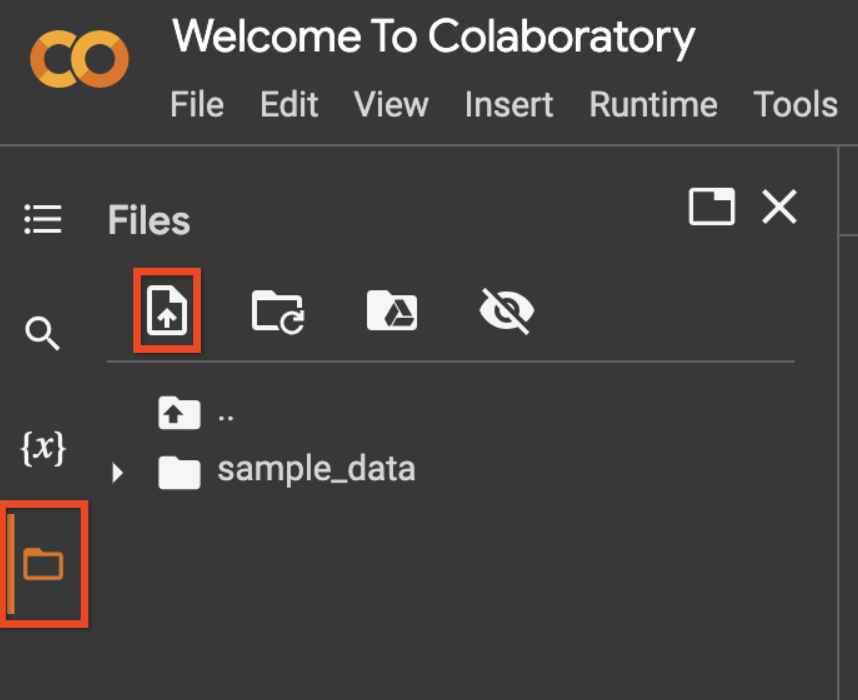
- 通过使用左侧边栏上的文件图标上传您的服务账户文件,然后点击上传图标,如下方截图所示。
- 将上传的文件重命名为
service_account_key.json或更改下方代码中的变量service_account_file_name。
%pip install google-auth-oauthlibfrom google.oauth2 import service_accountfrom llama_index.vector_stores.google import set_google_config
credentials = service_account.Credentials.from_service_account_file( "service_account_key.json", scopes=[ "https://www.googleapis.com/auth/generative-language.retriever", ],)set_google_config(auth_credentials=credentials)!mkdir -p 'data/paul_graham/'!wget 'https://raw.githubusercontent.com/run-llama/llama_index/main/docs/examples/data/paul_graham/paul_graham_essay.txt' -O 'data/paul_graham/paul_graham_essay.txt'首先,让我们在后台创建一些辅助函数。
import llama_index.core.vector_stores.google.generativeai.genai_extension as genaixfrom typing import Iterablefrom random import randrange

LLAMA_INDEX_COLAB_CORPUS_ID_PREFIX = f"llama-index-colab"SESSION_CORPUS_ID_PREFIX = (    f"{LLAMA_INDEX_COLAB_CORPUS_ID_PREFIX}-{randrange(1000000)}")

def corpus_id(num_id: int) -> str:    return f"{SESSION_CORPUS_ID_PREFIX}-{num_id}"

SESSION_CORPUS_ID = corpus_id(1)

def list_corpora() -> Iterable[genaix.Corpus]:    client = genaix.build_semantic_retriever()    yield from genaix.list_corpora(client=client)

def delete_corpus(*, corpus_id: str) -> None:    client = genaix.build_semantic_retriever()    genaix.delete_corpus(corpus_id=corpus_id, client=client)

def cleanup_colab_corpora():    for corpus in list_corpora():        if corpus.corpus_id.startswith(LLAMA_INDEX_COLAB_CORPUS_ID_PREFIX):            try:                delete_corpus(corpus_id=corpus.corpus_id)                print(f"Deleted corpus {corpus.corpus_id}.")            except Exception:                pass

# Remove any previously leftover corpora from this colab.cleanup_colab_corpora()一个 corpus 是 document 的集合。一个 document 是被分解为 chunk 的文本主体。
from llama_index.core import SimpleDirectoryReaderfrom llama_index.indices.managed.google import GoogleIndexfrom llama_index.core import Responseimport time
# Create a corpus.index = GoogleIndex.create_corpus(    corpus_id=SESSION_CORPUS_ID, display_name="My first corpus!")print(f"Newly created corpus ID is {index.corpus_id}.")
# Ingestion.documents = SimpleDirectoryReader("./data/paul_graham/").load_data()index.insert_documents(documents)
让我们检查一下我们已摄入的内容。
for corpus in list_corpora(): print(corpus)让我们向索引提问。
# Querying.query_engine = index.as_query_engine()response = query_engine.query("What did Paul Graham do growing up?")assert isinstance(response, Response)
# Show response.print(f"Response is {response.response}")
# Show cited passages that were used to construct the response.for cited_text in [node.text for node in response.source_nodes]:    print(f"Cited text: {cited_text}")
# Show answerability. 0 means not answerable from the passages.# 1 means the model is certain the answer can be provided from the passages.if response.metadata: print( f"Answerability: {response.metadata.get('answerable_probability', 0)}" )有多种方式可以创建语料库。
# The Google server will provide a corpus ID for you.index = GoogleIndex.create_corpus(display_name="My first corpus!")print(index.corpus_id)
# You can also provide your own corpus ID. However, this ID needs to be globally# unique. You will get an exception if someone else has this ID already.index = GoogleIndex.create_corpus(    corpus_id="my-first-corpus", display_name="My first corpus!")
# If you do not provide any parameter, Google will provide ID and a default# display name for you.index = GoogleIndex.create_corpus()您创建的语料库将在您的账户下持久保存在Google服务器上。 您可以使用其ID重新获取访问权限。 然后,您可以对其进行查询、添加更多文档等操作。
# Use a previously created corpus.index = GoogleIndex.from_corpus(corpus_id=SESSION_CORPUS_ID)
# Query it again!query_engine = index.as_query_engine()response = query_engine.query("Which company did Paul Graham build?")assert isinstance(response, Response)
# Show response.print(f"Response is {response.response}")请参阅 Python 库 google-generativeai 获取更多文档。
LlamaIndex 中的许多节点解析器和文本分割器会自动为每个节点添加 source_node 以将其与文件关联,例如:
relationships={ NodeRelationship.SOURCE: RelatedNodeInfo( node_id="abc-123", metadata={"file_name": "Title for the document"}, ) },无论是 GoogleIndex 还是 GoogleVectorStore 都能识别此源节点,
并会在 Google 服务器上自动在您的语料库下创建文档。
如果您正在编写自己的分块器,您也应该像下面这样提供此源节点关系:
from llama_index.core.schema import NodeRelationship, RelatedNodeInfo, TextNode
index = GoogleIndex.from_corpus(corpus_id=SESSION_CORPUS_ID)index.insert_nodes(    [        TextNode(            text="It was the best of times.",            relationships={                NodeRelationship.SOURCE: RelatedNodeInfo(                    node_id="123",                    metadata={"file_name": "Tale of Two Cities"},                )            },        ),        TextNode(            text="It was the worst of times.",            relationships={                NodeRelationship.SOURCE: RelatedNodeInfo(                    node_id="123",                    metadata={"file_name": "Tale of Two Cities"},                )            },        ),        TextNode(            text="Bugs Bunny: Wassup doc?",            relationships={                NodeRelationship.SOURCE: RelatedNodeInfo(                    node_id="456",                    metadata={"file_name": "Bugs Bunny Adventure"},                )            },        ),    ])
如果您的节点没有源节点,那么谷歌服务器会将您的节点放置在语料库下的默认文档中。
请参阅 Python 库 google-generativeai 获取更多文档。
谷歌的查询引擎由经过特殊调优的大语言模型驱动,该模型基于检索到的段落生成回应。对于每个回应,会返回一个可回答概率,用于指示大语言模型对从检索段落中回答该问题的置信程度。
此外,Google的查询引擎支持回答风格,例如ABSTRACTIVE(简洁但抽象)、EXTRACTIVE(非常简短且提取式)和VERBOSE(额外详细信息)。
该引擎还支持安全设置。
from google.ai.generativelanguage import (    GenerateAnswerRequest,    HarmCategory,    SafetySetting,)
index = GoogleIndex.from_corpus(corpus_id=SESSION_CORPUS_ID)query_engine = index.as_query_engine(    # We recommend temperature between 0 and 0.2.    temperature=0.2,    # See package `google-generativeai` for other voice styles.    answer_style=GenerateAnswerRequest.AnswerStyle.ABSTRACTIVE,    # See package `google-generativeai` for additional safety settings.    safety_setting=[        SafetySetting(            category=HarmCategory.HARM_CATEGORY_SEXUALLY_EXPLICIT,            threshold=SafetySetting.HarmBlockThreshold.BLOCK_LOW_AND_ABOVE,        ),        SafetySetting(            category=HarmCategory.HARM_CATEGORY_VIOLENCE,            threshold=SafetySetting.HarmBlockThreshold.BLOCK_ONLY_HIGH,        ),    ],)
response = query_engine.query("What was Bugs Bunny's favorite saying?")print(response)
请参阅 Python 库 google-generativeai 获取更多文档。
from llama_index.core import Response
response = query_engine.query("What were Paul Graham's achievements?")assert isinstance(response, Response)
# Show response.print(f"Response is {response.response}")
# Show cited passages that were used to construct the response.for cited_text in [node.text for node in response.source_nodes]:    print(f"Cited text: {cited_text}")
# Show answerability. 0 means not answerable from the passages.# 1 means the model is certain the answer can be provided from the passages.if response.metadata: print( f"Answerability: {response.metadata.get('answerable_probability', 0)}" )GoogleIndex 是基于 GoogleVectorStore 和 GoogleTextSynthesizer 构建的。
这些组件可以与 LlamaIndex 中的其他强大构造相结合,以生成高级 RAG 应用程序。
下面我们展示几个示例。
首先,您需要一个API密钥。请从AI Studio获取。
from llama_index.llms.gemini import Gemini
GEMINI_API_KEY = ""  # @param {type:"string"}gemini = Gemini(api_key=GEMINI_API_KEY)
重排序器 + Google 检索器
Section titled “Reranker + Google Retriever”将内容转换为向量是一个有损过程。基于LLM的重排序通过使用LLM对检索到的内容进行重新排序来弥补这一点,由于LLM能够同时访问实际查询和段落,因此具有更高的保真度。
from llama_index.response_synthesizers.google import GoogleTextSynthesizerfrom llama_index.vector_stores.google import GoogleVectorStorefrom llama_index.core import VectorStoreIndexfrom llama_index.core.postprocessor import LLMRerankfrom llama_index.core.query_engine import RetrieverQueryEnginefrom llama_index.core.retrievers import VectorIndexRetriever
# Set up the query engine with a reranker.store = GoogleVectorStore.from_corpus(corpus_id=SESSION_CORPUS_ID)index = VectorStoreIndex.from_vector_store(    vector_store=store,)response_synthesizer = GoogleTextSynthesizer.from_defaults(    temperature=0.2,    answer_style=GenerateAnswerRequest.AnswerStyle.ABSTRACTIVE,)reranker = LLMRerank(    top_n=10,    llm=gemini,)query_engine = RetrieverQueryEngine.from_args(    retriever=VectorIndexRetriever(        index=index,        similarity_top_k=20,    ),    node_postprocessors=[reranker],    response_synthesizer=response_synthesizer,)
# Query.response = query_engine.query("What were Paul Graham's achievements?")print(response)
多查询 + Google 检索器
Section titled “Multi-Query + Google Retriever”有时,用户的查询可能过于复杂。如果将原始查询分解为更小、更聚焦的查询,您可能会获得更好的检索结果。
from llama_index.core.indices.query.query_transform.base import (    StepDecomposeQueryTransform,)from llama_index.core.query_engine import MultiStepQueryEngine
# Set up the query engine with multi-turn query-rewriter.store = GoogleVectorStore.from_corpus(corpus_id=SESSION_CORPUS_ID)index = VectorStoreIndex.from_vector_store(    vector_store=store,)response_synthesizer = GoogleTextSynthesizer.from_defaults(    temperature=0.2,    answer_style=GenerateAnswerRequest.AnswerStyle.ABSTRACTIVE,)single_step_query_engine = index.as_query_engine(    similarity_top_k=10,    response_synthesizer=response_synthesizer,)step_decompose_transform = StepDecomposeQueryTransform(    llm=gemini,    verbose=True,)query_engine = MultiStepQueryEngine(    query_engine=single_step_query_engine,    query_transform=step_decompose_transform,    response_synthesizer=response_synthesizer,    index_summary="Ask me anything.",    num_steps=6,)
# Query.response = query_engine.query("What were Paul Graham's achievements?")print(response)
HyDE + 谷歌检索器
Section titled “HyDE + Google Retriever”当你能够编写出会产生与真实答案具有许多共同特征的虚假答案的提示时,你可以尝试HyDE!
from llama_index.core.indices.query.query_transform import HyDEQueryTransformfrom llama_index.core.query_engine import TransformQueryEngine
# Set up the query engine with multi-turn query-rewriter.store = GoogleVectorStore.from_corpus(corpus_id=SESSION_CORPUS_ID)index = VectorStoreIndex.from_vector_store(    vector_store=store,)response_synthesizer = GoogleTextSynthesizer.from_defaults(    temperature=0.2,    answer_style=GenerateAnswerRequest.AnswerStyle.ABSTRACTIVE,)base_query_engine = index.as_query_engine(    similarity_top_k=10,    response_synthesizer=response_synthesizer,)hyde = HyDEQueryTransform(    llm=gemini,    include_original=False,)hyde_query_engine = TransformQueryEngine(base_query_engine, hyde)
# Query.response = query_engine.query("What were Paul Graham's achievements?")print(response)
多查询 + 重排序器 + 假设文档嵌入 + 谷歌检索器
Section titled “Multi-Query + Reranker + HyDE + Google Retriever”或者将它们全部组合起来!
# Google's retriever and AQA model setup.store = GoogleVectorStore.from_corpus(corpus_id=SESSION_CORPUS_ID)index = VectorStoreIndex.from_vector_store(    vector_store=store,)response_synthesizer = GoogleTextSynthesizer.from_defaults(    temperature=0.2, answer_style=GenerateAnswerRequest.AnswerStyle.ABSTRACTIVE)
# Reranker setup.reranker = LLMRerank(    top_n=10,    llm=gemini,)single_step_query_engine = index.as_query_engine(    similarity_top_k=20,    node_postprocessors=[reranker],    response_synthesizer=response_synthesizer,)
# HyDE setup.hyde = HyDEQueryTransform(    llm=gemini,    include_original=False,)hyde_query_engine = TransformQueryEngine(single_step_query_engine, hyde)
# Multi-query setup.step_decompose_transform = StepDecomposeQueryTransform(    llm=gemini, verbose=True)query_engine = MultiStepQueryEngine(    query_engine=hyde_query_engine,    query_transform=step_decompose_transform,    response_synthesizer=response_synthesizer,    index_summary="Ask me anything.",    num_steps=6,)
# Query.response = query_engine.query("What were Paul Graham's achievements?")print(response)
清理在Colab中创建的语料库
Section titled “Cleanup corpora created in the colab”cleanup_colab_corpora()附录:使用用户凭据设置OAuth
Section titled “Appendix: Setup OAuth with user credentials”请按照OAuth快速入门指南使用用户凭据设置OAuth。以下是文档中必需的步骤概述。
-
如果您想在Colab中运行此笔记本,请首先使用“文件 > 上传”选项上传您的
client_secret*.json文件。 -
将上传的文件重命名为
client_secret.json或更改下方代码中的变量client_file_name。
# Replace TODO-your-project-name with the project used in the OAuth Quickstartproject_name = "TODO-your-project-name"  #  @param {type:"string"}# Replace TODO-your-email@gmail.com with the email added as a test user in the OAuth Quickstartemail = "TODO-your-email@gmail.com"  #  @param {type:"string"}# Replace client_secret.json with the client_secret_* file name you uploaded.client_file_name = "client_secret.json"
# IMPORTANT: Follow the instructions from the output - you must copy the command# to your terminal and copy the output after authentication back here.!gcloud config set project $project_name!gcloud config set account $email
# NOTE: The simplified project setup in this tutorial triggers a "Google hasn't verified this app." dialog.# This is normal, click "Advanced" -> "Go to [app name] (unsafe)"!gcloud auth application-default login --no-browser --client-id-file=$client_file_name --scopes="https://www.googleapis.com/auth/generative-language.retriever,https://www.googleapis.com/auth/cloud-platform"
这将为您提供一个URL,您需要在本地浏览器中输入该URL。 按照说明完成身份验证和授权。