

Langfuse 回调处理器
⚠️ 此集成已弃用。我们建议使用基于检测的新集成方案,详见此处。
本手册向您展示如何使用 Langfuse 回调处理器来监控 LlamaIndex 应用程序。
什么是Langfuse?
Section titled “What is Langfuse?”Langfuse 是一个开源的LLM工程平台,旨在帮助团队协作调试、分析和迭代他们的LLM应用程序。Langfuse 提供了简单的集成方式,可自动捕获在LlamaIndex应用程序中生成的追踪记录和指标。
LangfuseCallbackHandler 与 Langfuse 集成,使您能够无缝跟踪和监控 LlamaIndex 应用程序的性能、追踪记录和指标。LlamaIndex 上下文增强和 LLM 查询过程的详细追踪记录会被捕获,并可直接在 Langfuse 用户界面中进行检查。
%pip install llama-index llama-index-callbacks-langfuse如果尚未完成,请在 Langfuse 上注册并从项目设置中获取您的 API 密钥。
import os
# Get keys for your project from the project settings page https://cloud.langfuse.comos.environ["LANGFUSE_SECRET_KEY"] = "sk-lf-..."os.environ["LANGFUSE_PUBLIC_KEY"] = "pk-lf-..."os.environ["LANGFUSE_HOST"] = "https://cloud.langfuse.com"  # 🇪🇺 EU region# os.environ["LANGFUSE_HOST"] = "https://us.cloud.langfuse.com" # 🇺🇸 US region
# OpenAIos.environ["OPENAI_API_KEY"] = "sk-..."
注册 Langfuse 回调处理器
Section titled “Register the Langfuse callback handler”选项1:设置全局LlamaIndex处理器
Section titled “Option 1: Set global LlamaIndex handler”from llama_index.core import global_handler, set_global_handler
set_global_handler("langfuse")langfuse_callback_handler = global_handler选项2:直接使用Langfuse回调
Section titled “Option 2: Use Langfuse callback directly”from llama_index.core import Settingsfrom llama_index.core.callbacks import CallbackManagerfrom langfuse.llama_index import LlamaIndexCallbackHandler
langfuse_callback_handler = LlamaIndexCallbackHandler()Settings.callback_manager = CallbackManager([langfuse_callback_handler])将事件刷新到 Langfuse
Section titled “Flush events to Langfuse”Langfuse SDK 在后台对事件进行排队和批处理,以减少网络请求次数并提升整体性能。在退出应用程序之前,请确保所有排队的事件都已刷新到 Langfuse 服务器。
# ... your LlamaIndex calls here ...
langfuse_callback_handler.flush()
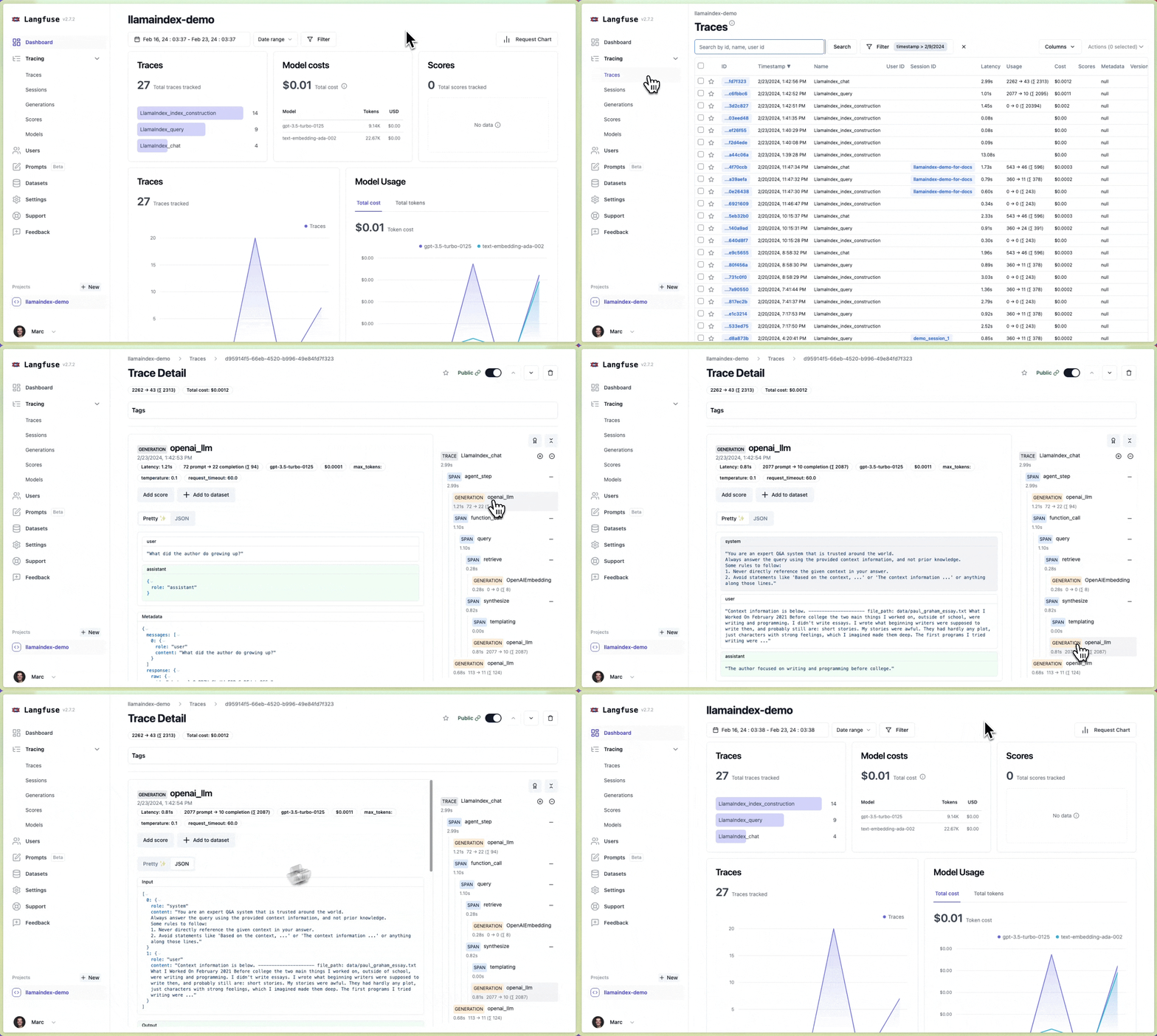
完成!✨ 您的LlamaIndex应用中的追踪记录和指标现已在Langfuse中自动跟踪。当您构建新索引或使用上下文中的文档查询LLM时,您的追踪记录和指标将立即在Langfuse界面中可见。接下来,让我们看看追踪记录在Langfuse中的呈现方式。
获取并保存示例数据。
!mkdir -p 'data/'!wget 'https://raw.githubusercontent.com/run-llama/llama_index/main/docs/examples/data/paul_graham/paul_graham_essay.txt' -O 'data/paul_graham_essay.txt'运行一个示例索引构建、查询和聊天。
from llama_index.core import SimpleDirectoryReader, VectorStoreIndex
# Create indexdocuments = SimpleDirectoryReader("data").load_data()index = VectorStoreIndex.from_documents(documents)
# Execute queryquery_engine = index.as_query_engine()query_response = query_engine.query("What did the author do growing up?")print(query_response)
# Execute chat querychat_engine = index.as_chat_engine()chat_response = chat_engine.chat("What did the author do growing up?")print(chat_response)
# As we want to immediately see result in Langfuse, we need to flush the callback handlerlangfuse_callback_handler.flush()
完成!✨ 您现在将在您的 Langfuse 项目中看到索引和查询的追踪记录。
示例追踪(公开链接):
查看完整的 Langfuse 文档 以获取有关 Langfuse 追踪与分析功能的更多详细信息,以及如何充分利用此集成。