

语言模型格式强制器
LM格式强制器是一个用于强制语言模型输出格式(JSON模式、正则表达式等)的库。与仅向LLM“建议”期望的输出结构不同,LM格式强制器实际上可以“强制”LLM输出遵循期望的模式。
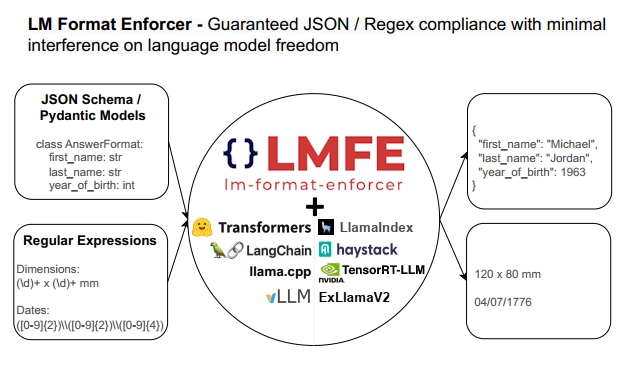
LM格式强制器适用于本地LLM(目前支持LlamaCPP和HuggingfaceLLM后端),且仅通过处理LLM的输出逻辑单元进行操作。这使得它能够支持如束搜索和批处理等高级生成方法,这与那些直接修改生成循环的其他解决方案不同。更多详情请参阅LM格式强制器页面中的对比表格。
JSON 模式输出
Section titled “JSON Schema Output”在LlamaIndex中,我们提供了与LM格式强制器的初步集成,使得生成结构化输出(更具体地说是pydantic对象)变得极其简单。
例如,如果我们想要生成一张歌曲专辑,使用以下模式:
class Song(BaseModel):    title: str    length_seconds: int

class Album(BaseModel):    name: str    artist: str    songs: List[Song]
只需创建一个 LMFormatEnforcerPydanticProgram,指定我们期望的 pydantic 类 Album,并提供合适的提示模板即可。
注意:
LMFormatEnforcerPydanticProgram会自动填充提示模板中可选参数{json_schema}的 pydantic 类的 JSON 模式。这有助于 LLM 自然地生成正确的 JSON,并减少格式强制器的干扰攻击性,从而提高输出质量。
program = LMFormatEnforcerPydanticProgram( output_cls=Album, prompt_template_str="Generate an example album, with an artist and a list of songs. Using the movie {movie_name} as inspiration. You must answer according to the following schema: \n{json_schema}\n", llm=LlamaCPP(), verbose=True,)现在我们可以通过调用程序并添加用户输入来运行它。 这里让我们尝试一些恐怖元素,创作一张受《闪灵》启发的专辑。
output = program(movie_name="The Shining")我们有我们的pydantic对象:
Album( name="The Shining: A Musical Journey Through the Haunted Halls of the Overlook Hotel", artist="The Shining Choir", songs=[ Song(title="Redrum", length_seconds=300), Song( title="All Work and No Play Makes Jack a Dull Boy", length_seconds=240, ), Song(title="Heeeeere's Johnny!", length_seconds=180), ],)你可以尝试使用这个笔记本获取更多详细信息。
LM格式强制器也支持正则表达式输出。由于LlamaIndex中尚无针对正则表达式的现有抽象,我们将在注入LM格式生成器后直接使用LLM。
regex = r'"Hello, my name is (?P<name>[a-zA-Z]*)\. I was born in (?P<hometown>[a-zA-Z]*). Nice to meet you!"'prompt = "Here is a way to present myself, if my name was John and I born in Boston: "
llm = LlamaCPP()regex_parser = lmformatenforcer.RegexParser(regex)lm_format_enforcer_fn = build_lm_format_enforcer_function(llm, regex_parser)with activate_lm_format_enforcer(llm, lm_format_enforcer_fn):    output = llm.complete(prompt)
这将导致LLM按照我们指定的正则表达式格式生成输出。我们还可以解析输出来获取命名分组:
print(output)# "Hello, my name is John. I was born in Boston, Nice to meet you!"print(re.match(regex, output.text).groupdict())# {'name': 'John', 'hometown': 'Boston'}查看此笔记本获取更多详情。