

可观测性
LlamaIndex 提供 一键可观测性 🔭,使您能够在生产环境中构建规范的LLM应用程序。
基于数据开发LLM应用(RAG系统、智能体)的一个关键原则性要求是能够观察、调试和评估系统——无论是整体系统还是每个组件。
此功能允许您将LlamaIndex库与我们合作伙伴提供的强大可观测性/评估工具无缝集成。 只需配置一次变量,您就能实现以下功能:
- 查看LLM/提示词输入输出
- 确保任何组件(LLMs、嵌入模型)的输出符合预期表现
- 查看索引和查询的调用轨迹
每个提供商都有相似之处和不同之处。请查看下方每个提供商的完整指南!
注意:
可观测性现在通过 instrumentation 模块 进行处理(适用于 v0.10.20 及更高版本)。
本页面提及的许多工具和集成使用了我们旧版的 CallbackManager 或未使用 set_global_handler。我们已将这些集成特别标注!
要切换,通常您只需执行以下操作:
from llama_index.core import set_global_handler
# general usageset_global_handler("<handler_name>", **kwargs)
请注意,所有 kwargs 到 set_global_handler 都会被传递给底层回调处理器。
就这样!执行过程将无缝传输到下游服务,您将能够访问诸如查看应用程序执行轨迹等功能。
OpenTelemetry
Section titled “OpenTelemetry”OpenTelemetry 是一个广泛使用的开源服务,用于追踪和可观测性,具有众多后端集成(例如 Jaeger、Zipkin 或 Prometheus)。
我们的 OpenTelemetry 集成可追踪由 LlamaIndex 代码片段生成的所有事件,包括 LLMs、智能体、RAG 流水线组件以及更多内容:通过 LlamaIndex 原生检测功能获得的所有内容,您都可以以 OpenTelemetry 格式导出!
您可以通过以下方式安装该库:
pip install llama-index-observability-otel并且可以在代码中使用默认设置,如下面这个RAG管道的示例所示:
from llama_index.observability.otel import LlamaIndexOpenTelemetryfrom llama_index.core import SimpleDirectoryReader, VectorStoreIndexfrom llama_index.llms.openai import OpenAIfrom llama_index.embeddings.openai import OpenAIEmbeddingfrom llama_index.core import Settings
# initialize the instrumentation objectinstrumentor = LlamaIndexOpenTelemetry()
if __name__ == "__main__":    embed_model = OpenAIEmbedding(model_name="text-embedding-3-small")    llm = OpenAI(model="gpt-4.1-mini")
    # start listening!    instrumentor.start_registering()
    # register events    documents = SimpleDirectoryReader(        input_dir="./data/paul_graham/"    ).load_data()
    index = VectorStoreIndex.from_documents(documents, embed_model=embed_model)    query_engine = index.as_query_engine(llm=llm)
    query_result_one = query_engine.query("Who is Paul?")    query_result_two = query_engine.query("What did Paul do?")
或者您可以使用更复杂和自定义的设置,如下例所示:
import jsonfrom pydantic import BaseModel, Fieldfrom typing import List
from llama_index.observability.otel import LlamaIndexOpenTelemetryfrom opentelemetry.exporter.otlp.proto.http.trace_exporter import (    OTLPSpanExporter,)
# define a custom span exporterspan_exporter = OTLPSpanExporter("http://0.0.0.0:4318/v1/traces")
# initialize the instrumentation objectinstrumentor = LlamaIndexOpenTelemetry(    service_name_or_resource="my.test.service.1",    span_exporter=span_exporter,    debug=True,)

if __name__ == "__main__": instrumentor.start_registering() # ... your code here我们还有一个演示仓库,展示如何追踪智能体工作流并将注册的追踪数据导入Postgres数据库。
LlamaTrace(托管版Arize Phoenix)
Section titled “LlamaTrace (Hosted Arize Phoenix)”我们已与Arize合作推出LlamaTrace,这是一个托管式追踪、可观测性与评估平台,可原生兼容LlamaIndex开源用户,并与LlamaCloud集成。
这是基于开源的Arize Phoenix项目构建的。Phoenix通过以下功能为监控您的模型和LLM应用程序提供笔记本优先的体验:
- LLM 追踪 - 追踪您的 LLM 应用程序执行过程,以了解 LLM 应用程序的内部运行机制,并排查与检索和工具执行相关的问题。
- LLM 评估 - 利用大型语言模型的能力来评估您的生成模型或应用的相关性、毒性等。
要安装集成包,请执行 pip install -U llama-index-callbacks-arize-phoenix。
然后在LlamaTrace上创建一个账户:https://llamatrace.com/login。创建一个API密钥并将其放入下面的PHOENIX_API_KEY变量中。
然后运行以下代码:
# Phoenix can display in real time the traces automatically# collected from your LlamaIndex application.# Run all of your LlamaIndex applications as usual and traces# will be collected and displayed in Phoenix.
# setup Arize Phoenix for logging/observabilityimport llama_index.coreimport os
PHOENIX_API_KEY = "<PHOENIX_API_KEY>"os.environ["OTEL_EXPORTER_OTLP_HEADERS"] = f"api_key={PHOENIX_API_KEY}"llama_index.core.set_global_handler(    "arize_phoenix", endpoint="https://llamatrace.com/v1/traces")
...
权重与偏置 (W&B) 编织
Section titled “Weights and Biases (W&B) Weave”W&B Weave 是一个用于追踪、实验、评估、部署和改进LLM应用程序的框架。专为可扩展性和灵活性而设计,Weave支持应用程序开发工作流程的每个阶段。
该集成利用LlamaIndex的instrumentation模块将跨度/事件注册为Weave调用。默认情况下,Weave会自动修补并追踪对常见LLM库和框架的调用。
安装 weave 库:
pip install weave获取一个 W&B API 密钥:
如果您还没有 W&B 账户,请访问 https://wandb.ai 创建一个,并从 https://wandb.ai/authorize 复制您的 API 密钥。当提示进行身份验证时,请输入该 API 密钥。
import weavefrom llama_index.llms.openai import OpenAI
# Initialize Weave with your project nameweave.init("llamaindex-demo")
# All LlamaIndex operations are now automatically tracedllm = OpenAI(model="gpt-4o-mini")response = llm.complete("William Shakespeare is ")print(response)
追踪记录包含执行时间、令牌使用量、成本、输入/输出、错误、嵌套操作和流数据。如果您是Weave追踪的新手,可在此处了解更多关于如何浏览它的信息此处。
如果你有一个未被追踪的自定义函数,请使用@weave.op()装饰它。
你也可以使用 autopatch_settings 参数在 weave.init 中控制补丁行为。例如,如果你不想追踪某个库/框架,可以像这样关闭它:
weave.init(..., autopatch_settings={"openai": {"enabled": False}})无需额外的LlamaIndex配置;一旦调用weave.init(),追踪就会开始。
与LlamaIndex的集成支持其几乎所有组件——流式/异步、补全、聊天、工具调用、智能体、工作流和RAG支持。在官方W&B Weave × LlamaIndex文档中了解更多相关信息。
MLflow
Section titled “MLflow”MLflow 是一个开源的 MLOps/LLMOps 平台,专注于机器学习项目的完整生命周期,确保每个阶段都可管理、可追踪和可复现。 MLflow 追踪 是基于 OpenTelemetry 的追踪功能,支持对 LlamaIndex 应用进行一键式检测。
由于 MLflow 是开源的,您无需创建账户或设置 API 密钥即可开始使用。安装 MLflow 软件包后即可直接开始编写代码!
import mlflow
mlflow.llama_index.autolog()  # Enable mlflow tracing
MLflow LlamaIndex 集成还提供实验跟踪、评估、依赖管理等功能。查看 MLflow 文档获取更多详情。
MLflow 追踪支持 LlamaIndex 的全部功能。某些新功能如 智能体工作流 需要 MLflow >= 2.18.0。
| 流式处理 | 异步 | 引擎 | 智能体 | 工作流 | AgentWorkflow |
|---|---|---|---|---|---|
| ✅ | ✅ | ✅ | ✅ | ✅ (>= 2.18) | ✅ (>= 2.18) |
OpenLLMetry
Section titled “OpenLLMetry”OpenLLMetry 是一个基于 OpenTelemetry 的开源项目,用于追踪和监控 LLM 应用程序。它能连接所有主流可观测性平台并在几分钟内完成安装。
from traceloop.sdk import Traceloop
Traceloop.init()
Arize Phoenix(本地)
Section titled “Arize Phoenix (local)”你也可以选择通过开源项目使用Phoenix的本地实例。
在这种情况下,您无需在LlamaTrace上创建账户或为Phoenix设置API密钥。Phoenix服务器将在本地启动。
要安装集成包,请执行 pip install -U llama-index-callbacks-arize-phoenix。
然后运行以下代码:
# Phoenix can display in real time the traces automatically# collected from your LlamaIndex application.# Run all of your LlamaIndex applications as usual and traces# will be collected and displayed in Phoenix.
import phoenix as px
# Look for a URL in the output to open the App in a browser.px.launch_app()# The App is initially empty, but as you proceed with the steps below,# traces will appear automatically as your LlamaIndex application runs.
import llama_index.core
llama_index.core.set_global_handler("arize_phoenix")...Langfuse 🪢
Section titled “Langfuse 🪢”Langfuse 是一个开源的LLM工程平台,旨在帮助团队协作调试、分析和迭代他们的LLM应用程序。通过Langfuse集成,您可以跟踪和监控LlamaIndex应用程序的性能、追踪记录和指标。上下文增强和LLM查询过程的详细追踪记录会被捕获,并可直接在Langfuse用户界面中检查。
请确保您已安装 llama-index 和 langfuse。
pip install llama-index langfuse openinference-instrumentation-llama-index接下来,设置您的 Langfuse API 密钥。您可以通过注册免费的 Langfuse Cloud 账户或通过 自行托管 Langfuse 来获取这些密钥。这些环境变量对于 Langfuse 客户端进行身份验证并将数据发送到您的 Langfuse 项目至关重要。
import os
# Get keys for your project from the project settings page: https://cloud.langfuse.com
os.environ["LANGFUSE_PUBLIC_KEY"] = "pk-lf-..."os.environ["LANGFUSE_SECRET_KEY"] = "sk-lf-..."os.environ["LANGFUSE_HOST"] = "https://cloud.langfuse.com" # 🇪🇺 EU region# os.environ["LANGFUSE_HOST"] = "https://us.cloud.langfuse.com" # 🇺🇸 US region环境变量设置完成后,我们现在可以初始化Langfuse客户端。get_client()使用环境变量中提供的凭据来初始化Langfuse客户端。
from langfuse import get_client
langfuse = get_client()
# Verify connectionif langfuse.auth_check():    print("Langfuse client is authenticated and ready!")else:    print("Authentication failed. Please check your credentials and host.")
现在,我们初始化 OpenInference LlamaIndex 检测工具。这个第三方检测工具会自动捕获 LlamaIndex 操作,并将 OpenTelemetry (OTel) 跨度导出到 Langfuse。
from openinference.instrumentation.llama_index import LlamaIndexInstrumentor
# Initialize LlamaIndex instrumentationLlamaIndexInstrumentor().instrument()
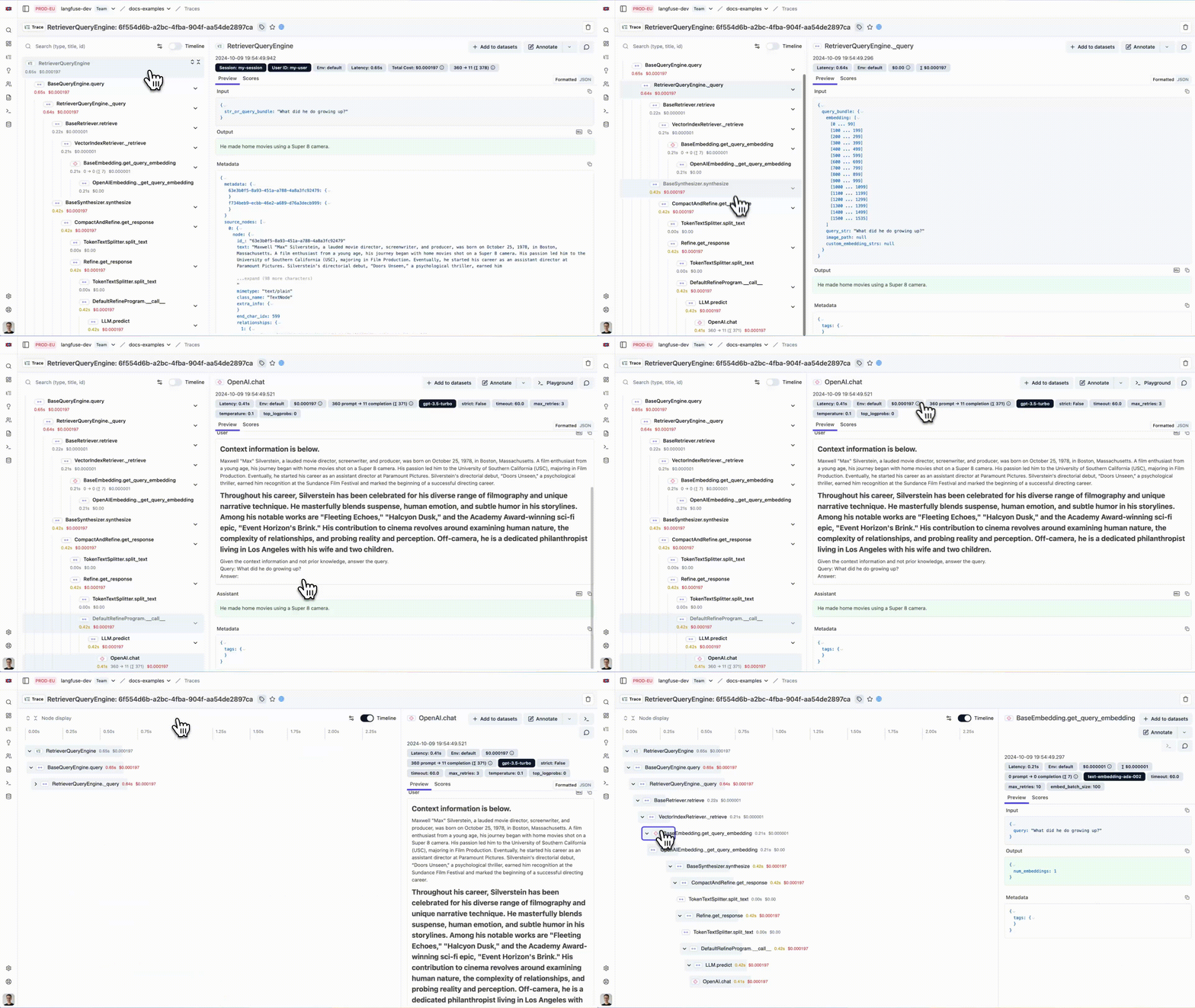
您现在可以在 Langfuse 中查看您的 LlamaIndex 应用程序日志:
Literal AI
Section titled “Literal AI”Literal AI 是首选的LLM评估与可观测性解决方案,助力工程和产品团队可靠、快速且大规模地部署LLM应用。这通过包含提示工程、LLM可观测性、LLM评估和LLM监控的协作开发周期实现。对话线程和智能体运行可自动记录在Literal AI上。
开始使用并尝试 Literal AI 的最简单方式是在我们的云端实例上注册。 然后您可以导航至设置,获取您的API密钥,并开始记录日志!
- 使用
pip install literalai安装 Literal AI Python SDK - 在你的 Literal AI 项目中,前往设置并获取你的 API 密钥
- 如果您正在使用 Literal AI 的自托管实例,请同时记录其基础 URL
然后将以下代码行添加到您的应用程序代码中:
from llama_index.core import set_global_handler
# You should provide your Literal AI API key and base url using the following environment variables:# LITERAL_API_KEY, LITERAL_API_URLset_global_handler("literalai")Opik 是由 Comet 构建的开源端到端 LLM 评估平台。
要开始使用,只需在 Comet 上注册账户并获取您的 API 密钥。
- 使用
pip install opik安装 Opik Python SDK - 在 Opik 中,从用户菜单获取您的 API 密钥。
- 如果您正在使用自托管的Opik实例,也请记下其基础URL。
您可以通过环境变量 OPIK_API_KEY、OPIK_WORKSPACE 和 OPIK_URL_OVERRIDE 来配置 Opik(如果您使用的是自托管实例)。您可以通过调用以下方式设置这些变量:
export OPIK_API_KEY="<OPIK_API_KEY>"export OPIK_WORKSPACE="<OPIK_WORKSPACE - Often the same as your API key>"
# Optional#export OPIK_URL_OVERRIDE="<OPIK_URL_OVERRIDE>"
现在您可以通过设置全局处理器来使用 Opik 与 LlamaIndex 的集成:
from llama_index.core import Document, VectorStoreIndex, set_global_handler
# You should provide your OPIK API key and Workspace using the following environment variables:# OPIK_API_KEY, OPIK_WORKSPACEset_global_handler(    "opik",)
# This example uses OpenAI by default so don't forget to set an OPENAI_API_KEYindex = VectorStoreIndex.from_documents([Document.example()])query_engine = index.as_query_engine()
questions = [    "Tell me about LLMs",    "How do you fine-tune a neural network ?",    "What is RAG ?",]
for question in questions:    print(f"> \033[92m{question}\033[0m")    response = query_engine.query(question)    print(response)
您将在Opik中看到以下追踪记录:

Argilla
Section titled “Argilla”Argilla 是一款面向AI工程师和领域专家的协作工具,旨在为项目构建高质量数据集。
要开始使用,您需要部署 Argilla 服务器。如果尚未部署,您可以按照此指南轻松完成部署。
- 使用
pip install argilla-llama-index安装 Argilla LlamaIndex 集成包 - 初始化 ArgillaHandler。
<api_key>位于您 Argilla 空间的My Settings页面,但请确保您使用创建该空间时所用的owner账户登录。<api_url> - 将 ArgillaHandler 添加到调度器中。
from llama_index.core.instrumentation import get_dispatcherfrom argilla_llama_index import ArgillaHandler
argilla_handler = ArgillaHandler(    dataset_name="query_llama_index",    api_url="http://localhost:6900",    api_key="argilla.apikey",    number_of_retrievals=2,)root_dispatcher = get_dispatcher()root_dispatcher.add_span_handler(argilla_handler)root_dispatcher.add_event_handler(argilla_handler)
Agenta 是一个开源的 LLMOps 平台,帮助开发者和产品团队构建基于大语言模型的强大 AI 应用程序。它提供可观测性、提示管理与工程以及大语言模型评估所需的全部工具。
安装集成所需的必要依赖项:
pip install agenta llama-index openinference-instrumentation-llama-index设置您的API凭据并初始化Agenta:
import osimport agenta as agfrom openinference.instrumentation.llama_index import LlamaIndexInstrumentor
# Set your Agenta credentialsos.environ["AGENTA_API_KEY"] = "your_agenta_api_key"os.environ[    "AGENTA_HOST"] = "https://cloud.agenta.ai"  # Use your self-hosted URL if applicable
# Initialize Agenta SDKag.init()
# Enable LlamaIndex instrumentationLlamaIndexInstrumentor().instrument()
构建您的插桩应用程序:
@ag.instrument()def document_search_app(user_query: str):    """    Document search application using LlamaIndex.    Loads documents, builds a searchable index, and answers user queries.    """    # Load documents from local directory    docs = SimpleDirectoryReader("data").load_data()
    # Build vector search index    search_index = VectorStoreIndex.from_documents(docs)
    # Initialize query processor    query_processor = search_index.as_query_engine()
    # Process user query    answer = query_processor.query(user_query)
    return answer
一旦设置完成,Agenta将自动捕获所有执行步骤。然后您可以在Agenta中查看追踪记录来调试应用程序,将其关联到特定配置和提示,评估性能表现,查询数据并监控关键指标。

Deepeval
Section titled “Deepeval”DeepEval(由 Confident AI 开发)是一个用于LLM应用的开源评估框架。当您使用DeepEval当前提供的14+种默认指标(摘要、幻觉、答案相关性、忠实度、RAGAS等)对LLM应用进行“单元测试”时,可以通过与LlamaIndex的追踪集成来调试失败的测试用例,或通过DeepEval托管的评估平台Confident AI在生产环境中调试不满意的评估结果,该平台可在生产环境中运行无参考评估。
pip install -U deepeval llama-indeximport deepevalfrom deepeval.integrations.llama_index import instrument_llama_index
import llama_index.core.instrumentation as instrument
# Logindeepeval.login("<your-confident-api-key>")
# Let DeepEval collect tracesinstrument_llama_index(instrument.get_dispatcher())
Maxim AI
Section titled “Maxim AI”Maxim AI 是一个智能体仿真、评估与可观测性平台,帮助开发者构建、监控和改进其大语言模型应用。Maxim 与 LlamaIndex 的集成为您的检索增强生成系统、智能体及其他大语言模型工作流提供全面的追踪、监控和评估能力。
安装所需的软件包:
pip install maxim-py设置您的环境变量:
import osfrom dotenv import load_dotenv
# Load environment variables from .env fileload_dotenv()
# Get environment variablesMAXIM_API_KEY = os.getenv("MAXIM_API_KEY")MAXIM_LOG_REPO_ID = os.getenv("MAXIM_LOG_REPO_ID")
# Verify required environment variables are setif not MAXIM_API_KEY:    raise ValueError("MAXIM_API_KEY environment variable is required")if not MAXIM_LOG_REPO_ID:    raise ValueError("MAXIM_LOG_REPO_ID environment variable is required")
初始化 Maxim 并集成 LlamaIndex:
from maxim import Config, Maximfrom maxim.logger import LoggerConfigfrom maxim.logger.llamaindex import instrument_llamaindex
# Initialize Maxim loggermaxim = Maxim(Config(api_key=os.getenv("MAXIM_API_KEY")))logger = maxim.logger(LoggerConfig(id=os.getenv("MAXIM_LOG_REPO_ID")))
# Instrument LlamaIndex with Maxim observability# Set debug=True to see detailed logs during developmentinstrument_llamaindex(logger, debug=True)
print("✅ Maxim instrumentation enabled for LlamaIndex")
现在您的LlamaIndex应用将自动向Maxim发送追踪数据:
from llama_index.core.agent import FunctionAgentfrom llama_index.core.tools import FunctionToolfrom llama_index.llms.openai import OpenAI

# Define tools and create agentdef add_numbers(a: float, b: float) -> float:    """Add two numbers together."""    return a + b

add_tool = FunctionTool.from_defaults(fn=add_numbers)llm = OpenAI(model="gpt-4o-mini", temperature=0)
agent = FunctionAgent(    tools=[add_tool],    llm=llm,    verbose=True,    system_prompt="You are a helpful calculator assistant.",)
# This will be automatically logged by Maxim instrumentationimport asyncio
response = await agent.run("What is 15 + 25?")print(f"Response: {response}")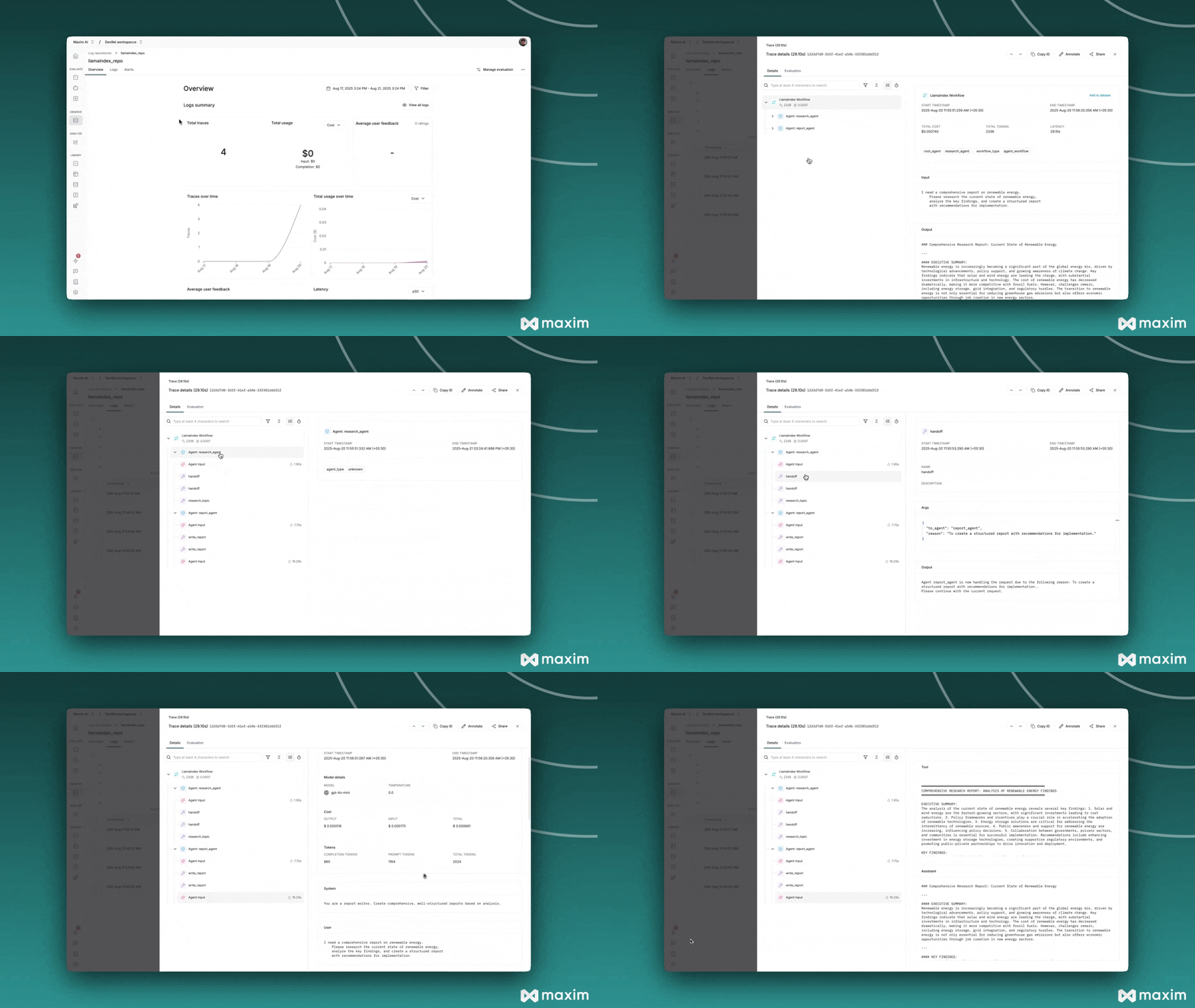
其他合作伙伴 One-Click 集成(遗留模块)
Section titled “Other Partner One-Click Integrations (Legacy Modules)”这些合作伙伴集成使用我们遗留的 CallbackManager 或第三方调用。
Langfuse
Section titled “Langfuse”此集成已弃用。我们建议使用基于检测的新集成方式与 Langfuse,如此处所述。
from llama_index.core import set_global_handler
# Make sure you've installed the 'llama-index-callbacks-langfuse' integration package.
# NOTE: Set your environment variables 'LANGFUSE_SECRET_KEY', 'LANGFUSE_PUBLIC_KEY' and 'LANGFUSE_HOST'# as shown in your langfuse.com project settings.
set_global_handler("langfuse")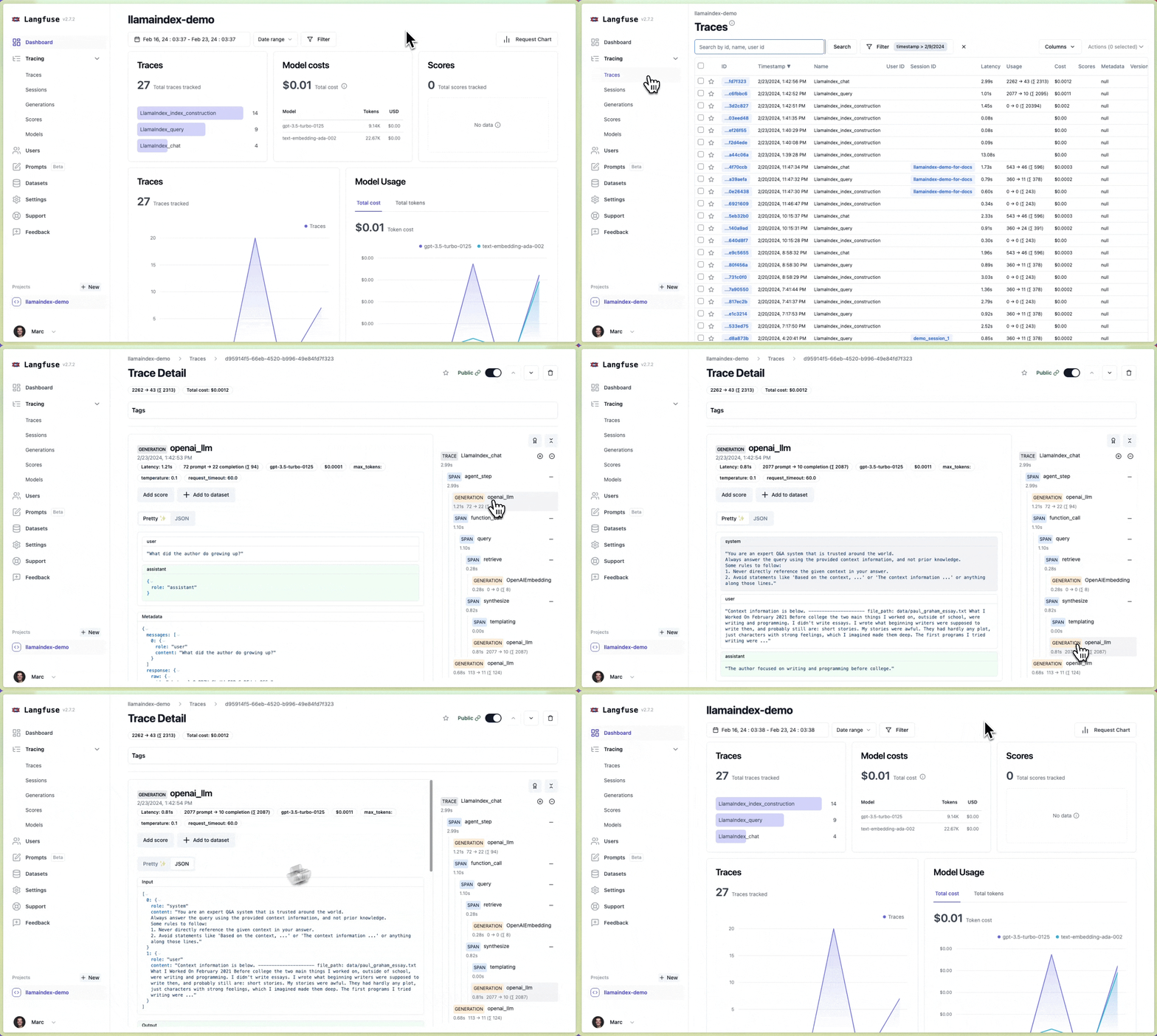
OpenInference
Section titled “OpenInference”OpenInference 是一个用于捕获和存储AI模型推理的开放标准。它支持使用诸如 Phoenix 等LLM可观测性解决方案对LLM应用进行实验、可视化和评估。
import llama_index.core
llama_index.core.set_global_handler("openinference")
# NOTE: No need to do the followingfrom llama_index.callbacks.openinference import OpenInferenceCallbackHandlerfrom llama_index.core.callbacks import CallbackManagerfrom llama_index.core import Settings
# callback_handler = OpenInferenceCallbackHandler()# Settings.callback_manager = CallbackManager([callback_handler])
# Run your LlamaIndex application here...for query in queries:    query_engine.query(query)
# View your LLM app data as a dataframe in OpenInference format.from llama_index.core.callbacks.open_inference_callback import as_dataframe
query_data_buffer = llama_index.core.global_handler.flush_query_data_buffer()query_dataframe = as_dataframe(query_data_buffer)注意:要解锁 Phoenix 的功能,您需要定义额外的步骤来输入查询/上下文数据框。请参阅下方!
TruEra TruLens
Section titled “TruEra TruLens”TruLens 允许用户通过反馈函数和追踪等功能,对 LlamaIndex 应用进行插装/评估。
# use trulensfrom trulens_eval import TruLlama
tru_query_engine = TruLlama(query_engine)
# querytru_query_engine.query("What did the author do growing up?")
HoneyHive
Section titled “HoneyHive”HoneyHive 允许用户追踪任何LLM工作流的执行流程。用户随后可以调试和分析其追踪记录,或针对特定追踪事件自定义反馈,从而从生产环境中创建评估或微调数据集。
from llama_index.core import set_global_handler
set_global_handler(    "honeyhive",    project="My HoneyHive Project",    name="My LLM Workflow Name",    api_key="MY HONEYHIVE API KEY",)
# NOTE: No need to do the followingfrom llama_index.core.callbacks import CallbackManager
# from honeyhive.utils.llamaindex_tracer import HoneyHiveLlamaIndexTracerfrom llama_index.core import Settings
# hh_tracer = HoneyHiveLlamaIndexTracer(#     project="My HoneyHive Project",#     name="My LLM Workflow Name",#     api_key="MY HONEYHIVE API KEY",# )# Settings.callback_manager = CallbackManager([hh_tracer])
 使用 Perfetto 调试和分析您的 HoneyHive 追踪记录
PromptLayer
Section titled “PromptLayer”PromptLayer 允许您追踪跨大语言模型调用的分析数据,为各种使用场景标记、分析和评估提示词。将其与 LlamaIndex 结合使用,可追踪您检索增强生成提示词及其他功能的性能表现。
import os
os.environ["PROMPTLAYER_API_KEY"] = "pl_7db888a22d8171fb58aab3738aa525a7"
from llama_index.core import set_global_handler
# pl_tags are optional, to help you organize your prompts and appsset_global_handler("promptlayer", pl_tags=["paul graham", "essay"])Langtrace
Section titled “Langtrace”Langtrace 是一个强大的开源工具,支持 OpenTelemetry,旨在无缝追踪、评估和管理 LLM 应用程序。Langtrace 直接与 LlamaIndex 集成,提供关于准确性、评估和延迟等性能指标的详细实时洞察。
pip install langtrace-python-sdkfrom langtrace_python_sdk import ( langtrace,) # Must precede any llm module imports
langtrace.init(api_key="<LANGTRACE_API_KEY>")OpenLIT
Section titled “OpenLIT”OpenLIT 是一个基于 OpenTelemetry 的生成式人工智能和大型语言模型应用可观测性工具。它旨在通过仅需一行代码即可将可观测性集成到生成式人工智能项目中。OpenLIT 为各种大型语言模型、向量数据库及框架(如 LlamaIndex)提供 OpenTelemetry 自动插装。OpenLIT 可深入洞察您的 LLM 应用性能、请求追踪、使用情况概览指标(如成本、令牌数等)以及更多内容。
pip install openlitimport openlit
openlit.init()AgentOps
Section titled “AgentOps”智能体运维 帮助开发者构建、评估和监控人工智能智能体。AgentOps 将协助智能体从原型到生产环境的全过程,支持智能体监控、大语言模型成本追踪、基准测试等功能。
pip install llama-index-instrumentation-agentopsfrom llama_index.core import set_global_handler
# NOTE: Feel free to set your AgentOps environment variables (e.g., 'AGENTOPS_API_KEY')# as outlined in the AgentOps documentation, or pass the equivalent keyword arguments# anticipated by AgentOps' AOClient as **eval_params in set_global_handler.
set_global_handler("agentops")简单(LLM 输入/输出)
Section titled “Simple (LLM Inputs/Outputs)”这个简单的可观测性工具会将每个LLM输入/输出对打印到终端。在需要快速为您的LLM应用程序启用调试日志记录时最为实用。
import llama_index.core
llama_index.core.set_global_handler("simple")