让AI指定工具参数#
在配置连接到工具智能体的app节点工具时,许多参数可以由AI模型自行填写。AI模型将利用任务上下文和其他连接工具的信息来填充适当的细节。
有两种方法可以实现这一点,您可以在它们之间切换。
让模型自动填充参数#
工具编辑对话框中每个适用的参数字段末尾都有一个额外按钮:
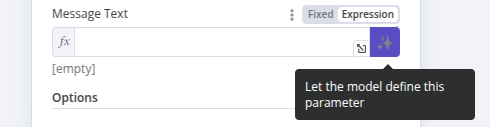
激活此按钮后,AI Agent将自动为您填写表达式,无需任何额外用户输入。 该字段本身会显示一条消息,表明参数已由模型自动定义。
如果你想自定义参数,请点击此框中的'X'以恢复用户定义值。请注意,此时'expression'字段将包含此功能生成的表达式,不过你可以按照下一节的说明进一步编辑它来添加额外细节。
警告
激活此功能将覆盖您可能已添加的任何手动定义。
使用 $fromAI() 函数#
$fromAI() 函数利用人工智能动态填充连接到Tools AI agent工具的各类参数。您可以在应用节点(如Gmail、Notion或Slack)的表达式中使用$fromAI()函数,这些节点作为工具连接到AI智能体。
仅适用于节点工具
$fromAI() 函数仅适用于连接到智能体工具的 app node 工具。无法在 Call n8n Workflow、Code、HTTP Request 或 other cluster sub-nodes 中使用 $fromAI() 函数。
要使用$fromAI()函数,请使用必需的key参数调用它:
1 | |
key 参数和 $fromAI() 函数的其他参数并非引用现有值。相反,应将这些参数视为提示,AI模型将使用这些提示来填充正确的数据。
例如,如果您选择一个名为email的键,AI模型将在其上下文、其他工具和输入数据中查找电子邮件地址。在聊天工作流中,如果无法在其他地方找到电子邮件地址,它可能会向用户询问。您可以选择性地传递其他参数,如description,为AI模型提供额外的上下文。
参数#
$fromAI() 函数接受以下参数:
| 参数 | 类型 | 是否必填 | 描述 |
|---|---|---|---|
key |
string |  |
A string representing the key or name of the argument. This must be between 1 and 64 characters in length and can only contain lowercase letters, uppercase letters, numbers, underscores, and hyphens. |
description |
string |  |
A string describing the argument. |
type |
string | |
A string specifying the data type. Can be string, number, boolean, or json (defaults to string). |
defaultValue |
any | |
The default value to use for the argument. |
示例#
例如,您可以使用以下$fromAI()表达式来动态填充名称字段:
1 | |
如果不需要可选参数,可以简化为:
1 | |
要动态显示库存商品数量,可以使用如下$fromAI()表达式:
1 | |
如果您只想用模型中的动态值填充字段的一部分,也可以在普通表达式中使用它。例如,如果您希望模型填写电子邮件的subject参数,但始终在生成值前加上字符串"由AI生成:",您可以使用以下表达式:
1 | |
模板#
你可以在以下模板中看到$fromAI()函数的实际应用:
