跳至内容

合并与拆分数据#

在本章节中,您将学习如何合并与拆分数据,以及了解在哪些情况下执行这些操作可能很有帮助。

合并数据#

在某些情况下,您可能需要合并(组合)并处理来自不同来源的数据。

合并数据可能涉及:

  • 从多个来源创建一个数据集。
  • 在多个系统之间同步数据。这可能包括删除重复数据或在另一个系统中的数据发生变化时更新一个系统中的数据。

单向同步 vs. 双向同步

在单向同步中,数据仅朝一个方向同步。一个系统作为唯一可信数据源。当主系统中的信息发生变化时,次要系统中的信息会自动更新;但如果次要系统中的信息发生变化,这些变更不会反映到主系统中。

在双向同步中,数据会在两个系统之间进行双向同步。当任一系统中的信息发生变化时,另一个系统中的相应信息也会自动更新。

本博客教程解释了如何在两个CRM系统之间单向和双向同步数据。

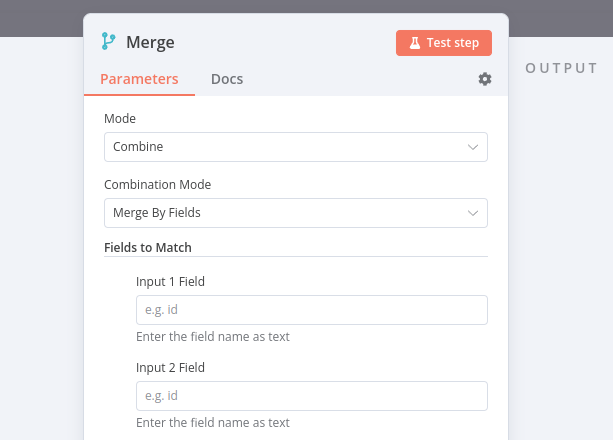
在n8n中,您可以使用Merge节点合并来自两个不同节点的数据,该节点提供多种合并选项:

请注意,合并 > 按字段合并需要您输入用于匹配的输入字段。这些字段应在数据源之间包含相同的值,以便n8n能够正确地将数据匹配在一起。在合并节点中,它们被称为Input 1 FieldInput 2 Field

Property Input fields in the Merge node

属性输入使用点符号表示法

如果你想在合并节点参数Input 1 FieldInput 2 Field中引用嵌套值,需要以点表示法格式输入属性键(作为文本,而非表达式)。

注意

你也可以在别名Join下找到Merge节点。如果你熟悉SQL连接操作,这个名称可能更直观。

合并练习#

构建一个工作流,合并来自客户数据存储节点和代码节点的数据。

  1. 添加一个合并节点,该节点从客户数据存储节点获取Input 1,并从代码节点获取Input 2
  2. 客户数据存储节点中,运行获取所有人员操作。
  3. In the Code node, create an array of two objects with three properties: name, language, and country, where the property country has two sub-properties code and name.
    • 使用客户数据库中两个角色的信息填写这些属性的值。
    • 例如,杰伊·盖茨比的语言是英语,国家名称是美国。
  4. 合并节点中,尝试不同的合并选项。
Show me the solution

本练习的工作流程如下所示:
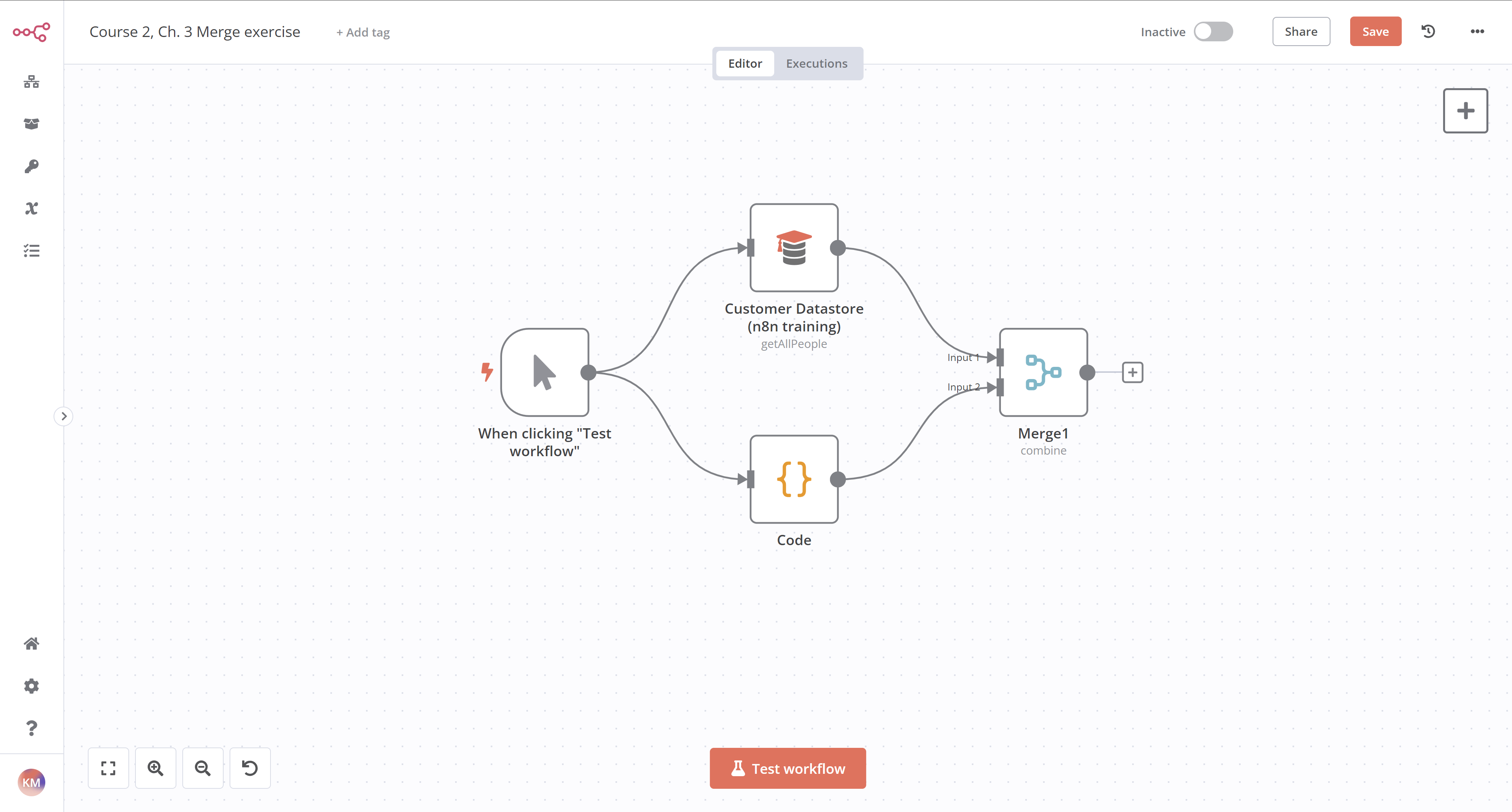
Workflow exercise for merging data
合并数据的工作流练习

如果您使用保留匹配项选项合并数据,并以名称作为匹配输入字段,结果应如下所示(请注意此示例仅包含Jay Gatsby;根据您选择的不同角色,您的结果可能会有所不同):
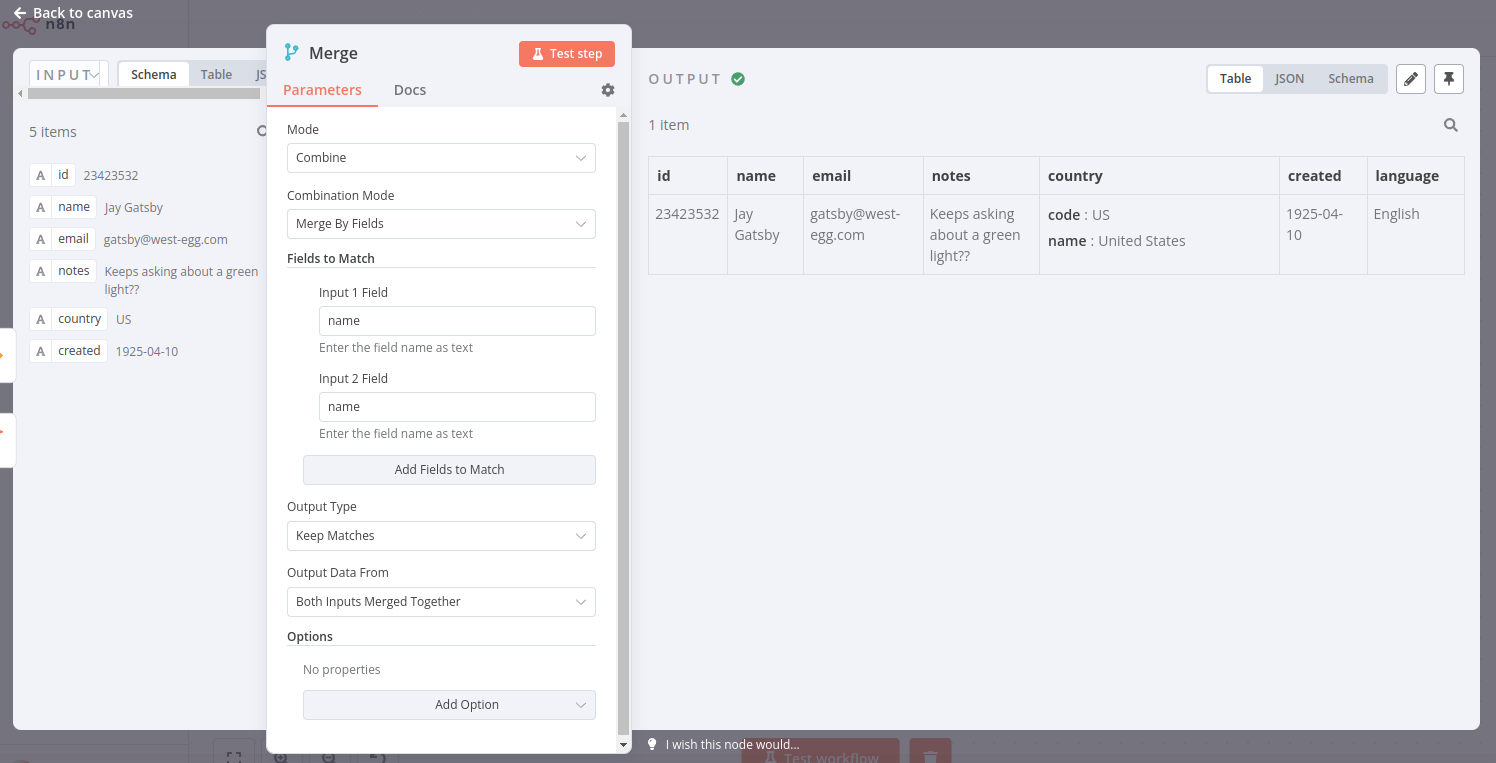
Output of Merge node with option to keep matches
合并节点的输出结果,可选择保留匹配项

要检查节点的配置,您可以复制下面的JSON工作流代码并粘贴到您的编辑器界面中:

  1
  2
  3
  4
  5
  6
  7
  8
  9
 10
 11
 12
 13
 14
 15
 16
 17
 18
 19
 20
 21
 22
 23
 24
 25
 26
 27
 28
 29
 30
 31
 32
 33
 34
 35
 36
 37
 38
 39
 40
 41
 42
 43
 44
 45
 46
 47
 48
 49
 50
 51
 52
 53
 54
 55
 56
 57
 58
 59
 60
 61
 62
 63
 64
 65
 66
 67
 68
 69
 70
 71
 72
 73
 74
 75
 76
 77
 78
 79
 80
 81
 82
 83
 84
 85
 86
 87
 88
 89
 90
 91
 92
 93
 94
 95
 96
 97
 98
 99
100
101
102
103
104
105
106
107
108
{
"meta": {
	"templateCredsSetupCompleted": true,
	"instanceId": "cb484ba7b742928a2048bf8829668bed5b5ad9787579adea888f05980292a4a7"
},
"nodes": [
	{
	"parameters": {
		"mode": "combine",
		"mergeByFields": {
		"values": [
			{
			"field1": "name",
			"field2": "name"
			}
		]
		},
		"options": {}
	},
	"id": "578365f3-26dd-4fa6-9858-f0a5fdfc413b",
	"name": "Merge",
	"type": "n8n-nodes-base.merge",
	"typeVersion": 2.1,
	"position": [
		720,
		580
	]
	},
	{
	"parameters": {},
	"id": "71aa5aad-afdf-4f8a-bca0-34450eee8acc",
	"name": "When clicking \"Test workflow\"",
	"type": "n8n-nodes-base.manualTrigger",
	"typeVersion": 1,
	"position": [
		260,
		560
	]
	},
	{
	"parameters": {
		"operation": "getAllPeople"
	},
	"id": "497174fe-3cab-4160-8103-78b44efd038d",
	"name": "Customer Datastore (n8n training)",
	"type": "n8n-nodes-base.n8nTrainingCustomerDatastore",
	"typeVersion": 1,
	"position": [
		500,
		460
	]
	},
	{
	"parameters": {
		"jsCode": "return [\n  {\n    'name': 'Jay Gatsby',\n    'language': 'English',\n    'country': {\n      'code': 'US',\n      'name': 'United States'\n    }\n    \n  }\n  \n];"
	},
	"id": "387e8a1e-e796-4f05-8e75-7ce25c786c5f",
	"name": "Code",
	"type": "n8n-nodes-base.code",
	"typeVersion": 2,
	"position": [
		500,
		720
	]
	}
],
"connections": {
	"When clicking \"Test workflow\"": {
	"main": [
		[
		{
			"node": "Customer Datastore (n8n training)",
			"type": "main",
			"index": 0
		},
		{
			"node": "Code",
			"type": "main",
			"index": 0
		}
		]
	]
	},
	"Customer Datastore (n8n training)": {
	"main": [
		[
		{
			"node": "Merge",
			"type": "main",
			"index": 0
		}
		]
	]
	},
	"Code": {
	"main": [
		[
		{
			"node": "Merge",
			"type": "main",
			"index": 1
		}
		]
	]
	}
},
"pinData": {}
}

循环#

在某些情况下,您可能需要对数组中的每个元素或每条数据项执行相同的操作(例如向通讯录中的每个联系人发送消息)。用专业术语来说,您需要通过循环来遍历数据。

n8n通常会自动处理这种重复性操作,因为每个节点会对每个项目运行一次,因此您无需在工作流中构建循环。

然而,存在一些节点和操作的例外情况,需要您在工作流中构建循环。

要在n8n工作流中创建循环,您需要将一个节点的输出连接到前一个节点的输入,并添加一个If节点来检查何时停止循环。

批量分割数据#

如果需要处理大量传入数据、多次执行Code节点或避免API速率限制,最好将数据拆分成批次(组)并处理这些批次。

对于这些流程,请使用Loop Over Items节点。该节点将输入数据分割成指定批次大小,并在每次迭代时返回预定义数量的数据。

循环遍历项目节点的执行

Loop Over Items节点会在所有传入项被分批并传递到工作流中的下一个节点后停止执行,因此无需添加If节点来停止循环。

循环/批次练习#

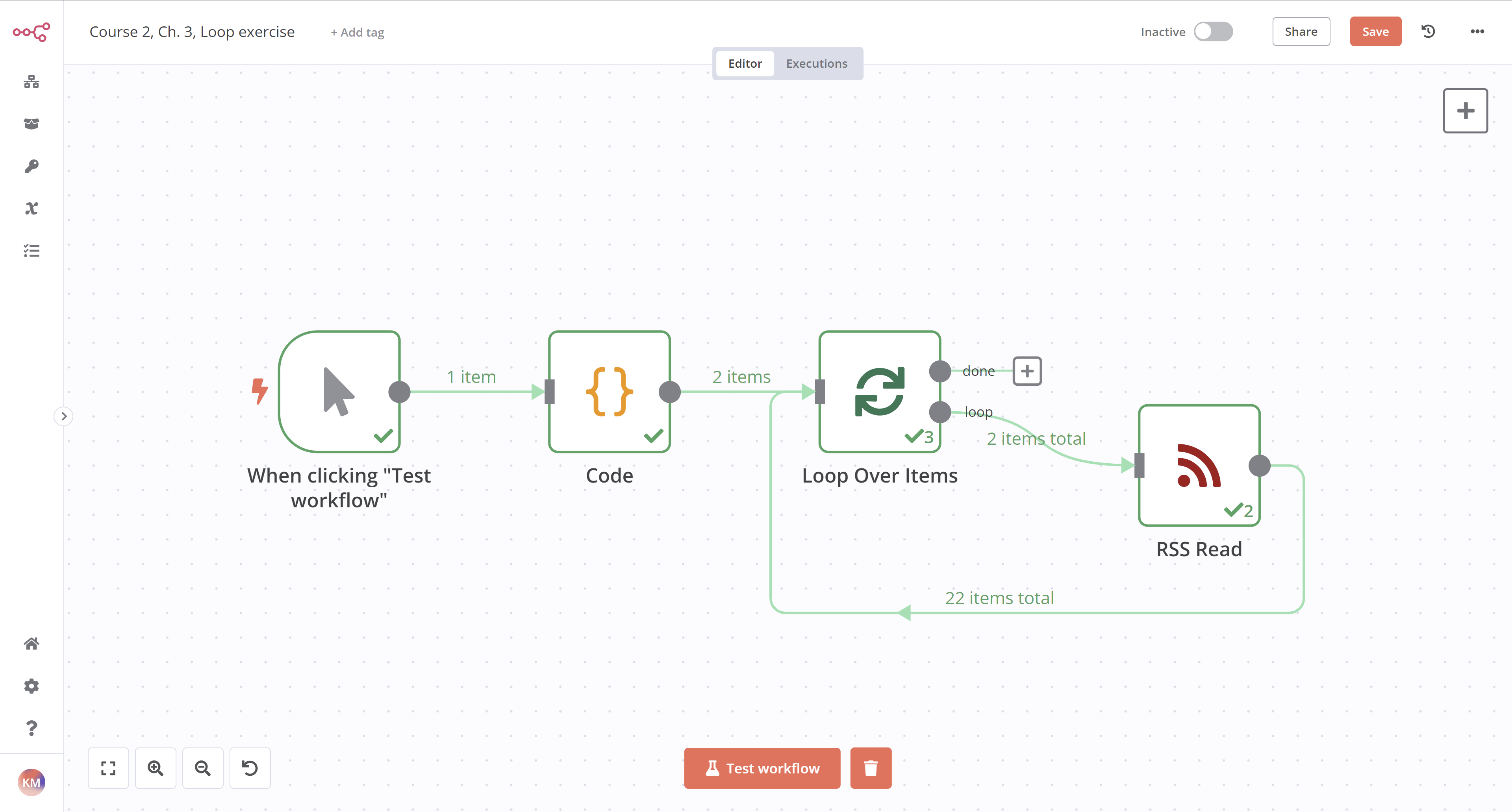
构建一个工作流,用于读取来自Medium和dev.to的RSS订阅源。该工作流应包含三个节点:

  1. 一个代码节点,用于返回Medium(https://medium.com/feed/n8n-io)和dev.to(https://dev.to/feed/n8n)的RSS订阅源URL。
  2. 一个循环遍历项节点,设置Batch Size: 1,接收来自代码节点RSS阅读节点的输入并遍历各项。
  3. An RSS Read node that gets the URL of the Medium RSS feed, passed as an expression: {{ $json.url }}.
    • RSS读取节点异常节点之一,它仅处理接收到的第一项数据,因此需要使用循环遍历项节点来迭代处理多个数据项。
Show me the solution
  1. Add a Code Node. You can format the code in several ways, one way is:
    • 模式设置为Run Once for All Items
    • 语言 设置为 JavaScript
    • 将以下代码复制并粘贴到JavaScript代码编辑器中:
       1
       2
       3
       4
       5
       6
       7
       8
       9
      10
      11
      12
      13
      let urls = [
      	{
      		json: {
      		url: 'https://medium.com/feed/n8n-io'
      		}
      	},
      	{
      	json: {
      		url: 'https://dev.to/feed/n8n'
      		} 
      	}
      ]
      return urls;
      
  2. Add a Loop Over Items node connected to the Code node.
    • Batch Size设置为1
  3. The Loop Over Items node automatically adds a node called "Replace Me". Replace that node with an RSS Read node.
    • URL设置为使用代码节点中的URL:{{ $json.url }}

本练习的工作流程如下所示:

Workflow for getting RSS feeds from two blogs
从两个博客获取RSS订阅的工作流

要检查节点的配置,您可以复制下面的JSON工作流代码并粘贴到您的编辑器界面中:

  1
  2
  3
  4
  5
  6
  7
  8
  9
 10
 11
 12
 13
 14
 15
 16
 17
 18
 19
 20
 21
 22
 23
 24
 25
 26
 27
 28
 29
 30
 31
 32
 33
 34
 35
 36
 37
 38
 39
 40
 41
 42
 43
 44
 45
 46
 47
 48
 49
 50
 51
 52
 53
 54
 55
 56
 57
 58
 59
 60
 61
 62
 63
 64
 65
 66
 67
 68
 69
 70
 71
 72
 73
 74
 75
 76
 77
 78
 79
 80
 81
 82
 83
 84
 85
 86
 87
 88
 89
 90
 91
 92
 93
 94
 95
 96
 97
 98
 99
100
101
102
103
104
105
106
107
{
"meta": {
	"templateCredsSetupCompleted": true,
	"instanceId": "cb484ba7b742928a2048bf8829668bed5b5ad9787579adea888f05980292a4a7"
},
"nodes": [
	{
	"parameters": {},
	"id": "ed8dc090-ae8c-4db6-a93b-0fa873015c25",
	"name": "When clicking \"Test workflow\"",
	"type": "n8n-nodes-base.manualTrigger",
	"typeVersion": 1,
	"position": [
		460,
		460
	]
	},
	{
	"parameters": {
		"jsCode": "let urls = [\n  {\n    json: {\n      url: 'https://medium.com/feed/n8n-io'\n    }\n  },\n  {\n   json: {\n     url: 'https://dev.to/feed/n8n'\n   } \n  }\n]\n\nreturn urls;"
	},
	"id": "1df2a9bf-f970-4e04-b906-92dbbc9e8d3a",
	"name": "Code",
	"type": "n8n-nodes-base.code",
	"typeVersion": 2,
	"position": [
		680,
		460
	]
	},
	{
	"parameters": {
		"options": {}
	},
	"id": "3cce249a-0eab-42e2-90e3-dbdf3684e012",
	"name": "Loop Over Items",
	"type": "n8n-nodes-base.splitInBatches",
	"typeVersion": 3,
	"position": [
		900,
		460
	]
	},
	{
	"parameters": {
		"url": "={{ $json.url }}",
		"options": {}
	},
	"id": "50e1c1dc-9a5d-42d3-b7c0-accc31636aa6",
	"name": "RSS Read",
	"type": "n8n-nodes-base.rssFeedRead",
	"typeVersion": 1,
	"position": [
		1120,
		460
	]
	}
],
"connections": {
	"When clicking \"Test workflow\"": {
	"main": [
		[
		{
			"node": "Code",
			"type": "main",
			"index": 0
		}
		]
	]
	},
	"Code": {
	"main": [
		[
		{
			"node": "Loop Over Items",
			"type": "main",
			"index": 0
		}
		]
	]
	},
	"Loop Over Items": {
	"main": [
		null,
		[
		{
			"node": "RSS Read",
			"type": "main",
			"index": 0
		}
		]
	]
	},
	"RSS Read": {
	"main": [
		[
		{
			"node": "Loop Over Items",
			"type": "main",
			"index": 0
		}
		]
	]
	}
},
"pinData": {}
}
优云智算